How to generate multiple variations of one AI image idea
What you'll learn
What is seed locking?
Common use cases
Create image variations step by step
STEP 1: Generate your base image
- On web: Go to picsart.com → AI Image Generator → Write your prompt
- On mobile: Open Picsart → "+" → AI Image → Enter prompt and generate
STEP 2: Lock the seed and plan variations
Find the image you like and note its seed number (usually shown in image details or settings):
- Copy the seed value from your chosen base image
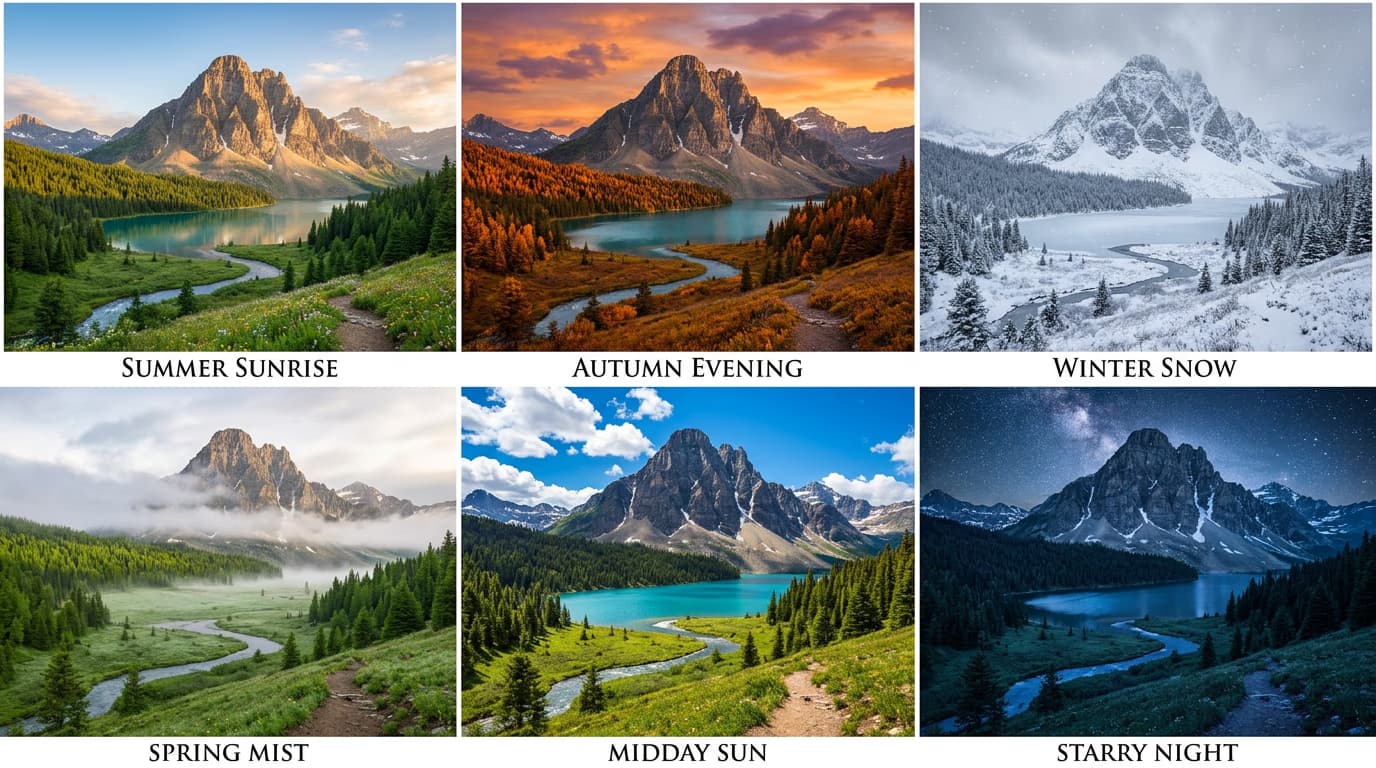
- Decide what to vary: colors, lighting, time of day, weather, or small details
- Keep the core subject and composition words identical in your prompt
- Change only the specific aspect you want to vary ("sunset" → "sunrise", "red dress" → "blue dress")
STEP 3: Generate variations with the locked seed
Paste your saved seed into the seed field. Modify one aspect of your prompt at a time and generate. The composition will stay similar while your changed detail updates. Generate 4-6 variations by changing different elements.
STEP 4: Compare and refine
Review your variations side by side to see which changes work best: Not perfect? Try smaller prompt changes, or unlock the seed and generate a new base composition if the original doesn't support the variations you need.
- Check that the core composition stayed consistent across all variations
- Verify that only your intended changes appeared in each version
- Look for unexpected differences that might signal the seed didn't lock properly
Tips for best results
💡 Change one thing at a time
Modify only color, lighting, or one detail per variation. Changing multiple aspects at once makes it harder to know what worked and can break composition consistency even with a locked seed.
💡 Keep structural words identical
Don't change words describing position, angle, or framing ("close-up," "aerial view," "centered"). Only swap descriptive details like colors, weather, or time of day to maintain consistent composition.
💡 Use similar word lengths when swapping
Replace "sunset" with "sunrise" rather than "early morning golden hour light" — drastically different prompt lengths can shift composition even with the same seed.
💡 Save your base prompt as a template
Write your prompt with placeholders: "A [COLOR] sports car on a coastal road at [TIME]." This makes it easy to generate systematic variations without rewriting everything each time.
Frequently asked questions

Ready to iterate faster?
Create dozens of variations from a single great idea with seed control.
Generate variations