


Contents
The fastest way to make Halloween ads is to start from a workflow that already knows the season: upload one product photo, and the canvas builds the spooky scenes, sets the sale copy and animates the result. Picsart Flow now carries a batch of these Halloween advertising workflows, each one built for a different kind of product.
Six of them are covered below, from a single cobweb-draped sale poster to complete Halloween ad campaigns with six monster-themed commercials and sound. Each breakdown shows what goes in, what the canvas does with it, and what comes out.
How every Halloween ad workflow is built
All six workflows run in the same order.
- The upload gets a clean studio shot first. Your product photo is re-rendered onto a plain white, grey or beige backdrop before anything spooky happens, and every Halloween scene is built from that clean shot, not from the original photo.
- Scene nodes build the Halloween stills. Each one places the product into its own set, and every scene prompt tells the model to keep the product’s shape and label exactly as in the reference.
- Copy is added as its own layer. In four of the six, the headline, offer and call to action sit in one text node that feeds every poster, so one edit updates the whole campaign. The drink workflow types its headline into each poster, and the monster commercials carry no copy at all.
- Seedance animates the stills. Every clip runs on Seedance, and the video prompts protect the product’s look rather than its position. Some keep it perfectly still while fog and cobwebs move, while others let a broom, a hand or a pumpkin carry it through the shot.
The clean studio shot is the halloween product photography step most people skip, and in these workflows it is the one image every scene starts from.
| Workflow | Product | Image model | Videos | Sound |
|---|---|---|---|---|
| Halloween sale video ad | perfume | Seedream 5.0 Pro | 1 x 10s | no |
| Halloween lipstick ads | lipstick | Seedream 5.0 Pro | 4 | no |
| Halloween skincare ads | skincare jar | Nano Banana Pro | 4 x 6s | no |
| Halloween perfume ads | perfume | Nano Banana Pro | 5 x 6s | no |
| Monster beauty commercials | lip gloss | Nano Banana Pro | 6 x 8s | yes |
| Halloween drink commercials | soda bottle | Nano Banana Pro, Nano Banana 2 | 4 x 8s | yes |
A Halloween sale video ad with drifting cobwebs
The Halloween-Themed Advertisement workflow is the shortest chain in the set and a good first run. One product photo goes in, and Seedream 5.0 Pro places it on a dark reflective surface inside a deep purple studio, with cobwebs draped over it.
A text node then adds the sale copy in uppercase: the headline and discount above the product, the dates and promo code below it. Seedance 2.5 turns that poster into a 10-second vertical clip where the cobweb strands sway, a small spider crawls along one thread, and purple mist drifts past.
The product and the copy stay fixed, and the webs settle back to where they started, so the clip loops cleanly in stories and reels.
Halloween lipstick ads with a witchy cauldron
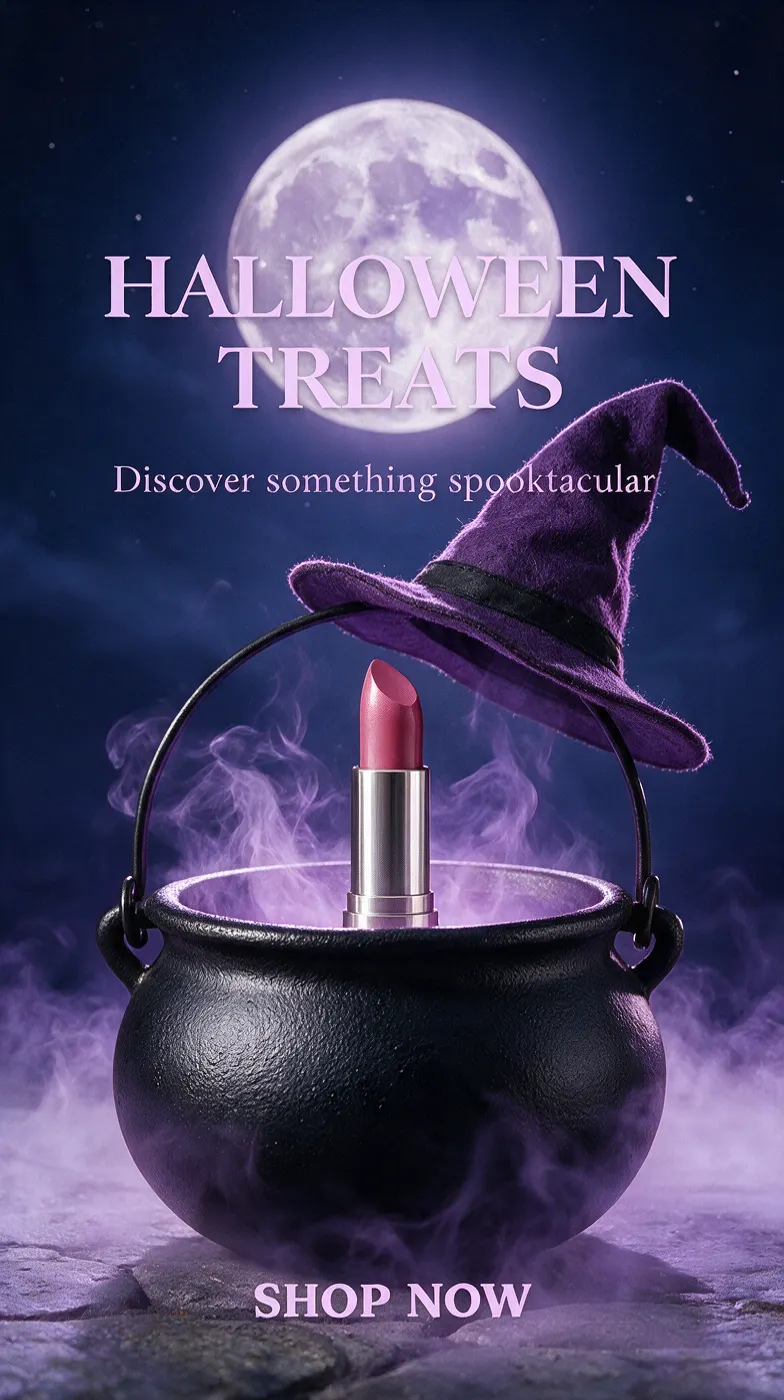
The Spooky Halloween Ads and Animations workflow turns one lipstick photo into a small Halloween ad campaign: four vertical promos plus a static ad. The scenes stay in one plum and violet palette: emerald velvet against heavy curtains, a smoked-glass pedestal in lavender mist, a velvet table, and a bubbling cauldron.
One shared copy node, “Halloween treats” with a short tagline and “Shop now”, feeds the posters. The motion is small on purpose. Purple smoke curls behind the product, a ringed skeleton hand lifts it off the table and carries it out of frame before the copy appears, and in the longest clip the lipstick rises slightly out of the cauldron and sinks back.
The skeleton-hand prompt is worth reading on the canvas. It insists on exactly one hand, and it removes any second hand from the reference before the first frame.
A Halloween skincare ad campaign: four ways to reveal one jar
The Halloween Skincare Ad Campaign workflow is built around the reveal. Nano Banana Pro places the product under a glass bell jar on black stone, behind a sheer ghost veil under an orange moon, on a witch’s broomstick, and under a white ghost sheet with cut-out eyes.
Every poster carries the same headline and call to action. Seedance 2.0 Fast then gives each one a 6-second move: the ghost sheet lifts off and drifts away, the veil ripples while bats cross the moon, and the broom glides through the night sky with the jar riding on it.
The bell-jar poster shows how precise the copy layout gets. Its headline is told to touch the base of the glass, so the type and the jar read as one object.
Halloween perfume ads with a sale offer
The Halloween Perfume Promotion Videos workflow produces five ads from one bottle, and each scene leans on a different classic scare. The bottle floats in cobwebs with a tarantula, sits on a mirror tray of eyeballs, balances on a mummy hand, arrives through velvet curtains in a skeletal grip, and stands among ghosts made of soap foam.
A promotional text node holds the headline, the offer and the call to action. Three posters use all three lines, while the busier spider and foam scenes take only the offer, so the copy never fights the props.
Each of the five clips runs 6 seconds. The eyeballs turn on the spot, the mummy’s fingertips flex, the foam ghosts sway as bubbles pop, and the curtains part to carry the bottle into frame.
Monster-themed beauty commercials with sound
The Spooky Halloween Beauty Product Campaign workflow moves from posters to short Halloween commercials. A lip gloss is handed to six monsters: a mummy, a vampire, a stitched lab monster, a zombie, a skeleton and a witch, each one holding it in a costumed hand.
The scene prompts treat the product as a fixed cutout that may only be scaled and repositioned, never redrawn. Seedance 2.5 then turns each still into an 8-second vertical story with sound. A spider drops onto the mummy’s bandages, a coffin lid creaks behind the vampire, a drowsy zombie snaps awake at the sight of the gloss, and the skeleton offers it, then wags a bony finger.
Halloween drink commercials with a magic trick
The Halloween-Themed Product Ads for Seasonal Marketing workflow stages a cherry soda as the star of four tiny tricks. Two friendly ghosts present it on a silver tray, a giant jack-o’-lantern holds it in its mouth, a skull sits beside it, and a witch hat waits on green velvet by candlelight.
Each video prompt is written as a timecoded shot list, second by second. The ghosts hide the bottle under their cloth and reveal it floating, spiders swarm out of the skull and scatter, and the hat bursts into bats that lift the bottle into the air.
The pumpkin clip shows a smart trick. Its prompt starts with the mouth closed, even though the poster shows it open, so the video has something to reveal. All four clips run 8 seconds with sound.
1.
Open the closest template Pick the one whose product shape matches yours: a bottle, a jar, a tube or a can.
2.
Replace the product photo Upload your product into the first image node. A sharp, front-facing shot with a readable label gives the clean-backdrop step the most to work with.
3.
Rewrite the copy Change the headline, offer and call to action in the text node, and every poster connected to it picks up the new wording. The drink workflow keeps its headline inside each poster node, so edit those one by one.
4.
Run the stills before the videos Generate the image nodes first and check each poster.
5.
Animate and download Run the video nodes, re-run any single clip that misses, and download the posters and videos for your Halloween social media posts. Yes. Upload your product photo into the first node and the whole chain rebuilds around it. The clean studio step runs first, so the photo does not need a perfect background.How to run a Halloween ad workflow
Get answers to common questions
Start your Halloween ads with one product photo
Pick the workflow closest to your product, swap in your photo and your offer, and run your first Halloween ad in Picsart Flow today.


