


A Black Friday campaign is built in five moves: set one look, prepare the product shots, give the hero product its own posters, cut a batch of video ads, then carry the offer into Cyber Monday. Each move has a ready-made template in Picsart Flow, so the whole campaign comes from one place and one set of inputs.
Most brands lose Black Friday time the same way: the offer is set early, but the creative arrives in pieces and in different styles. This guide follows the campaign in the order it runs, one template per step.
What is a Black Friday campaign?
A Black Friday campaign is a planned run of ads, posts and banners that promotes one sale across several channels, usually from the week before Black Friday through Cyber Monday.
A typical campaign moves through four phases:
- Tease.
Banners and announcement posts tell shoppers a sale is coming. - Launch.
Product posters and a hero video go live when the offer opens. - Peak.
Short video ads run on paid social and Reels while traffic is highest. - Extend.
A Cyber Monday version keeps the offer alive for late shoppers.
The best Black Friday campaign ideas usually come from one strong visual idea repeated across all four phases, rather than a new concept for every post.
Plan the campaign before you open a template
Each template asks for the same details as plain text, so settle them first:
- The offer.
One headline, one discount and one supporting line, such as SAVE BIG, 50% OFF and LIMITED TIME ONLY. - The brand color.
A single hex code, so banners match the website and packaging. - The hero product.
The one item that gets the most creative attention. - The lineup.
Three to five more products for the wider sale. - The channels.
Feed, Stories, Reels and display banners each need a different size.
A Black Friday marketing campaign that settles these points up front rarely needs a redesign halfway through the week.
Build the campaign in Picsart Flow, step by step
Every template below opens as an editable Flow canvas, a chain of connected nodes that starts with your photos and text and ends with finished images and videos.
Step 1. Set the look with brand-color sale banners
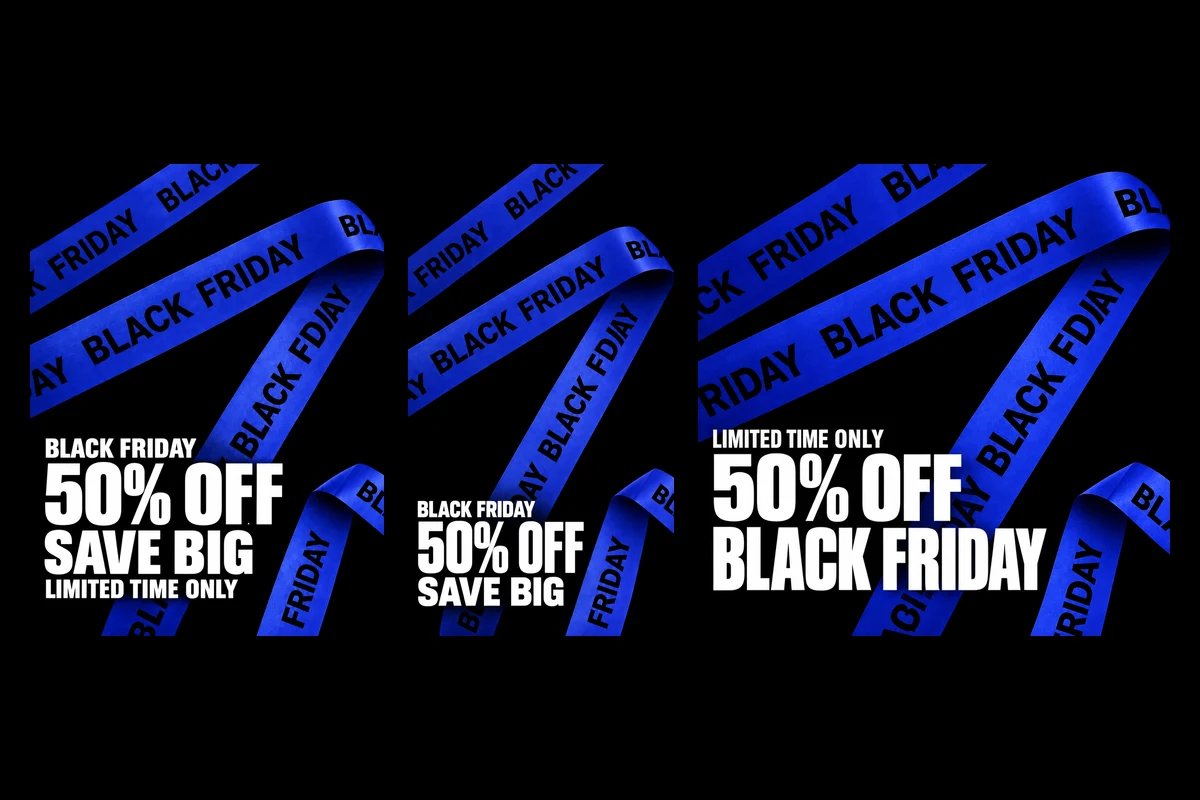
The Black Friday Promo Sale Banners template does not need a product photo. It starts from a 3D graphic of ribbons printed with BLACK FRIDAY and asks for two inputs: your brand color as a hex code and your offer text.
The canvas recolors the ribbons to the hex code, sets the offer in bold white type in the bottom-left corner and exports the banner in four sizes: square, 3:4, 9:16 and a 16:9 widescreen version for site headers. A final node turns the vertical banner into an 8-second video with sound, where the ribbon slides along its zigzag path while the offer stays still.
Open the brand-color ribbon banners first, because their color sets the tone for everything after.
Step 2. Clean up product shots and make the launch poster
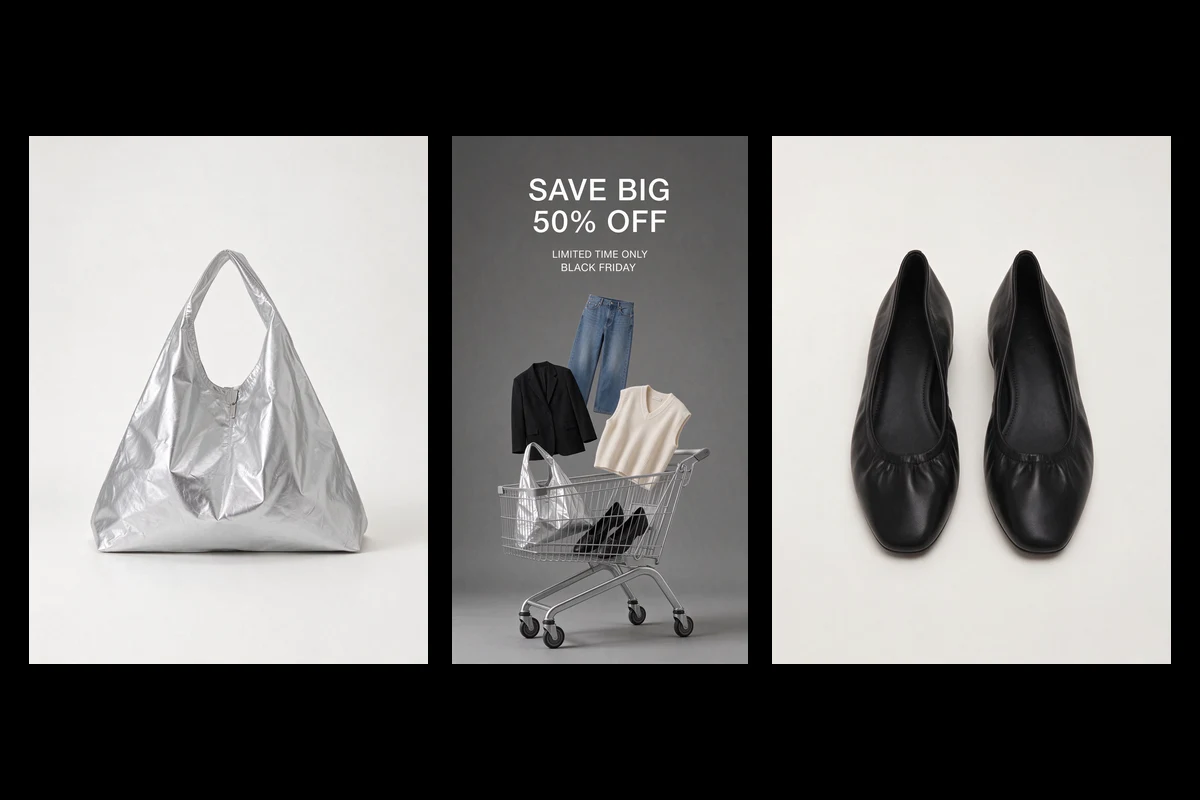
The Black Friday Sale Image and Video Promotion template fixes the problem most campaigns skip: casual product photos that do not match. It takes five photos, in the sample a tote bag, ballet flats, a suit jacket, a knit vest and jeans shot on tables, floors and hangers.
A text node turns each one into a clean studio shot on a seamless off-white background, keeping the shape, color and stitching of the real item. The canvas then builds a 9:16 launch poster on flat gray, with the five products and a silver shopping cart filling the bottom of the frame. The last node makes a 10-second video with sound, where each item drops into the cart one after another.
The shopping cart launch poster suits fashion and accessories, where the lineup matters more than any single product.
Step 3. Give the hero product its own posters
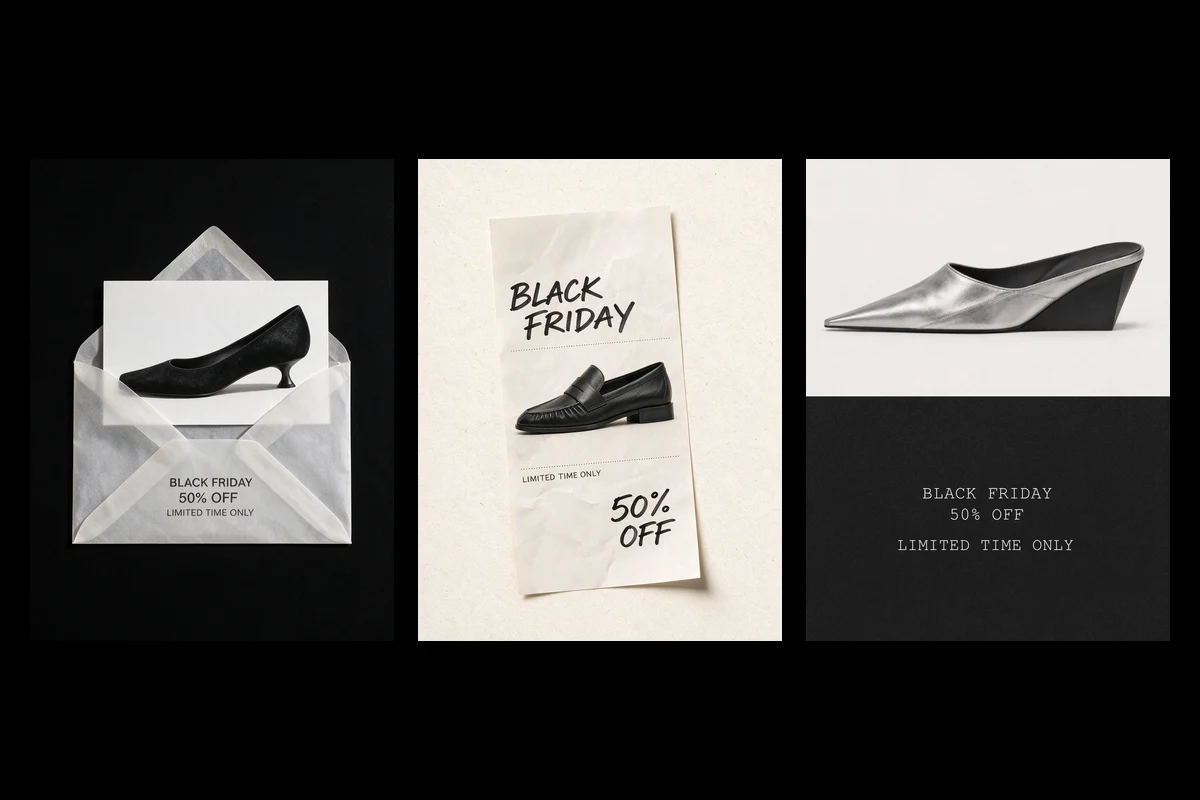
The Black Friday Footwear Sale Posters and Videos template takes three shoe photos and the offer text, then gives each shoe a different 3:4 editorial poster:
- An envelope reveal.
A product card sits in a translucent paper envelope on matte black. - A handwritten note.
The shoe sits on crumpled paper, with BLACK FRIDAY and 50% OFF in thick marker. - An editorial split.
The shoe floats on light gray above black paper carrying small, spaced-out type.
Each poster becomes its own short video with sound: a hand writes the marker text, the card rises out of the envelope, or the text types itself out. A strict rule in the prompts allows only the words you supply, so no stray copy appears. Built around shoes, the footwear sale poster set fits shoe and fashion brands best.
Step 4. Turn one photo into a set of video ads
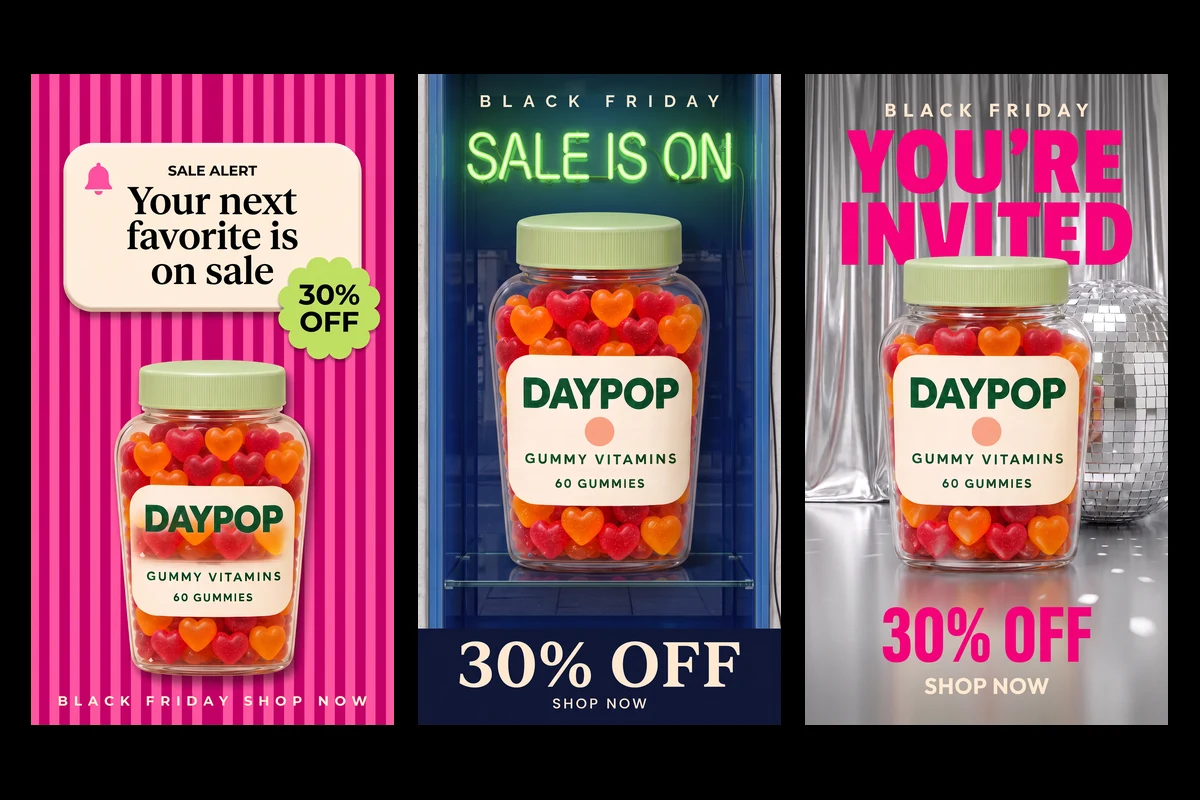
Paid social needs several versions to test. The Black Friday Gummy Vitamin Promo Ad template takes one product photo and first replaces its background with a soft beige studio backdrop.
From that base, the canvas branches into five vertical scenes, from pink candy stripes with a sale alert card to a silver curtain with a disco ball. Text such as 30% OFF and SHOP NOW is added in a separate step, with instructions to keep the product’s label, colors and position unchanged.
Each scene becomes a 6-second vertical video at 720p for TikTok and Reels. The clips have no audio, so add a track before posting. The five-video ad set suits packaged goods, supplements and beauty products.
Step 5. Carry the offer into Cyber Monday
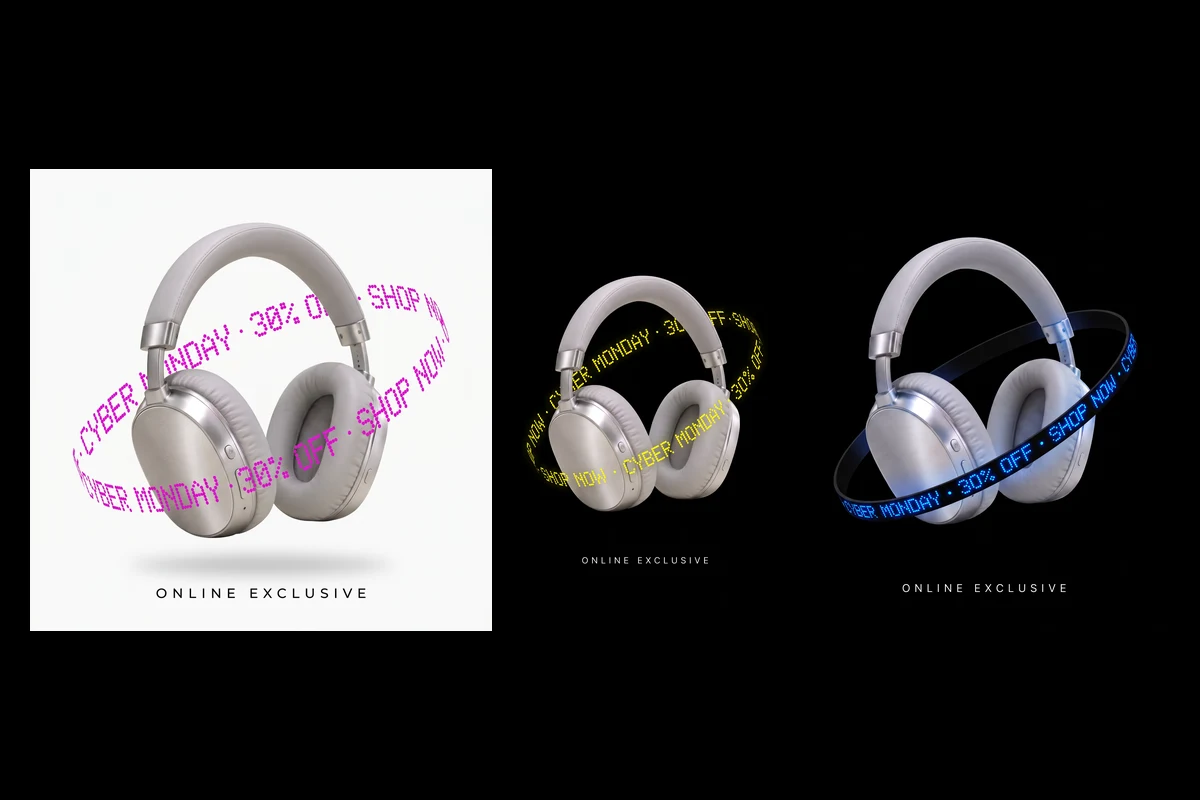
The Cyber Monday Headphones Sale Ad template gives the second wave a different look, so returning shoppers notice something new. It takes one product photo and a short deal text, places the product on an off-white background, then builds ads in 9:16, square and 4:5.
In each ad the product floats at a slight tilt while a ring of glowing text, such as CYBER MONDAY, 30% OFF and SHOP NOW, circles it like a ticker. A second pass creates dark versions with white type on black, and a final node animates the vertical ad into a 6-second clip where the ring scrolls around the still product.
The Cyber Monday orbit ads work for any single product with a clear silhouette, such as headphones, bottles or devices.
Running any template in the set
Opening a template creates an editable copy. Replace the sample photos and text nodes with your product and offer, then press run: image nodes finish first, and video nodes build on the images they connect to. Exporting the files requires a Picsart login.
To merge steps from different templates, build your own chain in the Flow workflow editor. For more poster styles, browse these Black Friday design ideas.
Every template reads the offer from a text node, so a late change to the discount means running every canvas again. The banners set the brand color, and the rest of the campaign should echo it. It is the easiest step to forget and the one that catches late shoppers. Most Black Friday campaigns start one to two weeks before the sale with teaser posts and banners. Searches for Black Friday campaign ideas begin to climb in September, so earlier planning leaves time to test the creative.Black Friday campaign tips that save the week
Lock the text before the visuals
Keep one hex code across all five steps
Prepare the Cyber Monday set early
Get answers to common questions
Start your Black Friday campaign
A strong Black Friday campaign is one look carried through five steps, from the first banner to the last Cyber Monday ad. Browse the Picsart Flow templates library, open the brand-color banners, set the hex code and build the rest of the campaign from there.


