


Contents
Veo prompts shape everything. The difference between a flat, generic clip and something that actually feels cinematic often comes down to how clearly you describe your idea. With Veo 3.1, a single prompt can generate a full 1080p video with synced dialogue, sound effects, and atmosphere – but only when the input gives it enough direction to work with.
This guide brings together 30+ carefully written Veo prompts you can use right away. They’re grouped by real use cases – cinematic storytelling, product content, social media clips, dialogue-driven scenes, nature visuals, and stylized formats – so you don’t have to guess where to start.
Stop prompting blindly. These are built to actually deliver results.
Anatomy of a Veo prompt
Before jumping into examples, it helps to understand why some prompts work better than others. A strong prompt doesn’t just describe a scene – it guides how that scene unfolds.
The most reliable structure includes seven elements: subject, action, context, camera, style, audio, and constraints. Think of it less like a sentence and more like a compact direction sheet. Who’s in the scene? What are they doing? Where are they? How is the camera moving? What does it feel like visually? What can you hear?
Camera direction plays a bigger role than most people expect. If you don’t mention it, Veo tends to default to static framing. Even a simple line like “the camera slowly pulls back” can completely change the output. Audio is another standout feature – Veo 3.1 can generate dialogue and ambient sound, but only if you clearly describe them.
In most cases, 3-6 sentences hit the sweet spot. Keep the most important details upfront, stay visual, and finish with constraints like: “No subtitles. No on-screen text. No watermark.”
Veo prompts for cinematic scenes
These prompts lean into storytelling, lighting, and camera movement. They’re ideal when you want something that feels closer to a film shot than a quick clip.
1. Drama/narrative
A young woman stands by a rain-covered window late at night, soft city lights blurred behind her. She wipes away a tear as warm, cinematic lighting gently highlights her face with a shallow depth of field. The room feels still, with only distant traffic and rain tapping against the glass. The camera slowly pushes in, tightening the emotional focus. No subtitles. No on-screen text. No watermark.
2. Action/movement
A cyclist speeds through a busy city street at sunset, weaving between cars and pedestrians. Reflections shimmer across wet pavement as motion blur enhances the sense of speed. The camera tracks alongside in a fast, fluid motion, keeping pace with the rider. You hear wind rushing past and tires gripping the road. No subtitles. No on-screen text. No watermark.
3. Establishing shot
A wide aerial shot reveals a vast mountain range at golden hour, with mist drifting through the valleys below. The warm light stretches across the landscape, adding depth and scale. The camera slowly pulls back to emphasize how expansive the scene is. Wind moves softly through the environment. No subtitles. No on-screen text. No watermark.
4. Noir/moody
A lone detective walks through a narrow alley, rain falling steadily under flickering neon lights. The scene is heavy with contrast – deep shadows, cool tones, and reflections on wet pavement. The camera moves forward in a slow dolly, building tension. Distant sirens and dripping water fill the silence. No subtitles. No on-screen text. No watermark.
5. Period/historical
A lively 1920s street scene filled with vintage cars, shopfronts, and people in era-specific clothing. The colors are slightly desaturated, with a subtle 35mm film texture. The camera pans slowly across the street, catching small interactions. Background chatter and carriage sounds bring it to life. No subtitles. No on-screen text. No watermark.
Veo prompts for product videos
Product videos benefit from control and precision. Small camera movements and lighting choices can make a product feel high-end almost instantly.
1. Hero product shot
A modern smartwatch rests on a clean white surface under soft, balanced lighting. Subtle reflections give it a premium finish. The camera slowly dollies in, drawing attention to the design. A faint electronic hum and minimal UI sound effects play in the background. No text. No watermark. No subtitles.
2. Lifestyle context
Someone wears wireless earbuds while jogging through a sunlit park. The scene feels warm and relaxed, with soft background blur and natural movement. The camera follows smoothly from the side. You hear footsteps, light wind, and distant nature sounds. No text. No watermark. No subtitles.
3. Unboxing/reveal
Close-up of hands opening a neatly designed product box on a wooden desk. The lighting is soft and controlled, highlighting textures as the packaging unfolds. The camera tilts slightly as the product is revealed. Subtle paper sounds add to the moment. No text. No watermark. No subtitles.
4. 360-degree orbit
A glass perfume bottle sits against a soft gradient background. Light catches its edges as the camera slowly orbits around it in a smooth, continuous motion. Details stay crisp and clear. A soft ambient tone plays underneath. No text. No watermark. No subtitles.
5. Before/after
A cluttered desk transitions into a clean, organized workspace. The framing stays consistent as the transformation happens smoothly. Bright, natural lighting enhances the contrast. The camera remains steady throughout. Light ambient room sound. No text. No watermark. No subtitles.
Short-form content needs to grab attention instantly. These prompts are built for vertical formats and fast engagement.
1. Trending/viral
Vertical 9:16 video of a person jumping into frame with bold neon colors and fast cuts. Movement starts immediately, within the first second. The camera feels handheld with quick zooms and transitions. Upbeat music drives the energy. No subtitles. No on-screen text. No watermark.
2. Aesthetic/mood
Coffee pours slowly into a glass cup by a window, captured in soft morning light. The scene feels calm and slightly dreamy, with gentle film grain. The camera stays mostly still, with a subtle push forward. Ambient cafe sounds fill the background. No subtitles. No on-screen text. No watermark.
3. Tutorial/how-to
Top-down view of hands working through a simple DIY project on a clean desk. Lighting is bright and even, making every step easy to follow. The camera remains fixed overhead. Soft background music and light material sounds. No subtitles. No on-screen text. No watermark.
4. Behind-the-scenes
A creator sits at a desk editing on a laptop, surrounded by tools and notes. Natural light comes through a nearby window. The camera slowly pans across the setup. You hear typing and quiet room tone. No subtitles. No on-screen text. No watermark.
5. Food/lifestyle
Vegetables sizzle in a pan, with steam rising into warm light. Close-up details highlight texture and color. The camera gently zooms in. Cooking sounds – sizzling and soft movement – add realism. No subtitles. No on-screen text. No watermark.
Veo prompts for dialogue scenes
Veo 3.1 stands out because it can handle audio natively. Dialogue works best when it’s short and natural.
1. Conversation/interview
Two coworkers sit across from each other in a modern office, speaking casually. One says, “This changes everything for our workflow.” The camera alternates between medium shots. Background office noise keeps it grounded. No subtitles. No on-screen text.
2. Monologue
A speaker faces the camera in a softly lit room. The background is simple and slightly blurred. “This is how we built it from scratch.” The camera slowly moves closer. Quiet room tone. No subtitles. No on-screen text.
3. Narration/voiceover
A calm forest scene at sunrise with fog drifting between trees. A voice says, “Every journey starts with a single step.” The camera glides forward. Birds and wind create a natural soundscape. No subtitles. No on-screen text.
4. Comedic/casual
Two friends sit on a couch laughing. One turns and says, “You actually did that?” The lighting is bright and natural. Quick cuts capture reactions. Background chatter and laughter. No subtitles. No on-screen text.
5. Dramatic/emotional
Close-up of a character whispering, “I never told anyone.” The lighting is dim and focused. The camera stays still, letting the moment sit. Almost complete silence in the background. No subtitles. No on-screen text.
Veo prompts for nature and atmosphere
These are great for setting a tone or adding visual breathing room to a project.
1. Landscape/golden hour
Rolling hills stretch into the distance under warm golden light. The camera pans slowly across the scene. Grass moves gently in the wind. No subtitles. No on-screen text.
2. Weather/seasonal
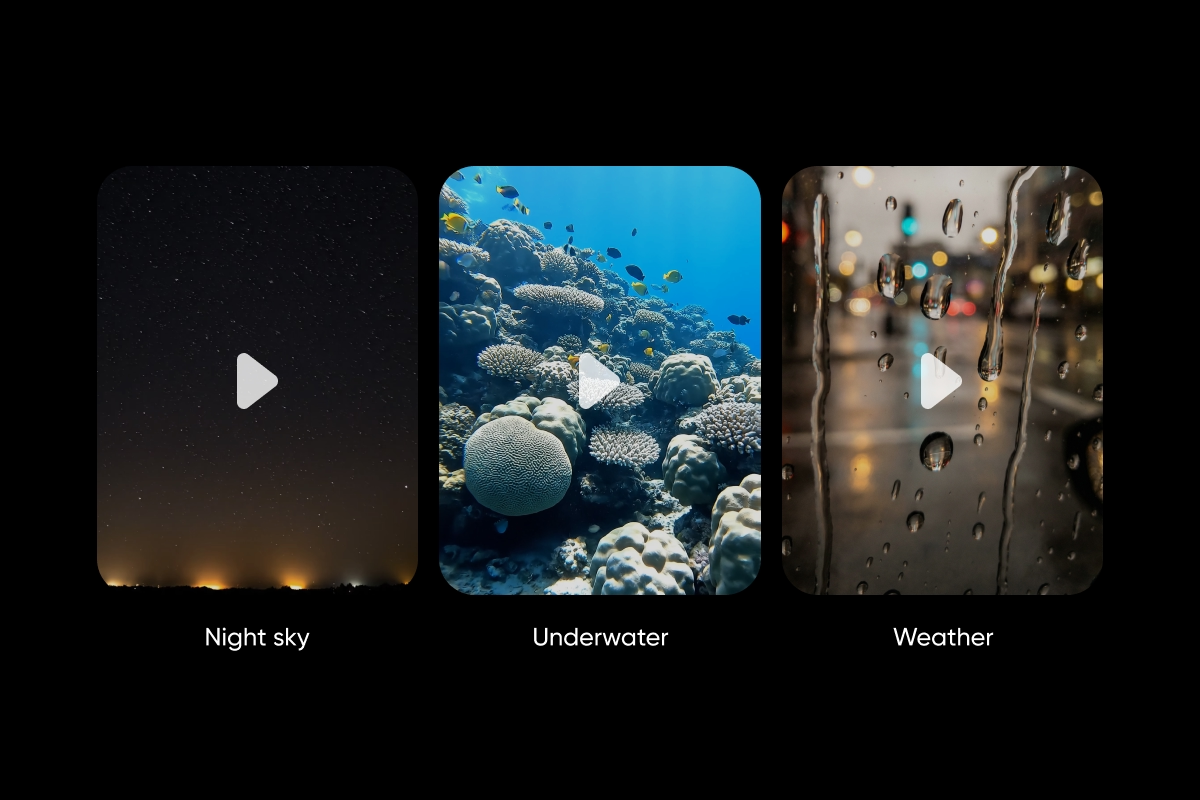
Raindrops hit a window in sharp focus while city lights blur in the background. The camera stays still. Soft rain fills the audio. No subtitles. No on-screen text.
3. Underwater/ocean
Fish drift through coral reefs as sunlight filters through the water above. The camera moves slowly with the current. Sound feels muted and distant. No subtitles. No on-screen text.
4. Night sky/timelapse
Stars move across the sky in a wide timelapse shot. A faint glow from a distant city sits on the horizon. The camera remains fixed. Quiet, minimal sound. No subtitles. No on-screen text.
5. Macro/nature detail
A single dewdrop rests on a leaf, reflecting light as the camera gently moves closer. Background blur keeps the focus tight. A soft breeze is barely audible. No subtitles. No on-screen text.
Veo prompts for animated and stylized videos
These prompts shift away from realism and open more creative directions.
1. 3D animation
A playful, Pixar-style character walks through a bright, colorful city. Movements feel smooth and expressive. The camera follows from behind. Light, upbeat music. No subtitles. No on-screen text.
2. 2D illustration
A hand-drawn village scene with bold outlines and a limited color palette. Small movements bring the environment to life. The camera pans slowly. Soft ambient sound. No subtitles. No on-screen text.
3. Stop-motion
A clay character builds a tiny house piece by piece. Textures feel tactile and slightly imperfect. The camera stays fixed. Gentle crafting sounds. No subtitles. No on-screen text.
4. Retro/VHS
A skateboarding clip styled like 90s VHS footage, complete with grain and scan lines. Colors are slightly faded. The camera follows loosely. Analog hiss in the audio. No subtitles. No on-screen text.
5. Abstract/experimental
Shapes flow and blend into each other in a colorful, non-representational animation. Movement feels smooth and continuous. The camera drifts subtly. Ambient electronic sound. No subtitles. No on-screen text.
Try these Veo prompts in Picsart
Once you have a solid prompt, where you run it matters just as much as how you write it.
With Picsart’s AI Playground, you can test these prompts across Veo 3.1 and dozens of other models in one place. That makes it easier to compare outputs and quickly adjust your direction without jumping between tools.
If you’re building repeatable workflows, Picsart Flow gives you a visual way to connect steps – generate a video, refine it, enhance quality, and export – all in one pipeline. It’s especially useful when you want to scale content or experiment with variations.
For more direct creation, the AI Video Generator lets you control pacing, tone, and style without needing a traditional timeline. And if you prefer a more conversational approach, Aura helps you iterate on ideas naturally without rewriting prompts from scratch.
Try them inside Picsart
These 30+ Veo prompts give you a practical starting point for cinematic scenes, product content, social clips, dialogue, nature visuals, and animation – all ready to use or adapt.
Try them inside Picsart’s AI Playground and see how far a well-written prompt can take you.
Frequently asked questions
They’re text instructions that guide how Veo generates a video – covering visuals, motion, sound, and style.


