


Creative work has a hidden tax. It’s not the big campaign ideas. It’s the repetitive steps in between – resizing, background removal, formatting, scheduling, testing, updating, fixing.
This is where people start asking: what is an AI agent, and why is everyone suddenly talking about them?
An AI agent is software that can take a goal and handle the steps required to reach it. Not just respond to a prompt. Not just generate text. It looks at the task, figures out what needs to happen, and carries it through.
That’s the real difference between traditional tools and modern AI agents. One waits for instructions. The other moves toward an outcome.
For creators and growing brands, that shift changes how work feels. Instead of bouncing between five tabs and manually polishing every image, you brief a digital teammate and let it execute the workflow. Picsart’s AI Agents were built around this idea – specialized agents designed to handle real creative and business tasks from start to finish.
Let’s break down how that actually works.
How AI agents work
Most people assume this technology is complicated behind the scenes. The mechanics are advanced, yes, but the experience is surprisingly simple.
Here’s how AI agent works in practical terms – you give directions, the agent builds a plan. Then you approve it. It executes and adjusts based on feedback and results.
Picture this: you message your Store Agent, “New collection just arrived. Make everything store-ready.” You upload 18 product photos. They’re raw. Lighting isn’t perfect. Backgrounds are inconsistent. Instead of instantly editing, the agent reviews what you sent and outlines the process: enhance lighting, remove backgrounds, generate lifestyle mockups, optimize sizing for Shopify, and create multiple variations.
You see the plan first. That matters. Once approved, it runs the workflow. Edits happen. Variants are created. Files are formatted correctly. By the end, you’re looking at polished, publish-ready assets – not just touched-up images.
Over time, the system remembers your preferences. It starts understanding what “on-brand” means for you. That feedback loop is what makes autonomous AI agents feel less like tools and more like collaborators.
So when someone asks, what is an AI agent? – this is the practical answer: a system that works toward completion, not just conversation.
Meet Picsart AI Agents
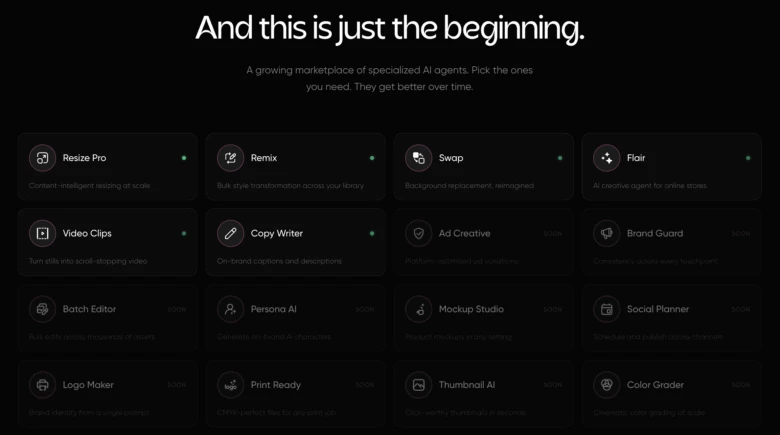
AI Agents is a marketplace of specialized agents built for creators and businesses. Each one focuses on a specific workflow – the kind that quietly eats hours every week.
Flair (ecommerce agent)
Flair connects directly to your online store and studies your data. Page views. Add-to-cart rates. Conversion gaps. Let’s say your Leather Jacket gets steady traffic but weak sales. Flair spots it and suggests a visual adjustment. Maybe a lifestyle background instead of a plain product shot. Maybe a different crop that highlights texture. It can generate variations, run visual tests, and track which version performs better. These are AI agents for business that tie creative decisions directly to performance metrics.
Resize Pro (content-intelligent resizing at scale)
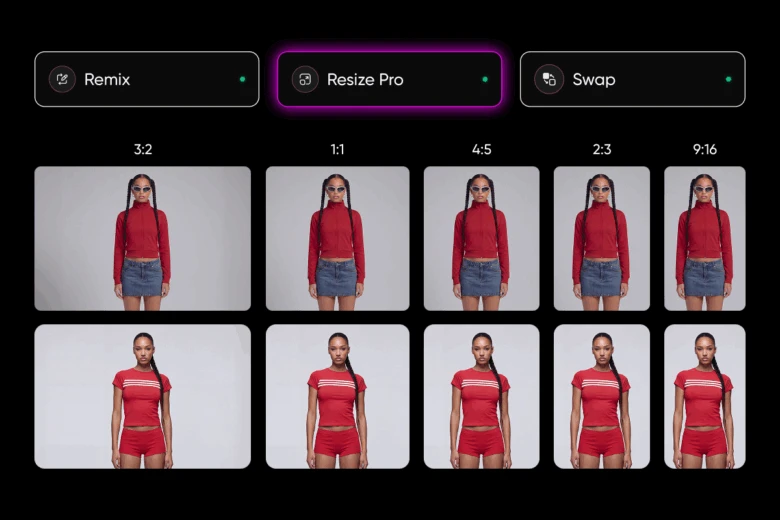
Resize Pro adapts images or videos to fit any platform – TikTok, Instagram, Amazon, Etsy, eBay, or custom dimensions. Unlike basic cropping tools, it understands what’s in the frame. It identifies subjects, extends backgrounds when needed, and delivers platform-ready assets that look intentionally composed, not mechanically cut. For creators managing multiple channels, this removes hours of repetitive formatting work. It’s a clear example of AI agents for productivity, solving a real execution bottleneck.
Remix (bulk style transformation)
Remix applies a chosen aesthetic across an entire content library. Describe the style – anime, cyberpunk, watercolor, vintage film, minimal, anything – and it transforms every selected asset to match. Set the look once. Every image updates. New files added later receive the same treatment automatically. For teams refreshing campaigns or testing creative directions, this becomes a scalable way to explore variation without rebuilding assets from scratch.
Swap (background replacement, reimagined)
Swap identifies the main subject in a photo and replaces the background with any destination, setting, or scene you describe. For e-commerce brands, this means one product shoot can power multiple environments. For creators, it unlocks fast scene changes without complex masking workflows. It turns a single asset into multiple contextual versions – ready for listings, ads, or social posts.
A marketplace that keeps growing
AI Agents isn’t a static feature drop. It’s a living marketplace designed to expand continuously. At launch, creators get access to specialized agents like Flair, Resize Pro, Remix, and Swap – each built to handle a distinct workflow from ecommerce optimization to intelligent resizing and bulk style transformation. But this is just the starting lineup.
New agents will be added every week, covering more creative and operational workflows across design, publishing, optimization, and beyond. As the marketplace grows, so does the range of tasks creators can delegate. Instead of adding more tools to your stack, you gain more teammates – each one focused on a specific job.
All agents are accessible through chat, inside Picsart and across messaging platforms like WhatsApp and Telegram. Brief them, review plans, approve execution, and manage multiple workflows from wherever you are.
The goal isn’t just automation. It’s scale without scaling headcount.
What can AI agents do? Real use cases
The easiest way to understand this technology is through outcomes. Here’s what AI agents for your business can handle today.
Product photography workflows
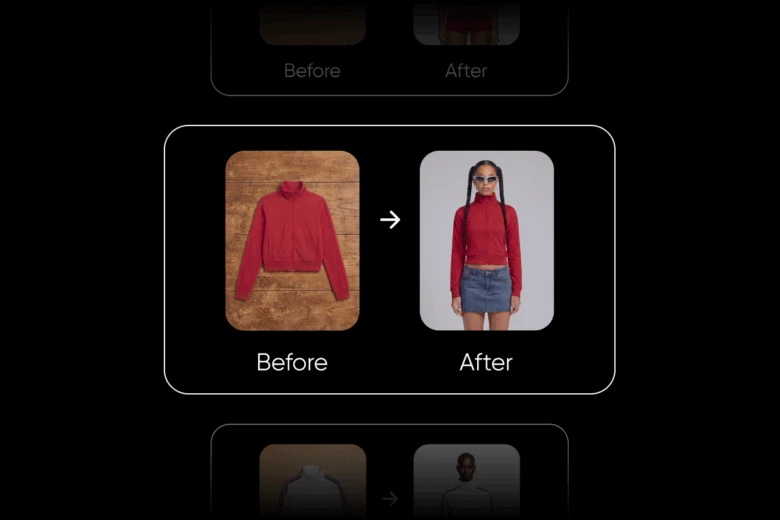
Upload raw images. Backgrounds are removed. Lighting improves. Lifestyle scenes are generated. Files are resized correctly. Eighteen inputs can turn into dozens of ready-to-publish visuals.
Content repurposing across formats
Drop a folder into Resize Pro. It reformats assets for Stories, banners, posts, and reels. Add new files later, and they follow the same rules automatically.
Brand consistency at scale
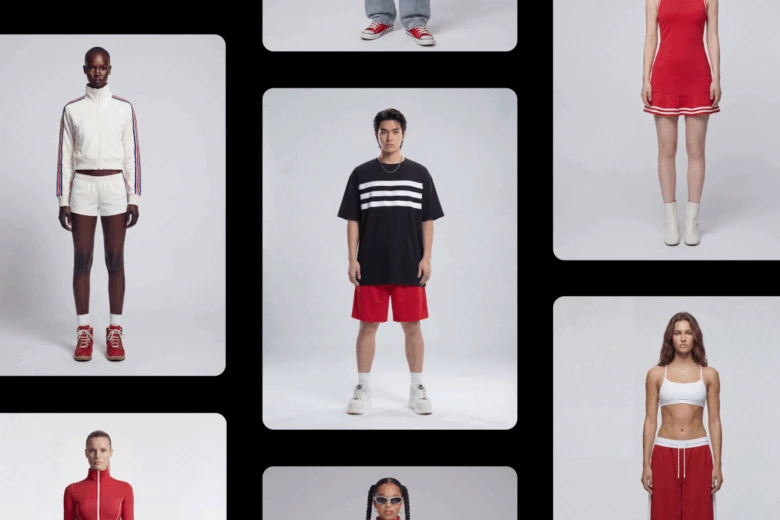
Describe your aesthetic once. Every new file aligns to it. No repeated design notes. No color mismatches creeping in.
How to get started with AI agents
1. Identify your bottleneck
Pinpoint what slows you down most. Is it editing product photos? Managing social media? Maintaining brand consistency? Get specific about the workflow that drains the most time.
2. Choose the right AI Agent
Select the agent designed to solve that exact problem. Each AI Agent focuses on a specialized workflow, so you’re not forcing one tool to do everything.
3. Brief it clearly
Share context. Upload assets. Explain your preferences. The clearer your direction, the stronger the outcome.
4. Review the plan
Every agent outlines what it intends to do before execution. You approve the plan, which keeps you fully in control.
5. Let it execute and learn
Once approved, the agent completes the workflow and adapts to your feedback over time. The collaboration becomes smoother with each use.
Work differently, not longer
Creative teams don’t need more tabs open. They need fewer manual steps.
AI agents are already handling real workflows from product photography to social scheduling to brand management. Picsart AI Agents brings these specialized agents into one accessible marketplace.
Join 2,000+ creators on the waitlist and meet your next digital teammate.
Frequently asked questions
Think of it as a digital worker – you give it a goal, and it decides the steps, takes action, and handles surprises along the way.


