


OpenAI shut down Sora on March 24, 2026. The app closes April 26, and the API sunsets in September. Despite hitting 3.3 million peak downloads, the economics never worked – Sora burned over $1 million per day in compute (some estimates ran as high as $15 million per day) against just $2.1 million in total revenue.
So what now? The closest single replacement is Google Veo 3.1 – up to 4K resolution, native audio generation in a single pass, and strong prompt understanding that handles complex scenes without hand-holding. But for specific Sora strengths, better options exist. Kling AI 3.0 delivers longer clips with multi-shot narratives and multilingual audio. Runway Gen-4.5 gives filmmakers granular creative control. Seedance 2.0 keeps characters consistent across multiple scenes with multimodal input. Hailuo 2.3 delivers consistent quality across content types at competitive pricing.
The good news: you don’t need to pick just one. All of these models are available on Picsart AI Playground alongside 129+ other models – one prompt bar, one credit balance, side-by-side comparison.
This guide matches each Sora alternative to the specific strength it replaces, so you can find the right tool without testing different platforms.
What made Sora different
Sora wasn’t just another text-to-video tool. It was trained as a world simulator – you described a scene with emotions, transitions, and physics, and it figured out how to visualize it. That approach produced impressive results but also made it expensive to run and difficult to control.
Each of Sora’s core strengths now has a stronger alternative.
Best Sora alternatives based on what you need
Every tool in this list generates AI video from text or images – text-to-video, image-to-video, and camera control. What separates them is where each one excels beyond that baseline.
Best for realism and audio: Google Veo 3.1
Veo 3.1 is the closest thing to a direct Sora replacement because it covers the most ground in a single model. It generates video with built-in audio – dialogue, ambient sound, and sound effects – all in a single pass. Resolution goes up to 4K, and it comes in three tiers so you can balance quality against speed and cost.
It also supports extending videos beyond the initial clip, using reference images to guide generation, and creating video from start and end frames. Google is retiring Veo 2 and Veo 3 by June 2026, making Veo 3.1 the only Veo model worth building on.
Best for character consistency across scenes: Seedance 2.0 (ByteDance)
When your project requires the same character across multiple shots – different angles, different scenes, different lighting – Seedance 2.0 is built for that. You can feed it a mix of images, video clips, and audio as reference, and the model pulls composition, motion, camera style, and sound from your materials to guide generation.
The standout feature is character locking. Upload or record a short video of your character, and the model extracts both their look and their voice. From that point on, the character stays consistent across every scene you generate – same face, same voice, no drift.
It generates up to 15 seconds of multi-shot video with stereo audio. Video editing, extension, and multilingual support are all built in. The model handles complex interactions with physical accuracy – from pair figure skating sequences to subtle close-up performances.
Best for creative control and filmmaking: Runway Gen-4.5
Runway doesn’t just generate video – it combines generation, compositing, editing, and VFX in one workspace. Gen-4.5 currently holds the top position on the Artificial Analysis video benchmark, and the quality shows in human content specifically. Facial expressions and emotional progression feel more natural than any other model in this list.
Give it a single reference image and it keeps your character consistent across endless lighting conditions, locations, and styles – no fine-tuning needed. Objects stay consistent across environments too. Act Two lets you control a character’s facial expressions and body movements using a reference video, which makes it feel less like a generator and more like a filmmaking tool.
Gen-4 Turbo offers a faster, cheaper option for iteration. Both models generate clips from 2 to 10 seconds across multiple aspect ratios including widescreen and vertical.
Best for duration, multi-shot, and affordability: Kling AI 3.0
If Sora’s biggest pain points for you were clip length and price, Kling AI 3.0 addresses both directly. It generates up to 15 seconds per clip and supports multi-shot narratives – the model automatically plans shot transitions, camera angles, and compositions from your prompt. No manual cutting or stitching needed.
Built-in audio covers five languages (Chinese, English, Japanese, Korean, Spanish) with dialect and accent support. You can lock a character’s look and voice across scenes, so they stay consistent no matter how the camera moves. The Omni version accepts a mix of images, videos, and text as input for more creative control.
Pricing is competitive – one of the most affordable options in this comparison, especially for longer clips without audio.
Best for consistent quality across content types: Hailuo 2.3 (MiniMax)
Most AI video models have a sweet spot and a weak spot. Hailuo 2.3 is the most even performer in this comparison, delivering steady quality without obvious content-type gaps.
It supports up to 1080p at 6 seconds and 10-second clips at lower resolution. A Fast version generates quicker at lower cost – roughly half the price of the standard tier for the same output. Camera control covers 15 commands including truck, pan, zoom, tilt, tracking shots, and static shots, with support for combining movements in sequence.
Built-in prompt optimization helps get better results without manual prompt engineering. For budget work, older Hailuo models offer even lower pricing.
Bottom line
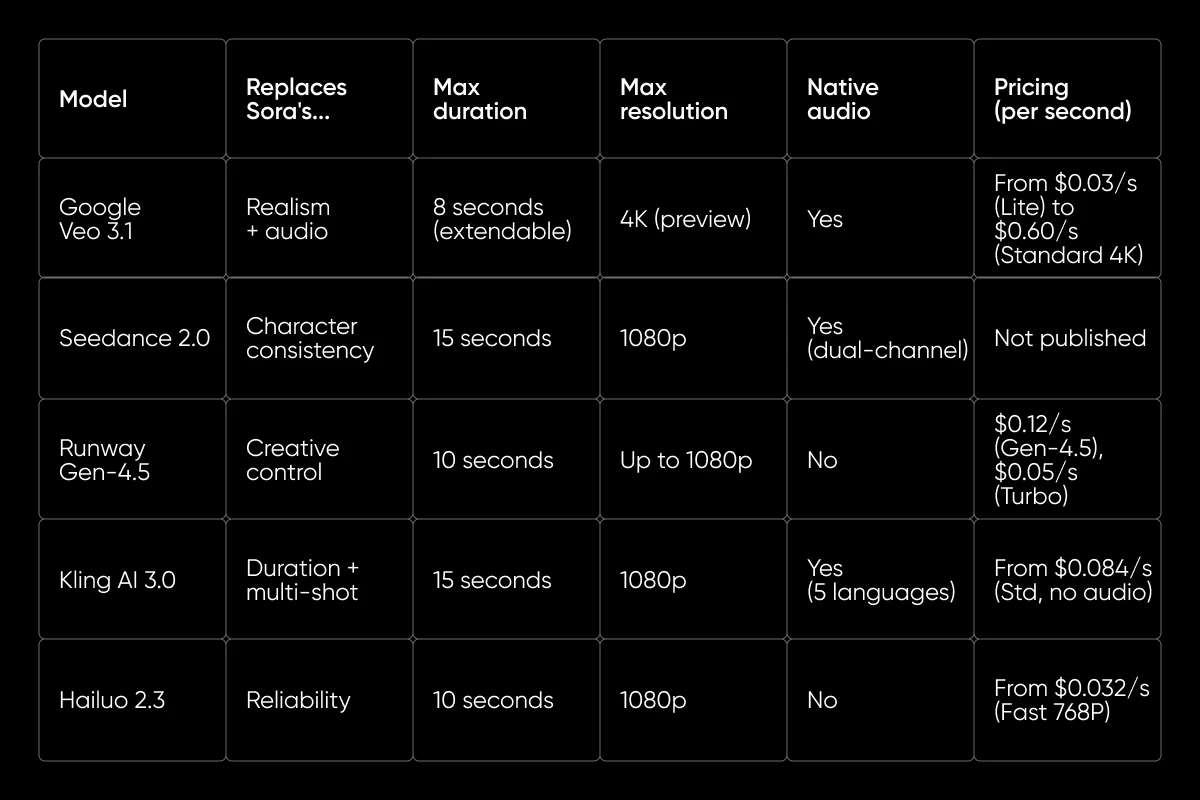
Of all the alternatives, Google Veo 3.1 covers the most Sora qualities in a single tool – native audio, high resolution, and prompt understanding. If you want one replacement, Veo 3.1 is the closest. For specific needs, the comparison table below breaks it down.
How Sora alternatives compare – quick reference
How to try multiple Sora alternatives in one place with Picsart
Testing different platforms with different accounts and different billing cycles is exactly the kind of friction that slows production down. Picsart solves that.
- Go to Picsart AI Playground – 129+ models from 27 providers behind one prompt bar.
- Choose your input – type a text prompt or upload an image.
- Select a model, or let Auto Mode choose the best one for your prompt. Kling, Veo, Runway, and Hailuo are all available.
- Adjust settings – camera movement, aspect ratio, duration.
- Generate and compare – run the same prompt across different models to see which output fits your project.
One credit balance instead of separate subscriptions.
Frequently asked questions
Google Veo 3.1 is widely considered the best overall alternative to Sora, offering up to 4K resolution, native audio generation, and strong prompt understanding for complex scenes. It comes in three tiers (Standard, Fast, Lite) with pricing from $0.03 per second.
Frequently asked questions
Google Veo 3.1 is widely considered the best overall alternative to Sora, offering up to 4K resolution, native audio generation, and strong prompt understanding for complex scenes. It comes in three tiers (Standard, Fast, Lite) with pricing from $0.03 per second.
Find the right Sora replacement
No single tool replaces everything Sora did – but the alternatives are individually better at what they do. Veo 3.1 for realism and audio. Seedance 2.0 for character consistency. Kling 3.0 for duration and multi-shot. The best workflow uses the right model for each project.
Compare them all side by side on Picsart AI Playground – one prompt, multiple models, one credit balance.


