The gap between a flat, generic loop and a full track with structure, emotion, and real vocals comes down to exactly what you type. Lyria 3 can generate lo-fi beats, orchestral scores, punk anthems, R&B ballads, and gospel hip-hop fusions, but only if the prompt says so.
This guide walks through 18 ready-to-use Lyria 3 prompts across six genres, plus the prompt framework that makes them work. Pop, rock, hip-hop, electronic, classical, jazz, copy, paste, and generate. Along the way, you’ll learn how to control vocals and lyrics, layer in advanced moves like timestamp prompting, and chain music into bigger creative workflows across Picsart AI Playground, Gen AI, and Flow.
Whether the goal is scoring a video, building a playlist of original tracks, or just experimenting with AI music for fun, the right prompt turns Lyria 3 from a novelty into a production tool. Let’s get into it.
Master the Lyria 3 prompt framework
Strong Lyria 3 prompts share the same anatomy. Layer these six building blocks, keep it to three to five detailed sentences, and the output lands a lot closer to what’s in your head.
Genre and style. Start with the primary category and era: “early 90s hip-hop,” “modern lo-fi,” “1970s soul.” This sets the sonic vocabulary before anything else lands on top.
Mood. Name the emotional intent. “Tense and suspenseful.” “Intimate and warm.” “Triumphant.” Mood tells Lyria how to perform everything else in the prompt.
Instrumentation. Spell out the specific instruments driving the track, like “nylon-string guitar, warm electric piano, crisp hip-hop drum beat.” Skip this step and Lyria chooses defaults that may or may not match the vision.
Tempo and rhythm. Use descriptive language, not just BPM. “A fast, energetic pace with a driving beat.” “Slow, swaying tempo.” Words shape feel more than numbers do.
Vocal style and language. Specify gender, tone (raspy, smooth, breathy), delivery, and language. Lyria 3 supports English, German, Spanish, French, Hindi, Japanese, Korean, and Portuguese.
Lyrics. Hand Lyria a theme (“a song about a cross-cultural connection”) or feed it exact words using the “Lyrics:” prefix. To skip vocals entirely, just say “instrumental.”
The sweet spot is three to five detailed sentences, enough signal without drowning the model in noise.
Copy these music prompt ideas by genre
Eighteen ready-to-paste prompts across six genres. Each one follows the framework above: genre first, then mood, instruments, tempo, and vocals. Drop them straight into Lyria 3, or use them as starting points and tweak.
Pop and R&B
Upbeat summer pop with bright synths, catchy vocal hooks, and feel-good energy. Female lead, polished and confident.
Slow R&B ballad with smooth male vocals, electric piano, intimate mood, and a gentle swaying tempo.
Modern pop-funk crossover with a bass-heavy groove, punchy female vocals, and retro 80s energy.
Rock
Classic rock anthem with distorted guitars, powerful drums, and commanding male vocals built for stadium choruses.
Early 2000s punk-rock with gritty vocals, heavy distorted guitars, and a fast, aggressive tempo.
Motown-influenced rock with warm brass, a driving rhythm section, and soulful male vocals.
Hip-hop and rap
Boom-bap beat with dusty vinyl samples, deep 808 bass, and confident male rap delivery.
Modern trap with skittering hi-hats, heavy 808 bass, atmospheric pads, and a melodic vocal style.
Gospel-hip-hop fusion with a massive choir, driving beat, and uplifting lyrics about overcoming challenges.
Electronic and lo-fi
Deep house track with pulsing bass, arpeggiated synths, warm pads, and a steady four-on-the-floor beat.
Lo-fi hip-hop study beat with a muffled drum break, dusty jazz piano samples, instrumental.
Synthwave with retro 80s analog synths, driving bass, neon atmosphere, instrumental.
Classical
Epic orchestral score with sweeping strings, brass fanfare, thunderous percussion, and building intensity.
Gentle classical piano piece with delicate arpeggios, soft dynamics, and a reflective mood.
Full orchestra with choir, heroic melody, and a triumphant resolution.
Jazz and bossa nova
Romantic bossa nova and R&B fusion with nylon-string guitar, electric piano, and a vocal duet, smooth male in English, breathy female in French.
Smooth jazz ballad with piano and upright bass, a breathy female soprano, and soulful delivery.
Upbeat funk-jazz crossover with slap bass, brass stabs, rhythmic guitar, and high energy.
Control vocals and lyrics like a pro
Vocals make or break a Lyria 3 track. Here’s how to steer them.
Shape the singer. Specify gender and vocal range, like “commanding baritone,” “clear high soprano,” or “expressive tenor.” Add texture: “gravelly,” “soulful,” “breathy,” “polished,” “raspy.” Then describe delivery: “fast-paced and melodic,” “laid-back groove,” “calmer and quieter as the track progresses.” More specific inputs get closer to the right result.
Pick a language. Lyria 3 supports eight languages: English, German, Spanish, French, Hindi, Japanese, Korean, and Portuguese. Pairing language with voice description gives even tighter control. “Breathy female vocal in French” reads completely differently from the same voice in English.
Write the lyrics two ways. Theme-based prompts describe the subject and let Lyria generate the words, like “a love song about meeting someone in New York.” Exact-lyrics prompts use the “Lyrics:” prefix before the lines you want performed verbatim. Both work. Exact control is great for storytelling; themes are faster.
Add backing vocals. Mention where you want backing singers to echo or harmonize (“backing vocals echo the chorus hook”) and Lyria layers them in.
Keep lyrics short on standard Lyria 3, since tracks max out at 30 seconds. Save full verses and longer storytelling for Lyria 3 Pro, which generates up to three minutes.
Try advanced music prompt techniques
Once the basics feel natural, timestamp prompting opens up a new level of control.
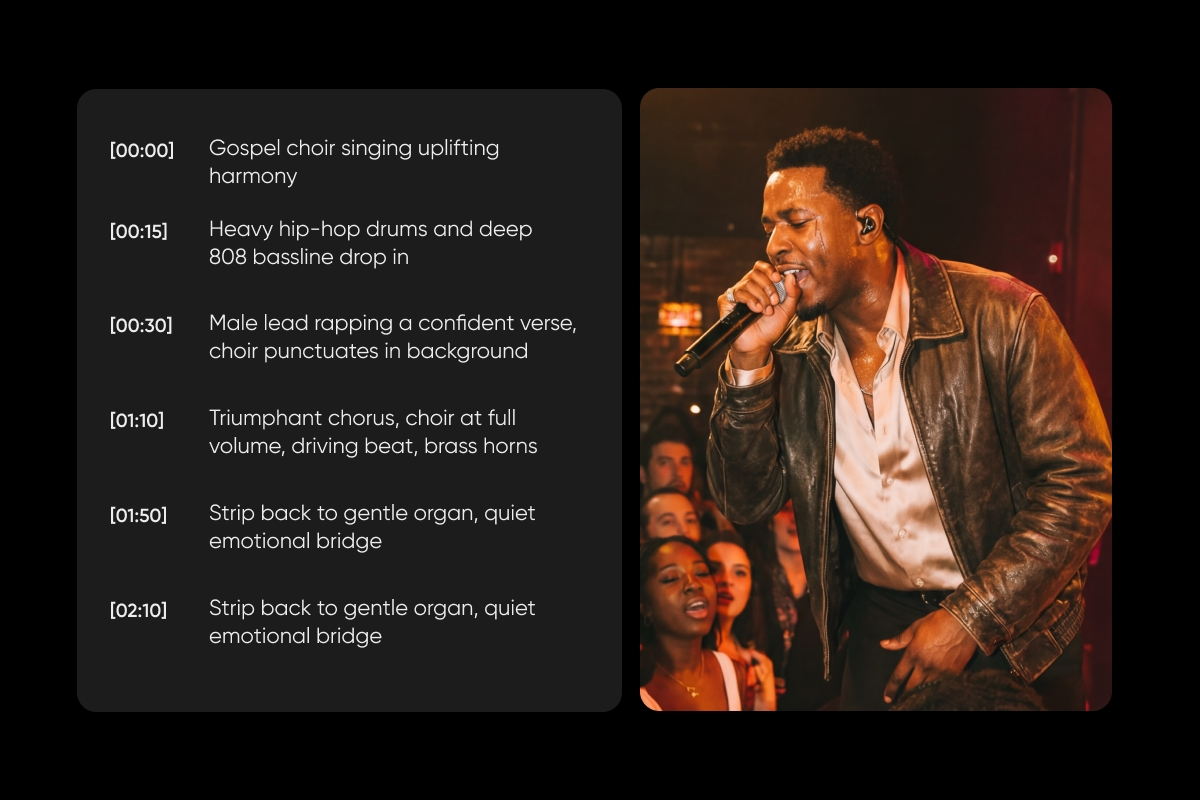
Timestamp prompting assigns specific musical actions to timed segments using [MM:SS] markers. This is how you score a video, build dynamic genre shifts, or write a full song structure instead of a 30-second loop.
Example:
Timestamp prompting requires Lyria 3 Pro and its three-minute tracks. Standard Lyria 3 caps out at 30 seconds, which is plenty for loops and hooks but too short for full arrangements.
Generate AI music in Picsart
Lyria 3 lives in three places inside Picsart: AI Playground, Gen AI, and Picsart Flow. Here’s the quick path from blank page to finished track.
Open AI Playground and switch to Audio mode. Choose Lyria 3 for 30-second clips or Lyria 3 Pro for full tracks up to three minutes. Write the prompt, simple (“a chill lo-fi beat with soft piano”) or detailed (tempo, instrumentation, vocal style, lyrics). Generate, preview, refine until it feels right, then export as MP3 or MP4.
Inside Picsart Flow, Lyria 3 plugs into end-to-end creative workflows: script, visuals, video, score with Lyria 3 Pro, voiceover, and export. AI Copilot helps pick models and settings along the way, and the same flow becomes a repeatable system across future projects.
Generate Lyria 3 tracks alongside AI-generated videos (Veo, Sora, Kling, Runway), images, and voiceovers in the same workspace. Every asset lands in one organized library. And since all music is original, it’s cleared for commercial use, no licensing headaches, no takedowns.
Create your soundtrack with Lyria in Picsart Gen AI
Picsart Gen AI takes a different approach than the AI Playground. Instead of writing prompts from scratch, start with a template. Each Lyria template pairs a visual concept with an original AI-generated soundtrack, so the mood and music are already locked in. Pick the one that fits the project, drop in text or images, and the score comes along for the ride.
Template themes cover a lot of ground. “Neon rooftop city” leans into synthwave. “Futuristic suit” goes full cinematic. “Glowing fantasy forest” plays with ambient textures. “Jazz lounge” keeps things smooth and classic. Swap the look, and the track follows.
Start exploring Lyria templates in Picsart Gen AI and pair your visuals with soundtracks that feel intentional from the first beat.
Get answers to common Lyria 3 questions
Lyria 3 prompts are the text instructions that tell Google’s Lyria 3 model what kind of music to generate, including genre, mood, instruments, tempo, vocals, lyrics, and anything else that shapes the track.
Use the six-block framework: genre and style, mood, instrumentation, tempo and rhythm, vocal style and language, and lyrics. Aim for three to five detailed sentences. Start with genre, layer in specifics, and avoid contradicting yourself.
Yes. Describe the singer (gender, range, texture, delivery), then either give Lyria a theme to write lyrics from or feed it exact lyrics using the “Lyrics:” prefix. Say “instrumental” to skip vocals entirely.
Eight: English, German, Spanish, French, Hindi, Japanese, Korean, and Portuguese.
Lyria 3 runs on a credit-based system inside Picsart AI Playground, Gen AI, and Flow. Each generation uses credits from the active Picsart plan. Lyria 3 Pro, which generates up to three-minute tracks with timestamp control, uses credits too and is available on higher-tier plans.
Standard Lyria 3 generates 30-second clips, perfect for loops, hooks, and quick experiments. Lyria 3 Pro generates up to three-minute tracks and supports timestamp prompting, so full songs or video scores come together scene by scene.