


Contents
To make a Thanksgiving invitation, pick a style, upload one photo, type your event details, and run the workflow: you get a finished invitation image plus a short animated version to text to guests. Picsart Flow’s no-code workflows include five ready-made Thanksgiving invitation templates, covering a sit-down dinner, a potluck, and a Friendsgiving. Each one draws its own illustrations, sets your details in clean type, and animates the result.
This guide walks through two of them step by step. The first turns a photo of your own dish into a hand-drawn Friendsgiving invite. The second turns a single pumpkin photo into a papercraft dinner invitation in three sizes. The other three styles follow, so you can pick the one that fits your table.
What goes on a Thanksgiving invitation
Every workflow below has an event details node with the same handful of lines. Fill in the ones your party needs and delete the rest.
- Headline: the name of the gathering, such as “Gather & give thanks” or “Friendsgiving feast.”
- Host or supporting line: who is hosting, or one line that sets the mood.
- Date and time: the day and the hour dinner starts.
- Location: the street address or the venue.
- RSVP: the reply-by date, especially for a potluck where dishes need planning.
The workflows print only what you type, exactly as typed. Leave a line empty and the layout closes the gap instead of inventing filler text.
Choose your starting photo
All five workflows start from one image, and that image does a different job in each style.
| Workflow | Your image becomes | Invitation sizes | Video |
|---|---|---|---|
| Friendsgiving Feast Invitation and Animation | A brush-ink drawing of your dish | 2 layouts, 4:5 | 6 s |
| Thanksgiving Dinner Invitation Creation | A layered papercraft illustration | 4:5, 1:1, 9:16 | 6 s |
| Thanksgiving Potluck Invitation Designs | A gouache painting of your dish | 2 layouts, 4:5 | 5 s |
| Thanksgiving Potluck Invitation Video | A set of five linocut-style harvest icons | 4:5, 9:16 | 5 s, 9:16 |
| Thanksgiving Invitation Card Design | The color palette for six vintage icons | 2 layouts, 4:5 | 4 s |
Every video is a silent 720p clip, built by the Seedance 2.5 video model in four of the five workflows.
Example 1: a Friendsgiving invitation from your dish photo
The Friendsgiving Feast Invitation and Animation workflow suits a host who already knows what they are bringing. A photo of the signature dish becomes the art.
Step 1. Upload a photo of your dish
Take a clear photo of one dish from above or at a slight angle, a lattice pie on a plate in the sample. The workflow removes the background and redraws the dish as a bold brush-ink illustration in deep chestnut brown, keeping its shape and its plate.
Step 2. Type the event details
Edit the details node with a headline, a supporting line, the date, the time, and the address. The sample reads “Friendsgiving feast,” “Good food, better company,” November 21 at 6:00 PM.
Step 3. Run the canvas
Two 4:5 layouts come back in the same hand-drawn style. One wraps the text in a border of feast sketches, from a roast turkey to cutlery and candles, and the other sets a table scene above the details.
Step 4. Send the animated version
A 6-second video reveals the drawings one by one, then fades in the text. It works as a save-the-date in a group chat, while the still prints for the fridge. For the rest of the party plan, these Friendsgiving hosting ideas cover menus and games.
Example 2: a Thanksgiving dinner invitation in three sizes
The Thanksgiving Dinner Invitation Creation workflow is the better fit for a family dinner that needs a printed card, a post, and a story from one design.
Step 1. Upload one seasonal photo
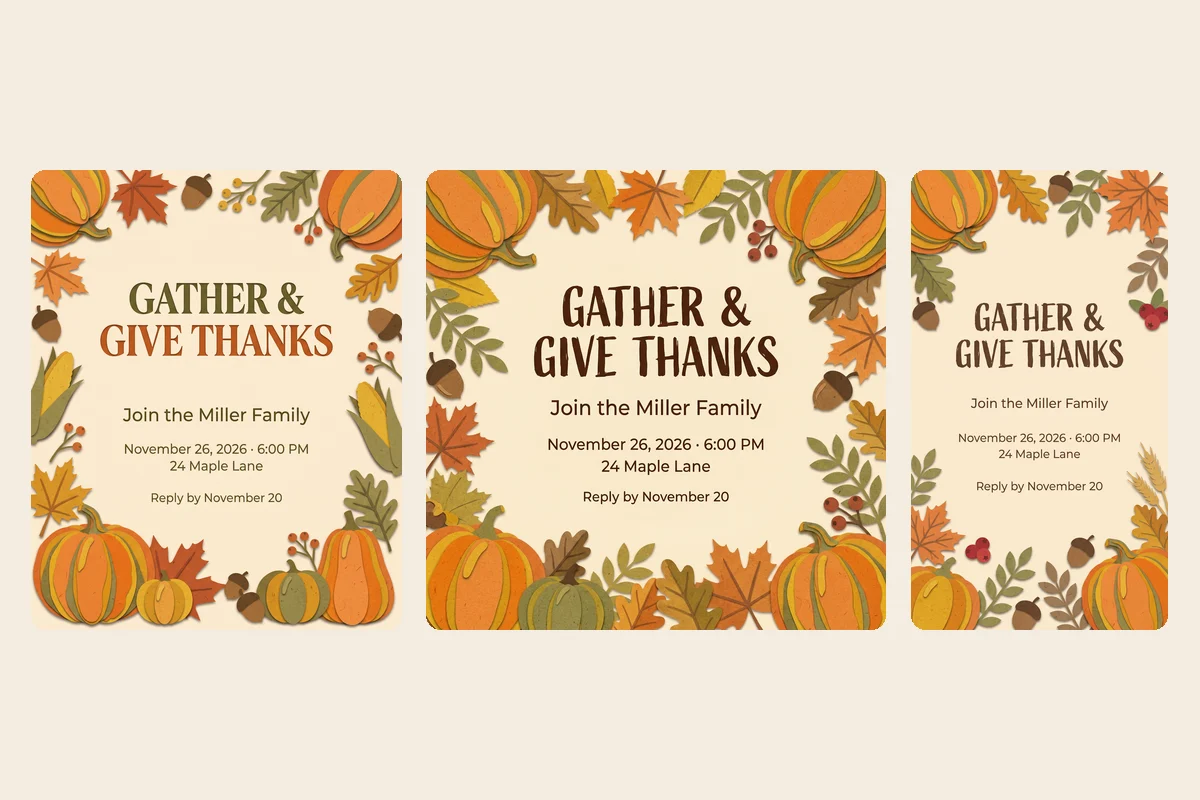
The sample starts from a single orange pumpkin on a wooden table. The workflow isolates it and rebuilds it as layered paper-cut art, with visible paper fibers and soft shadows between the layers.
Step 2. Fill in the dinner details
Type in the headline, who is hosting, when dinner starts, where it is, and when guests should reply. The sample reads “Gather & give thanks,” “Join the Miller Family,” with an RSVP line.
Step 3. Run and collect three sizes
Three invitation nodes frame the details with papercraft pumpkins, corn, acorns, and maple leaves. The 4:5 version prints as a card, the 1:1 square fits a feed post, and the tall 9:16 version fits a phone screen or a story.
Step 4. Share the 6-second video
The border illustrations slide in first, then the text appears. Send the clip to the family chat the same day the printed cards go out.
Three more Thanksgiving invitation styles
A gingham potluck invitation
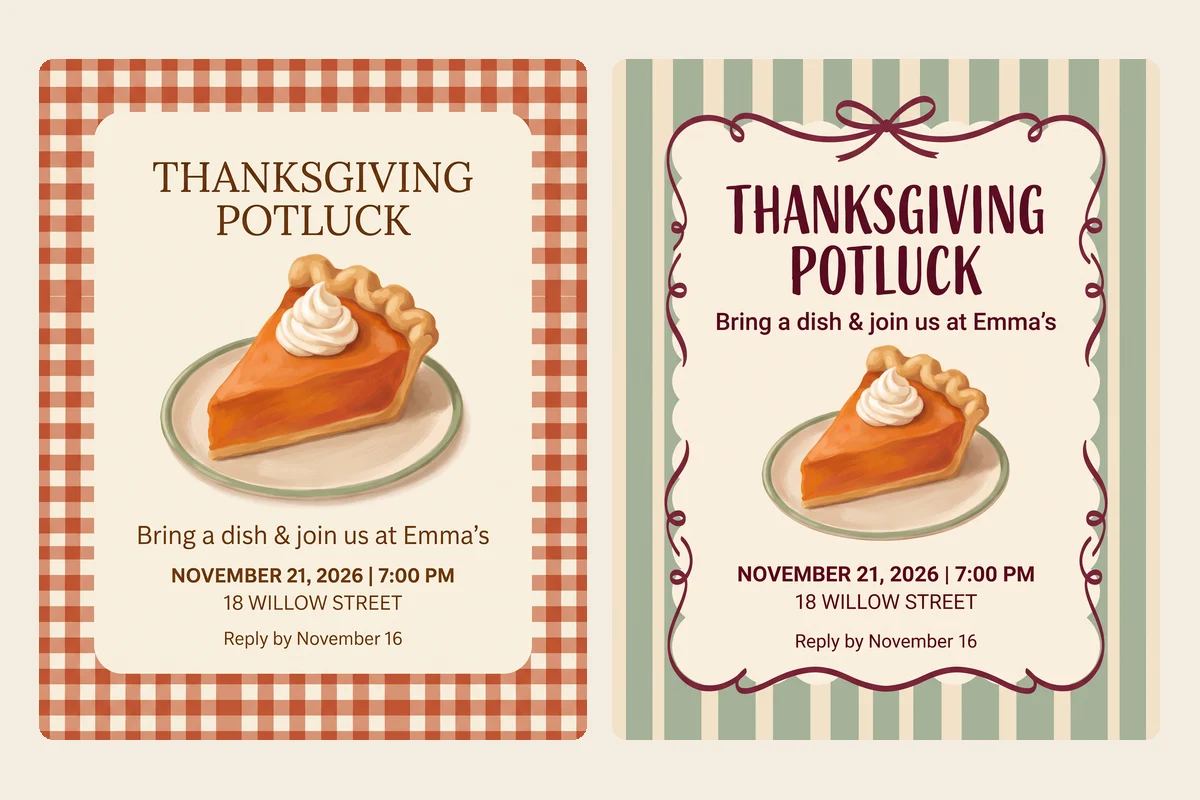
The Thanksgiving Potluck Invitation Designs workflow also starts from a dish photo, a slice of pumpkin pie in the sample, and paints it in soft gouache. One layout puts it on a cream panel inside a red gingham border, and the other on green stripes with a scalloped frame and a bow. The RSVP line makes it a good fit for an office or classroom potluck where someone tracks the dishes.
A rustic community potluck flyer
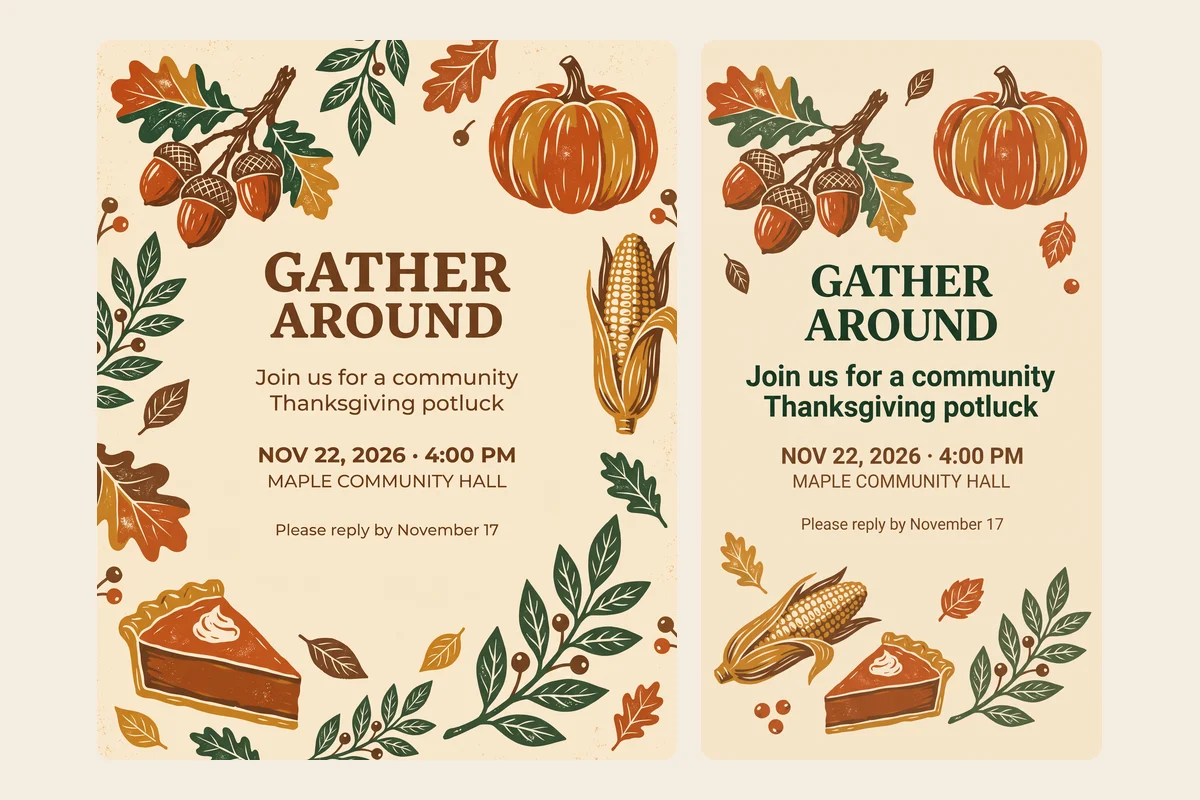
The Thanksgiving Potluck Invitation Video workflow turns one seasonal photo, an acorn branch in the sample, into a set of five harvest icons in a rustic linocut style: acorns, a pumpkin, corn, oak leaves, and a pie slice. They frame the text on a 4:5 invitation and a tall 9:16 version, which doubles as a potluck flyer for a community hall or a lobby board.
A vintage invitation card for coffee and pie
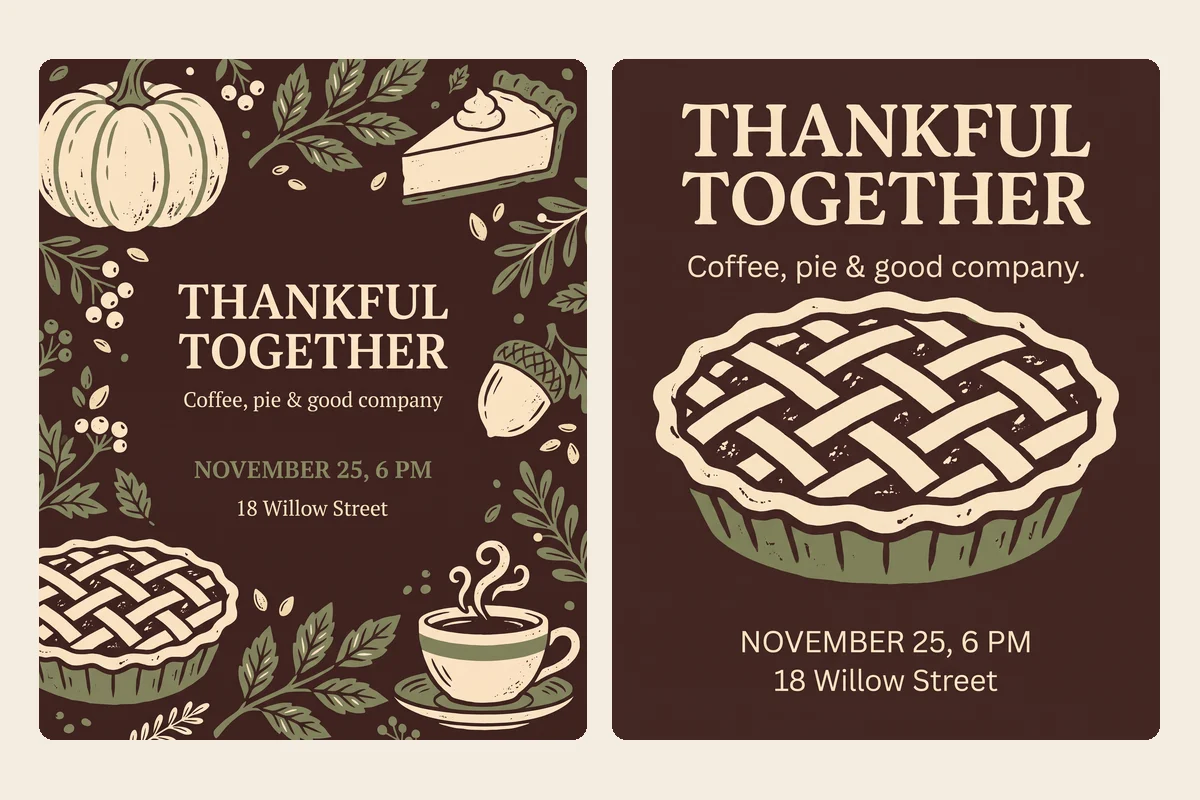
The Thanksgiving Invitation Card Design workflow uses your image only as a color reference. Upload a cafe logo or any photo with the colors you like, and it draws six vintage block-print icons in that palette: a pumpkin, a pie slice, a lattice pie, an acorn, a leaf sprig, and a steaming coffee cup. One layout centers the pie under the headline, and the other frames the text with all six icons.
A single pie or pumpkin redraws cleanly, while a crowded table turns into clutter. Short headlines get the biggest, most decorative type. It gives you time to balance the dishes before the shopping trip. The clip gets the date into everyone's calendar, and the printed card arrives as the reminder. Open one of the five Thanksgiving invitation workflows in Picsart Flow, upload one photo, and type your event details. Each run returns finished invitation images and a short animated video. Each generation uses the AI credits in your Picsart plan.Tips for a Thanksgiving invitation guests actually read
Use a photo with one clear subject
Keep the headline to three or four words
Add an RSVP date for potlucks
Send the video first, print second
Get answers to common questions
Make your Thanksgiving invitation today
Pick the style that matches your gathering, upload one photo, and fill in the details. Start in the AI invitation maker, then text the animated invite to your guests and print the card for the fridge.


