


Realistic AI videos come down to three things: choosing the right model, writing cinematic prompts, and knowing exactly which settings to push. Most outputs still fall into the uncanny valley – warped motion, flat lighting, or that unmistakable “AI sheen.” But with the right workflow, the gap between artificial and believable shrinks fast. This guide breaks down how to make realistic AI videos that actually pass the eye test, from picking the best AI realistic video generator to crafting prompts that feel like direction, not guesswork.
Picsart’s AI Video Generator brings together multiple leading models in one place, so you can test, compare, and refine without juggling tools. Instead of committing to a single engine, you can match each model’s strengths to your creative goal, and that’s where realism starts to click.
What makes an AI video look realistic?
Realism in AI video isn’t one single feature – it’s a stack of small details working together. When even one layer breaks, the illusion falls apart.
Physics is the first checkpoint. Objects need to behave as they exist in the real world. Tires should compress when turning, clothing should react to movement and gravity, and liquids should pour with believable weight. When motion ignores physics, viewers instantly sense something is off, even if they can’t explain why.
Lighting and atmosphere do most of the heavy lifting. Real-world lighting is complex and layered. Think soft shadows at golden hour, reflections bouncing off wet pavement, or subtle fog diffusing light in the distance. Flat lighting is one of the biggest giveaways in realistic AI videos. The more specific and dynamic the light behavior, the more convincing the scene becomes.
Skin and texture add the human layer. Perfectly smooth skin doesn’t exist, yet many AI outputs default to it. Realistic results include pores, fine imperfections, subtle oil shine, and how light scatters across the surface. The same applies to hair, fabric, and materials — detail at a micro level creates believability at a macro level.
Motion continuity ties everything together. A scene can look perfect frame-by-frame but still fail if objects warp or shift mid-motion. Consistency across frames — especially in faces and moving objects — is what makes footage feel stable and real.
Audio is the newest realism factor. Advanced models now generate synchronized sound, from footsteps changing across surfaces to ambient noise adapting to environments. When visuals and sound align naturally, the realism jumps to another level.
Best AI models for realistic video
Not all models approach realism the same way. Each one excels in a specific area, and understanding those strengths is key to making realistic AI videos.
Veo 3.1 / Veo 3.1 Fast
These models stand out for lighting and atmosphere. Scenes feel cinematic, with rich depth and natural light behavior that mimics real-world cameras. From neon reflections to golden hour glow, Veo captures subtle lighting shifts better than most. It also supports native audio generation, making it ideal for immersive clips.
Kling V3 / Kling V3 Omni
Kling’s strength is object stability. While many models struggle to maintain shape during movement, Kling keeps objects consistent — even during complex rotations. That makes it a go-to for product videos or anything requiring precision.
Runway Gen 3 / Runway Gen 4
Runway excels at human realism. Facial expressions, eye movement, and subtle emotional cues feel natural and grounded. If your content revolves around people, storytelling, or UGC-style clips, this model delivers some of the most believable results.
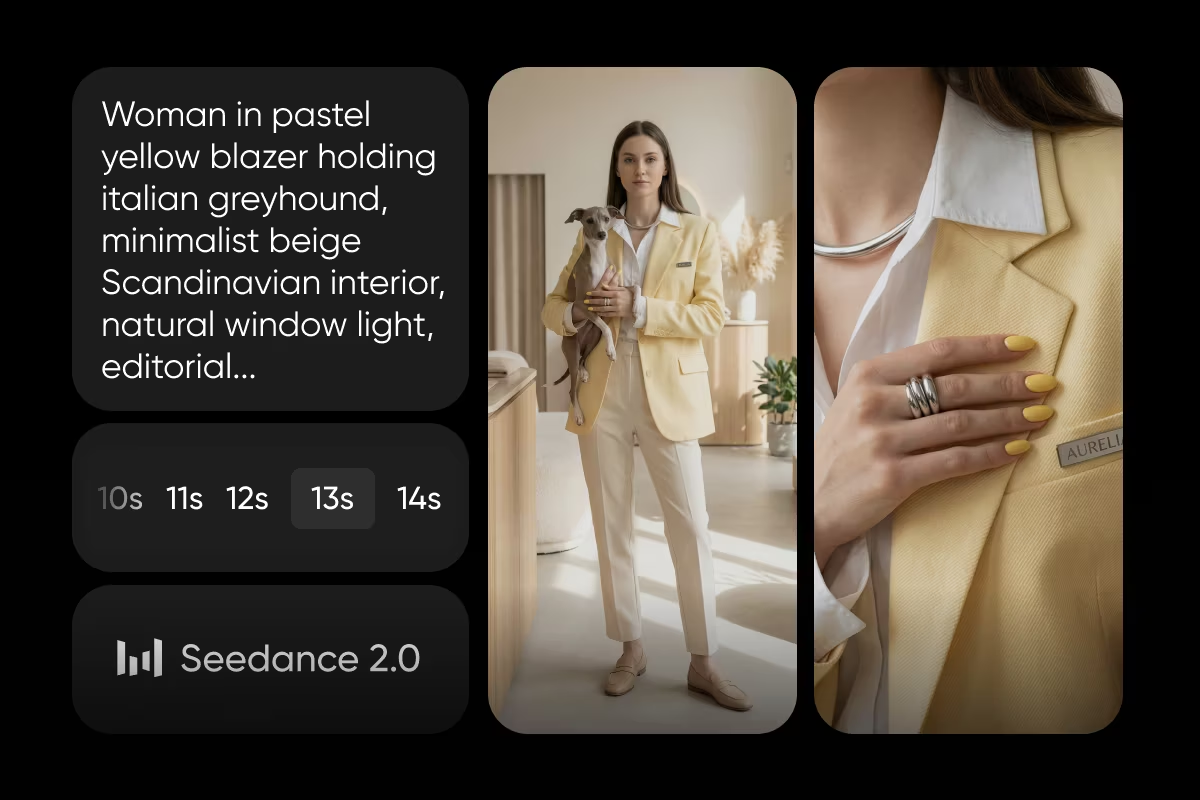
Seedance 1 Pro / Seedance 1 Pro Fast
Seedance 1 Pro focuses on physics and motion. Fast-moving scenes, action shots, and dynamic camera work hold together with convincing weight and momentum. It’s also one of the more efficient options for quick iterations.
Luma
Luma leans into expressive character animation. Faces don’t just look real — they feel alive. Subtle movements and emotional range make it ideal for narrative-driven content.
WAN 2.6 / WAN 2.7
These models offer a balanced approach at a lower cost. They handle both environments and characters reasonably well, making them great for experimentation or budget-friendly projects.
Pika / Pika Frames
Pika focuses on controlled motion. While slightly more stylized, it gives you precise control over how a scene begins and ends, which is useful for transitions and creative edits.
The takeaway is simple: there’s no single best AI realistic video generator for everything. The most realistic AI videos come from pairing the right model with the right type of scene.
How to make realistic AI videos with Picsart
1. Choose your workflow
Start by deciding between text-to-video and image-to-video. Text-to-video gives you creative freedom, letting you describe a scene from scratch. But it can introduce unpredictability in how the first frame looks. Image-to-video, on the other hand, anchors your result to a reference image. This makes it easier to maintain consistency and control details. For realism, image-to-video often produces stronger results.
2. Pick the right model
Match your model to your goal. For cinematic lighting, choose Veo. For stable product shots, go with Kling. For human realism, Runway is a strong pick. For action-heavy scenes, Seedance delivers better physics. One effective strategy is to run the same prompt across multiple models. Each interprets the input differently, and comparing results helps you identify which version feels the most real.
3. Write a cinematic prompt
Think like a director, not a search engine. Instead of "a man walking in a park," describe the full scene: camera angle, lighting, textures, and motion. Include details about how things behave - fabric moving in the wind, light reflecting on surfaces, footsteps interacting with the ground. The more grounded your description, the more realistic the output.
4. Refine and iterate
The first result is rarely the best. Small prompt tweaks can dramatically improve realism. Generate multiple variations, adjust details, and refine your direction. After generating, use editing tools to enhance color, contrast, and overall composition.
Prompting tips that actually improve realism
Strong prompting is what separates average results from hyper-realistic AI videos.
Use camera language
Terms like “slow pan,” “dolly shot,” or “handheld tracking” guide the model toward natural movement. These cues mimic how real footage is captured, making motion feel less artificial.
Be specific about lighting
Instead of generic lighting descriptions, define the source and behavior. Golden hour, backlighting, reflections, and atmospheric effects all add depth. Lighting isn’t just visual — it shapes how the entire scene feels.
Describe textures in detail
Realism lives in the details. Mention skin texture, fabric movement, or surface imperfections. A scene becomes believable when it includes subtle flaws and variations.
Include sound cues when possible
For models that support audio, describing environmental sounds adds another layer of immersion. Footsteps, ambient noise, and background activity all contribute to realism.
Keep prompts focused
Overloading your prompt with too many elements can dilute the result. Focus on a few key details and execute them well.
Use style anchors
Phrases like “shot on 35mm film” or “documentary style” push the output toward natural visuals instead of overly polished AI aesthetics.
Conclusion
Realistic AI video isn’t about finding one perfect tool — it’s about understanding how different models behave and directing them with intention. When you combine the right model, a well-crafted prompt, and a bit of iteration, the results stop looking artificial and start feeling real.
Picsart brings that entire process into one place, giving you the flexibility to experiment, compare, and refine without friction.
Start creating realistic AI videos with AI Video Generator.
Frequently asked questions
There isn’t a single answer. The most realistic AI video generator depends on your use case. Some models excel at lighting, others at motion or human realism. Using multiple models together often produces the best results.


