

Contents
Use Nano Banana 2.1 to edit in conversation, steer changes with a doodle, or build scenes from several images. Use Nano Banana 2 for fast batches, Nano Banana 2 Lite for quick high-volume drafts, Nano Banana Pro when fine detail and typography have to hold up, and the original Nano Banana for quick, simple visuals.
This nano banana models comparison breaks down all five.
What are the Nano Banana models?
Nano Banana (original)
Nano Banana is the simplest of the family. It runs on Gemini 2.5 Flash Image and is made for fast, low-effort generation.
It suits quick social posts and early ideas. Push it harder and text warps, details soften, and busy scenes lose structure.
Nano Banana Pro
Nano Banana Pro runs on Gemini 3 Pro Image and is the detail model. Expect richer textures, more natural light and better-built compositions.
Text is its big strength. Posters, labels and lettering in other languages stay crisp. You can also restyle an upload or blend up to 14 images.
The trade-off: Pro puts quality ahead of speed, so each image takes longer.
Nano Banana 2
Nano Banana 2 runs on Gemini 3.1 Flash Image. It gets close to Pro quality at a much faster pace, so it is the practical everyday pick.
It outputs 512px to 4K and keeps up to five characters and fourteen objects consistent. Grounding with Google Image Search pulls real web images in as context, so real places and products come out more accurate.
Nano Banana 2 Lite
A lighter, faster tier of Nano Banana 2, Nano Banana 2 Lite shares its Gemini 3.1 Flash Image base. It is made for quick drafts in bulk, with consistent characters and readable text.
Nano Banana 2.1
The newest model, Nano Banana 2.1, joined the family in October 2026. It sits in Google's Gemini 3 lineup and runs on Gemini 3.6 Flash.
It is designed around editing as much as generating:
- Doodle editing: draw on the picture to show what should change.
- Multi-turn refining: ask for a change, check it, then ask for the next one in the same chat.
- Multi-image scenes: put several products into one setting, or several characters into one frame.
- Text and world knowledge: multilingual lettering for factually grounded posters and infographics.
- Output: 1K, 2K or 4K, in 15 aspect ratios from 1:1 to wide 8:1 and tall 1:8 banners.
In Google's side-by-side human ratings, Nano Banana 2.1 outscored Nano Banana 2 and Nano Banana Pro across every category Google published.
Nano Banana vs Nano Banana Pro
Nano Banana vs Pro is the widest gap in the family. The original suits speed and rough concepts, while Pro is built for finished work.
- Detail: Pro renders richer textures and more natural light.
- Text: Pro keeps posters, labels and lettering in other languages crisp, where the original often distorts text.
- Resolution: Pro outputs up to 4K, while the original is limited.
- Speed: the original is quicker, and Pro takes longer per image.
Nano Banana Pro vs Nano Banana 2
The nano banana pro vs nano banana 2 choice is fidelity versus pace.
- Pick Pro when an image must survive close inspection, like print or type-heavy designs.
- Pick Nano Banana 2 for everyday work. It is much faster, costs less and comes close to Pro quality.
- Grounding: Nano Banana 2 adds Google Image Search grounding, so real places and products come out more accurate.
For most jobs, Nano Banana 2 is the better default.
Nano Banana vs Nano Banana 2
In this Nano Banana comparison, Nano Banana 2 wins nearly every area:
- Faster, sharper and better lit
- Steadier multi-character scenes, with up to 5 characters and 14 objects kept consistent
- Readable text where the original often warps it
- Output from 512px up to 4K
Nano Banana 2 vs Nano Banana 2.1
Nano Banana 2.1 shifts the focus to editing.
- Editing: doodle edits and multi-turn refining in the same chat.
- Consistency: its largest lead over Nano Banana 2 in Google's ratings was multi-character consistency.
- Infographics: it nearly tripled the older model's infographic factuality score.
- What Nano Banana 2 keeps: Google Image Search grounding and a 512px draft option.
- Tip for 2.1: pick 2K or 4K for posters, since small text blurs at 1K.
Full comparison table
Here is the full nano banana model comparison at a glance.
| Nano Banana | Nano Banana Pro | Nano Banana 2 | Nano Banana 2 Lite | Nano Banana 2.1 | |
|---|---|---|---|---|---|
| Built on | Gemini 2.5 Flash Image | Gemini 3 Pro Image | Gemini 3.1 Flash Image | Gemini 3.1 Flash Image | Gemini 3.6 Flash |
| Best for | Quick, simple visuals | Detail and typography | Fast, high-volume work | Quick drafts in bulk | Doodle and multi-turn edits, text layouts |
| Resolution | Limited | 1K, 2K, 4K | 512px to 4K | Draft or high-resolution | 1K, 2K, 4K in 15 aspect ratios |
| Text in images | Often distorted | Crisp, multilingual | Readable, localized | Readable | Multilingual, sharpest at 2K and 4K |
| Multi-image and consistency | Struggles with multi-character scenes | Blend up to 14 images | Up to 5 characters and 14 objects | Consistent characters | Multi-product and multi-character scenes |
Visual showdown: same prompt, five models
Each prompt ran once on all five models with default settings and no edits.
Photorealistic portrait
A close-up portrait of an elderly woman with deep wrinkles, natural lighting, sharp focus
All five keep the wrinkles and the soft window light. Pro and 2.1 show the most skin texture up close.
A neon sign reading ‘Open 24 Hours’ on a rainy city street at night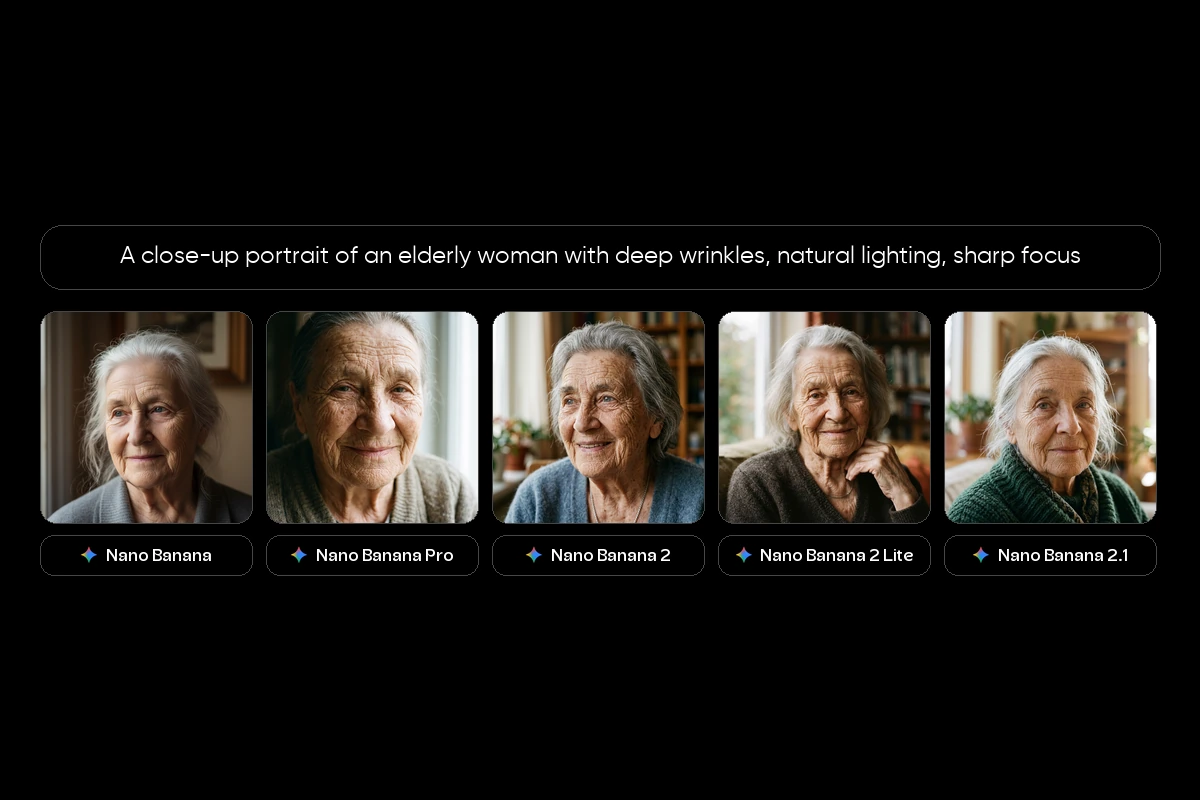
Text rendering
Every model spells the sign correctly. Pro switches to script lettering, while 2.1 gives the cleanest, easiest-to-read sign.
A bustling outdoor market with at least 5 people, food stalls, hanging lights, and a dog in the foreground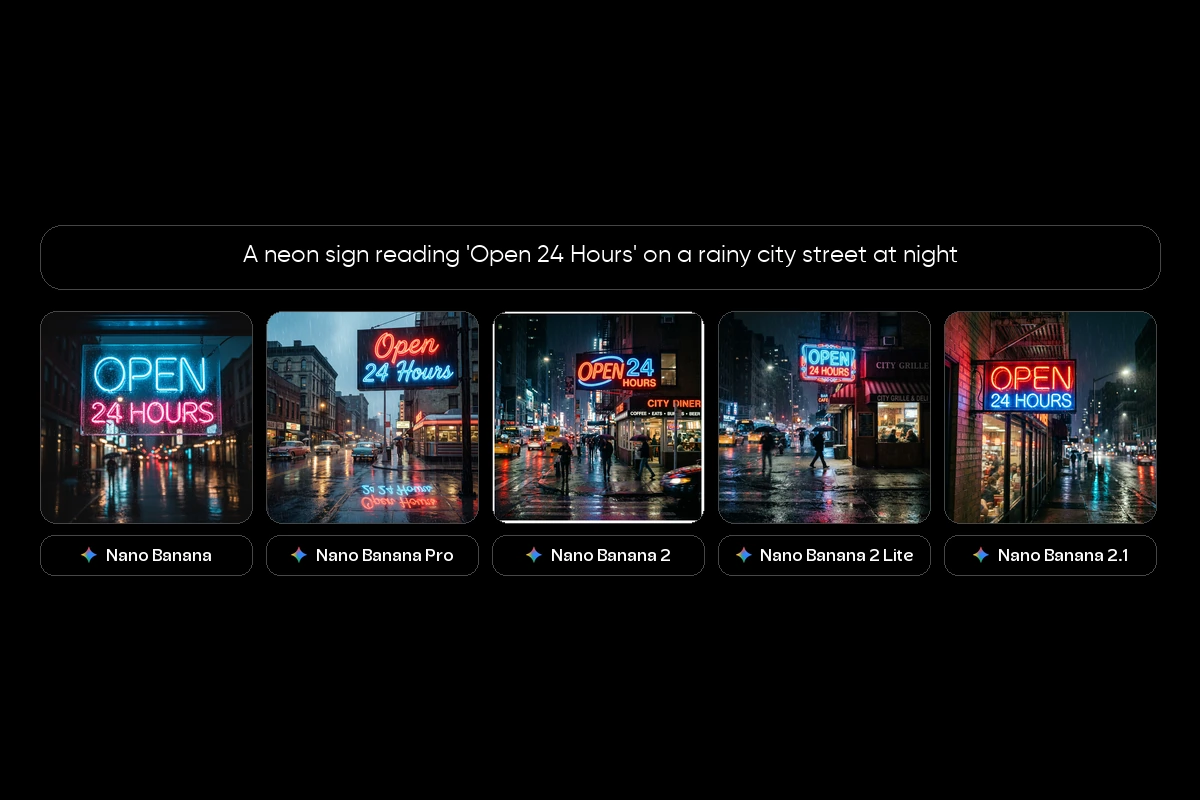
Complex scene
All five fit the crowd, stalls, lights and a dog up front. The original leans illustrated, while the newer models look photographic.
A minimalist flat lay of a skincare product on a marble surface with eucalyptus leaves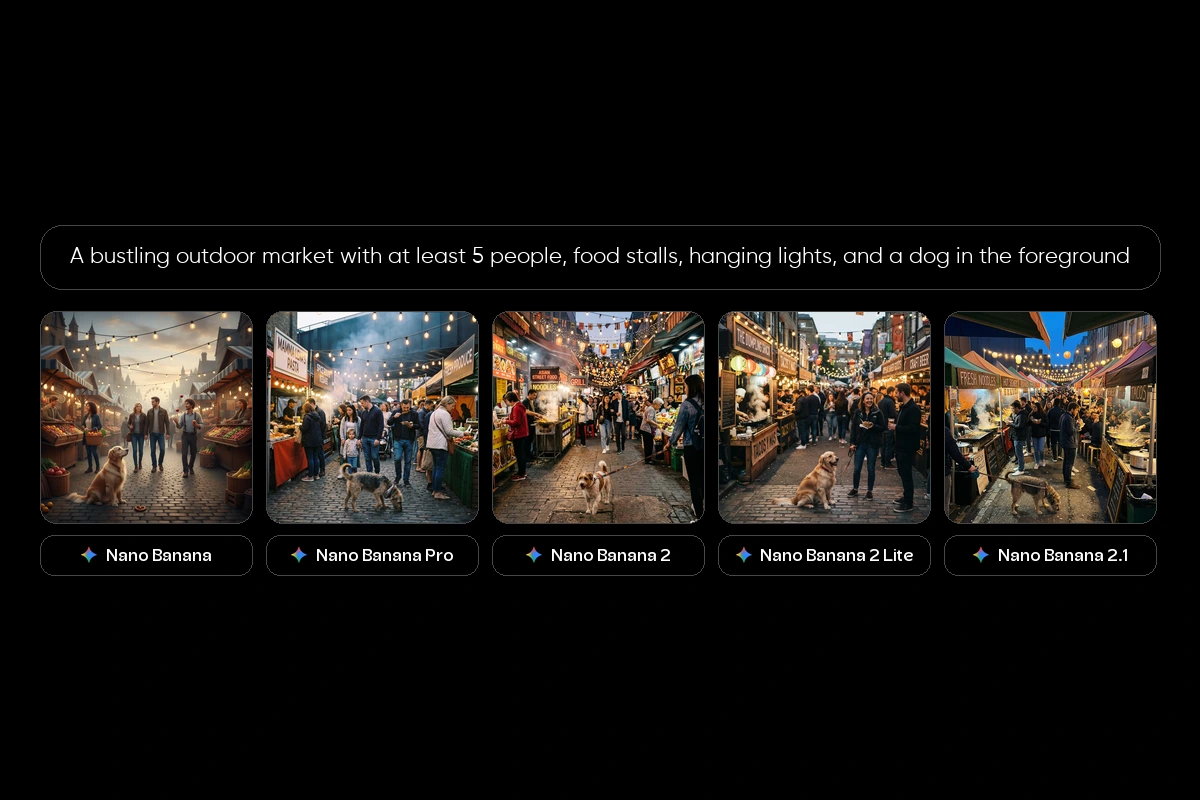
Product/commercial
Each returns a clean marble flat lay. The original leaves the bottle unlabeled, and 2 Lite keeps the product smallest in the frame.
A surreal dreamscape with floating islands, waterfalls flowing upward, and bioluminescent trees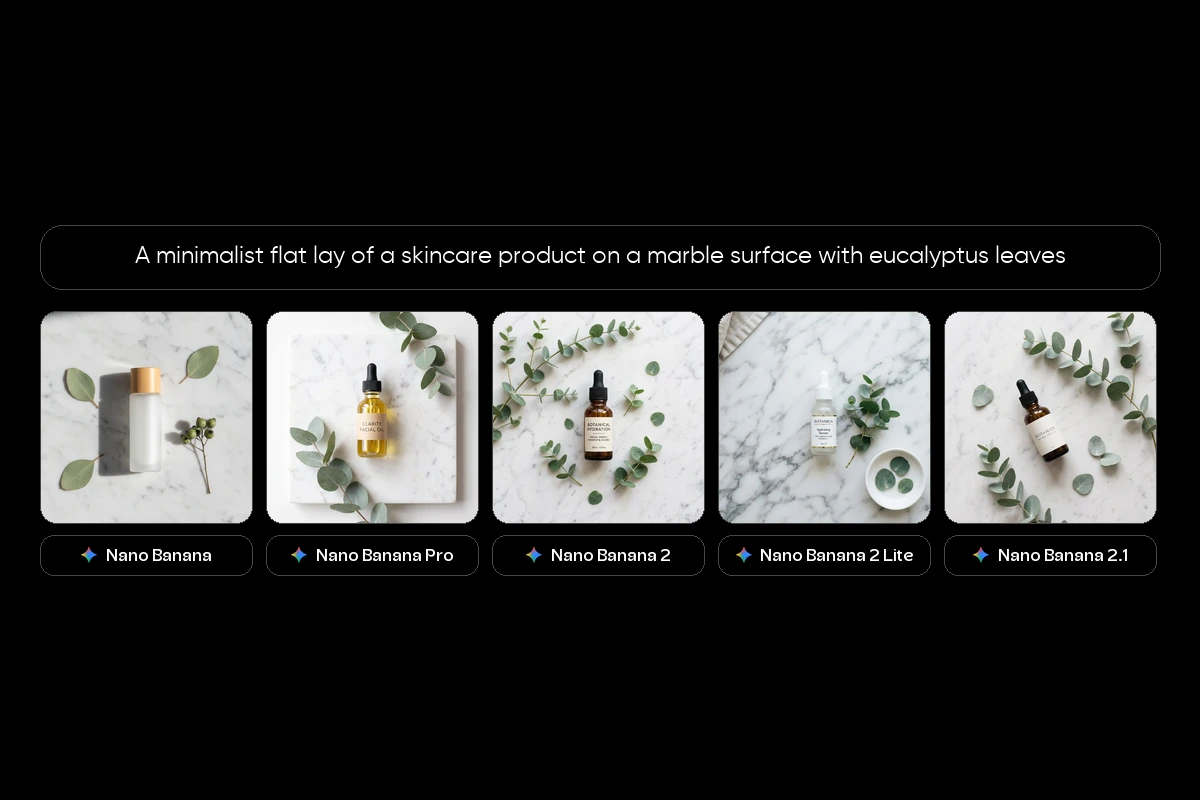
Abstract/artistic
The original paints the scene in daylight. The other four turn it into a glowing night scene.
A macro shot of a mechanical watch movement showing every gear and jewel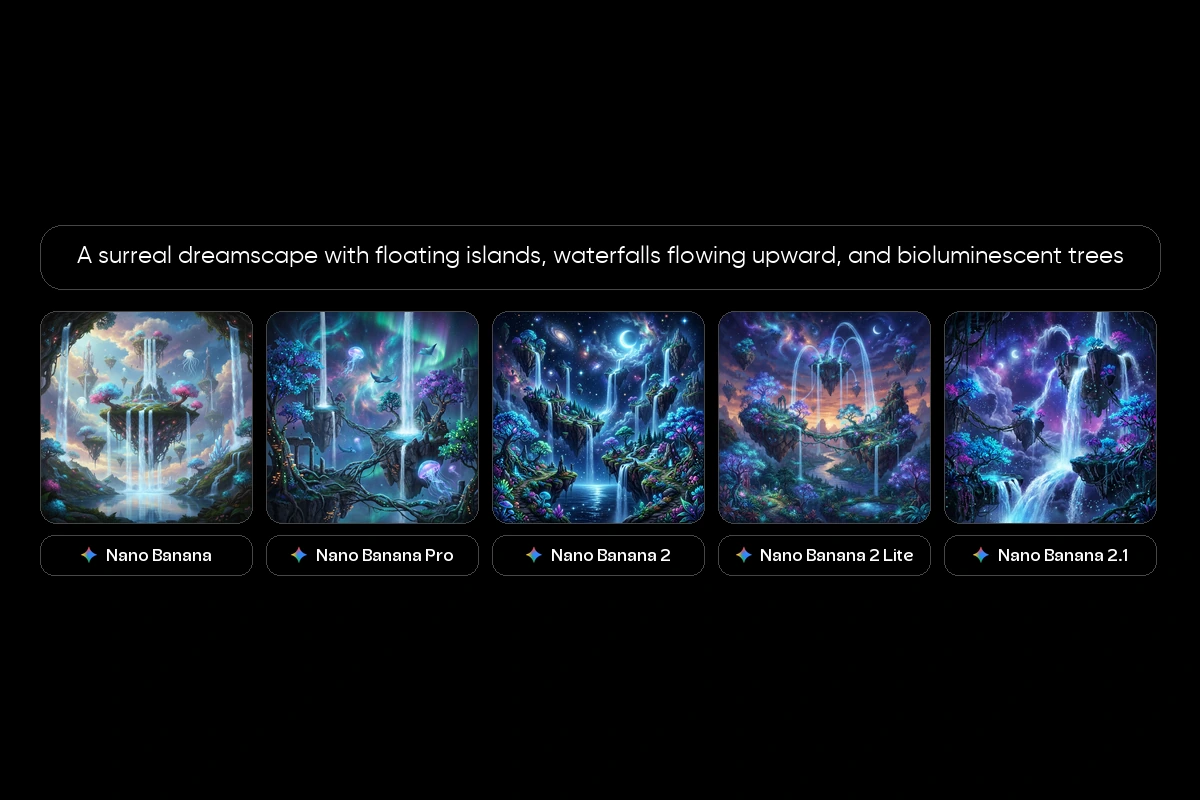
Fine detail
Differences are small here. Every model renders the gears and red jewels in fine detail.
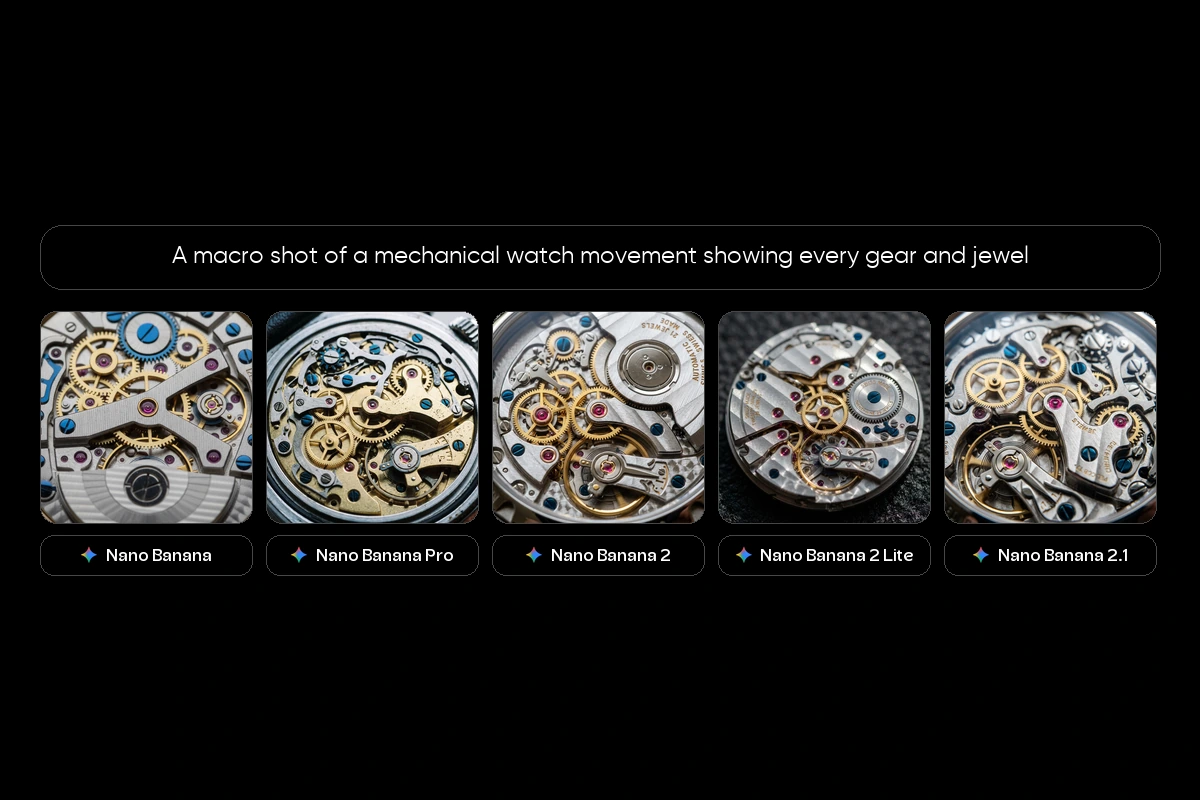
The four newer models land close to each other. The original looks the most illustrated, so it suits simpler jobs.
Which Nano Banana model should you use?
Which is the best Nano Banana model? Asking which of them is the best only works with a job attached.
Choose Nano Banana (original) if: You need quick, simple images and polish is not the priority.
Choose Nano Banana Pro if: You need professional output where text, fine detail and composition matter.
Choose Nano Banana 2 if: You want speed, quality and lower cost together, especially for big batches.
Choose Nano Banana 2 Lite if: You need lots of quick drafts and speed comes first.
Choose Nano Banana 2.1 if: You want to edit your own pictures over several turns, build scenes from several images, or design text-heavy posters and infographics.
For most new work, the best Nano Banana model is 2.1 or 2. Switch to Pro when precision is critical.
How to try all five Nano Banana models with Picsart
All five Nano Banana models are in Picsart AI Playground, next to the rest of the model catalog. Run the same prompt on each one and compare the results in one gallery.
To get started:
- Open AI Playground
- Enter your prompt
- Select Nano Banana, Pro, 2, 2 Lite or 2.1
- Compare the results and refine the one you like
Frequently asked questions
Nano Banana is built for speed and simple images. Nano Banana Pro is slower but delivers sharper detail, cleaner text and up to 4K output.
Start creating with the Nano Banana models
Five models, five strengths. Run one prompt across the family and keep your favorite.


