


Contents
An AI headshot prompt is a short text instruction that tells an AI image generator how to produce a professional portrait: clean background, studio lighting, business attire, and sharp focus on the face. Get the prompt right and a polished headshot lands in seconds. No studio booking, no $300 photographer invoice, no awkward reshoots in someone’s lobby.
The use cases stack up fast: a LinkedIn profile, a resume, a company About page, a conference speaker bio, an email signature, a press kit. AI headshots don’t replace a great photographer for hero brand shoots or senior leadership pages, but they’re perfect for quick refreshes, role pivots, and first-job portfolios.
This guide hands over 26 copy-ready prompts across four categories: professional, LinkedIn, industry-specific, and creative, plus a tip section for dodging the dreaded “AI face” look. Every prompt runs inside Picsart’s AI Image Generator and its 30 AI models. Attach a selfie before generating, and the output keeps your features intact.
Build a prompt that actually delivers
The best AI headshot prompts follow a six-part formula: subject + framing + wardrobe + background + lighting + camera detail. One strong detail per slot beats five vague ones.
Compare a vague description to a specific one for each slot. Subject: “confident woman in her 30s with shoulder-length brown hair” works far harder than “a person.” Framing: “head-and-shoulders portrait, eye-level, slight three-quarter angle” beats “portrait.” Wardrobe: “tailored navy blazer, crisp white shirt, no tie” beats “business clothes.” Background: “soft-blurred gray studio backdrop” beats “office.” Lighting: “soft key light from the front-left, gentle fill, subtle rim light” beats “good lighting.” Camera detail: “shot on 85mm lens, shallow depth of field, sharp focus on eyes” beats “high quality.”
Two phrases belong in nearly every prompt: “natural skin texture” and “no smoothing.” They’re the difference between a portrait and a wax figurine. And when iterating, change one variable at a time, lighting first, then background, then wardrobe. That’s how a model’s behavior actually clicks.
Generate a polished professional headshot with these 8 prompts
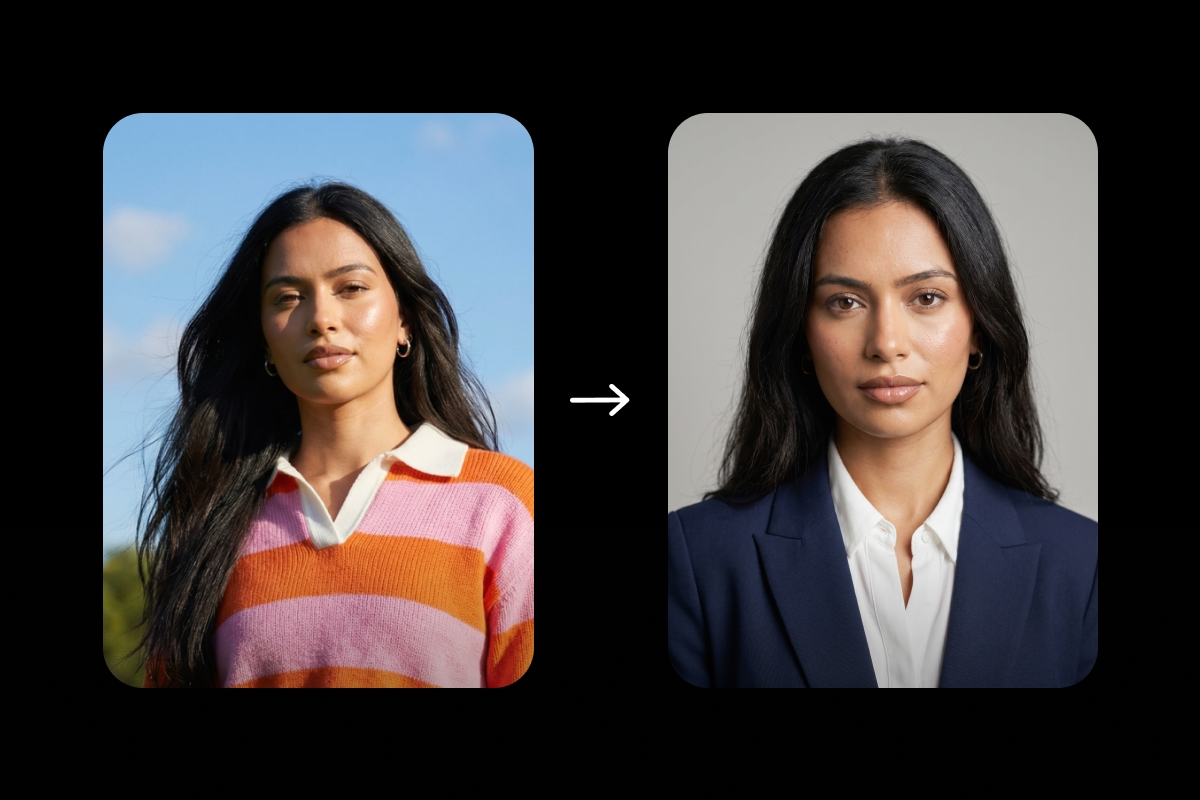
These are the universal default prompts, the ones that work for almost any role, industry, or platform. Personalize each one by swapping in age, gender expression, hair, skin tone, and wardrobe color.
1. Classic corporate headshot
Head-and-shoulders portrait of a professional in their 30s, tailored navy blazer over a white shirt, neutral light gray studio background, soft front lighting with gentle fill, sharp focus on the eyes, natural skin texture, no smoothing, shot on 85mm lens.
2. Executive boardroom portrait
Three-quarter portrait of an executive, charcoal suit, confident posture, low-key dramatic lighting from the side, deep gray seamless backdrop, subtle catchlights in both eyes, realistic skin detail, 85mm lens, shallow depth of field.
3. Modern minimalist headshot
Clean head-and-shoulders portrait, soft cream knitwear, slight smile, pure white seamless backdrop, even flat lighting, approachable and unfussy, natural skin texture, visible pores, 85mm lens.
4. Outdoor business portrait
Half-body portrait outside, navy blazer over an open-collar shirt, blurred urban background of glass and steel, golden-hour light from camera-left, candid, relaxed expression, natural, asymmetric features, shallow depth of field.
5. Black-and-white editorial headshot
Monochrome head-and-shoulders portrait, high-contrast lighting from the front-left, neutral expression, magazine-cover crop, fine grain, realistic skin texture, sharp eyes, shot on 85mm lens.
6. Office environment portrait
Mid-foreground portrait of a professional, softly blurred modern workspace behind, soft window light from the left, relaxed posture, smart-casual blazer, natural skin tone and texture, shallow depth of field, storytelling feel.
7. Studio portrait with colored backdrop
Head-and-shoulders portrait, tailored top, single accent-color seamless background in forest green, Rembrandt lighting from the right, slight three-quarter angle, sharp focus on the eyes, realistic skin texture, 85mm lens.
8. High-key bright headshot
Bright, even-lit head-and-shoulders portrait, pure white background, soft front lighting, no harsh shadows, light wardrobe in cream or pale blue, friendly expression, natural pores and skin imperfections, sharp eye focus.
Upgrade your LinkedIn profile with these 5 prompts

LinkedIn rewards trust and clarity. Crop tight, hold eye contact, keep the background simple, and pick a wardrobe that matches the role.
9. LinkedIn default headshot
Friendly head-and-shoulders portrait, soft smile, direct eye contact, blurred neutral gray background, navy business-casual top, soft front lighting, natural skin texture, sharp focus on the eyes, 1:1 crop.
10. LinkedIn creative-industry headshot
Warm head-and-shoulders portrait, textured knit sweater in rust or olive, warm neutral background, side light from the left, natural laughter expression, realistic skin imperfections, shallow depth of field.
11. LinkedIn tech founder headshot
Clean portrait of a founder, simple charcoal crewneck or button-down, minimal solid-color background, even soft lighting, calm direct gaze, sharp eyes, natural skin detail, modern and uncluttered.
12. LinkedIn consultant or finance headshot
Polished head-and-shoulders portrait, sharp navy blazer, structured posture, gradient gray backdrop, clean key light from the front-left, subtle smile, trust-building expression, realistic skin texture, 85mm lens.
13. LinkedIn personal-brand headshot
Three-quarter portrait, on-brand background in a signature color, complementary wardrobe, expressive but professional expression, soft directional lighting, natural pores and asymmetric features, distinctive feed thumbnail.
Pick a prompt that fits your industry
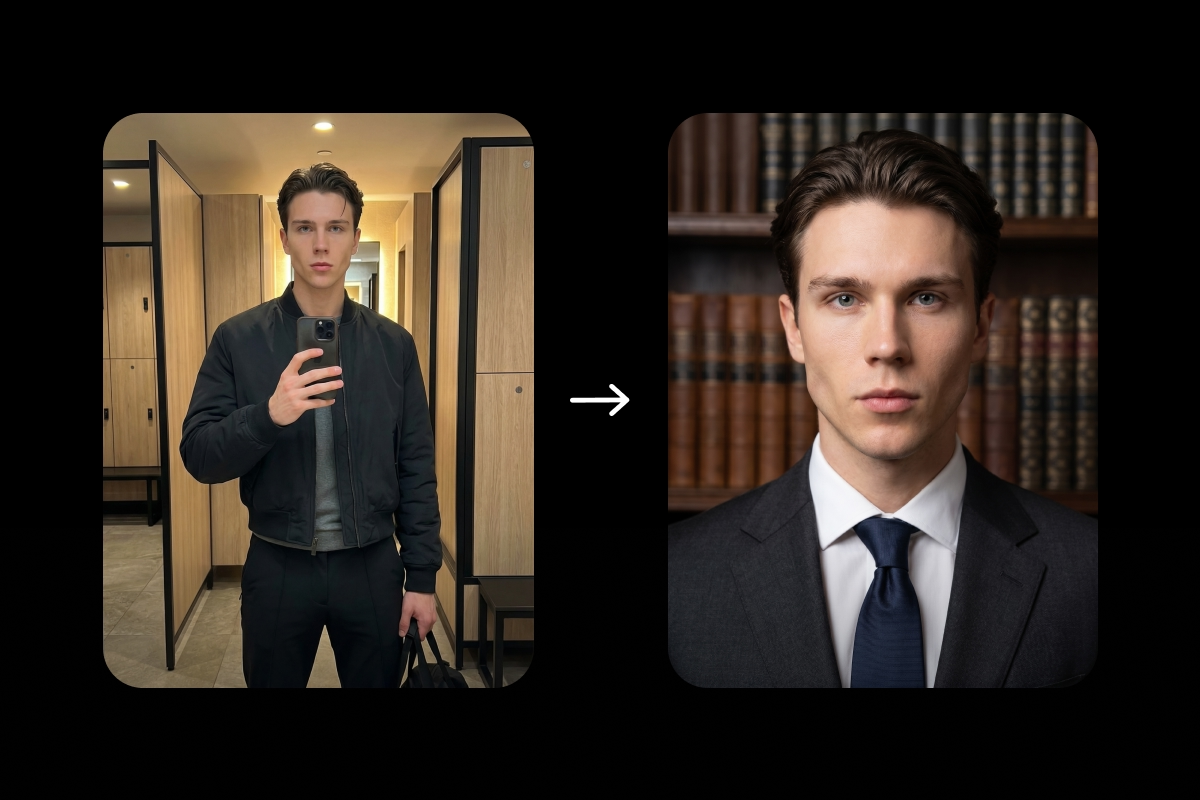
Industry cues sell credibility before anyone reads a single word. The right wardrobe, prop, and setting do half the work.
14. Lawyer or legal professional
Formal head-and-shoulders portrait, dark suit and conservative blouse or tie, softly blurred leather-bound bookshelves behind, even key light, composed posture, sharp focus on the eyes, realistic skin texture, authoritative feel.
15. Doctor or healthcare professional
Friendly head-and-shoulders portrait, white coat over a collared shirt, soft-blurred clinical background, bright clean lighting, warm trustworthy smile, natural skin detail, 85mm lens, shallow depth of field.
16. Real estate agent
Confident half-body portrait, navy blazer over an open-collar shirt, blurred modern architectural background, golden-hour warm glow, easy smile, realistic asymmetric features, aspirational and approachable.
17. Tech professional or engineer
Modern head-and-shoulders portrait, dark crewneck or simple button-down, minimal gradient background, even soft lighting, neutral focused expression, sharp eyes, natural skin texture, clean and capable feel.
18. Creative director or agency lead
Editorial three-quarter portrait, statement piece such as bold eyewear or a textured fabric, studio backdrop in a brand color, side lighting with subtle shadow, slight three-quarter angle, realistic skin detail, design-aware energy.
19. Educator or academic
Warm head-and-shoulders portrait, soft cardigan or tweed blazer, softly blurred bookshelf behind, natural window light from the left, kind smile, sharp eye focus, natural skin imperfections, approachable expertise.
20. Consultant or finance leader
Executive head-and-shoulders portrait, structured charcoal suit, mid-gray seamless backdrop, professional three-quarter angle, sharp key light from the front-left, calm confident gaze, realistic skin texture, 85mm lens.
21. Founder or entrepreneur
Modern half-body portrait, blazer over a plain tee or quality knitwear, blurred urban or studio background, confident direct gaze, slight smile, soft directional lighting, natural skin texture, modern leader energy.
Push editorial with these 5 creative headshot prompts
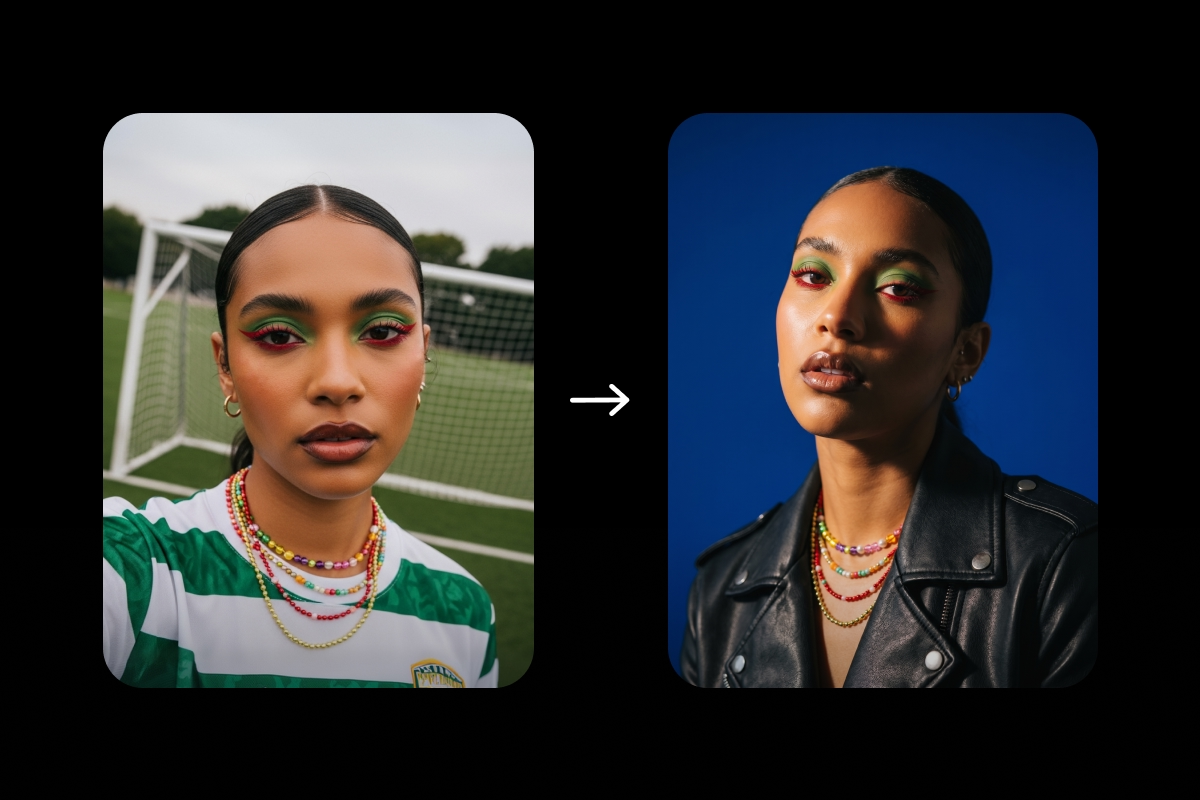
Creative work needs creative portraits. These prompts are built for artists, performers, personal brands, and press kits where personality matters more than polish.
22. Editorial magazine portrait
High-fashion head-and-shoulders portrait, dramatic side light, bold solid backdrop in deep red or cobalt, fashion-forward wardrobe, slight upward chin angle, intense gaze, realistic skin texture, 85mm lens, magazine-cover energy.
23. Artist’s studio portrait
Environmental half-body portrait, paint-splattered apron or rolled sleeves, softly blurred artwork behind, warm window light from the left, candid expression, natural skin detail, shallow depth of field, creative authenticity.
24. Performer or talent headshot
Clean head-and-shoulders portrait, neutral studio backdrop, expressive face with a warm half-smile, butterfly lighting from the front, sharp eyes, realistic skin texture, casting-ready framing, 85mm lens.
25. Author or writer portrait
Thoughtful three-quarter portrait, soft natural light from the side, blurred desk or open book in the background, muted earth-tone palette, calm direct gaze, natural skin imperfections, press-bio feel.
26. Personal-brand color headshot
Bold head-and-shoulders portrait, signature backdrop color such as magenta, teal, or mustard, matching or contrasting wardrobe, even soft lighting, expressive smile, realistic skin detail, distinctive social-feed thumbnail.
Dodge the “AI face” look
The reason most AI headshots fail believability is the plastic-skin tell. Skin reads as airbrushed plastic, and the eyes look glassy. The fix lives in the prompt.
Always add: “natural skin texture, visible pores, soft skin imperfections,” “realistic asymmetric features,” “no smoothing, no airbrushing, no plastic finish,” “subtle catchlight in both eyes,” and “shot on 85mm lens, shallow depth of field.” Each phrase pulls the model toward photography and away from rendering.
Cut anything that asks for perfection. Words like “perfect skin,” “flawless complexion,” and “beautiful” push the model straight into wax-figure territory. Drop them. The same goes for stacking lighting terms; “dramatic cinematic studio lighting” tells the model nothing. Pick one quality of light and commit.
The single most important step: attach a selfie as a reference image. This is mandatory, not optional. Without a reference, the AI invents a new face. With one, it keeps the features and layers the wardrobe, lighting, and background on top.
Pick the right AI model for the job
Headshots come down to skin, light, and likeness. Four Picsart models pull more weight than the rest.
Nano Banana 2 is the reference-image champion. Drop a selfie in, and it nails likeness accuracy better than anything else. Start here when the goal is “looks like me.”
Flux 2 Pro renders photorealistic skin texture and natural lighting with no extra coaxing. It’s the strongest default for “looks like a real photo” headshots generated from prompt alone.
Imagen 4.0 delivers cinematic depth of field and handles every skin tone with accuracy. Reach for it when the brief calls for magazine-quality output.
Seedream 4.5 pushes resolution and polish, making it ideal for press kits and editorial use.
Quick nudge: run the same prompt across all four inside the Picsart AI Playground and pick the strongest result. Side-by-side comparison saves hours.
Run any of these prompts inside Picsart
Open Picsart’s AI Image Generator. Paste a prompt from the lists above. Swap in personal details: age, hair, skin tone, wardrobe color, background color.
For example, upload a clear selfie as a reference image before generating. Pick a model from the lineup; Flux 2 Pro and Imagen 4.0 are the safest starting points for photoreal results.
Set the aspect ratio to match the destination: 1:1 for LinkedIn, 4:5 for a resume or About page, 3:4 for press kits. Generate, then iterate one variable at a time. Try the same prompt with different lighting, then different backgrounds.
Want a one-click route instead of writing a prompt from scratch? Try the AI Avatar tool. Upload a few selfies, and it returns a full set of headshots ready for upload.
Open Picsart and try one now
The right prompt equals a polished, on-brand headshot in seconds, and iteration is the skill that compounds. AI headshots earn their keep next to professional photography, not in place of it; use AI for quick refreshes and first portfolios, then book a photographer for the hero shots that anchor a brand. Open Picsart’s AI Image Generator, paste a prompt, and swap one variable at a time.
Frequently asked questions
An AI headshot prompt is a short text instruction that tells an AI image generator how to produce a professional portrait. The prompt names the subject, framing, wardrobe, background, lighting, and camera detail. The model does the rest.


