


Contents
What is workflow automation?
Workflow automation is the practice of mapping a repeatable process and letting software trigger, route, and complete steps with minimal human input. In creative operations, that can look like automatically generating assets, moving them to the right folders, notifying stakeholders, and logging progress without manual busywork. Done right, workflow automation software becomes the “glue” connecting content requests, production, approvals, and publishing.
What are three automated workflows?
Here are three starter patterns you can set up this week:
- Content request → brief → assignment. A form captures requirements, creates a task, tags the right designer, and posts a summary in your team channel.
- Design → review → approval. When a draft is exported, the approver gets a link, comments are tracked automatically, and final sign‑off triggers versioning and archive rules.
- Bulk image prep for campaigns. Drop a folder of product photos and automatically crop, resize, and watermark variations for each platform using a Batch Editor, then push to your asset library.
Pros and cons of workflow automation
Pros. Teams reduce handoffs, cut production costs, and normalize quality. Automations increase on‑time delivery and make workloads visible, so managers can forecast better.
Cons. Poorly designed flows can calcify bad habits. Over‑automation may create brittle systems that break when edge cases appear. And if you skip change management, adoption stalls. For an operations‑first perspective on balancing efficiency with governance, see Achieving operational efficiency through workflow automation.
What are the 5 stages of workflow?
A useful model for creative teams includes five stages:
- Capture. Collect structured requests (owner, goals, specs, due date).
- Design. Map steps, roles, and rules; define inputs/outputs and SLAs.
- Automate. Choose triggers, conditions, and actions; connect your stack.
- Execute. Run in production with clear ownership and escalation paths.
- Measure & iterate. Track time‑to‑complete, revision counts, and blockers; refine the flow based on data.
What are the four types of workflows?
Different work demands different logic. Think in four patterns:
Sequential (linear steps with dependencies), state‑based (items move between “states” like Draft → In review → Approved), rules‑driven (if/then routing by priority, channel, or audience), and case‑management (non‑linear, collaborative work where the path changes as information emerges).
Workflow automation with AI
Workflow automation with AI turns creative operations into a co‑pilot experience. Models can generate on‑brand variations, detect low‑quality inputs, summarize feedback, and predict due‑date risk. Think of workflow automation AI as orchestration plus intelligence: your automations do the plumbing while AI handles interpretation – like extracting a brief from an email and tagging the right project automatically. Explore creator‑friendly AI tools that plug into multi‑step flows for ideation, image generation, upscaling, and style transfer.
Workflow automation companies
Most stacks mix categories:
- Creative automation platforms streamline image and video production and connect to publishing tools.
- Integration‑platform‑as‑a‑service (iPaaS) vendors connect apps, webhooks, and data across your marketing stack. For budgets of any size, read Cost‑effective workflow automation with Make, then see how it plays with creative ops in this Picsart x Make integration overview.
- Project/asset tools handle intake, approvals, and versioning; combine them with creative automation to close the loop from request to publish.
Workflow automation tools
When evaluating workflow automation tools, prioritize:
Visual builders (drag‑and‑drop logic anyone can edit), AI assistance (smart defaults, content generation, quality checks), connectors (CMS, DAM, chat, storage), governance (roles, permissions, audit logs), and telemetry (SLA tracking, error alerts, retry logic). Look for reusable templates so your team can clone “what works” across campaigns.
Workflow automation examples
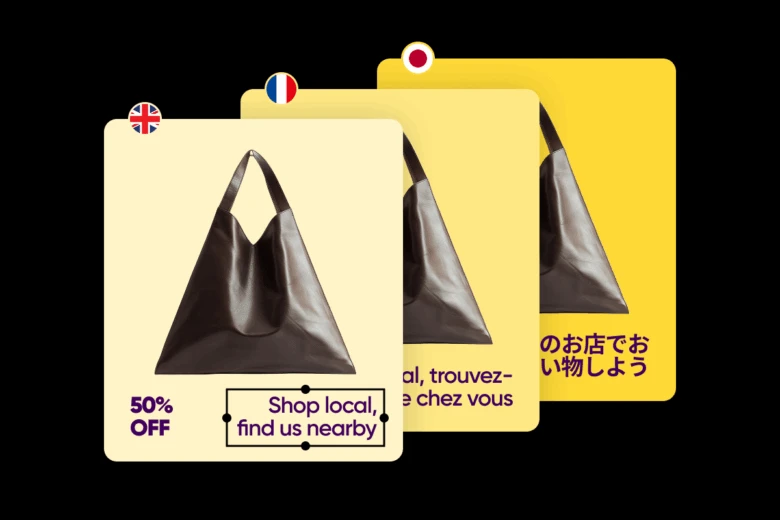
Try these field‑tested workflow automation examples to spark ideas:
- Campaign kit generator. Enter a theme and audience; auto‑generate a set of sizes, copy options, and image treatments; route the best set to review.
- Localization at scale. Translate captions, swap currencies, and adapt color palettes for regional preferences; auto‑package per market.
- Creator marketplace QA. Auto‑flag submissions that miss brand‑safe thresholds; route edge cases to a human.
- Product drops. Combine inventory signals with social scheduling; auto‑swap creative when stock changes.
- Evergreen refresh. Each quarter, identify top performers and auto‑produce refreshed variants to A/B test.
Workflow automation software
The most effective workflow automation software acts like a fabric, not a silo. It should let non‑developers model processes, call AI as a step, support human‑in‑the‑loop approvals, and provide clean audit trails. Bonus points for live previews of automation runs and sandbox environments so operations teams can test without risk.
Automate your workflows with Magic Workflow
If you want a launch‑ready starting point, try Magic Workflow. It packages best‑practice steps – intake, asset generation, feedback, and delivery – so teams can publish faster without writing code. Start with a template, then tailor triggers, approvals, and outputs for your brand.
Improve your workflows with AI tools
Pair process automation with creative superpowers. Use AI to draft concepts, restyle assets, upscale tricky images, and pre‑flight files before review. Bake these steps into your flows so designers spend time on craft, not copy‑paste. Picsart’s AI design tools
Quick FAQ
- What is workflow automation? A structured, software‑driven process that routes work and completes steps with minimal manual effort.
- What are three automated workflows? Intake → assignment, design → review → approval, and bulk image prep are high‑impact starters.
- What are the 5 stages of workflow? Capture, design, automate, execute, and measure & iterate.
- What are the four types of workflows? Sequential, state‑based, rules‑driven, and case‑management.
By aligning clear stages with the right tools – and layering AI where it adds judgment – your team can reduce rework, control costs, and release more polished content, more often.


