


Contents
Creative teams move faster when everyone can create together in one shared space, and now Picsart Flows makes that seamless with real-time editing, commenting, and link sharing. And with new features like @mentions and shareable links, Flows now operates as a true collaboration hub where feedback, iteration, and handoffs happen in one place. These new collaboration features bring your entire team onto one infinite canvas so ideas can flow, feedback stays in context, and every iteration happens live.
Picsart Flows – the AI-powered, infinite canvas design workflow – now eliminates scattered tools and chaotic versioning so creators, teams, and agencies can work the way modern creative work actually happens: visually, interactively, and together.
Why collaboration matters for today’s creators
Creative work thrives on connection. Designers, marketers, and content teams produce their best work when they can iterate, review, and brainstorm together without friction.
Studies consistently show just how powerful collaboration can be:
- 73% of employees create better work when they collaborate
- 60% report greater innovation from collaborative workflows
- Businesses that encourage collaboration are five times more likely to be high-performing
When feedback lives across email threads, files get lost in folders, or multiple versions float around, creative momentum slows. Picsart Flows removes that friction by bringing collaboration directly into the space where you already create.
What’s new in Picsart Flows collaboration
Flows introduces three major features that transform how creative teams work together:
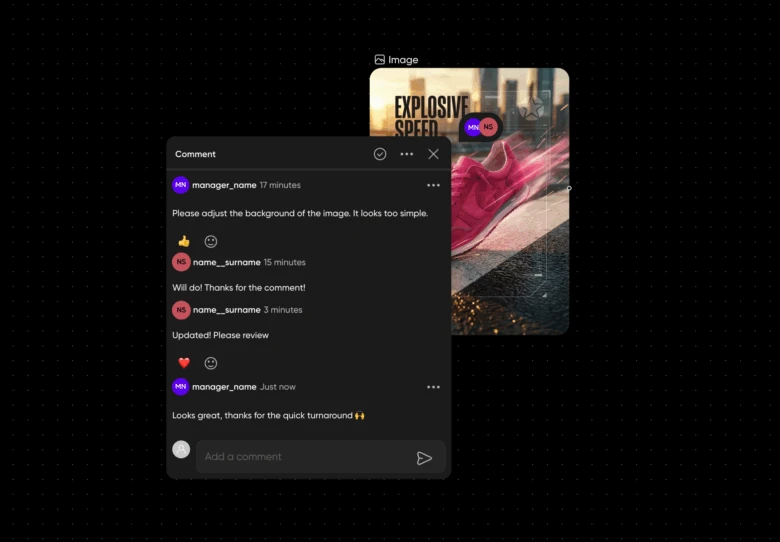
- Commenting with threads and replies to keep feedback attached to the exact element it refers to
- Real-time editing and cursor chat so teammates can co-create and communicate live
- Simple link sharing to give clients, stakeholders, or collaborators instant access to a Flow
Why this matters:
- Feedback stays organized and in context
- Live edits eliminate version confusion
- Everyone stays aligned, viewing the same canvas
- Hand-offs and approvals move faster
- Creative teams save hours every week normally lost to coordination overhead
Who these collaboration features are designed for
Creators and solo makers
Whether you’re building social content, experimenting with AI workflows, or planning YouTube thumbnails, Flows lets you invite collaborators only when you need them. Share a link, gather comments, and keep every idea in one space.
In-house creative and marketing teams
Say goodbye to update meetings and scattered feedback. Teams can work together in real time, comment directly on assets, and rapidly refine designs – all on a shared infinite canvas.
Agencies and client teams
Instead of emailing static files, send clients a living workspace. They can give feedback, review concepts, and even duplicate a Flow to continue a workflow on their own.
Commenting with threads and replies: feedback that stays in context
Feedback only works when it’s clear, organized, and tied to the work itself. With comment threads in Flows, teammates can pin feedback directly to specific elements. Replies keep the conversation tidy, decisions are documented, and nothing gets lost.
You can also @mention teammates to instantly notify them and pull them into a specific discussion. This makes feedback targeted and impossible to miss.
Once an edit is complete, simply resolve the comment to keep the canvas clean. Resolved threads are automatically archived to keep your canvas clean and organized. It’s a fast, transparent, creator-friendly workflow that encourages meaningful collaboration – not endless back-and-forths.
Real-time editing and cursor chat: create together instantly
Flows turns creative work into a shared, interactive experience. Multiple teammates can edit the same Flow at the same time, with live cursors showing exactly who’s working on what.
Need to clarify something quickly? Just press \ and open the cursor chat – no switching apps, no breaking your workflow. Your message appears at your cursor position, providing perfect context for quick questions or real-time decisions.
This is co-creation the way it should be: fluid, fast, and intuitive.
Link sharing: one-click access for teammates and clients
Sharing work in Flows is as simple as copying a URL. Anyone with the link can view the project instantly, and if you allow it, they can comment or duplicate the Flow.
Link sharing removes the usual friction of downloads, permissions, or platform switching. Whether you’re sending work to a teammate or inviting a client into the process, everyone sees the latest version instantly.
You stay in control with configurable access settings, from view-only links for stakeholders to edit access for your core team.
How to collaborate inside Picsart Flows
Working together in Flows feels natural because it’s built into the creation process:
- Create or open a Flow
Start from a blank infinite canvas or a template to map ideas, design visuals, or build AI workflows. - Invite collaborators
Use link sharing to bring teammates or clients into your project instantly. - Co-edit in real time
Watch live updates as everyone edits together. Adjust layouts, refine visuals, or iterate workflows side-by-side. - Use comments and cursor chat
Keep feedback structured and accessible – no external docs, no lost notes. Click anywhere on the canvas to add a comment and type @ to tag teammates who need to see it. Type “\” during co-editing to open cursor chat for quick, contextual messaging.
- Resolve and iterate
Track progress easily by resolving comments and updating the canvas in real time. Resolved threads move out of the way so your canvas stays focused and ready for the next stage.
Why collaboration in Flows transforms your workflow
Faster feedback loops
Threaded comments eliminate confusion and tighten iteration cycles, helping creators refine work quickly.
Better team alignment
Real-time editing ensures everyone sees the most current version – a single source of truth for every project.
More creative innovation
With a live shared canvas, teams bounce ideas off each other visually, sparking fresh perspectives and new directions.
Time and cost savings
No more exporting files, digging through versions, or hosting status meetings. Flows removes the friction so you can stay in your creative zone.
Effortless remote collaboration
Whether you’re working across time zones or in a hybrid environment, Flows keeps the whole team connected and moving.
Ship your next project with Picsart Flows
Picsart Flows brings creators, designers, marketers, and clients into one shared creative system where collaboration feels natural and ideas move faster. From real-time editing to one-click sharing, Flows is built for modern teams who want to produce more — and enjoy the process.
👉 Try Picsart Flows today. Watch how real-time collaboration can fuel creativity, accelerate delivery, and turn your team into a powerhouse of visual storytelling.


