


Google’s Veo lineup now includes three generations of AI video models, and the differences between them go well beyond version numbers. Veo 2 generates silent cinematic video. Veo 3 added built-in audio. Veo 3.1 pushed into 4K, video extension, reference images, and start-and-end-frame generation – with pricing starting as low as $0.03 per second.
If you’re picking a Veo model today, Veo 3.1 is the clear starting point. It’s the most capable option, and Google is retiring both Veo 2 and Veo 3 by June 30, 2026.
This guide compares all three generations side by side – what each one can do, what it costs, and which one fits your workflow.
The Veo model family
Veo is Google’s AI video generation family. All Veo models can generate video from text prompts or images, support vertical (9:16) and landscape (16:9) formats, output at 24 frames per second, and include content credentials.
Each generation built on the last. Veo 2 introduced cinematic video generation with reference image support. Veo 3 added built-in audio – dialogue, sound effects, and ambient sound generated alongside the video. Veo 3.1 expanded into 4K resolution, video extension, start-and-end-frame generation, and three pricing tiers (Standard, Fast, and Lite).
Google is retiring Veo 2 and Veo 3 by June 30, 2026, and recommends Veo 3.1 as the replacement.
How each model compares
Veo 2 is the oldest model in the lineup – and it’s being retired. It generates silent video at 720p with clips running 5 to 8 seconds. Where Veo 2 still stands out is reference images – you can feed it style references and asset references to guide the output, and it supports adding or removing objects from videos (in preview). But with no audio and 720p-only output, it’s a legacy option. At $0.50 per second, it’s actually more expensive than newer, more capable models.
Veo 3 brought the biggest leap in the lineup: built-in audio. For the first time, a Veo model could produce dialogue, sound effects, and ambient sound alongside the video. Resolution jumped to 1080p, and clips can be 4, 6, or 8 seconds. Available in Standard and Fast tiers. The tradeoff: no reference images, no video extension, and no start-and-end-frame generation. Also being retired in favor of Veo 3.1.
Veo 3.1 is Google’s recommended model going forward. It keeps Veo 3’s audio and adds 4K resolution (in preview), reference images (in preview), video extension (in preview), and start-and-end-frame generation. It comes in three tiers – Standard for highest quality, Fast for quicker output at lower cost, and Lite for the cheapest generation. Pricing ranges from $0.03/sec (Lite, 720p video only) to $0.60/sec (Standard, 4K with audio). All tiers offer cheaper pricing when you don’t need audio.
Veo 2 vs Veo 3
The biggest leap in the lineup – silent video versus built-in audio.
Audio is the defining difference. Veo 3 generates dialogue, sound effects, and ambient sound as part of the video. Veo 2 outputs silent video only – any audio has to be added separately.
Resolution gives Veo 3 another edge. Veo 2 caps at 720p. Veo 3 goes up to 1080p.
Reference images go the other direction. Veo 2 supports both style and asset reference images. Veo 3 dropped reference image support entirely – a surprising gap for the newer model.
Cost favors Veo 3. Veo 2 costs $0.50 per second. Veo 3 Fast starts at $0.08 per second for video only and $0.10 per second with audio – a fraction of Veo 2’s price with more features.
Both models are being retired by June 30, 2026. Google recommends switching to Veo 3.1.
Veo 3 vs Veo 3.1
Same audio foundation, expanded capabilities across almost every other dimension.
Resolution gets a major bump. Veo 3.1 adds 4K support (in preview). Veo 3 maxes out at 1080p.
Video extension is entirely new. Veo 3.1 can extend generated videos (in preview) – something Veo 3 can’t do at all. This means longer video content without manually stitching clips together.
Reference images return. Veo 3.1 supports reference images (in preview), a feature Veo 3 dropped. For anyone producing brand-consistent or character-consistent video, this fills a big gap.
Start-and-end-frame generation is new. You give Veo 3.1 a first frame and a last frame, and it generates the video between them. Not available in Veo 3.
Pricing is structured differently. Veo 3.1 adds video-only pricing at lower rates and introduces Veo 3.1 Lite as the budget option. At 720p with audio, Veo 3 Standard and Veo 3.1 Standard both cost $0.40 per second. But Veo 3.1 Lite delivers video with audio at just $0.05 per second for 720p.
Veo 3 is being retired. Veo 3.1 is the direct replacement, and there’s no practical reason to stay on Veo 3.
Veo 2 vs Veo 3.1
The generational leap – Google’s oldest Veo model against its newest.
Audio: Veo 3.1 generates full audio natively. Veo 2 is completely silent.
Resolution: Veo 3.1 goes up to 4K (in preview). Veo 2 tops out at 720p.
Video extension: Veo 3.1 can extend videos (in preview). Veo 2 cannot.
Start-and-end-frame generation: Veo 3.1 creates video between two frames you define. Veo 2 cannot.
Reference images: both support them, but differently. Veo 2 handles style and asset references. Veo 3.1 supports asset references (in preview) but not style references.
Cost: Veo 3.1 Lite at $0.03 per second for 720p video is a fraction of Veo 2’s $0.50 per second. Even Veo 3.1 Standard with audio at $0.40 per second is cheaper than Veo 2 while delivering far more.
Veo 2 is being retired. Veo 3.1 is the recommended replacement.
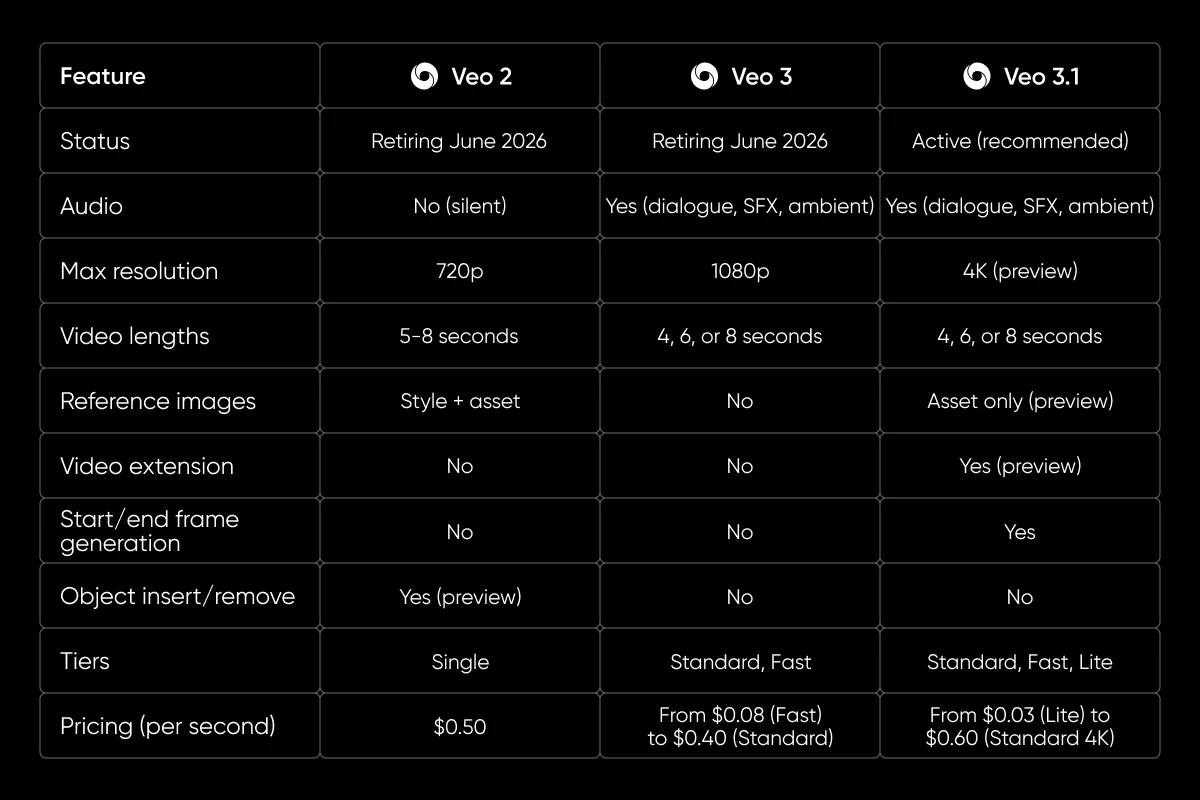
Full comparison table
Here’s how all three Veo models stack up.
Same prompt, three models
The most useful way to compare is to run the same prompt through all three models and see the raw output. No editing, no post-processing, default settings.
Cinematic dialogue – “A woman sits across from a man at a cafe table, leans in and says ‘I don’t think we should do this anymore,’ camera slowly pushes in on a 50mm lens, shallow depth of field, afternoon light”
Action with physics – “A glass of red wine falls off a marble kitchen counter in slow motion, shattering on a tile floor, liquid splashing outward, overhead camera angle, 120fps feel”
Complex scene – “A bustling Tokyo street at night, neon signs reflecting on wet pavement, crowds walking, a street musician playing guitar in the foreground, handheld camera movement”
Product/commercial – “A perfume bottle rotating slowly on a black reflective surface, soft golden backlight, wisps of smoke drifting past, cinematic 4K, no text”
Abstract/artistic – “A surreal underwater ballet dancer made of liquid mercury, bioluminescent particles floating upward, ethereal ambient soundtrack, anamorphic lens flare”
Vertical social content – “A creator unboxing a mystery package on camera, genuine surprised reaction, ring light setup, 9:16 vertical format, natural voiceover”
Which Veo model should you use?
If you’re starting a new project today – use Veo 3.1. It does everything Veo 3 does and more, at the same price for standard resolutions, with additional tiers for faster or cheaper generation. Veo 2 and Veo 3 are both being retired by June 30, 2026, so building on them means a forced switch later.
If you need silent footage only and you’re on an existing setup – Veo 2 still works, but plan your switch to Veo 3.1 before June 2026.
If you need video with audio at 1080p and don’t need 4K, reference images, or video extension – Veo 3 handles it, but Veo 3.1 does the same and more.
If you need 4K, video extension, reference images, or start-and-end-frame generation – Veo 3.1 is the only option.
Quick rule: start with Veo 3.1. It’s the most capable, the most flexible on pricing, and the only model Google is actively developing.
How to try Veo models with Picsart
Picsart gives you access to Veo models alongside 100+ other AI models – no API keys, no setup, no command line.
Picsart AI Video Generator turns text into video in seconds. Describe your scene, choose a model, and compare results across multiple AI video models without switching platforms.
Picsart Flow is an AI workflow canvas where images, text, and video come together. Build repeatable workflows and scale projects from concept to full campaigns using Veo models.
Picsart Aura lets you create and refine videos through simple conversation. Generate, edit, and extend Veo videos naturally.
Picsart AI Playground helps you compare outputs from different video models side by side using a single prompt.
Browse all available video models across the full AI models library on Picsart.
Getting started:
- Go to Picsart Flow or the AI Video Generator
- Select a Veo video model
- Enter your prompt with detail – scene, camera, lighting, mood
- Compare outputs across models and iterate
Find your Veo model
Three generations, one clear recommendation – Veo 3.1. Pick Standard for premium quality, Fast for the best balance of speed and cost, or Lite for budget-friendly volume work.
Try Veo models alongside 100+ AI generators in Picsart Flow – build complete video workflows on one canvas.


