


The best Grok Imagine prompts sound like someone briefing a photographer, not someone stuffing keywords into a search bar. Lead with the subject, describe the scene in 30-80 words of plain English, and let the specifics do the work. “A chef plating a dish in a busy kitchen, warm overhead lighting, shot on an 85mm lens” will beat “chef, kitchen, cinematic, 8K, masterpiece” every single time, because one reads like a scene and the other reads like a grocery list.
Grok Imagine thrives on natural language. It doesn’t support negative prompts. Quality adjectives like “stunning,” “breathtaking,” or “ultra-detailed” mostly waste space. What actually moves the output is a specific visual description: subjects, environments, lighting behavior, camera language, and mood.
This guide walks through prompt structure, copy-ready Grok image prompts across six categories, techniques for photorealism, the mistakes that trip everyone up, and how to run Grok Imagine prompts inside Picsart alongside 100+ other AI models.
Structure Grok Imagine prompts like you’re briefing a photographer
Grok Imagine reads full sentences, not tag stacks. The words at the front of your prompt carry the most weight, so lead with what the image is actually of. That’s rule one.
Rule two: keep it tight. The sweet spot is 30-80 words. Shorter than that leaves the model too little to work with. Longer, and it starts losing focus.
Rule three: drop the baggage from other tools. Grok Imagine ignores negative prompts entirely, so phrase everything as a positive. Instead of “no blemishes,” write “smooth, clear skin.”
A useful prompt formula: subject + environment + lighting + style + camera/technical. Put those elements in that order, write in natural sentences, and you’re most of the way there.
Here’s the difference in practice.
Weak:
beautiful woman, golden hour, cinematic, 8K, ultra realistic, masterpiece
Strong:
A woman in a linen dress standing on a stone balcony overlooking the Mediterranean at sunset, warm amber light catching the fabric folds, soft breeze in her hair, shot on an 85mm f/1.4 lens, shallow depth of field, muted film tones.
The first is a wish list. The second is a scene with direction, and that’s what Grok Imagine rewards.
One more thing: commit to one aesthetic per prompt. Don’t mix “cyberpunk watercolor Renaissance photograph” and hope for the best. Pick a visual idea and stay with it.
Grok Imagine generates at 1K and 2K resolutions and supports aspect ratios of 1:1, 16:9, 9:16, 4:3, 3:4, 3:2, 2:3, and auto. Choose the ratio before generating, so the composition is framed for the platform you’re producing for.
Copy these best Grok image prompts by category
Six categories, ready to paste and remix. Each prompt is followed by a one-line note on why it works.
Portrait
A chef in his fifties, pausing between orders in a cramped restaurant kitchen, ambient warm light from overhead pendants, beads of sweat catching the glow, natural skin texture, shot on a 50mm f/1.8 lens, shallow depth of field.
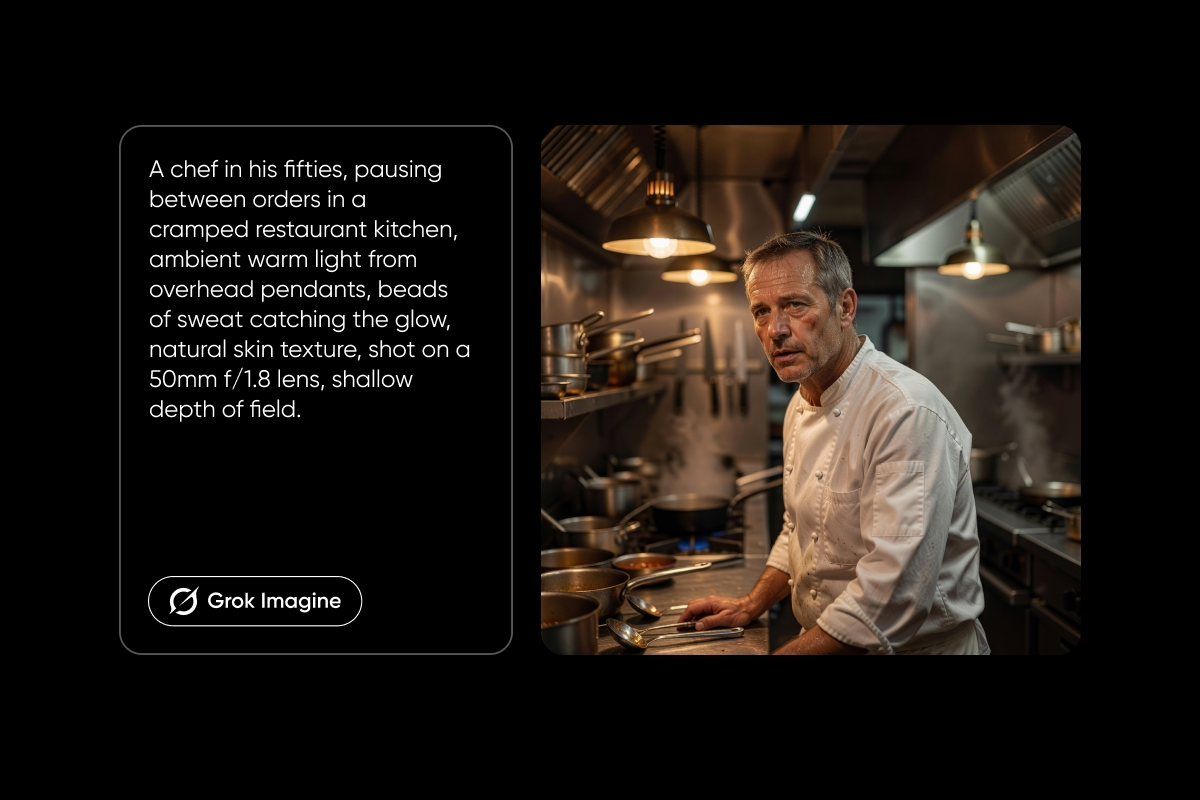
Why it works: specific lens and aperture, natural skin detail, and lighting direction give the model concrete photographic references instead of vague “portrait” vibes.
Product/commercial
A matte ceramic coffee mug on a slate countertop, steam curling from the surface, diffused morning light from a nearby window catching the glaze, subtle reflection on the slate, shot straight-on at 45 degrees, clean negative space on the left for copy.
Why it works: material texture, controlled lighting, and layout notes make the image brand-ready straight out of the generator.
Landscape/nature
Morning mist hanging low over a pine forest in the Pacific Northwest, shafts of cool sunlight breaking through the canopy, moss-covered boulders in the foreground, wide-angle 24mm perspective, Kodak Portra 400 color tones.
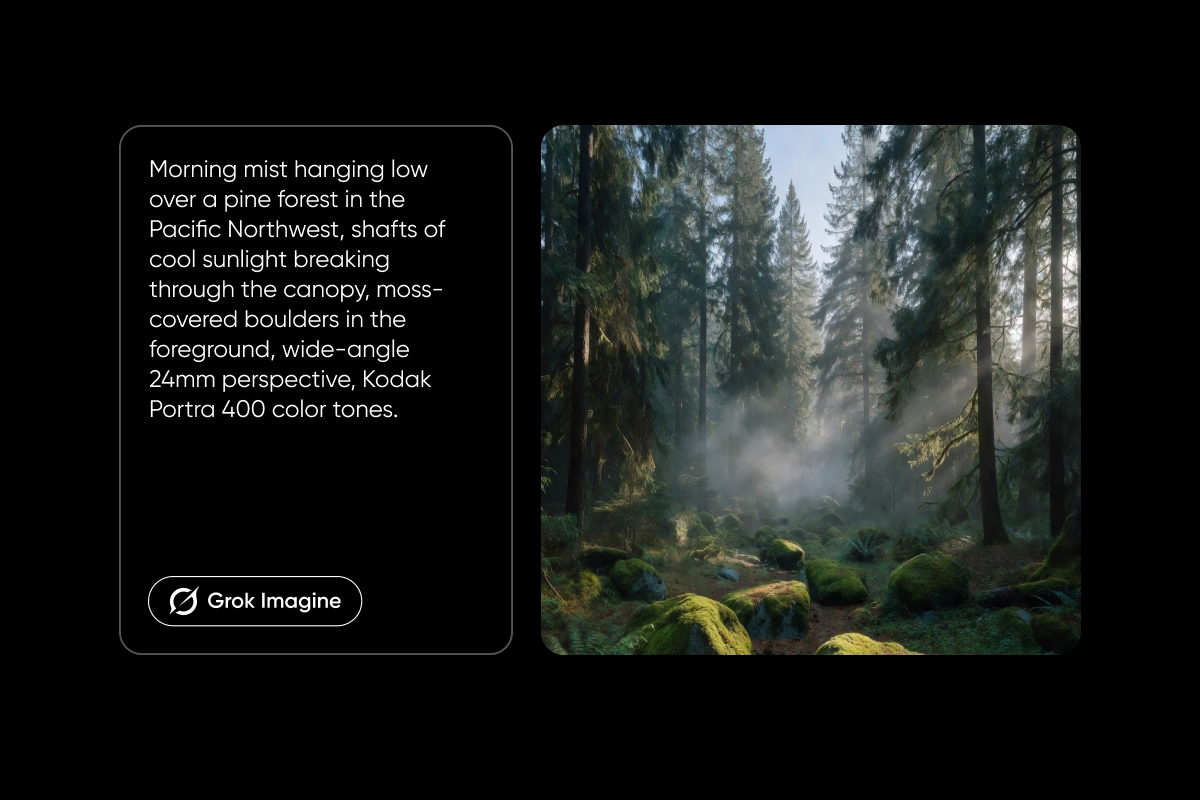
Why it works: atmospheric depth, a specific location, lens choice, and a film stock reference give the scene place and feel rather than generic “nature.”
Fantasy/concept art
An ancient tree with glowing blue leaves at the center of a moonlit clearing, bioluminescent mushrooms scattered across the mossy ground, painterly brushwork, a cool jewel-toned palette of deep teal and violet, dramatic rim lighting from behind the tree.
Why it works: a single coherent aesthetic with clear color direction and a painterly cue, no clashing genres competing for the model’s attention.
Street photography
A young couple laughing at a crosswalk in Tokyo at dusk, neon signs reflecting on wet pavement, candid mid-step framing, Fujifilm film grain, 35mm perspective, natural ambient light.
Why it works: documentary framing, natural light, and film-grain language sell the candid, lived-in feel Grok Imagine does so well.
Text in image
A hand-painted wooden sign outside a small coffee shop reading “Open Early, Closed Late,” weathered paint, warm afternoon sunlight, shallow depth of field behind the sign.
Why it works: Grok Imagine renders in-image text more reliably than most generators. Spell out the exact wording in quotes, and the model places it where you put it in the description.
Write Grok Imagine prompts for photorealism
Photorealism doesn’t come from writing “realistic” ten times. It comes from the kind of technical language a photographer would actually use. Five techniques to lean on:
Camera specs beat adjectives. “Shot on a Sony A7R V with an 85mm f/1.2 lens, shallow depth of field” gives Grok Imagine a concrete reference to a specific look. “Realistic, photographic, 8K” gives it nothing.
Describe light behavior, not light names. “Golden hour” is a cliché that the model averages out. “Warm golden sunset streaming through the window at a low angle, casting long diagonal shadows across the hardwood floor” is a scene it can actually render.
Name the film stock. “Kodak Portra 400 grain and skin tones” or “Fujifilm X-T5 color science” pull in real color profiles and texture. They’re shortcuts to a specific aesthetic.
Ground the scene in physical detail. Skin pores, fabric weave, condensation on a glass, water droplets on leaves. The more tangible the description, the more photographic the output.
Use time and weather specifics. “Early March morning” beats “morning.” “Overcast afternoon in November” beats “cloudy.” These cues tell the model the exact angle and quality of light without relying on shorthand.
Five prompts to try:
Realistic portrait
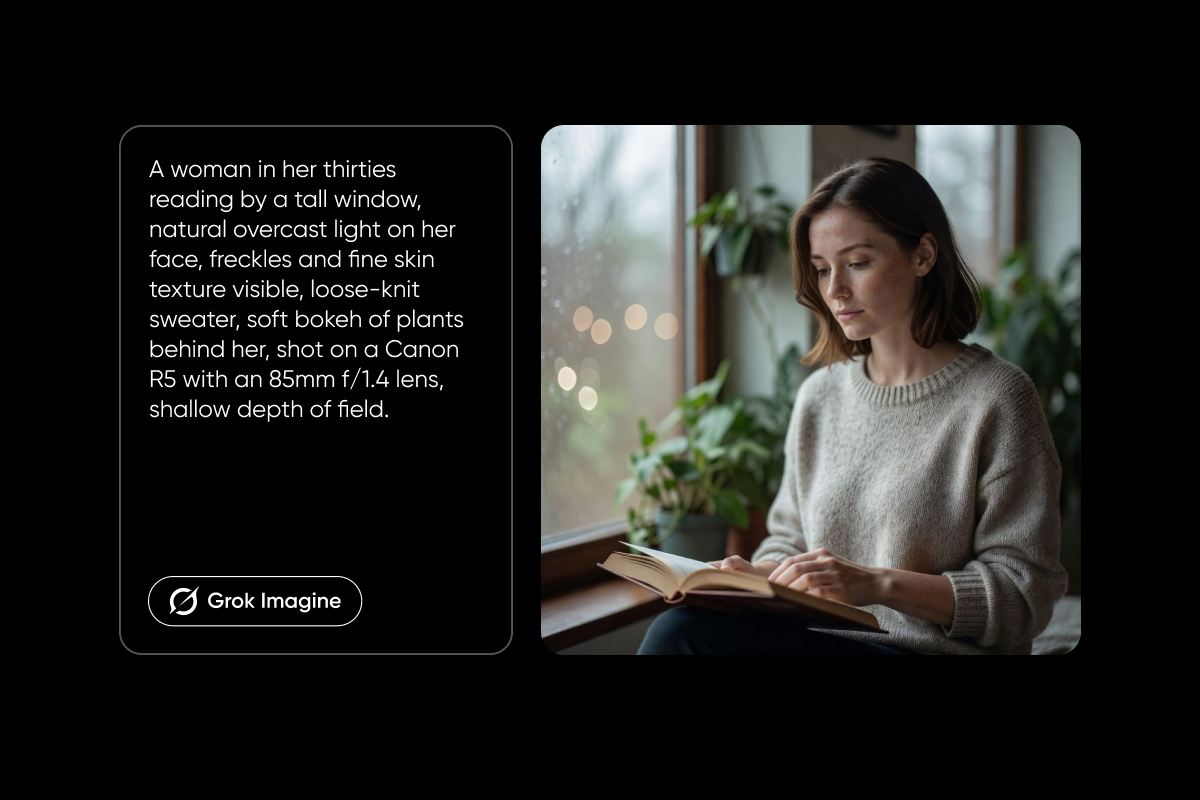
A woman in her thirties reading by a tall window, natural overcast light on her face, freckles and fine skin texture visible, loose-knit sweater, soft bokeh of plants behind her, shot on a Canon R5 with an 85mm f/1.4 lens, shallow depth of field.
Street/documentary
A vendor setting up a flower stall on a cobblestone street in Lisbon at sunrise, warm low light raking across buckets of eucalyptus and roses, candid composition, Kodak Portra 400 film grain, 35mm lens.
Food/still life
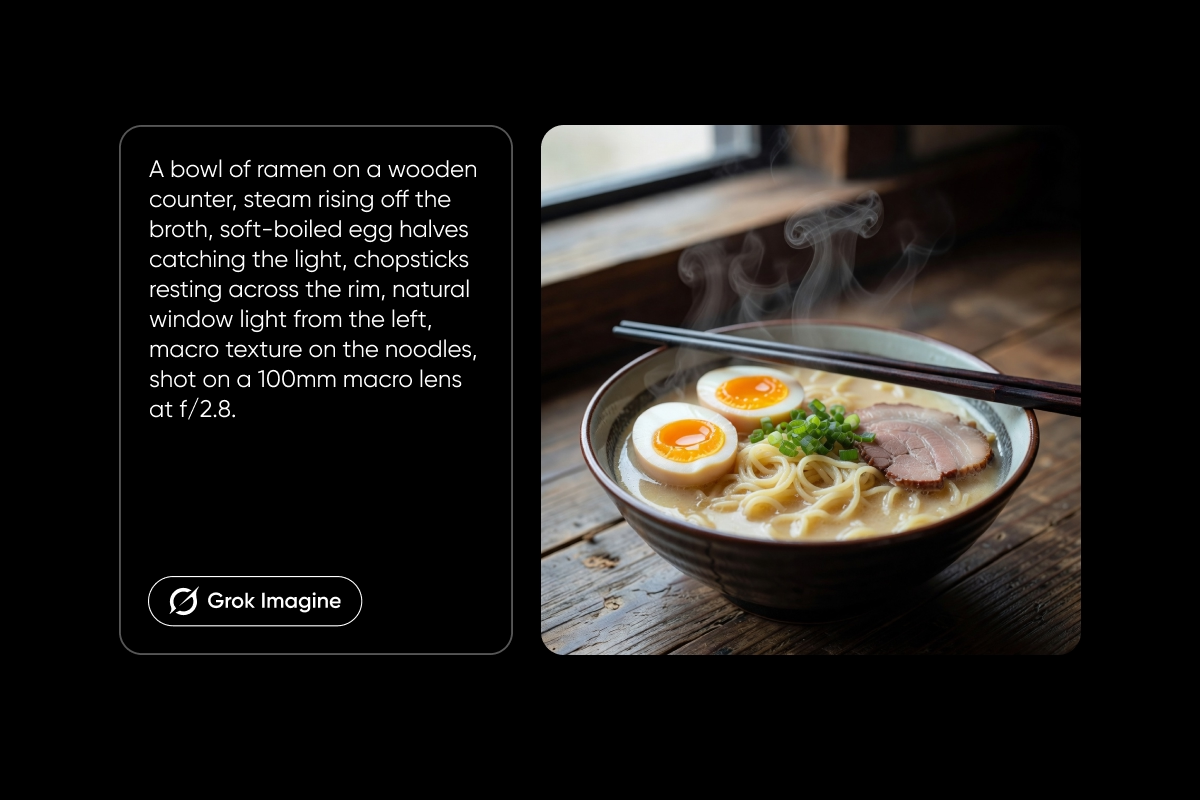
A bowl of ramen on a wooden counter, steam rising off the broth, soft-boiled egg halves catching the light, chopsticks resting across the rim, natural window light from the left, macro texture on the noodles, shot on a 100mm macro lens at f/2.8.
Landscape/nature
Foggy sunrise over Icelandic volcanic fields in late September, muted earth tones, distant mountains fading into mist, wide 24mm perspective, Kodak Ektar 100 color palette.
Interior/architecture
A minimalist concrete loft at mid-morning, tall windows casting long rectangles of light across a polished floor, exposed wooden beams, a leather chair in the foreground, medium-format look, natural color palette.
Each one pairs a specific location or subject with directional light, real camera language, and a tonal reference. That’s the recipe.
Avoid these common Grok Imagine prompting mistakes
Burying the subject. Putting style words first and the subject last weakens the image. Grok Imagine reads left to right. Whatever comes first gets the most weight.
Writing negatives. Grok Imagine ignores them. Rephrase as positives: “clear skin” instead of “no blemishes,” “calm sea” instead of “no waves.”
Quality-adjective spam. “Stunning, breathtaking, cinematic, ultra-detailed, 8K, masterpiece” eats word count without improving output. Replace that pile with actual visual descriptions.
Overloading the prompt. Past 80 words, focus starts to slip. If the draft is creeping toward 120, cut.
Mixing clashing aesthetics. One coherent style per prompt. Cyberpunk OR watercolor OR film photography, not all three fighting each other.
Changing everything at once. When iterating, adjust one variable per generation: lighting, camera, or mood. That’s how you learn what each piece of the prompt is actually doing.
Generate with Grok Imagine inside Picsart
Picsart runs Grok Imagine directly inside its AI Image Generator and AI Playground, so creators get high-quality AI images without wrestling with the model itself. It sits alongside tools like AI Enhance and the Photo Editor, which means a single project can go from prompt to polished asset.
Here’s the flow. Type a prompt using the structure from this guide: subject first, natural sentences, 30-80 words. Pick an aspect ratio and resolution. Generate, compare, iterate one element at a time.
The bigger unlock is the AI Playground. It gives access to 134+ AI models from 27 providers in one interface, so the same prompt runs through Grok Imagine, Flux, GPT Image, and others side by side. That’s how you find the model that matches a specific visual need, quickly, without juggling tabs.
Start generating smarter
Grok Imagine rewards specific, natural descriptions over keyword lists. Lead with the subject; describe the scene as if you’re briefing a photographer, and change one variable at a time when you iterate. Try it alongside 134+ other AI models in Picsart’s AI Playground.


