


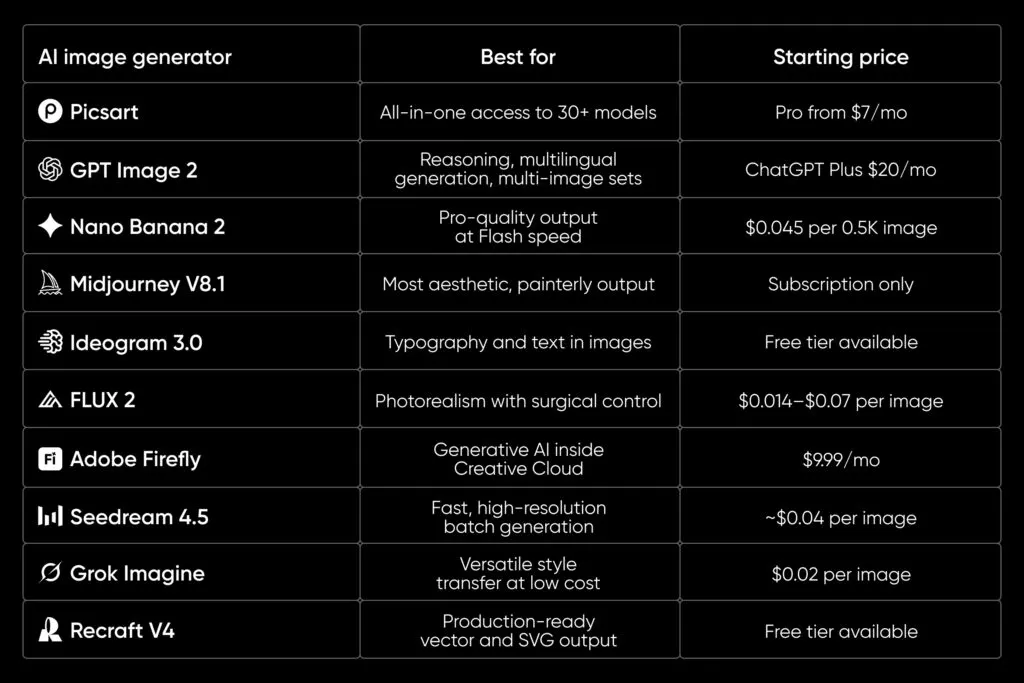
Ideogram built its reputation on one hard problem that most AI image tools still struggle with: rendering clean, legible text inside an image. Designers reach for it when they need readable typography on a poster, a logo mockup, or a social graphic that has to spell words correctly. That single strength turned it into a favorite for anyone who needs design output rather than abstract art. When your creative depends on words showing up right, Ideogram earns its place in the workflow.
The catch is that no single model wins at everything, so people look for Ideogram alternatives the moment they hit a wall on photorealism, editing, or vector output. Some want sharper photographic detail, others want brand-ready vectors, and many just want to compare results before committing credits. Picsart AI Playground solves that by putting many text-capable models behind one login, one prompt bar, and one credit balance. You test the field, keep what works, and pay per generation instead of juggling separate subscriptions.
What is Ideogram?
Ideogram is an AI image generator known for accurate in-image text, clean typography, and design-focused output. It handles the kind of prompts that trip up general models, like a coffee shop sign, a book cover with a title, or a poster with a tagline that has to read correctly. Because it treats letters as design elements rather than random shapes, it became a go-to for logos, marketing graphics, and layout concepts. That focus on legible words is what separates it from tools built mainly for artistic or photographic scenes.
Ideogram is also available inside Picsart AI Playground, so you do not have to choose it in isolation. Both Ideogram 3.0 Flash and Ideogram 4.0 run there alongside dozens of other models. You can generate with Ideogram, then swap to a different model on the same prompt to compare. That makes it easy to keep Ideogram for typography while testing alternatives for the jobs it handles less well.
Ideogram alternatives at a glance
| Model | Best for | In-image text | Design/vector | Available in Picsart |
|---|---|---|---|---|
| Recraft V4 | Design, brand, vector output | Strong | Vector and SVG | Yes |
| GPT Image 2 | Text and instruction-following | Very strong | Raster | Yes |
| Nano Banana Pro | Editing and text edits | Strong | Raster | Yes |
| Flux 2 Pro | Photorealistic detail | Good | Raster | Yes |
| Seedream 4.5 | Artistic and stylized scenes | Good | Raster | Yes |
| Imagen 4 Ultra | Photorealism | Good | Raster | Yes |
The best Ideogram alternatives by what you need
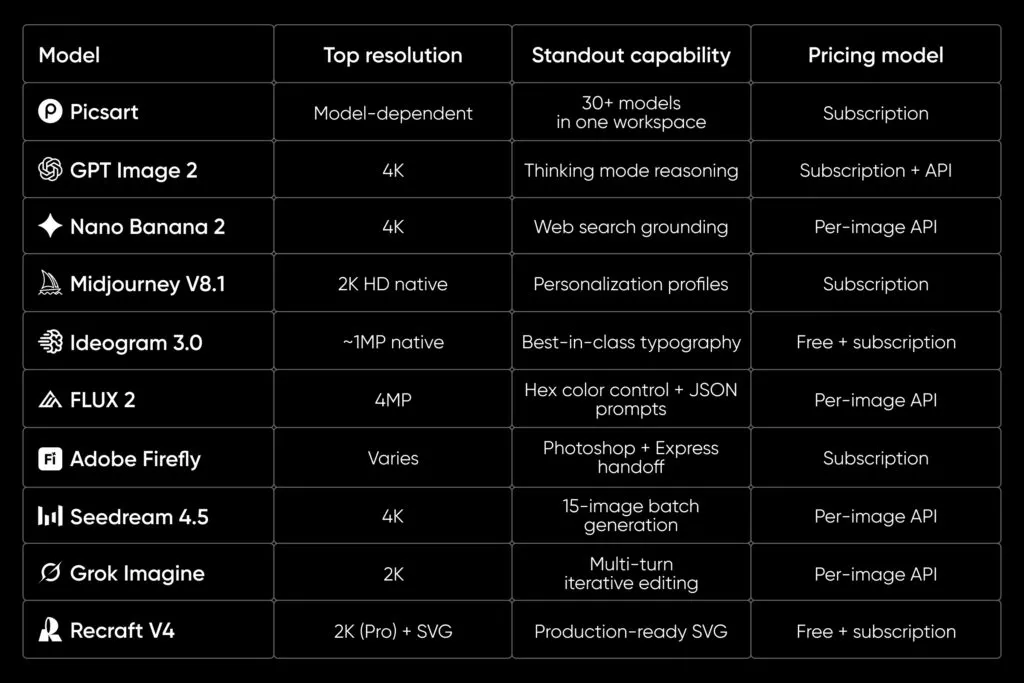
The right alternative depends on the job in front of you, so match the model to the outcome rather than chasing one winner. Each option below covers a specific strength, a trade-off to keep in mind, and a prompt you can drop straight into Picsart AI Playground.
Best for design and vector: Recraft V4
Recraft V4 is built for design work, which makes it the closest match for people who liked Ideogram for brand assets. It produces clean layouts, consistent styles, and it can output vector and SVG files, which is rare among image models. That vector capability matters when a logo or icon has to scale to a billboard without turning fuzzy. It also holds a brand style across a set of images, so a campaign looks like it came from one place.
The trade-off is that Recraft V4 leans toward graphic and illustrative output rather than photorealism, so it is not the pick for lifelike portraits. Its text rendering is strong, though it rewards clear, structured prompts that name the layout you want. For most marketing and product design tasks, that structure is a feature rather than a limitation. It is a natural first stop when you need editable, brand-ready design instead of a single flat image.
Prompt to try: “Minimal logo for a plant shop called Fernbox, sans-serif wordmark, leaf icon, flat vector, green and cream palette.”
Best for text and instructions: GPT Image 2
GPT Image 2 is one of the strongest models for putting accurate text into an image, which puts it head to head with Ideogram. It also follows detailed, multi-part instructions closely, so you can describe a full scene with several elements and get most of them placed correctly. That combination suits infographics, labeled diagrams, and social graphics where wording and layout both matter. When the brief is specific, this model tends to respect the specifics.
The trade-off is speed and cost on very complex prompts, since detailed generations take more work to get right. It rewards careful prompt writing over one-line requests, so plan to iterate a little. Photorealism is solid but not its headline strength, so reach for a photo-focused model when realism is the goal. For text-heavy design and precise instruction-following, it is a top alternative.
Prompt to try: “A motivational poster that reads ‘Ship it Friday’ in bold condensed type, muted orange background, subtle paper texture.”
Best for editing and text edits: Nano Banana Pro
Nano Banana Pro shines when you already have an image and need to change part of it without redoing the whole thing. It handles targeted edits well, including swapping objects, adjusting scenes, and updating text that appears in the image. That makes it useful for iterating on a design after the first draft, which is where many workflows actually live. You keep what works and fix only what does not.
The trade-off is that pure from-scratch generation is not always its strongest mode compared with models tuned for first-pass rendering. It performs best when given a clear source image and a precise edit instruction. Because it respects existing composition, it is ideal for refining rather than reinventing. For anyone who edits more than they generate, it is a practical Ideogram alternative.
Prompt to try: “Change the sign in this storefront photo to read ‘Now Open’ in clean white letters, keep the rest of the scene unchanged.”
Best for photorealistic detail: Flux 2 Pro
Flux 2 Pro is a strong pick when you need sharp, detailed, photorealistic images rather than graphic design. It handles lighting, texture, and fine detail well, which makes it suited to product shots, lifestyle scenes, and realistic mockups. Where Ideogram leans into typography, Flux 2 Pro leans into believable imagery. That difference makes it a good partner model when a project needs both words and realism.
The trade-off is that in-image text is capable but not its main purpose, so for heavy typography you may still combine it with a text-focused model. It rewards descriptive prompts that specify camera angle, lighting, and mood. For hero images and photoreal concepts, the output quality is hard to beat. It rounds out a toolkit that already includes a strong text model.
Prompt to try: “Studio product photo of a matte black water bottle on a wet stone surface, soft window light, shallow depth of field.”
Best for artistic scenes: Seedream 4.5
Seedream 4.5 is a good match when you want stylized, artistic, or richly composed images with a distinct look. It handles imaginative scenes and creative styles well, which suits editorial art, concept pieces, and eye-catching social visuals. Where a design model keeps things clean and literal, Seedream 4.5 brings mood and flair. That makes it a change of pace from Ideogram’s design-first output.
The trade-off is that highly stylized models can be less predictable on precise text and strict layouts. It performs best when you give it room to interpret rather than a rigid spec. For projects that value visual impact over exact wording, that flexibility is the point. It is a strong alternative when the goal is art direction rather than a tidy graphic.
Prompt to try: “Dreamlike cityscape at dusk, floating lanterns, warm gradients, painterly brushwork, cinematic composition.”
Best for photorealism: Imagen 4 Ultra
Imagen 4 Ultra is a top-tier choice for lifelike, high-fidelity photographic images. It captures natural lighting, accurate proportions, and convincing detail, which makes it dependable for realistic people, places, and products. When a project needs to feel like a real photo rather than a rendered scene, this model delivers. It sits alongside Flux 2 Pro as a realism-first option with its own character.
The trade-off is that, like most photo-focused models, it is not built primarily for dense in-image typography. It rewards prompts that describe a real-world scene with specific detail about setting and light. For photoreal marketing and editorial imagery, the results are polished and consistent. It is the alternative to reach for when realism outranks text.
Prompt to try: “Candid photo of a family baking together in a sunlit kitchen, natural light, warm tones, realistic detail.”
How to try Ideogram and its alternatives in Picsart
Picsart AI Playground lets you test Ideogram and every alternative above from one place, with one login and one credit balance. Instead of signing up for six services, you type a prompt once and run it across 150+ models to see which output fits. That side-by-side approach turns model choice into a quick experiment rather than a guess. You pay per generation, so you only spend on the results you actually want. The same models are also available in the Picsart AI Image Generator and inside Picsart Flow, so you can move from testing to finished assets without switching accounts.
This setup works because it treats models as tools in one kit, not competing subscriptions. You keep Ideogram for typography, switch to Recraft V4 for vectors, and jump to Imagen 4 Ultra for a photoreal hero, all without leaving the workspace. Start comparing at Picsart AI Playground and browse the full lineup at Picsart image models. For deeper picks, the best AI image generators guide breaks down more options.
Frequently asked questions
What is the best AI image generator for text in images?
GPT Image 2 and Ideogram are among the strongest models for rendering accurate, legible text inside an image. Recraft V4 also performs well and adds vector output for design work. The best way to decide is to run the same prompt across all three in Picsart AI Playground and compare the results directly. That removes the guesswork and shows which one handles your specific wording best.
Are there free options to try Ideogram alternatives?
Picsart AI Playground uses a pay-per-generation model, so you spend credits only on the images you generate rather than a flat fee for one tool. That keeps testing affordable because you are not locked into a subscription just to compare models. You can run a few prompts across several models and keep only the outputs worth it. Check current credit options directly in Picsart AI Playground before you start a big batch.
Which alternative gives vector or SVG output?
Recraft V4 is the standout for vector and SVG output among the alternatives here. That makes it the right pick when a logo or icon needs to scale cleanly without losing quality. Most other image models produce raster files, which are fine for photos but not for infinitely scalable graphics. If editable vectors are the goal, start with Recraft V4 in Picsart AI Playground.
Can I use multiple AI image models in one place?
Yes, Picsart AI Playground brings 150+ models together under one login and one credit balance. You type a prompt in a single bar and run it across different models to compare output side by side. That means you can keep Ideogram for typography and switch to a photoreal or vector model without new accounts. It turns model comparison into part of the normal workflow.
Is Ideogram free to use?
Ideogram offers its own plans and pricing, which can change over time, so check its current terms before relying on a free tier. Inside Picsart AI Playground, you can access Ideogram 3.0 Flash and Ideogram 4.0 on a pay-per-generation basis alongside other models. That lets you try Ideogram without a separate subscription and compare it against alternatives in the same session. It is a low-commitment way to see whether Ideogram still fits your project.
Start generating with Ideogram alternatives in Picsart
The smartest move is to stop picking one model and start testing several against the exact job in front of you. Ideogram remains excellent for typography, but Recraft V4, GPT Image 2, Nano Banana Pro, Flux 2 Pro, Seedream 4.5, and Imagen 4 Ultra each win at something different. Running them side by side shows you the best result instead of forcing a guess up front. That is faster, cheaper, and more reliable than committing to a single tool.
Open Picsart AI Playground, type one prompt, and compare the field in a few clicks at Picsart AI Playground. You keep one credit balance, pay per generation, and walk away with the output that actually fits. Start generating today and let the results decide.


