


FLUX.2 Pro is the best all-around pick for most creators – production-grade quality in under 10 seconds at the best price-to-quality ratio. But it’s one of five models in the FLUX.2 family from Black Forest Labs, and each one serves a different creative need – from sub-second generation to premium quality to local customization.
All FLUX.2 models share one architecture: unified generation and editing, up to 4MP resolution, hex color precision, structured prompting, and multi-reference support. This guide compares every model with a full spec table and a decision guide to help you pick the right one.
What every FLUX.2 model can do
Before getting into individual models – here’s what the entire family shares as standard:
- Unified generation and editing – generate from text or edit existing images through one model
- Up to 4MP resolution at any aspect ratio
- Multi-reference input – combine multiple images while maintaining character and style consistency (up to 4 refs for Klein, up to 10 for Pro/Flex/Max, 6 recommended for Dev)
- Exact hex color matching – specify brand colors with precision, no approximation
- JSON-structured prompting – control subject, background, lighting, style, camera angle, and composition
- Pose guidance – direct character positioning through reference inputs
- Text rendering – all models handle typography, with Flex and Max excelling at complex text
The differences between models come down to speed, quality ceiling, pricing, licensing, and one exclusive feature: grounding search, available only on Max.
How each model compares
Klein is the fastest option in the family. Images generate in under a second, making it ideal for real-time apps and high-volume projects. It comes in two sizes – 4B is fully open for commercial use (Apache 2.0), while 9B produces better quality under a non-commercial license. Both run on consumer hardware and are available on Hugging Face for fine-tuning. The tradeoff: fewer reference images (up to 4) and no grounding search.
Pro is the everyday workhorse. It balances quality, speed, and cost better than any other model in the lineup – images generate in under 10 seconds starting at $0.03/MP. Whether you’re building product catalogs, social ads, or campaign visuals, Pro handles it. You don’t get manual control over inference steps, but for most workflows you won’t need it.
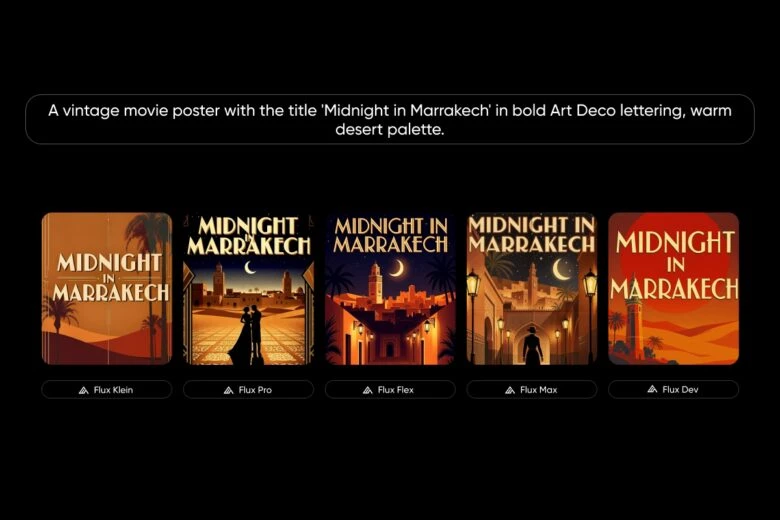
Flex is built for text. If your project involves posters, ads, UI mockups, or anything with typography, Flex gives you direct control over how many inference steps the model runs (up to 50) – more steps means sharper, more accurate text. It costs $0.06/MP and takes longer than Pro, but the text quality is worth it when it matters.
Max is the premium choice. It produces the highest quality output with the strongest prompt adherence, priced at $0.07/MP. What makes it unique is grounding search – Max can search the web during generation to pull in real-time information like current events, trending products, or real-world locations. No other FLUX.2 model does this. The tradeoff: it’s the slowest and most expensive.
Dev is the free model for developers and researchers. You run it locally with full control – fine-tuning, LoRA training, custom pipelines, no API needed. The license is non-commercial, and speed depends on your hardware, but it’s the most flexible option for building something custom.
Overall, quality ranks Max, Flex, Pro, Klein – but the gap between Pro and Max is smaller than the price difference suggests.
Same prompt, every model
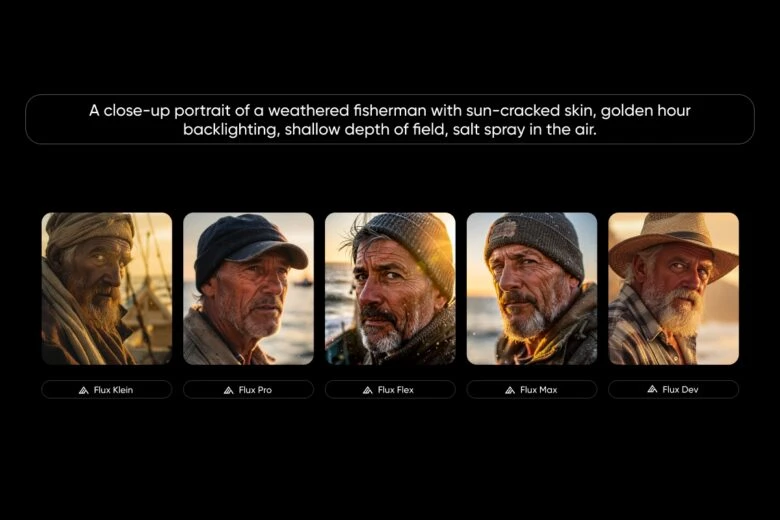
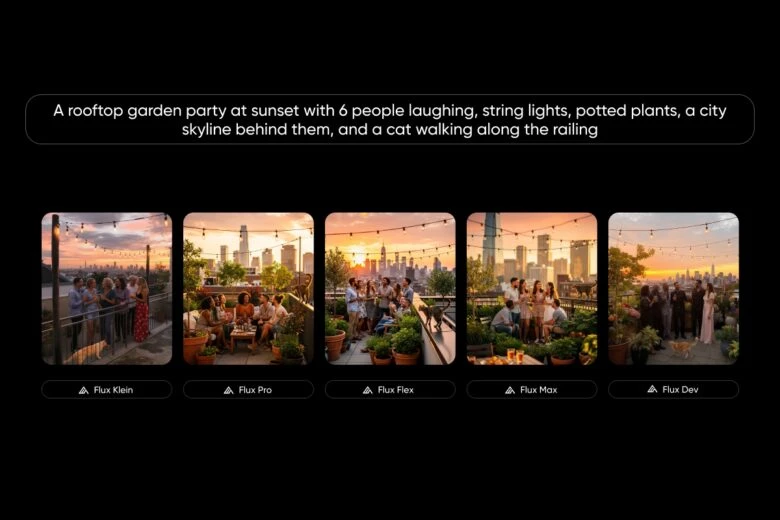
The clearest way to compare is to run the same prompt through every FLUX.2 model and see the raw output. No editing, no post-processing, default settings.
Photorealistic portrait – “A close-up portrait of a weathered fisherman with sun-cracked skin, golden hour backlighting, shallow depth of field, salt spray in the air”
Text rendering – “A vintage movie poster with the title ‘Midnight in Marrakech’ in bold Art Deco lettering, warm desert palette”
Complex scene – “A rooftop garden party at sunset with 6 people laughing, string lights, potted plants, a city skyline behind them, and a cat walking along the railing”
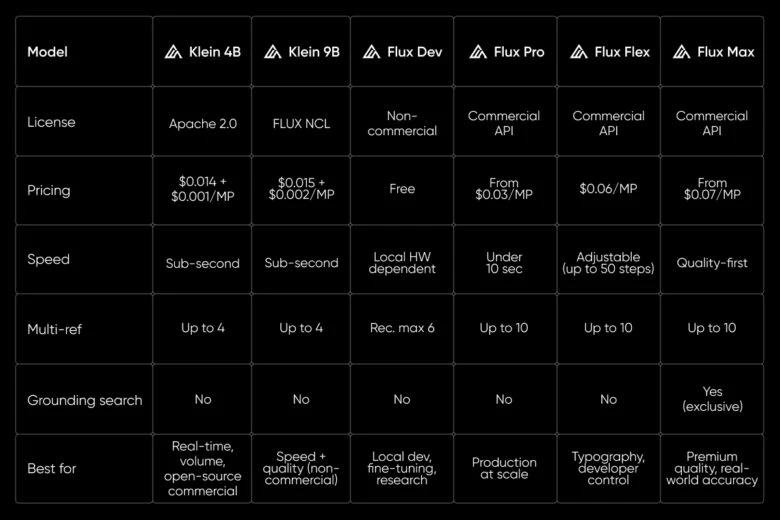
Full comparison table
Which FLUX.2 model should you use?
If you need one model for everyday production work – choose Pro.
If you need the highest possible quality or visuals grounded in real-world events – choose Max.
If you need accurate text and typography in your images – choose Flex.
If you need sub-second speed – choose Klein. Pick 4B for commercial open-source, 9B for better quality.
If you need full local control for fine-tuning or research – choose Dev.
Try FLUX.2 with Picsart
Picsart AI Image Generator lets you generate with FLUX.2 directly through a simple text-to-image interface. Enter a prompt, pick your model, and get results.
Picsart AI Playground gives you access to 129+ models from 27+ providers, including FLUX.2. Compare outputs side by side from one prompt bar.
Picsart Flows is a no-code AI workflow builder where you can chain FLUX.2 into multi-step pipelines – concept to image to edit to export.
Getting started takes four steps:
- Open Picsart AI Playground
- Enter your prompt
- Select a FLUX.2 model
- Compare outputs and iterate
Frequently asked questions
All three are commercial API models at 4MP resolution. FLUX.2 Pro is the fastest and most affordable starting at $0.03 per megapixel – best for production work. Flex is the typography specialist with adjustable inference up to 50 steps at $0.06 per megapixel. Max delivers the highest quality with exclusive grounding search at $0.07 per megapixel.
Frequently asked questions
All three are commercial API models at 4MP resolution. FLUX.2 Pro is the fastest and most affordable starting at $0.03 per megapixel – best for production work. Flex is the typography specialist with adjustable inference up to 50 steps at $0.06 per megapixel. Max delivers the highest quality with exclusive grounding search at $0.07 per megapixel.
Find your FLUX.2 model
Five models, one architecture – and now you know which FLUX.2 model fits your workflow and budget. Whether you need production speed, premium quality, typography control, or open-source flexibility, there’s a FLUX.2 model built for it.
Try FLUX.2 models side by side in Picsart AI Playground – one prompt, every model, instant comparison.


