


Comic strips turn everyday ideas into something visual, dramatic, and surprisingly shareable. You don’t need to know how to draw. You don’t need complicated design software. To make comic strips online for free, you can upload a photo to Picsart’s ComicMe, choose a genre, describe your storyline, and generate a fully illustrated comic strip in seconds.
That’s a massive shift from how comics used to work. Creating even a short strip once meant sketching characters by hand, arranging panels, inking outlines, adding color, and carefully placing every speech bubble. It was creative, sure, but also time-intensive and technical.
Now? You can make your own comic strip with nothing more than a clear idea and a photo. Whether you’re building comic stories for social media, experimenting with visual storytelling, or just curious what you’d look like as a neon-lit antihero, the process is surprisingly smooth. Here’s how it works and how to make it good.
What makes a good comic strip
A comic strip isn’t just a sequence of drawings. It’s pacing. It’s tension. It’s personality compressed into panels.
At the heart of strong comic strip design is character. A memorable comic strip character doesn’t have to be complex, but they do need to feel distinct. Maybe they’re overly confident. Maybe they’re awkward and self-aware. Maybe they’re the villain who thinks they’re the hero. Personality drives the panels forward.
Then comes structure. Even short comic stories follow a rhythm: something changes, something escalates, something resolves. That resolution might be a punchline, a plot twist, or a dramatic cliffhanger. Without movement, a strip feels static – more like illustrated text than storytelling.
Dialogue plays a different role in comics than in traditional writing. It has to be tight. Natural. Slightly exaggerated at times. Long speeches slow everything down. A single sharp line often lands harder than a paragraph.
The good news? You no longer have to manually design every frame to achieve this. When you create a comic strip online, the technical layout can happen in the background while you focus on the fun part – the story itself.
How to make a comic strip with Picsart ComicMe
1. Upload your hero photo
Start by opening ComicMe Editor and uploading a photo of your main character. The tool transforms your image into a stylized comic version, keeping recognizable features while adding bold, illustrated detail. You can also upload a second image as a nemesis. A well-lit photo with a clear facial expression produces stronger results.

2. Choose your genre
Select a genre. Genre influences color palette, background atmosphere, lighting style, and overall mood. Action feels bold and dynamic. Horror leans shadowy and tense. Comedy exaggerates expression. Neon Noir introduces dramatic contrast. There is also a Custom option.
3. Write your storyline
The storyline field guides how the panels unfold. Specific descriptions work better than vague ones. Instead of 'A hero saves the city,' try 'An inexperienced superhero accidentally causes chaos while trying to stop a runaway robot.'
4. Select tone and language
Choose tone settings such as Action Heavy or Inner Monologue. One emphasizes movement and conflict. The other leans into introspection and character thoughts. You can also select your preferred language for different audiences.
5. Generate your comic strip
Click Generate and within seconds, your multi-panel comic strip appears. Dialogue, composition, and stylized artwork are arranged automatically. Download it. Share it. Post it as a carousel.
Comic strip genres you can explore
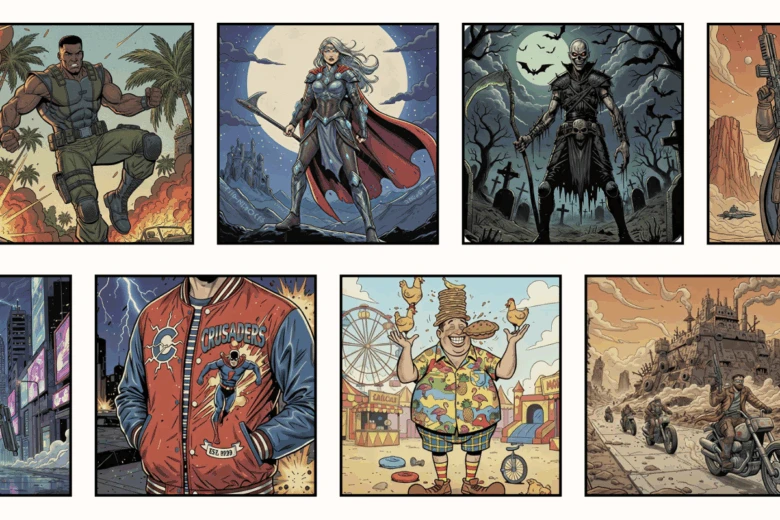
ComicMe includes nine genre presets: Action, High Fantasy, Horror, Sci-Fi, Neon Noir, Wasteland, Comedy, and Teen Drama, along with Custom.
What’s interesting is how dramatically the same concept changes across styles. A simple rescue scene in High Fantasy feels epic. In Comedy, it becomes chaotic and exaggerated. In Horror, the tension shifts completely.
If you want to experiment, generate the same storyline in two different genres. You’ll quickly see how visual tone reshapes the narrative.
That flexibility makes it easier to create a cartoon strip that matches your mood or your brand.
Tips for stronger comic strip characters
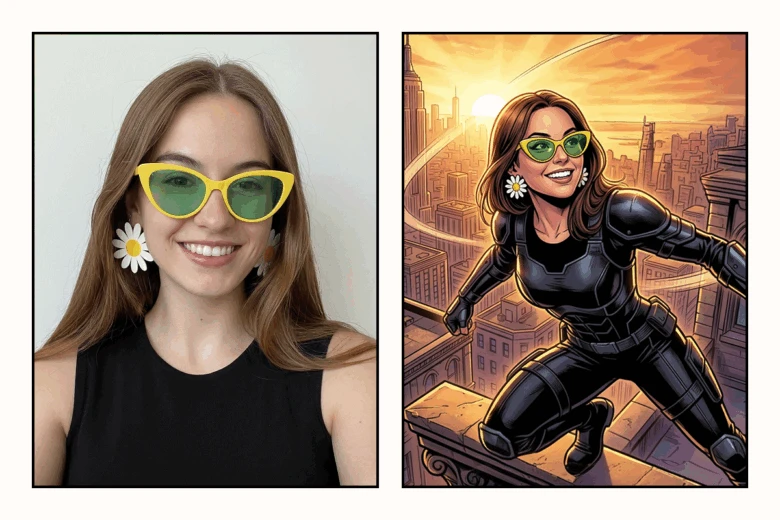
Characters carry comic strips. When they feel flat, the panels feel flat too.
Start with a clear image. If your photo is low resolution, sharpen it first using Picsart’s HD Photo Converter. Better image quality leads to stronger illustrated detail.
Next, define the character’s role. Are they the hero? The rival? The reluctant participant dragged into chaos? Clear roles prevent your story from wandering.
Conflict helps. Uploading a nemesis adds immediate narrative tension. Even friendly rivalry creates energy.
You can also think beyond yourself. Turn a pet into a sci-fi explorer. Make a friend the star of a dramatic teen saga. Transform everyday objects into unlikely heroes. Comic strip design thrives on imagination.
When personality comes through clearly, readers connect – even in just a few panels.
Bring your comic idea to life
Making comic strips no longer requires artistic training or hours of manual drawing. You can make your own comic strip quickly and focus on what actually matters – the idea.
Upload a photo. Choose a genre. Write a storyline. Create a comic strip online that feels personal, dramatic, funny, or completely unexpected.
Sometimes all it takes is seeing yourself inside the panels to spark the next story.
Start making your own comic strip with ComicMe.
FAQ
Yes. You can make free comic strips online and generate illustrated stories without needing advanced design skills.


