


Contents
A brochure is one of the most versatile, visually-driven tools in marketing. It’s compact but impactful, folded, clickable, or digital and crafted to inform, inspire, and convert. If you’re wondering what a brochure is, what it looks like, or how to design one that speaks your brand’s language, this guide breaks it all down with clarity and creativity.
From travel agencies to classrooms, brochures are still a go-to tool to communicate clearly and beautifully. Let’s explore brochure formats, design example,s and how to make your own using modern tools like Picsart’s Brochure Maker.
What is the definition of a brochure?

A brochure is a printed or digital document designed to present information in a structured, eye-catching format. Typically folded (think tri-fold or bi-fold), brochures can be handed out physically or shared online.
They’re built to promote a product, service, destination or idea – condensing essential information into small, digestible sections paired with striking visuals. Unlike long-form web pages or posters, brochures are designed to be skimmed quickly while still delivering a strong message.
What is the difference between a pamphlet and a brochure?
People often use the words interchangeably but there are key differences.
A pamphlet is usually a single, unbound page with minimal visual design- more informational, often used in healthcare, nonprofit or educational settings.
A brochure, on the other hand, is typically multi-folded, graphically rich and used for promotional purposes. If you’re wondering what the difference is between a pamphlet and a brochure, think of the latter as a sales-driven storytelling tool, while the former is more about pure information.
| Feature | Pamphlet | Brochure |
| Primary goal | Inform | Promote |
| Design focus | Minimal or no visuals | Visually driven |
| Format | Single page, often flat | Folded layout with multiple panels |
| Use case | Education, health info | Marketing, travel, retail |
What is a brochure used for?
Brochures have wide applications. They’re great for both print and digital formats and can be tailored to almost any industry.
Some common use cases include:
- Travel: Want to know what a travel brochure is? It’s a visually rich guide showing places to visit, travel packages, or itineraries. Often seen at tourism booths or travel sites.
- Retail: New product lines, seasonal offers, or store catalogs.
- Education: Schools use brochures to highlight programs, facilities, and enrollment processes, answering the common query what is a brochure for students.
- Healthcare: Clinics and hospitals use brochures to explain treatments or promote wellness campaigns.
- Events: Trade shows, concerts or conferences with schedules and speaker info.
- Nonprofits: Advocacy or fundraising materials summarizing mission and impact.
Who should create brochures?
Brochures aren’t just for big corporations. They’re ideal for:
- Small business owners wanting to promote a service
- Freelancers showcasing portfolios
- Teachers creating learning materials
- Event organizers sharing schedules
- Travel agents promoting destinations
- Nonprofits advocating for causes
Anyone looking to communicate a clear, structured and branded message should consider a brochure. You can create one easily with the Picsart Brochure Maker – no design experience needed.
Where in the customer journey does a brochure belong?
Brochures typically support the middle-to-bottom of the funnel. That means a potential customer is already aware of your brand or offer and needs more convincing.
- At the consideration stage, brochures build trust and share critical details.
- At the decision stage, they offer comparisons, features, pricing and calls to action.
That’s why design, format and messaging matter so much – your brochure may be the last thing a customer sees before making a choice.
Digital brochures vs. print: Which should you choose?
Both options work, depending on your audience.
Digital brochures

- Ideal for email campaigns, social sharing and web downloads
- Cost-effective and easy to update
- Can include interactive features (videos, links, animation)
Print brochures

- Great for events, lobbies, and in-store browsing
- Offers tactile experience and perceived value
- Often used in high-touch, high-trust industries (e.g., real estate, luxury travel)
Pro tip: Start with a digital version and print select copies for premium clients or events.
What kind of information should be in a brochure?
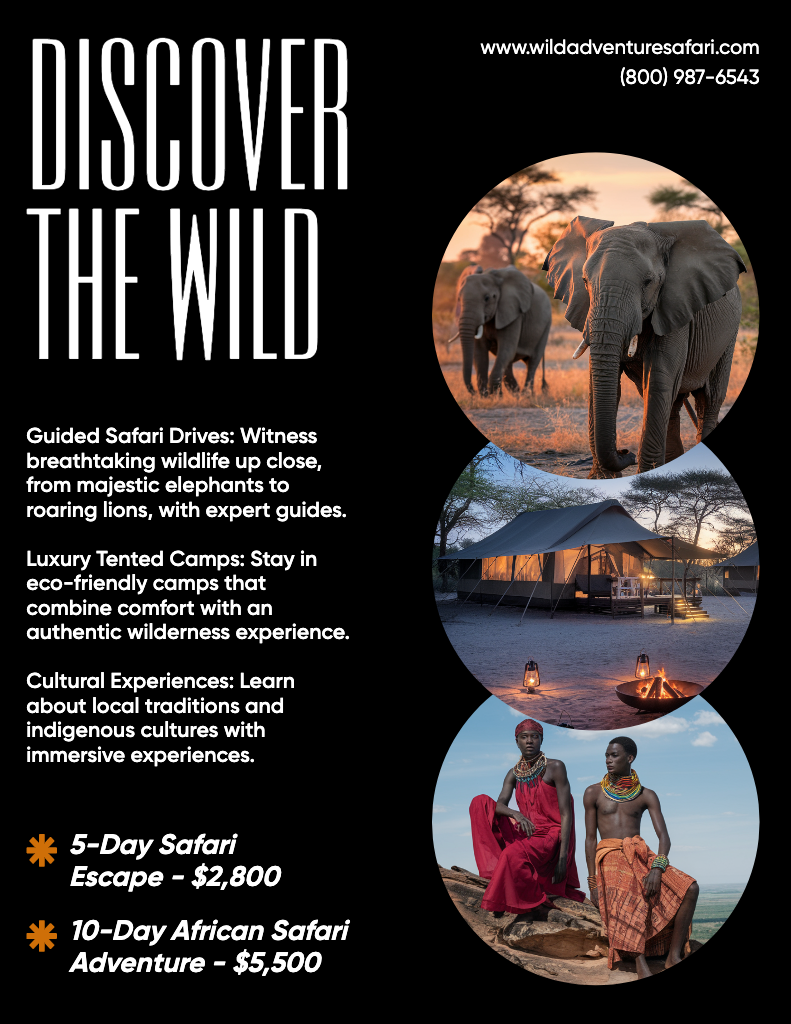
The content of your brochure depends on your goal. But great brochures usually include:
- A compelling headline that captures attention
- Brief sections explaining the offer, benefits or story
- Images or graphics that reinforce the message
- Contact information, website or social links
- Call-to-action: “Visit now,” “Book today” or “Learn more”
If you’re creating digital versions, consider embedding QR codes, clickable buttons or links to videos.
Need more guidance? Here’s a full brochure design and printing guide to help you avoid common pitfalls and elevate your print or digital format.
How to make a brochure
Designing a brochure today is fast, intuitive and doesn’t require professional software. Here’s how to get started with Picsart’s Brochure Maker:
- Choose your layout: Tri-fold for dense info, bi-fold for visual-heavy spreads.
- Select a template: Browse the template library by industry or use case.
- Add your brand elements: Upload your logo, choose brand fonts/colors.
- Edit the content: Write persuasive copy, add photos or illustrations.
- Include a CTA: Guide the reader – what should they do next?
- Download or share: Export for print or download as a PDF for email or web.
Want the full process explained? This brochure-making guide walks you through both digital and physical formatting, including pro tips for printing and folding.
15 editable brochure templates to try today
If you’re feeling stuck on where to begin, editable templates are the fastest way to start. Picsart offers hundreds of professionally designed Brochure Templates that you can customize in minutes.
Here are 15 standouts to explore:
- Modern Travel Brochure – Ideal for tour agencies

- Fashion Collection Lookbook – For seasonal retail promos
- School Admissions Guide – Built for universities or tutors
- Fitness Class Timetable – For gyms or wellness centers
- Wedding Services Brochure – Vendors, planners, and venues

- Nonprofit Fundraiser Flyer – Showcase impact and ways to donate
- Real Estate Listing Brochure – Highlight homes or apartments
- Salon & Spa Menu – Price lists and service breakdowns
- Business Consulting Services – For B2B outreach

- Restaurant Menu Trifold – Dine-in or delivery friendly

- Tech Product Launch Brochure – Spec sheets + features
- Photography Portfolio Layout – Display your best shots
- Health Clinic Info Sheet – Treatments, doctors, insurance

- Conference Speaker Lineup – Event schedules and bios
- Art Show Lookbook – Artist bios and exhibition previews
All templates are editable online – just drag, drop, and personalize with your colors, logos and content.
Conclusion
Now that you know what a brochure is, you can start using this dynamic format to share your message in a bold, beautiful,and structured way. From educational tools to business promos, brochures continue to be a top choice for creators and marketers alike.
Ready to design your own? Start with the easy-to-use Picsart Brochure Maker, browse hundreds of customizable Brochure Templates, and follow expert tips in this brochure creation and printing guide. Your next big idea deserves a format that’s as compelling as the story it tells.


