


Resume format isn’t something recruiters consciously think about. That’s kind of the point. When it works, it disappears. When it doesn’t, it quietly gets in the way of everything else you’re trying to say.
So, what resume format is best? For most job seekers, the chronological resume format still comes out on top. It’s familiar, easy to follow, and works well with applicant tracking systems. That said, there isn’t one best resume format for everyone. The right choice depends on how your experience fits together, what kind of role you’re targeting, and how much explanation your career path needs.
This article breaks down the most common resume formats, looks at which layouts actually hold up in real hiring situations, and shows how to create a resume online for free without turning it into a design project.
What are the main resume format types?
Most resumes fall into one of three formats. They’re not new, and they haven’t changed much, but people use them in very different ways.
Chronological resume format
The chronological resume format lists your work experience starting with your most recent job and moving backward. It shows progression clearly, which is why recruiters tend to like it. You can see where someone is now, how long they stayed in roles, and whether their responsibilities grew over time. It’s also the easiest format for ATS software to read, which matters more than most people realize.
Functional resume format
Functional resumes focus on skills first and job history second. Instead of a timeline, you get grouped abilities and competencies. This format can sound appealing, especially if you’re trying to pivot careers, but it often leaves hiring managers with unanswered questions. When timelines disappear, trust can disappear with them.
Combination (hybrid) resume format
Combination resumes try to keep both sides happy. Skills come early, work history still exists, and nothing feels completely hidden. This format works well for experienced professionals, freelancers, or people whose skills matter more than their job titles alone.
What resume format is best for most job seekers?
For most candidates, the chronological resume remains the best resume format. It’s predictable in a good way. Recruiters know where to look, what to scan, and how to compare candidates quickly.
That speed matters. When someone is reviewing dozens of applications, clarity wins.
Other formats can work, but they usually require more context. A combination format can be helpful if your career isn’t perfectly linear or if you’re changing industries. The goal isn’t to be clever. It’s to make your experience feel understandable at a glance.
Best resume layouts for readability and design
Resume format and layout aren’t the same thing, but they depend on each other.
The best layouts for resumes feel balanced. Nothing is cramped. Nothing is shouting for attention. Headings are clear, spacing is consistent, and the page doesn’t feel like it’s trying too hard.
One-column layouts are still the safest choice for most industries. They’re easier for ATS systems to process and simpler for humans to read quickly. Two-column layouts can work in creative roles, but they require restraint. When layout becomes the star, content usually suffers.
Simple layouts also age better. That matters when you reuse a resume across applications.
Choosing the right resume layout
Some templates naturally support chronological resumes, with clear sections for roles and dates. Others give more space to skills, which suits combination formats better. When choosing a layout, clarity should come first. A resume doesn’t need to stand out visually to do its job.
How to create a resume online for free with Picsart
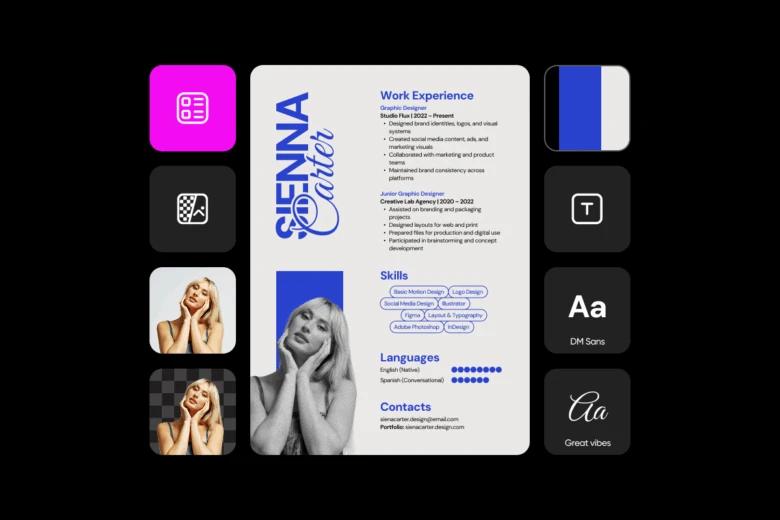
1.Start with a flexible resume template
Choose from Picsart Resume templates designed to support common resume formats while still allowing customization, so you’re not locked into a rigid design.
2. Adjust spacing for readability
Tweak spacing between sections so content doesn’t blur together and the page feels easy to scan at a glance.
3. Prioritize important information
Move the most relevant experience or details higher on the page to naturally guide a recruiter’s attention.
4. Choose clean, readable typography
Use minimalist font styles to keep the resume uncluttered and easy to read.
5. Use color intentionally
Stick to soft or pastel tones for most professional roles. Reserve bolder or more expressive colors for creative fields like design or illustration.
6. Check photo quality (if applicable)
If your resume includes a photo, make sure it looks sharp and professional. Using the HD Photo Converter can noticeably improve image quality.
7. Fine-tune layout and hierarchy
Use the Resume Builder to adjust sections, spacing, and layout without locking yourself into one look, making it easier to refine structure while keeping the design clean.
8. Review before exporting
Step away briefly, then review alignment, spacing, and consistency with fresh eyes.
9. Export in a readable format
Make sure the resume holds up as a PDF and reads comfortably on screen. Small details here often make the difference between a good resume and a forgettable one.
FAQs about resume formats
What resume format do employers prefer?
Most employers still prefer chronological resumes because they clearly show work history and progression.
Is a chronological resume always the best?
No. Combination formats can work better when skills need more emphasis.
What resume format is best for beginners?
Chronological formats usually work best for beginners, especially when education and early experience matter most.
Can I create a resume online for free?
Yes. You can create a resume online for free using Picsart Resume templates.
Are resume templates ATS-friendly?
Clean templates with standard headings are generally ATS-friendly.
Conclusion
There isn’t one resume format that works for everyone. The best resume format depends on how your experience fits together and how much context a recruiter needs to understand it. For most job seekers, chronological resumes remain the easiest and most effective option, but combination formats offer flexibility when careers don’t follow a straight line.
What matters most is clarity. When your resume is easy to read and thoughtfully laid out, it does what it’s supposed to do. Creating a resume online for free just makes that process simpler.


