How to replace product photo backgrounds at scale with AI agents

BACKGROUNDS4 minAdvanced

Automate background replacement for hundreds of product photos using AI agents that learn your brand style.

Loading tutorial video

What you'll learn

  • Set up AI agents to automate background replacement for product photos
  • Configure brand-specific background styles and preferences
  • Process hundreds of images with consistent results while you focus on creative strategy
  • Review and refine agent outputs to improve future generations

What are AI agents for product photos?

AI agents are automated assistants that handle repetitive creative tasks like background replacement. You train them once with your brand style, then they process entire product catalogs while you sleep. Think of them as having a designer on staff who never gets tired and gets better at understanding your preferences with every batch.

Common use cases

  • E-commerce: Replace inconsistent supplier photos with branded backgrounds for entire catalog
  • Marketing campaigns: Create multiple background variations for A/B testing across ad platforms
  • Seasonal updates: Swap backgrounds for holiday themes without reshooting products
  • Multi-platform optimization: Generate different background styles for marketplace requirements
  • Product launch prep: Process hundreds of SKU photos overnight before launch day
  • Brand consistency: Standardize backgrounds across products shot by different photographers

Replace product backgrounds at scale step by step

STEP 1: Set up your AI agent

  • On web: Go to picsart.com/ai-agents → Book a demo to get started with agent setup
  • On mobile: AI agents are currently available through web-based workflows only
Book agent demo

STEP 2: Configure background preferences

Train your agent with specific background requirements:

  • Background type: Pure white, gradient, lifestyle scene, or custom brand environment
  • Product positioning: Center placement, rule of thirds, or custom framing rules
  • Shadow and lighting: Natural shadows, drop shadows, or floating product effect
  • Brand assets: Upload reference images showing your preferred background aesthetic
  • Output specs: Set resolution, aspect ratio, and file format requirements for your platform
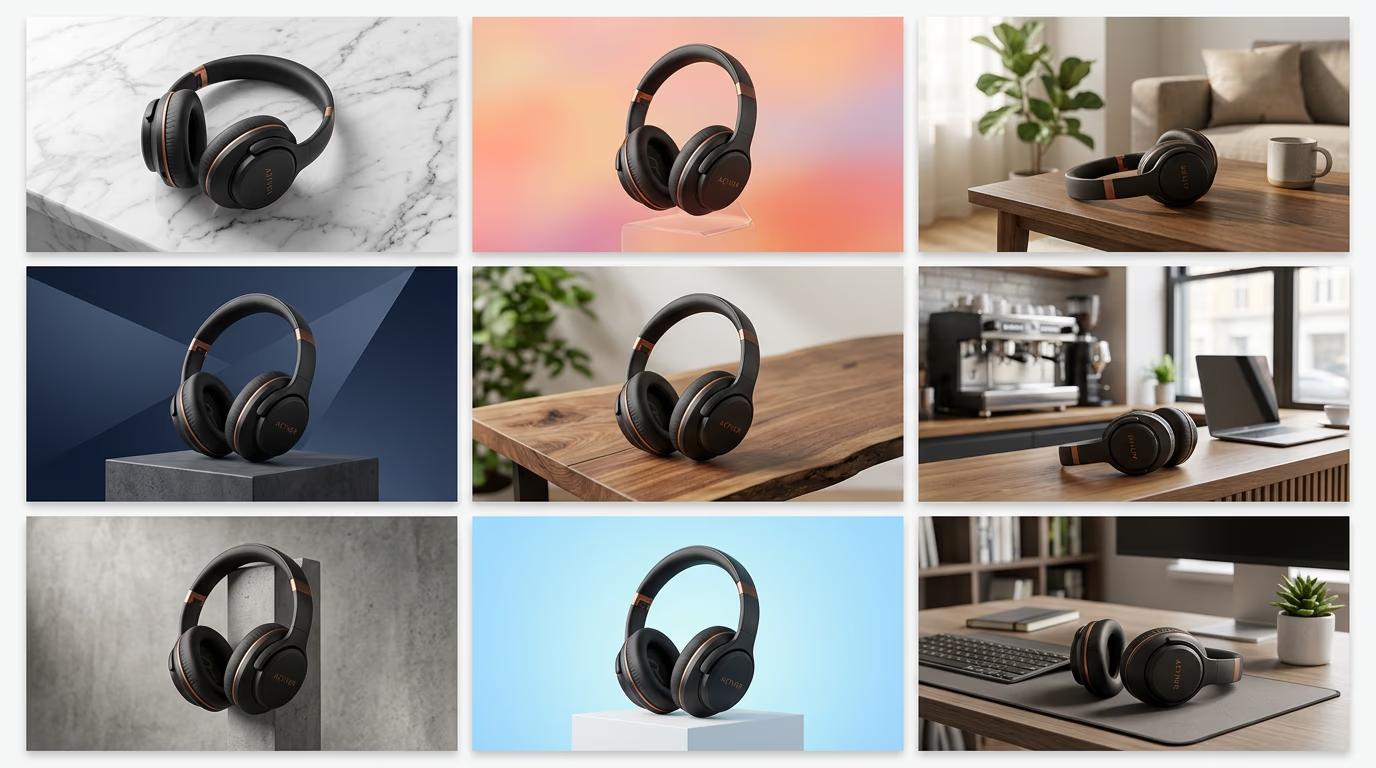
STEP 3: Upload and process your batch

Upload your product photos as a batch or connect your product feed. The AI agent will process each image, removing the original background and applying your configured style. Processing speed depends on batch size, but agents typically handle 100-500 images per hour with consistent quality.

STEP 4: Review and refine results

Check a sample of processed images for quality: Not perfect? Flag problem images to help your agent learn. Each correction improves future batches, so your agent gets smarter over time.

  • Verify clean edge cutouts with no background remnants or halos
  • Check that shadows look natural and match lighting direction
  • Confirm consistent background style across all products in the batch
Start using agents

Tips for best results

💡 Start with a test batch

Process 10-20 images first to fine-tune your agent's settings before running your entire catalog. This saves time and helps you catch any preference mismatches early.

💡 Use consistent source photos

AI agents work best when your input photos have similar lighting and angles. If your catalog has wildly different photography styles, consider grouping similar products together for better results.

💡 Provide clear reference examples

Upload 5-10 manually edited products as reference images showing exactly what you want. Your agent will learn faster from visual examples than from text descriptions alone.

💡 Schedule processing during off-hours

Run large batches overnight or during slow periods. Your agent works while you sleep, and you wake up to hundreds of finished images ready for upload.

Platform background requirements

  • Amazon: Pure white (RGB 255, 255, 255), product fills 85% of frame, no props or text
  • Shopify: White or transparent PNG, square format recommended, 2048x2048px minimum
  • Instagram Shopping: Clean background (white or lifestyle), 1:1 aspect ratio, product clearly visible
  • Google Shopping: White, gray, or lifestyle background, no watermarks, 800x800px minimum
  • eBay: White background preferred, 1600px on longest side recommended
  • Etsy: Lifestyle or plain backgrounds both accepted, 2000px width minimum for zoom feature

Frequently asked questions

AI agents learn your specific brand preferences and improve with feedback, while batch tools apply the same generic process to every image. Agents remember things like how you prefer shadows, what backgrounds match your brand, and how products should be positioned. After a few batches, your agent produces results that match your manual edits without you having to configure settings each time.

Yes, agents handle complex edges better than traditional batch tools because they use advanced AI models trained on challenging cutout scenarios. Hair, fabric texture, and transparent materials all process cleanly. You can flag any problem images during review to help your agent improve on similar products in future batches.

AI agents are available for enterprise and business accounts with custom pricing based on volume. Contact the Picsart team for a demo to discuss your catalog size and processing needs. Pricing typically includes setup, unlimited processing during your subscription period, and ongoing agent training.

Agents can output PNG with transparency, JPEG with solid backgrounds, or WebP for optimized web use. You configure output settings during agent setup, including resolution, color profile, and compression level. All outputs maintain your original image quality with no visible degradation.

Ready to scale your product photography?

Let AI agents handle your background replacement while you focus on growing your business.

Book a demo