


TikTok’s algorithm focuses on finding relevant, recent content for different audiences. So by learning the best times to post on TikTok, you could attract more views, boost engagement, and grow your followers.
This principle applies whether you’re just getting started on TikTok or you’ve built up a following on the platform already.
In this guide, we explore the best time to post on TikTok and look at techniques you can use to optimize your posting schedule.
The importance of understanding your audience demographics
If you’ve been on TikTok for any length of time, you’ll know that its most powerful feature is the “For You” page. This is how your content could go viral.
The “For You” page is designed to show users recent content from creators they aren’t necessarily already following.
In TikTok’s own words, the “For You” page delivers “A stream of videos curated to your interests, making it easy to find content and creators you love.” To do this, TikTok uses demographic data…
When users first join, the algorithm uses data such as age and location to deliver recent content. Then it uses their activity in the app to keep assessing which videos they’re most likely to engage with.
Because of this focus on recent content, you need to make sure you’re posting at the right times. This way you can show up both for new users and those who are interested in similar content and creators to yours.
To do this, you can use TikTok analytics:
- Create a TikTok business account by going to “Settings and Privacy,” then “Manage Account,” then “Switch to Business Account.”
- Clicking the menu at the top right of the profile screen, then “Creator Tools,” then “Analytics.”
- Click on the “Followers” tab.
- Finding “Follower Activity” to discover the times your users are most active. This is displayed in UTC so make sure to convert to your time zone if necessary.
Understanding TikTok analytics
A big part of understanding when to post on TikTok comes from the analytics page. Here’s a quick guide that will help you understand which other metrics you should monitor to get a more accurate picture of your audience’s activity. The first word is the tab you need to click on in the analytics page.
- Overview: Video views. This will show you how many times your video has been watched in the last seven days, 28 days, or 60 days.
- Followers: Net Followers. This shows the number of new followers minus the number of unfollowers in the past seven days.
- Followers: Gender. This shows a pie chart with the percentage of your followers who are men vs women.
- Followers: Age. This shows a graph with the ages of your followers.
When is the best time to post on TikTok?
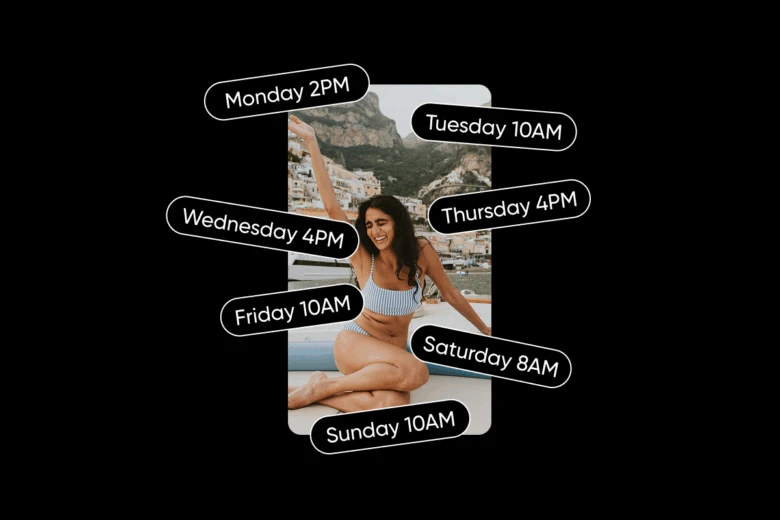
When figuring out when to post on TikTok, you should check with your specific audience demographics to get the most accurate results. However, some times are usually better for engagement.
Here we’ve compiled the data on the best time to post on TikTok according to Buffer. This takes into account users in different time zones.
[The best time to post on TikTok across the world]
| Day | Time |
| Monday | 2 PM |
| Tuesday | 10 AM |
| Wednesday | 4 PM |
| Thursday | 4 PM |
| Friday | 10 AM |
| Saturday | 8 AM |
| Sunday | 10 AM |
[According to research from social media scheduler, Buffer]
Tailoring your posting schedule
Now that you know the general guidance about the best time to post on TikTok, combine that with insights from your specific audience to set the optimal posting schedule. Over two weeks, you should include a mix of both generally recommended times and times from your own analytics.
Then you can run A/B tests to find out when is the best time to post on TikTok for yourself. This is where you track how one video performs versus another.
For example, you might find out from TikTok Analytics that most of your users are active at 10 PM on Monday, while general advice dictates that 2 PM is the best time to post.
After posting once on Monday at 10 PM and then once the following week on Monday at 2 PM, you can see which time gets you more followers, likes, and shares. To make sure you’re testing results are based on time posted rather than any other factor, you should try to post a similar type of video both times.
You can also post at the same time for a few weeks in a row to validate your results.
Pro-tip: Use Picsart’s easy schedule maker to set up your schedule in a more attractive way! These fully customizable templates are quick to create and will keep your team on track.
Let’s face it: You’re much more likely to remember an eye-catching personalized schedule than a boring list!
How to get more engagement on TikTok
To get more engagement on TikTok, you need to think in three layers: content, interaction, and consistency. The content itself must grab attention quickly, ideally within the first three seconds, by using bold visuals, humor, or curiosity. Storytelling is powerful on TikTok, whether it’s through relatable POVs, mini-vlogs, or challenges, and keeping videos short and punchy often increases completion rates. Adding trending sounds, memes, or editing styles with your personal twist can push your videos into broader circulation.
Interaction is just as important. When viewers comment, replying with a video makes them feel seen and often sparks more discussion. Asking questions, pinning strong comments, or encouraging duets and stitches are simple but effective ways to invite conversation. Small cues like “Agree or nah?” or “Which one would you pick?” keep people engaged rather than just scrolling past.
Finally, consistency and optimization hold everything together. Posting at times when your audience is active, using a mix of trending and niche hashtags, and writing short, intriguing captions can boost reach. Engaging back with your audience—through replies, lives, or even casual shout-outs—builds a loyal base. Above all, authenticity performs better on TikTok than polished, corporate-style content, so showing personality and being relatable makes a lasting difference.
So there you have it, a comprehensive guide about the best time to post on TikTok!
For more tips and tools that could improve your results on social media, keep an eye on our page. We regularly post guides to help you boost engagement and followers.


