

How to write better prompts for AI image generation
What you'll learn
What makes a good AI prompt?
Common use cases
Write better prompts step by step
STEP 1: Start with Aura
- On web: Go to picsart.com/aura → Click "Start creating"
- On mobile: Open Picsart → Tap "+" → Select "Aura"
STEP 2: Build your prompt structure
Structure your prompt using these elements in order:
- Main subject: Start with what you want ("A vintage motorcycle")
- Action or pose: What's happening ("parked on a cobblestone street")
- Environment: Where it is ("old European town at dusk")
- Lighting: Set the mood ("warm streetlamp glow, blue hour sky")
- Style: Choose the look ("cinematic photography, shallow depth of field")
- Camera details: Add technical specs ("50mm lens, f/1.8, film grain")
STEP 3: Test and compare
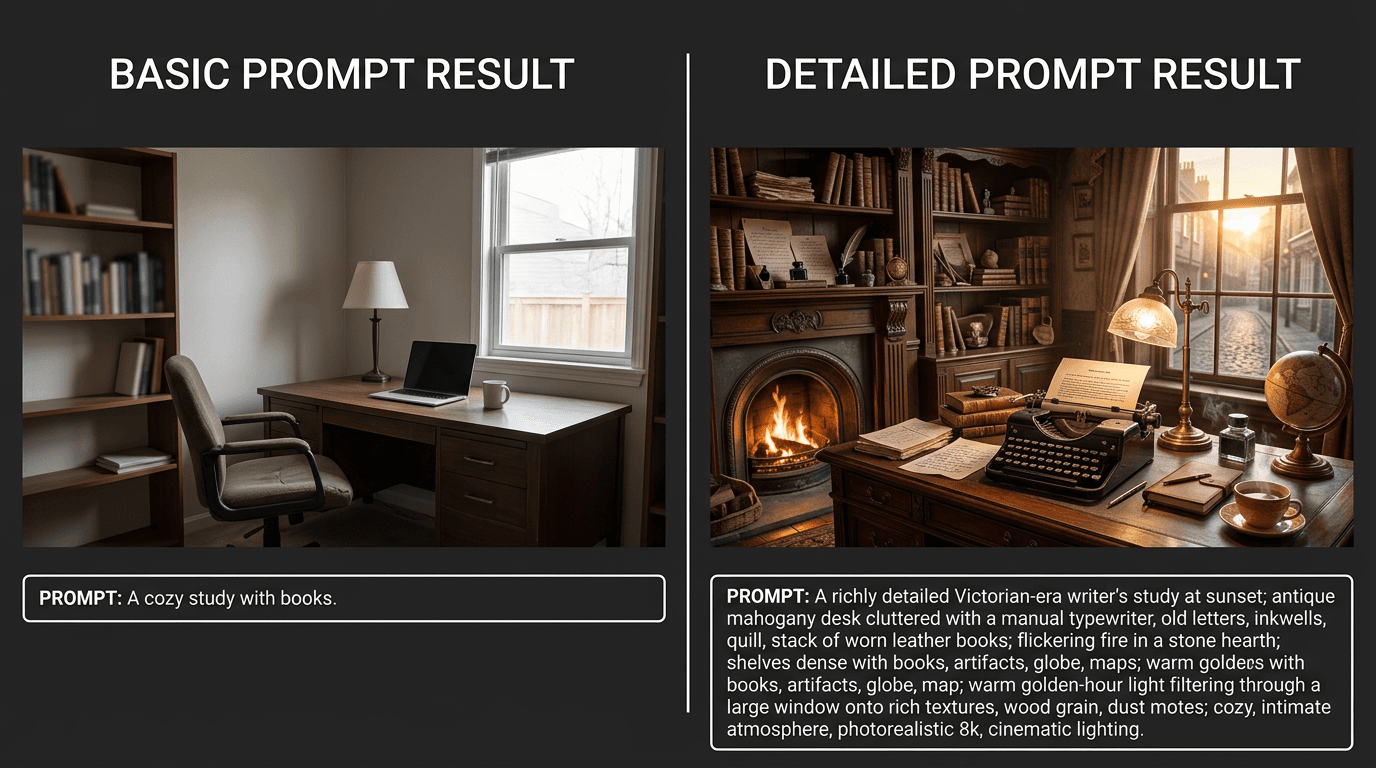
Generate with your detailed prompt. Then create a second version with a simpler prompt to see the difference. The detailed version should have better composition, lighting, and style.
STEP 4: Refine with keywords
Review your results and adjust: Not quite right? Add more specific keywords or adjust the order of your descriptions. Small changes in wording can produce dramatically different results.
- Too generic? Add style keywords like "editorial photography" or "Renaissance painting"
- Wrong mood? Change lighting words to "harsh shadows" or "soft diffused light"
- Poor composition? Add camera angles like "low angle" or "bird's eye view"
Tips for best results
💡 Use sensory language
Words like "rough texture", "soft fabric", "smooth glass" help the AI understand materials. "Glowing", "dusty", and "weathered" add realism.
💡 Reference photography terms
Photography keywords work great: "bokeh", "golden hour", "rim lighting", "motion blur", "long exposure". They tell the AI exactly how to render light and focus.
💡 Specify what you don't want
Add "no watermarks", "no text", or "no logos" to avoid unwanted elements. The AI pays attention to negatives.
💡 Study example prompts
Look at prompts from images you like on AI art platforms. Notice patterns in how successful creators structure their descriptions.
Style keyword reference

Ready to experiment?
Put your new prompt skills to work and create better AI images with Aura.
Start generating