


The easiest way to make a Polaroid photo is to start with a Polaroid-style template and replace the image inside the frame. In Picsart, templates already include the correct proportions, white borders, and spacing that give Polaroid photos their signature look.
Once your photo is in place, you can adjust its position, tweak colors, or add a small caption before exporting the final image. The process is quick, flexible, and designed to feel more like experimenting than designing from scratch.
Polaroid photos have a way of slowing things down. Even when they’re digital, they still feel personal, imperfect, and a little nostalgic. That familiar white frame and square image instantly bring back the look of instant film, which is why Polaroid-style visuals remain popular across social media and creative projects.
Learning how to make Polaroid photos today isn’t about perfectly recreating the past. It’s about borrowing that feeling and using it in a modern, flexible way. With Picsart, creators can make photo Polaroid designs in minutes, tweak them freely, and reuse them across Instagram posts, mood boards, or personal projects. No camera. No film. No pressure to get it right the first time.
This guide shows how to create Polaroid pictures using templates, and how to customize them so they feel natural and authentic rather than overly polished.
What is a Polaroid-style photo?
A Polaroid-style photo is less about technical perfection and more about recognizable details. The white frame is the first thing people notice, especially the thicker border at the bottom. The image itself is usually square or close to it, and the overall look feels casual – sometimes even a little rough around the edges.
Physical Polaroids come from instant cameras and film. Digital Polaroid designs copy the same visual language, just without the limitations. You still get the frame and the proportions, but you also get freedom. You can adjust colors, move elements around, and try different versions without wasting film.
That flexibility is why so many creators make Polaroid photos digitally. They’re easier to experiment with, easier to share, and much easier to adapt for modern platforms.
How to make Polaroid photos with Picsart templates
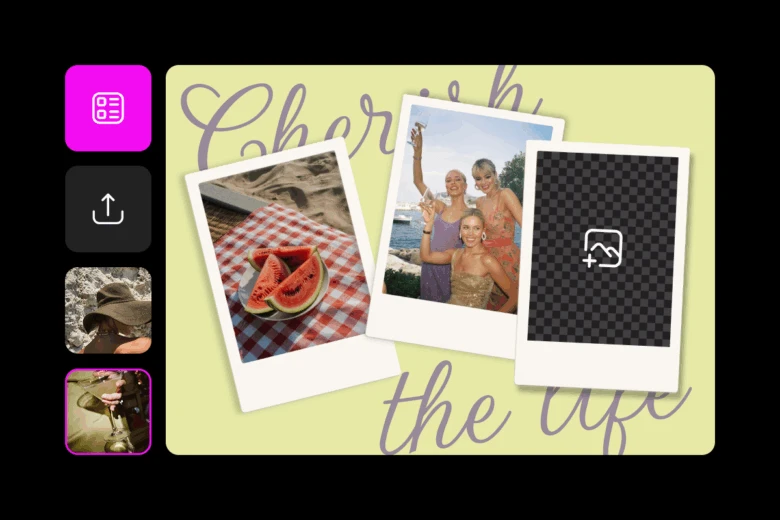
If you want the Polaroid look without overthinking it, Polaroid-style templates are the easiest starting point. The frame, spacing, and proportions are already set, so you’re not guessing your way through the layout.
Once that structure is in place, the focus shifts to customization – choosing the right photo, adjusting the look, and adding small details that make the Polaroid feel personal rather than generic.
- Add your photo to the frame
Once your template is open, upload your image and place it inside the Polaroid frame. Don’t aim for perfect alignment. Slightly off-center photos often feel more natural and closer to the instant-film look. - Adjust the colors to set the mood
Small color changes can completely shift how the Polaroid feels. Warmer tones tend to look softer and more nostalgic, while cleaner contrast gives the image a modern edge. Use Picsart’s color tools to experiment without locking yourself into one look too quickly. - Add text only if it adds meaning
Text isn’t required, but it’s a classic Polaroid detail. Some creators add dates, others include short captions or inside jokes. Using the Text Editor, you can add or tweak text while keeping the layout clean and uncluttered. - Choose simple, understated fonts
Font choice matters more than it seems. Simple fonts usually feel more believable than decorative ones. The goal isn’t to show off typography – it’s to support the photo without pulling attention away from it. - Decide between sharp or soft
When editing the photo itself, pick one direction. For a cleaner Polaroid look, improving clarity before final styling can help. The HD Photo Converter sharpens details while keeping the image natural. - Use blur sparingly for a nostalgic feel
If you’re leaning into nostalgia, a touch of softness works better. A light blur can recreate the instant-film effect, as long as it’s barely noticeable. - Stop before it feels overworked
More edits don’t make a better Polaroid. In most cases, stopping early gives you a stronger, more authentic result.
Creative ways to use Polaroid photos
Polaroid photos show up everywhere for a reason. On Instagram, they feel intentional without being too designed. One framed image can stand on its own or be layered into Stories for a scrapbook-style effect.
They’re also popular for digital scrapbooks and mood boards. Using the same Polaroid format across multiple images helps tie everything together visually, even when the photos themselves are very different.
Some creators also use Polaroid designs for digital gifts or simple prints. There’s something about the format that makes even everyday photos feel more meaningful.
FAQs about making Polaroid photos
How do you make a photo look like a Polaroid?
Use a Polaroid-style template with a white frame and square image area, then keep edits minimal.
Can you print regular pictures as Polaroids?
Yes. As long as the frame proportions stay intact and the image resolution is high, digital Polaroids can be printed.
Are Polaroid templates free to use?
Many Polaroid templates on Picsart are free, with additional premium options available.
What size should a digital Polaroid photo be?
Square or near-square images work best. Templates are already sized for common digital and print use cases.
Can I customize Polaroid templates in Picsart?
Yes. Photos, colors, text, and effects can all be edited while keeping the original structure.
Start creating Polaroid photos in minutes
Polaroid photos don’t need to be perfect to work. In fact, they usually work better when they aren’t. With digital templates, you can create Polaroid pictures quickly, try different versions, and stop when the design feels right instead of finished.
Start with a template, make small edits, and let the imperfections stay. That’s usually the part people respond to most.


