Face editor online: Adjust your appearance with face reshape
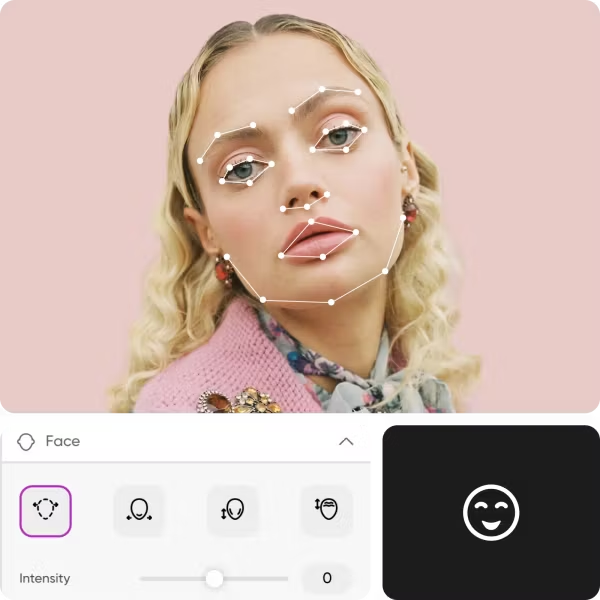

Instant face editing
Thanks to intuitive face reshaping sliders, you can adjust appearances in less than two minutes.
Easy asymmetry correction
Photo taken from a bad angle? Effortlessly fix any unwanted asymmetry in your photos with face reshaping.

Automatic face recognition
No need to select or trace a face in photos for accurate results. The face editor automatically recognizes and applies face edits.
How to edit faces in photos with Picsart
Select an image
Pick a photo you’d like to adjust.
Open face editor
Reshape
Choose styles
Download
More AI photo editing tools from Picsart


Face editor FAQ
Do I need any special skills to use the face editor?
How to reshape my face in a photo?
Follow these steps to reshape your face with Picsart:
- Upload your photo.
- Select the Face editor from the More Tools section.
- Use the reshaping sliders to edit your face.
- If you’re happy with the result, use the Export button to download.
Can I correct asymmetry on my face with Picsart’s online face editor?
Yes, absolutely. Just use the intuitive face reshaping sliders to adjust the symmetry of your face.
How to make my eyes pop in a picture with the face editor?
Just pick the face editor slider that targets the eyes and adjust it until you get the desired look. As a bonus step, you can use Picsart’s AI enhancer tool to get rid of any pixelation or blurriness and make your eyes pop more.
How can I slim my nose on a photo with the face editor online?
Pick the nose adjustment slider to get the nose shape that you’re after.


Retouch portraits for profiles, content, and campaigns
Pro
AI tools for everyday creative work.
- Access to all photo & video editing features
- Advanced background & object removal
- Parallel video generations with the world's most powerful AI video models
- Unlimited image generations with Flex.2 Klein
- 1-tap image enhancer
- Millions of stock photos & Getty video clips
- Selection of trendy fonts, text styles & stickers
- Thousands of premium templates
- Support for 3+ brand kits
- Bulk edit up to 50 images at once
- 100 GB of cloud storage
- Auto-generate content from your terminal or agent with the Picsart CLI
- Use Picsart inside Claude Code, Cursor, and ChatGPT via MCP — coming soon
- AI agents for multi-step workflows and batch generation — coming soon
Ultra
Heavy AI usage for creators & teams.
- Everything in Pro
- Early access to advanced AI features
- Leading AI models to design & automate workflows (Nano Banana, Veo 3, Seedance 2.0 & more)
- Parallel video generations with the world's most powerful AI video models
- Unlimited image generations with Flex.2 Klein
- Support for 10+ brand kits
- Add team seats
- Create ad variations and localize
- Track ads performance
- 2000 credits for API services
- Bulk edit up to 100 images at once
- 300 GB of cloud storage per seat
- Auto-generate content from your terminal or agent with the Picsart CLI
- Use Picsart inside Claude Code, Cursor, and ChatGPT via MCP — coming soon
- AI agents for multi-step workflows and batch generation — coming soon
Enterprise
Custom AI solutions for large organizations.
- Access to photo & video editor SDKs
- Mobile web SDK support
- Prepaid or pay-as-you-go creative APIs
- Embed professional-grade editing into your product or workflow
- Fully configurable editing experience
- White-label to match your brand
- Support for built-in marketing, e-commerce & printing use cases
- Bring your own assets: images, templates & fonts
- Enterprise-grade security, SLAs & support
- Dedicated account manager