logo

How to batch-process press photos for multi-format distribution
SKILLS5 minAdvanced

Transform 50 event photos into wire, web, print, and social packs in one pass with automated grading and metadata.

How to batch-process press photos for multi-format distribution

What you'll learn

  • How to set up output profiles for wire, web, print, and social formats
  • How to apply color grading and watermarks to entire batches
  • How to embed IPTC metadata automatically for press distribution
  • How to process hundreds of photos in parallel without manual work

What is press batch processing?

Press batch processing turns one set of event photos into multiple distribution-ready formats in a single automated run. You define output profiles for wire services, web articles, print publications, and social media. The system resizes, color-grades, watermarks, and tags each photo according to the target format. Fifty raw photos become 200 ready-to-send files in minutes. It's like having a photo editor who knows exactly what each outlet needs.

Common use cases

  • Press offices: Send event coverage to AP, Getty, Reuters, and in-house web team simultaneously
  • Sports photography: Deliver game photos in multiple formats before final whistle
  • Event coverage: Turn concert or conference photos into press kits, social posts, and archive files
  • News agencies: Process breaking news photos for wire, digital, and broadcast in one pass
  • Corporate communications: Distribute executive event photos to PR, social, and internal teams
  • Political campaigns: Push rally photos to press, web, and social channels instantly

Process your press photos step by step

STEP 1: Set up your batch folder

  • On web: Create a project folder → Add your raw photos → Create a batch-config.json file
  • On mobile: Not available — batch processing requires CLI access on desktop
View batch docs

STEP 2: Define output profiles

Create profiles for each distribution format:

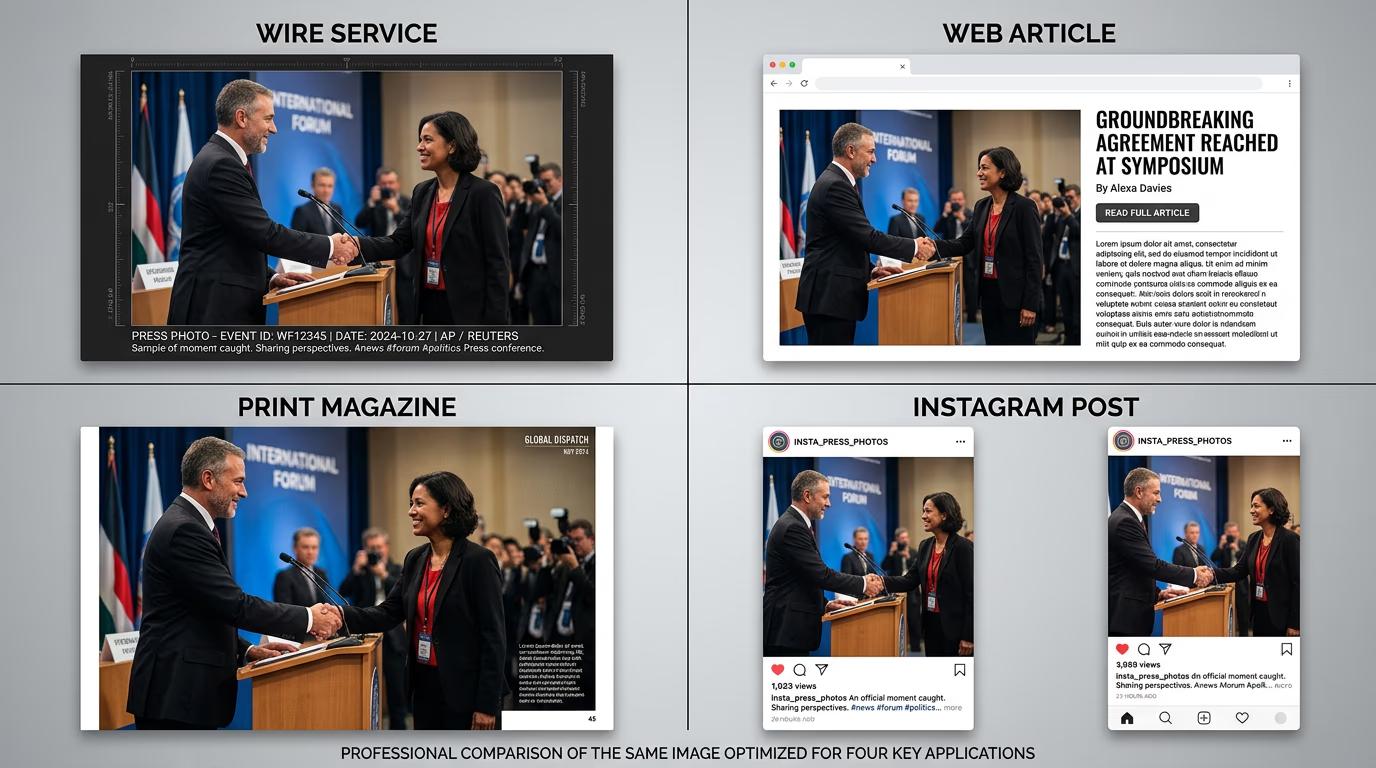
  • Wire service: 2000px max width, sRGB color, 300dpi, embedded IPTC metadata, no watermark
  • Web: 1200px width, sRGB, 72dpi, light compression, optional watermark
  • Print: Original resolution, CMYK color, 300dpi, no watermark, embedded color profile
  • Social: 1080×1080 or 1080×1920, sRGB, heavy compression, branded watermark, caption in metadata
STEP 3: Run the batch process

Execute your batch command. The system processes all photos in parallel, applying each profile. Progress shows in real-time. Files land in separate folders per format — wire/, web/, print/, social/. Metadata gets embedded automatically based on your config.

STEP 4: Verify outputs and distribute

Spot-check one file from each format folder: Not right? Adjust your profile settings and re-run. The batch system resumes from failures, so you only reprocess what broke.

  • Check dimensions match the target format specs
  • Verify metadata embedded correctly — photographer credit, caption, keywords
  • Confirm watermarks appear where expected and color grading looks consistent
Start batch processing

Tips for best results

💡 Save profiles as templates for recurring events

Once you dial in settings for wire, web, print, and social, save that config as a named template. Next event, run the same template with new photos. No need to recreate profiles every time.

💡 Use IPTC metadata for automatic captioning

Embed photographer name, event name, date, and keywords in IPTC fields. Wire services and DAMs read this data automatically. It saves manual tagging later and keeps attribution consistent across all formats.

💡 Set concurrency based on your machine

Batch processing runs photos in parallel. If you have 8 CPU cores, set concurrency to 6-7. More than that overloads your system. Less wastes time. Test with a small batch first to find your sweet spot.

💡 Name output folders by deadline, not format

If different formats have different delivery times, name folders by deadline instead of format — urgent/, end-of-day/, archive/. Makes it obvious what needs to go out first when you're under pressure.

Press format specifications

  • Wire services (AP, Reuters, Getty): 2000px max width, sRGB, 300dpi, JPEG quality 90+, IPTC metadata required
  • Web editorial: 1200-1600px width, sRGB, 72-96dpi, JPEG quality 80-85, optional watermark
  • Print publications: Original resolution, CMYK or Adobe RGB, 300dpi, TIFF or high-quality JPEG
  • Social media (Instagram, Twitter): 1080×1080 or 1080×1920, sRGB, 72dpi, JPEG quality 75-80, branded watermark
  • Internal archive: Original RAW files plus full-res JPEG backup, all metadata preserved

Frequently asked questions

Press batch processing converts one set of photos into multiple distribution formats in a single automated run. You define profiles for wire services, web, print, and social. The system resizes, color-grades, watermarks, and embeds metadata automatically. Fifty event photos become 200 ready-to-send files in minutes, each optimized for its specific outlet or platform.

Define metadata fields in your batch config file — photographer name, caption, event name, keywords, copyright. The system writes these into IPTC fields during processing. Wire services and digital asset managers read this data automatically. You can set global metadata for all photos or per-photo metadata from a CSV file.

Yes. Each output profile can have its own color grade. Use a neutral grade for wire services, a punchy grade for social media, and a print-optimized CMYK grade for magazines. Define the grade in the profile config. The batch processor applies it during conversion.

The system logs which files succeeded and which failed. Run the batch again with --resume. It skips files that already processed and picks up where it stopped. You don't reprocess the entire batch from scratch. Failed files get retried automatically.

Need faster distribution?

Stop manually resizing and tagging. Process hundreds of photos into distribution-ready formats in minutes.

Start batch processing