logo

How to build a brand identity kit workflow in Picsart Flow

WORKFLOWS5 minAdvanced

Create complete brand identity systems automatically—from logo concepts to color palettes, typography, and social templates in one workflow.

How to build a brand identity kit workflow in Picsart Flow

What you'll learn

  • How to generate cohesive brand identity systems from text descriptions
  • How to chain logo creation with color and typography tools
  • How to apply brand elements across multiple template formats
  • How to export complete brand kits ready for client delivery

What is a brand identity workflow?

A brand identity workflow is an automated system that generates all the visual elements of a brand from a single creative brief. Instead of manually creating logos, choosing colors, selecting fonts, and designing templates separately, the workflow produces a complete, cohesive brand system in one run. It's like having a design agency that can instantly translate brand strategy into deliverable assets, maintaining perfect consistency across every element because they all come from the same generative process.

Common use cases

  • Freelance designers: Generate multiple brand concepts for client presentations quickly
  • Startup founders: Create professional brand identity without hiring a design agency
  • Marketing teams: Produce brand variations for different products or campaigns
  • Design agencies: Speed up the concept phase and focus human time on refinement
  • Rebrands: Explore different visual directions before committing to one
  • Sub-brands: Maintain connection to parent brand while creating distinct identities

Build your brand workflow step by step

STEP 1: Open Flow and select brand template

  • On web: Go to picsart.com/create/workflows → "Create new workflow" → Choose "Brand identity kit" template
  • On mobile: Open Picsart → "+" → "Workflow" → "Templates" → Find "Brand kit generator"
Create brand workflow

STEP 2: Configure brand generation steps

Set up your workflow with these connected steps:

  • Input: Brand brief (business name, industry, values, target audience, style keywords)
  • Logo generation: AI creates 3-5 logo concepts based on brief
  • Color extraction: Pulls dominant colors from logos to build palette
  • Typography pairing: Selects fonts that match brand personality
  • Template application: Applies brand elements to social media, business card, and presentation templates
  • Export package: Outputs logo files, color codes, font names, and editable templates
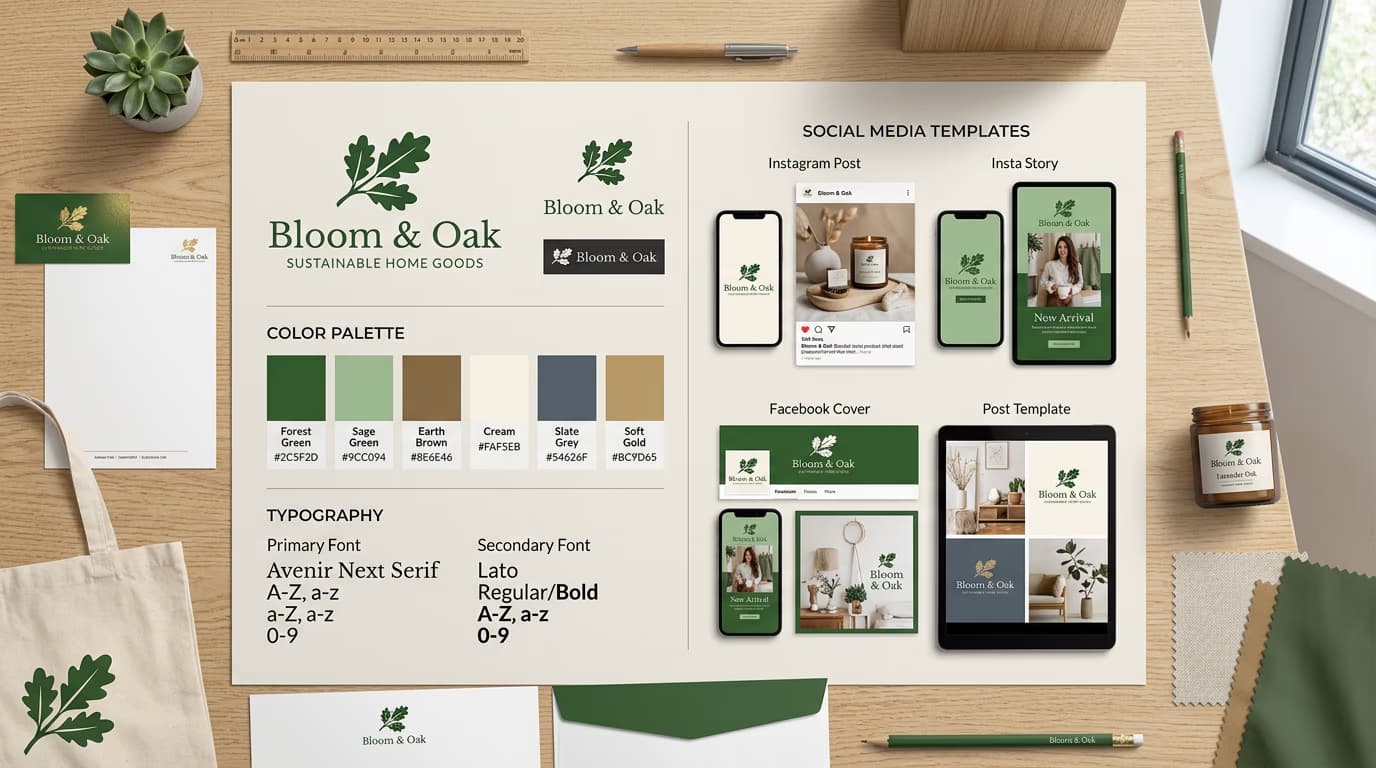
STEP 3: Run workflow with brand brief

Input your brand brief and run the workflow. The AI will generate logo options, extract a cohesive color palette, suggest typography, and apply everything to templates. This takes 2-3 minutes depending on how many variations you're generating.

STEP 4: Review and export brand assets

Check that all brand elements work together: Not cohesive? Adjust your brand brief or regenerate specific elements. When everything aligns, export the complete brand kit with all assets organized and ready to use.

  • Verify logos are distinctive and work at different sizes
  • Confirm color palette has good contrast and feels on-brand
  • Check that typography is readable and matches brand personality
  • Review templates to ensure brand elements are applied consistently
Build brand kit

Tips for best results

💡 Write detailed brand briefs

The more specific your input, the better your results. Instead of "modern tech company," try "B2B SaaS for healthcare, trustworthy but approachable, primary users are hospital administrators aged 35-50." Specific details about industry, audience, and values help the AI generate appropriate brand elements.

💡 Generate multiple variations

Configure your workflow to produce 3-5 logo directions with corresponding color and typography options. This gives you and your clients choices without doing all the work manually.

💡 Build in brand guardrails

If you're designing for a specific industry (like healthcare or finance), add constraints to your workflow to ensure results meet industry standards. For example, specify accessible color contrast ratios or professional typography styles.

💡 Save successful brand patterns

When you generate a brand kit that works well, save that workflow configuration as a template. Over time, you'll build a library of proven patterns for different industries and brand personalities.

💡 Combine AI with human refinement

Use the workflow to handle the heavy lifting of initial concept generation, then spend your creative energy on refinement. Adjust colors, tweak typography, and add unique details that make the brand memorable.

Brand identity deliverables checklist

  • Logo files: Full color, black, white, and icon versions in SVG, PNG, and JPG formats
  • Color palette: Primary, secondary, and accent colors with HEX, RGB, and CMYK values
  • Typography system: Headline and body fonts with size scales and usage guidelines
  • Social media templates: Instagram post/story, Facebook cover, LinkedIn banner, Twitter header
  • Business collateral: Business card, letterhead, email signature templates
  • Presentation deck: Branded slide template with title, content, and image layouts
  • Brand guidelines: Simple one-page reference showing logo usage, colors, and typography

Frequently asked questions

Trademark protection covers how you use a logo to identify your business, not who created the design. You can trademark an AI-generated logo as long as you're the first to use it in commerce for your specific industry and products. However, you should modify or refine AI-generated logos to make them unique before filing for trademark protection.

Connect your workflow steps so outputs from one step become inputs for the next. For example, feed generated logos into color extraction, then use those colors to create templates. This ensures all elements derive from the same source. Also write detailed, consistent brand briefs—vague or contradictory descriptions produce disconnected results.

Yes, every step in a Picsart workflow is editable. After the workflow generates templates, you can open them in the editor to adjust layouts, change fonts, or add custom elements. You can also modify the workflow itself to use specific template designs or apply brand elements differently.

A workflow handles repetitive tasks and generates options quickly, but it won't have strategic insights about your business or market. Use workflows to explore possibilities fast, generate multiple directions, or produce consistent assets. Hire a designer when you need strategic thinking, unique creative concepts, or refinement of subtle details that make brands memorable.

Ready to automate brand design?

Build complete brand identity systems in minutes, not weeks.

Create brand workflow