


Contents
Your Instagram profile picture is your digital first impression – the face of your online presence. It’s not just a photo; it’s your personal brand! In the sea of social media content, a striking profile picture is your chance to stand out, make a bold statement, and leave a lasting impression. Don’t be a tuna – be a butterflyfish!
This article dives into why it’s essential to have a creative profile picture and how to curate one that not only captures attention but also reflects your unique style. Here are the best Instagram profile picture ideas!
How to change your profile picture on Instagram
If you want to replace your outdated profile photo and make a statement with your new one, you have to know how to first.
Luckily, it’s a breeze.
- Navigate to your profile and tap on your current profile picture.
- Select “Change Profile Picture,” and choose the photo you want from your camera roll.
Remember, your profile picture is usually the first thing people see, so make it count. Say cheese!
Best practices for an eye-catching Instagram photo
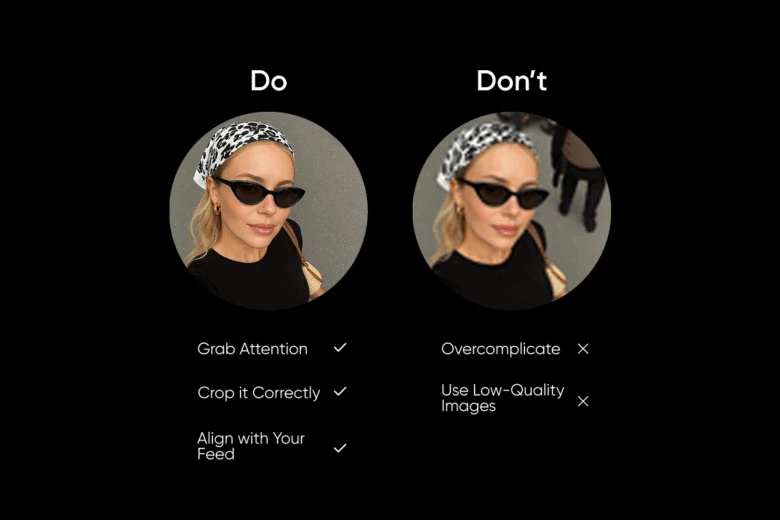
When it’s time to choose the best profile picture for your Instagram account, there are a few dos and don’ts to keep in mind. Here are some tips to ensure your profile picture makes a strong impression:
Dos:
- Grab Attention: Use bold colors or visually interesting backgrounds to catch the eye.
- Crop it Correctly: Pick a close-up crop to ensure your face is the focal point. You don’t want anyone squinting to see your face!
- Align with Your Feed: Have you ever seen an Instagram feed that just looks satisfying? It’s because that person likely has a theme. Choose a profile picture that complements the overall aesthetic and color patterns of your Instagram feed.
Don’ts:
- Overcomplicate: Keep it simple and avoid cluttered backgrounds or distracting elements.
- Use Low-Quality Images: Make sure your profile picture is clear, crisp, and high-resolution.
Creating the perfect Instagram profile picture
To create a good profile picture for Instagram, consider using our array of editing tools!
With Picsart, you can easily amplify and enhance your photos, experiment with different backgrounds, and add creative effects to make your profile picture pop.
Utilize Picsart for editing
Picsart offers a variety of features to help you come up with Instagram profile picture ideas. Whether you’re looking to remove backgrounds, add filters, or create custom graphics, we have you covered.
Using ready-made Instagram templates
If you’re short on time or inspiration, consider using our ready-made Instagram templates. They allow you a quick and easy way to create professional-looking profile pictures that align with your style and personal aesthetic.
Creating perfect Instagram profile pictures with Picsart
To show your potential followers what you’re all about, you’ll need to follow our simple yet effective profile picture tips.
1. Choose your own photo
In order to leave a lasting impression, it’s vital that your followers see YOU. But remember that a well-executed photoshoot isn’t just about capturing flattering angles; it’s about conveying your essence in a single image. By understanding effective profile picture ideas for Instagram, you can captivate your viewers. So, grab your camera, strike a pose, and let your authenticity shine through!
2. Use editing tools
Never underestimate the power of editing when it comes to Instagram profile pic ideas. Elevating your visuals shows users you’re serious about your image! Cropping is an easy way to add a unique flair to your profile. Learn how to seamlessly crop your photos in three steps using Picsart.
3. Upload your photo
Choose your own picture or select one from the #FreeToEdit library.
4. Apply the crop tool
Scroll through the editor panel at the bottom of your screen, then choose “Tools”, followed by “Crop Tool”. Customize your image.
5. Save your changes
Click “Apply” at the top right of your screen. Now you’re ready!
Pick the right background
When selecting the perfect Instagram profile photo, consider the impact of your background. Choosing a neutral backdrop can work wonders for your image! A neutral background eliminates distractions, keeping the focus squarely on you. It creates a clean, polished look that enhances your overall aesthetic.
Picsart’s background changer makes uploading a custom background a piece of cake. To change your background, follow these steps:
On the web:
- Visit the background changer and upload your photo.
- Use the “Remove BG” button on the top toolbar to easily remove the background from your picture.
- Add your new background. Choose from a variety of options based on your theme.
- Modify your photo using Picsart’s array of beginner-friendly editing tools if needed.
- Click “Export” and then “Download” to save your edited photo. Voila!
On mobile:
- Open the Picsart app. Tap the + button at the bottom of the screen. Select a photo from your camera roll or search the “FreeToEdit” library in the search bar at the top.
- Tap “Remove BG” on the bottom toolbar to automatically remove the background from your image.
- Add a new background color or choose from the gradient options to add flair to your new photo.
- Select “Apply” to save your changes. If needed, edit your photo further with Picsart’s other editing tools.
- Tap “Next”. Then, choose “Save” to download your new image. You’re all done!
You may even want to import your own background. By doing this, you supply your photo with personality and creativity, setting it apart from the crowd. Whether it’s a scenic landscape, a vibrant cityscape, or a whimsical pattern, your chosen background reflects your individual style and interests. Picsart’s background changer makes uploading a custom background a piece of cake.
- Add personal touches
It’s all about making you stand out among the rest when you’re making your profile picture. That’s why using personalized effects can help draw attention to your page. With Picsart’s online photo editor, you can easily add professional effects to your picture in just a few seconds.
- Consider branding
When it comes to Instagram profile photo ideas, many freelancers and small business owners choose to feature their brand logo. It’s a savvy strategy to boost brand recognition and showcase your brand’s sole identity! If you’re starting out and need a logo design, these customizable logo templates are the perfect solution.
- Size matters
To create aesthetic profile pictures for Instagram, keep in mind that they have to be the right size. Image sizes that are too large or small will either be blurry or look “off”, affecting your social media presence. Instagram profile pictures display at 110 x 110 pixels.
Your Instagram profile picture is a reflection of you and your unique brand. By following these tips and taking advantage of Picsart’s editing tools, you can create a profile picture that captures attention, tells your story, and leaves a lasting impression. So, go ahead – unleash your creativity and make your mark on the digital world!


