logo

How to balance speed and quality in AI video models

VIDEO MODELS4 minIntermediate

Learn when to use fast models for testing and premium models for final output.

How to balance speed and quality in AI video models

What you'll learn

  • Understand the speed vs quality tradeoff across video models
  • Choose fast models for rapid iteration and testing
  • Know when to invest in premium models for final output
  • Save credits by prototyping cheaply and rendering expensively

What is the speed vs quality tradeoff?

AI video models offer different balances between generation speed and output quality. Fast models generate in seconds but with less polish. Premium models take longer but deliver cinematic results. The key is knowing which to use when. Think of it like sketching vs painting — you sketch quickly to explore ideas, then paint slowly to create the final piece.

Common use cases

  • Concept testing: Use fast models to try multiple prompts and find the right direction
  • Client previews: Generate quick drafts for approval before investing in high-quality renders
  • Social media drafts: Test timing and composition with fast models before final export
  • Final deliverables: Use premium models for client work, portfolio pieces, and public content
  • Iterative refinement: Prototype with fast models, refine prompts, then render final with premium
  • Batch production: Mix fast models for volume work and premium models for hero shots

Optimize your workflow step by step

STEP 1: Start with fast models

  • On web: Go to picsart.com/video-models → Select a fast model (Veo 3.1 Fast, Pika Frames)
  • On mobile: Open Picsart → AI Video → Choose "Fast" or "Quick" model options
Open video models

STEP 2: Test your concept

Generate multiple variations to explore your idea:

  • Try 3-5 different prompts with the same fast model to find what works
  • Test different camera angles, subjects, or motion descriptions
  • Review results quickly — fast models let you iterate in minutes, not hours
  • Identify the strongest concept before investing in quality
  • Note which prompt elements produce the best results for later refinement
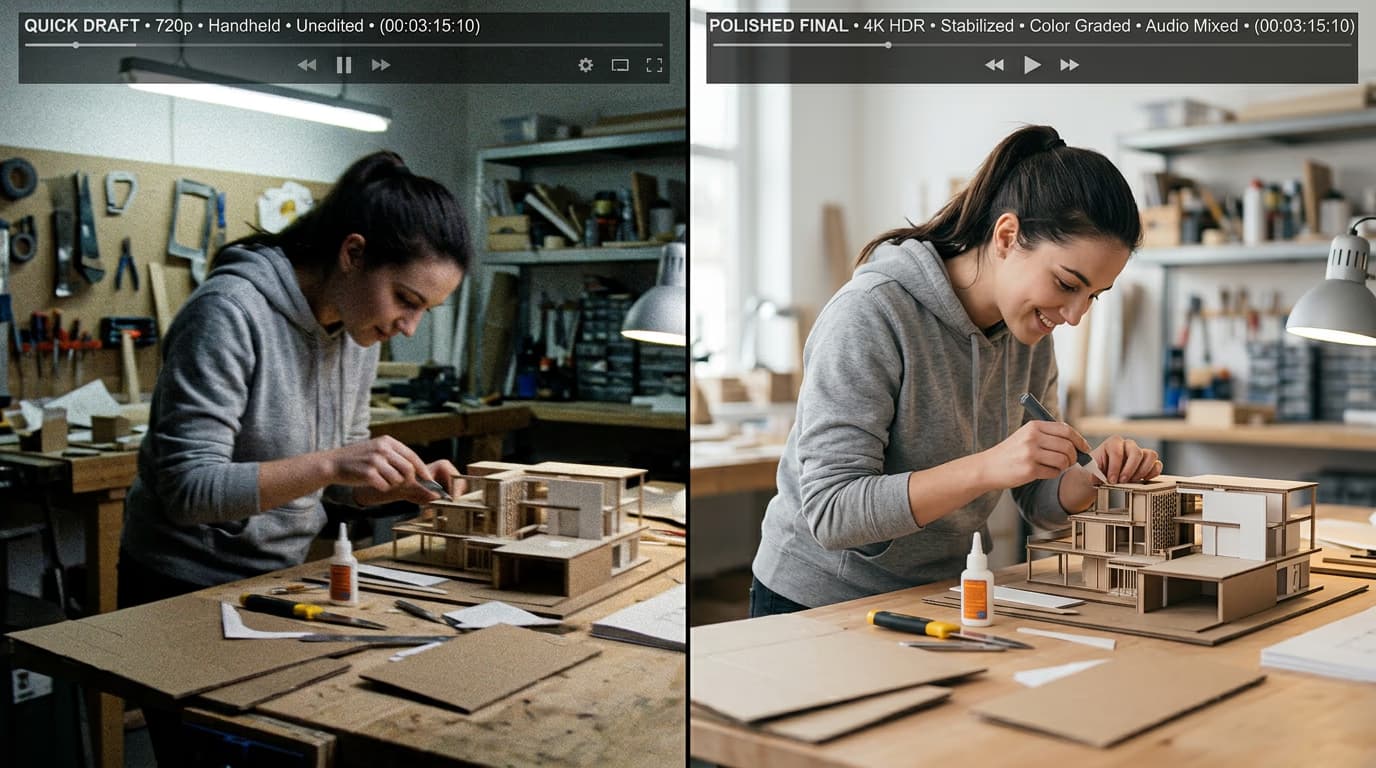
STEP 3: Switch to premium for finals

Once you've nailed your concept with fast models, switch to a premium model like Veo 3.1, Sora 2, or Runway Gen 4. Use the exact same prompt that worked best in testing. Premium models will take longer but deliver cinematic quality, realistic physics, and polished details.

STEP 4: Compare and export

Review your premium render against the fast draft: Not perfect? Generate one more variation with the premium model rather than returning to fast models — you're refining, not exploring anymore.

  • Check if the quality jump justifies the extra time and credits
  • Look for improved realism, smoother motion, and better lighting
  • Verify the premium model kept the creative elements that worked in the draft
Create AI video

Tips for best results

💡 Use the 80/20 rule for model selection

Spend 80% of your generation time on fast models exploring concepts, then 20% on premium models polishing the winners. This maximizes creative exploration while keeping costs down and delivers better final results than going straight to expensive renders.

💡 Match speed to project stage

Early concept phase? Fast models only. Client review? Medium-quality models for realistic previews. Final delivery? Premium models. Don't waste premium credits on exploratory work, and don't submit fast drafts as finished work.

💡 Keep the same prompt when switching models

When you move from fast to premium, use the exact same prompt that worked in testing. This isolates the quality variable and ensures you get the concept you validated, just with better execution.

💡 Track your credit efficiency

Calculate cost per finished video by adding draft credits plus final render credits. If you're spending more on drafts than finals, you're over-iterating. If you're skipping drafts and re-rendering finals multiple times, you're under-prototyping.

Speed vs quality comparison

  • Fast models (Veo 3.1 Fast, Pika): Generation: 15-45 seconds. Quality: Good for drafts, previews, social posts. Best for: Concept testing, rapid iteration, high-volume work.
  • Medium models (Kling 3.0, Seedance): Generation: 1-3 minutes. Quality: Polished enough for most social and web use. Best for: Client previews, standard content, when speed and quality both matter.
  • Premium models (Veo 3.1, Sora 2, Runway Gen 4): Generation: 3-10 minutes. Quality: Cinematic, commercial-grade. Best for: Final deliverables, client work, portfolio pieces, anything public-facing.
  • When to prototype: Use fast models when: exploring new ideas, testing prompts, making concept selections, learning what works, generating high volumes.
  • When to go premium: Use premium models when: you have a validated concept, creating final deliverables, quality is non-negotiable, credits aren't a constraint, work is client-facing.

Frequently asked questions

Fast models like Veo 3.1 Fast or Pika generate in 15-45 seconds, while premium models like Veo 3.1 or Sora 2 take 3-10 minutes. That's roughly 5-10x faster, which adds up quickly when testing multiple concepts. For ten test renders, fast models save you 30-90 minutes compared to using premium models for exploration.

Yes, especially in motion smoothness, lighting realism, and fine details. Fast models deliver solid drafts that clearly communicate your concept. Premium models add cinematic polish, realistic physics, and professional-grade finishing. For social media or internal reviews, fast models often suffice. For client work or public content, premium quality is worth the investment.

You can, and for certain use cases like quick social posts or internal content, fast models work fine. But if your video represents your brand publicly, goes to a client, or sits in your portfolio, premium models are worth the extra time. Think of fast models as good enough for most things, premium as necessary for important things.

Aim for 3-5 fast renders to explore different approaches, then pick the strongest concept for premium rendering. More than 5-7 tests usually means you're iterating without direction. Fewer than 3 means you might miss better options. Find the sweet spot where you've validated your concept without overthinking it.

Ready to optimize your workflow?

Start testing concepts with fast models and finish strong with premium quality.

Browse video models