Localize campaigns across markets with Localize Campaign skill
What you'll learn
What is the Localize Campaign skill?
Common use cases
Localize your campaign step by step
STEP 1: Download and import the skill
- On web: Go to picsart.com/cli/#skills-marketer-localize-campaign → Download skill → Unzip to your skills folder
- On AI agent: Point your Claude Code, Codex, or Cursor MCP server to the downloaded skill directory
STEP 2: Configure localization parameters
Define your source campaign and target markets:
- Source assets: Upload your base campaign creative (images, copy, layout templates)
- Target markets: Specify which regions to localize for — include language, cultural preferences, and visual style notes
- Translation settings: Define copy to translate (headlines, body, CTAs) and provide brand voice guidelines for each market
- Talent swapping: Specify diversity requirements and regional representation preferences for each market
- Regional imagery: Define which elements to adapt — backgrounds, props, settings, cultural symbols
- Brand consistency rules: Set which elements must remain identical across markets (logo, colors, core product imagery)
STEP 3: Generate localized assets
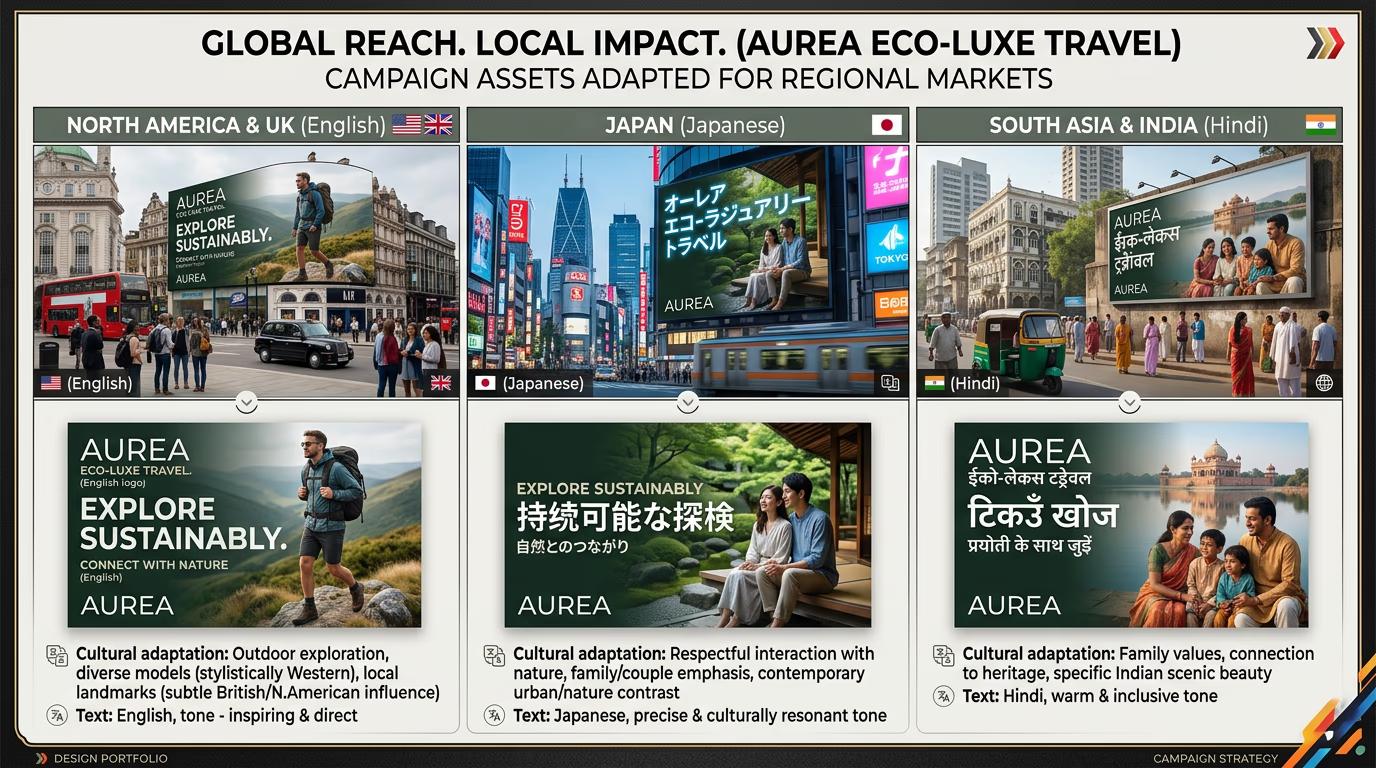
Run the skill and let it create market-specific versions. The AI will translate copy while preserving brand voice, swap talent to match regional demographics, adapt backgrounds and cultural elements, maintain consistent layout and brand elements, and organize assets into folders by market. This takes 90-180 seconds depending on market count.
STEP 4: Review and refine
Check that each market version meets cultural and brand standards: Not perfect? Regenerate specific markets with adjusted parameters, or provide more detailed cultural guidelines and run again.
- Verify translations read naturally and match brand voice
- Check that talent and imagery feel authentic to each market
- Confirm brand elements (logo, colors, core product) remain consistent
Tips for best results
💡 Provide cultural context for each market
Don't just list countries — include cultural preferences, visual sensitivities, and local holidays or events. "Japan: prefer minimal text, avoid red-white color combos (funeral association), cherry blossoms resonate well" gives better results than just "Japan."
💡 Define what stays consistent
Specify which brand elements must remain identical across all markets — logo placement, brand colors, product photography angles. This prevents the AI from inadvertently changing core brand assets that should stay global.
💡 Start with fewer markets
Localize for 2-3 key markets first to validate your cultural guidelines and brand consistency rules. Once you approve those versions, scale to additional markets. This saves credits if you need to iterate on localization approach.
💡 Review with native speakers
AI translation is good but not perfect. Have native speakers or local teams review copy before launching. They'll catch nuances, idioms, or cultural references that don't translate directly.
Frequently asked questions

Ready to go global?
Download the Localize Campaign skill and adapt your creative across multiple markets.
Get the skill