Improve video quality instantly with a Video Enhancer
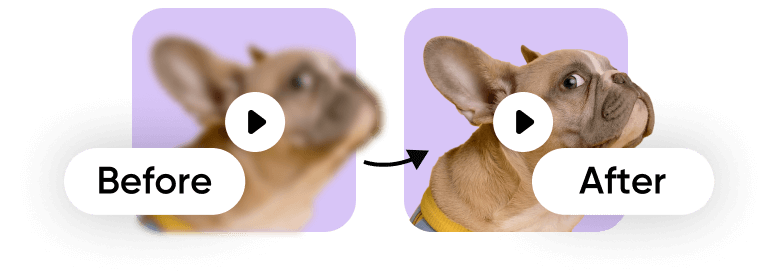 Video Enhancer
By uploading a file, you agree to Picsart’s Terms of Use and Privacy Policy.

Enables free video enhancement
Unlocks free access to AI-powered video enhancement, letting you raise video quality instantly without upfront cost.

Supports one-click quality improvement
Delivers automatic video quality results in one click, without timelines, filters, or technical steps.
Uses AI for clearer video
Applies AI analysis to every frame to produce clearer visuals and higher resolution automatically.
How to enhance video quality with AI?
Upload your video
Upload your video using Browse files to select a file from your device and start the enhancement process.
Apply AI enhancement
Preview the result
Edit or download your video
higher productivity with AI-powered video tools
saved per video project
more video output without extra resources
lower costs with AI video workflows
A Video Enhancer for every type of content
Use this Video Enhancer to prepare videos for fast publishing and flexible workflows, including export-ready formats that support html export, html snippet export, and design to html tool use cases when needed.
Clean up short-form videos quickly so every frame looks sharp, clear, and ready for scrolling audiences.
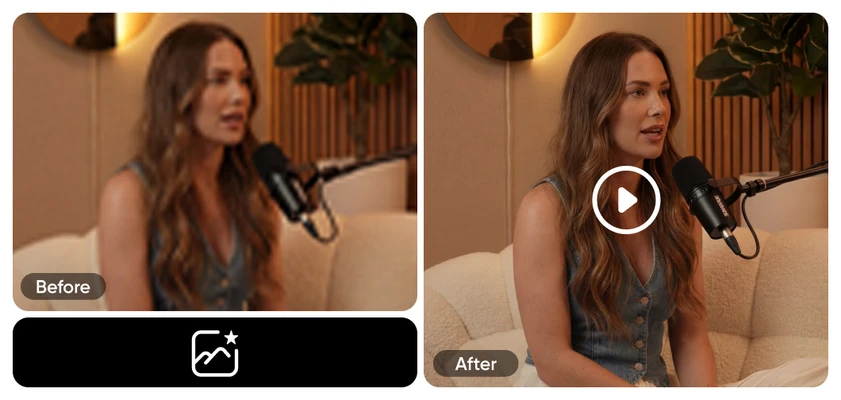
Build cleaner and higher-quality video
Automatically raise overall video quality.
Bring out cleaner details in every frame.
Smooth grain, blur, and compression issues.
Prepare videos for modern social formats.
Get results with a single action.
Work without timelines or technical adjustments.
Handle clips and full-length content equally well.
Continue into editing and exporting tools with ease.
See results in seconds, not hours.
Fit solo creators and growing teams alike.
Keep footage realistic and visually consistent.
Apply uniform results from start to finish.
Video Enhancer FAQ
How can I improve video quality?
How does AI enhance video quality?
AI enhances video quality by reviewing each video frame and applying automatic adjustments such as noise reduction, sharper details, balanced colors, and video upscaling. This process ensures consistent results across the entire clip, even when working with low-quality footage.
Can I enhance low-resolution videos?
Yes. A video resolution enhancer is designed to work with low-resolution videos by improving clarity and visual balance. While it can't recreate missing details, it helps make footage cleaner, sharper, and more watchable across modern screens and platforms.
Is Picsart's AI Video Enhancer free to use?
Picsart's AI Video Enhancer is free to start, allowing you to enhance video quality online without an upfront cost. You can test how the tool works on your footage before deciding whether to continue with additional creative or editing features.
What types of videos can I enhance?
You can enhance video content for social media clips, video ads, product demos, marketing videos, presentations, and longer-form projects. The tool works for both short and long videos, making it suitable for creators, marketers, and teams.
How is video enhancement different from video editing?
Video enhancement focuses on automatically improving visual quality, such as clarity and resolution. Video editing involves manual changes like trimming clips, adding text, or applying effects. Enhancement often comes first, followed by editing to finalize the video.
How to enhance video quality online?
To enhance video quality online, upload your file to an AI Video Enhancer, apply automatic enhancement, and export the improved video. This process removes the need for downloads or advanced software while delivering fast, consistent results.