
Convert PSD to JPG
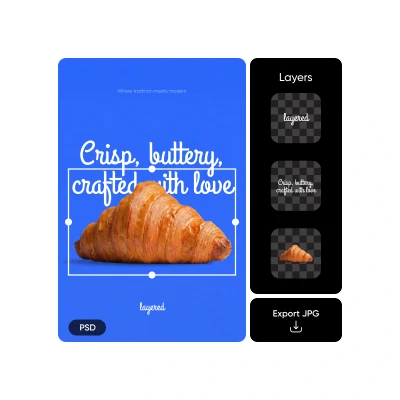
Open PSD online and turn layered Photoshop files into share-ready JPG images directly in your browser - no Adobe software, downloads, or installs required.
Edit PSD before exporting to JPG
Edit PSD online by adjusting layers, text, images, and effects before flattening your design into a clean, high-quality JPG or PNG.

Export PSD files as JPG
Export Photoshop (PSD) files as JPG images that are lightweight, widely supported, and ready for sharing across websites, email, social media, and design handoffs.
How to convert PSD to JPG
Import your PSD
Upload your PSD file and let Picsart automatically process it so it’s ready for editing on the canvas.
Preview & confirm
Edit on canvas
Export in a new format
Convert PSD to JPG for every workflow
From creative teams to clients, this PSD to JPG Converter fits seamlessly into real-world workflows - turning layered designs into accessible images whenever speed, compatibility, and clarity matter.
Convert PSD to JPG to deliver finalized visuals that are easy to review, share, and implement across teams.
Powerful features for converting PSD to JPG
Add Photoshop files directly from your device or browser.
View and work with PSDs without Adobe software installed.
Review individual layers before making changes or exporting.
Adjust text, images, colors, and layers before export.
Export layered designs as clean, share-ready JPG images.
Turn editable files into accessible image formats instantly.
Maintain sharp details, accurate colors, and visual clarity.
Work fully online with no downloads or installations.
Convert and edit PSD files across devices seamlessly.
Download converted images in just a few clicks.
Save or share JPG files across platforms instantly.
Use PSD to JPG alongside Picsart’s full editing toolkit.
PSD to JPG FAQ
What is a PSD file?
How do I convert PSD to JPG?
Upload your PSD file to Picsart, preview or edit the layers if needed, choose Export, select JPG, and download your image instantly - all online.
Can I open PSD files without Photoshop?
Yes. Picsart lets you open PSD files directly in your browser, so you can view and work with them without installing Adobe Photoshop.
Does converting PSD to JPG flatten layers?
Yes. When you convert a PSD to JPG, all layers are flattened into a single image to ensure compatibility and easy sharing.
Can I edit a PSD before exporting?
Yes. You can edit text, images, colors, and layers before exporting using Picsart’s online tools, including the full Photo Editor.
What formats can I export besides JPG?
In addition to JPG, you can export designs as PNG, PDF, WEBM, MP4, and HTML.
Is this PSD to JPG Converter free?
Picsart offers free tools for converting and exporting PSD files, with advanced features available through paid plans.
Does image quality change after conversion?
Picsart exports high-quality JPG images optimized to preserve clarity, color accuracy, and sharp details.
Can I use PSD to JPG for print?
Yes. You can export high-resolution JPG files suitable for print previews and layout reviews before final production.
Is Picsart a Photoshop alternative for exports?
For opening, editing, and exporting PSD files online, Picsart provides a flexible, browser-based alternative focused on fast, accessible exports.