AI மூலம் படங்களை சுத்தம் செய்
AI-powered image cleaner
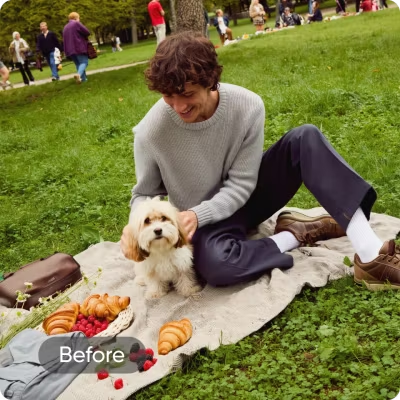
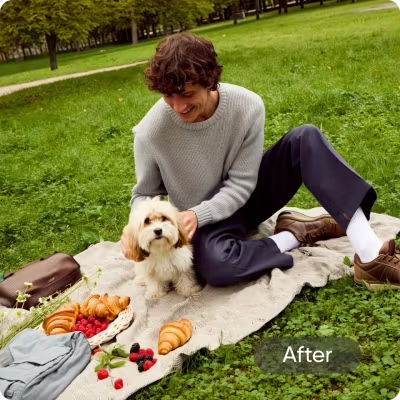
All you have to do is brush over an object and let the AI image cleaner work its magic to cleanup your photos.

Instantly remove any distraction
Reclaim control over your photos by quickly removing unwanted objects, text, and people.

Enjoy 100% precision
No editing skills? No problem. Use our image cleaner online for 100% high-quality photo cleanup.
How to clean up a picture
Upload your image
Open the object remover tool and choose the image you’d like to clean up.
Remove the object
Customize your edit
Κατέβασμα
AI cleanup tool for picture-perfect edits
Clean up your shots by removing random people with one tap. Let AI fill in the background seamlessly and fast.

Everything you need to clean up any photo
Automatically detect and erase unwanted elements from any photo in seconds.
Replace erased objects with new ones using smart AI suggestions tailored to your image.
Export your cleaned-up images in crisp, high-res quality - perfect for print or digital.
Get started for free with powerful AI cleanup tools.
Smooth, rebuild, or enhance messy backgrounds while keeping your subject sharp and natural.
Ensure smooth, natural edges around cleaned-up areas so edits blend seamlessly into the photo.
Remove blemishes, flyaways, or background distractions for clean, polished selfies and headshots.
Access a full suite of AI features for editing, enhancing and transforming your photos.
Discover more AI tools


Photo cleaner FAQ
What is Picsart’s AI image cleaner, and how does it work?
Can I use the cleanup feature even if I'm not a professional photographer?
Absolutely! You don’t need any technical skills to cleanup pictures online with Picsart, and it only takes a few seconds to remove imperfections from your photo.
What types of imperfections and distractions can the cleanup pictures feature handle?
Picsart’s online photo cleaner can easily remove unwanted text, objects, and people from photos.
How can I get started with Picsart’s AI image cleaner?
Simply upload your picture to the Remove Object tool and brush over any objects you’d like to remove. After cleaning pictures, use our beginner-friendly photo editor to make any further edits.
Explore more editing tools


ஒவ்வொரு கிரியேட்டர் திட்டத்திற்கான படங்களையும் சுத்தம் செய்யவும்
Pro
Εργαλεία τεχνητής νοημοσύνης για καθημερινή δημιουργική εργασία.
- Πρόσβαση σε όλες τις λειτουργίες επεξεργασίας φωτογραφιών και βίντεο
- Προηγμένη αφαίρεση φόντου και αντικειμένων
- Παράλληλες γενιές βίντεο με τα πιο ισχυρά μοντέλα βίντεο AI στον κόσμο
- Απεριόριστες δημιουργίες εικόνων με το Flex.2 Klein
- Βελτιωτής εικόνας με 1 άγγιγμα
- Millions of stock photos & Getty video clips
- Επιλογή από μοντέρνες γραμματοσειρές, στυλ κειμένου και αυτοκόλλητα
- Χιλιάδες premium πρότυπα
- Support for 3+ brand kits
- Bulk edit up to 50 images at once
- 100 GB of cloud storage
- 15+ creative AI agents that plan, execute, and deliver — across video, brand, localization, and more
- Δημιουργήστε αυτόματα περιεχόμενο από το τερματικό ή τον εκπρόσωπό σας με το Picsart CLI
- Use Picsart inside Claude Code, Cursor, and ChatGPT via MCP
Ultra
Εντατική χρήση τεχνητής νοημοσύνης από δημιουργούς και ομάδες.
- 140+ leading AI video, image, and audio models (Kling 3.0, Nano Banana, Veo 3, Seedance 2.0 & more)
- Παράλληλες γενιές βίντεο με τα πιο ισχυρά μοντέλα βίντεο AI στον κόσμο
- Πρώιμη πρόσβαση σε προηγμένες λειτουργίες τεχνητής νοημοσύνης
- Απεριόριστες δημιουργίες εικόνων με το Flex.2 Klein
- Δυνατότητα αγοράς πρόσθετων μονάδων που δεν λήγουν ποτέ
- Έως και 6,5 εκατομμύρια βίντεο Getty
- Bulk edit up to 100 images at once
- Support for 10+ brand kits
- Create ad variations & localize
- Παρακολούθηση απόδοσης διαφημίσεων
- Προσθήκη θέσεων ομάδας
- 300 GB of cloud storage per seat
- 15+ creative AI agents that plan, execute, and deliver — across video, brand, localization, and more
- Δημιουργήστε αυτόματα περιεχόμενο από το τερματικό ή τον εκπρόσωπό σας με το Picsart CLI
- Use Picsart inside Claude Code, Cursor, and ChatGPT via MCP