How to build an AI influencer workflow with Picsart Flow
What you'll learn
What is Picsart Flow?
Common use cases
Build your AI influencer workflow step by step
STEP 1: Open Picsart Flow
- On web: Go to picsart.com/flow → Click "Start creating" or choose a template
- On mobile: Open Picsart app → Navigate to "Flow" section → Tap "+" to create new workflow
STEP 2: Choose your niche and AI models
Select the influencer type and connect AI models that match your style:
- Fashion/beauty: Use Nano Banana 2 for photorealistic portraits with style consistency
- Lifestyle/travel: Combine image generation with background replacement nodes
- Fitness/wellness: Add pose control nodes for specific body positions
- Multiple niches: Connect different model chains for varied content types
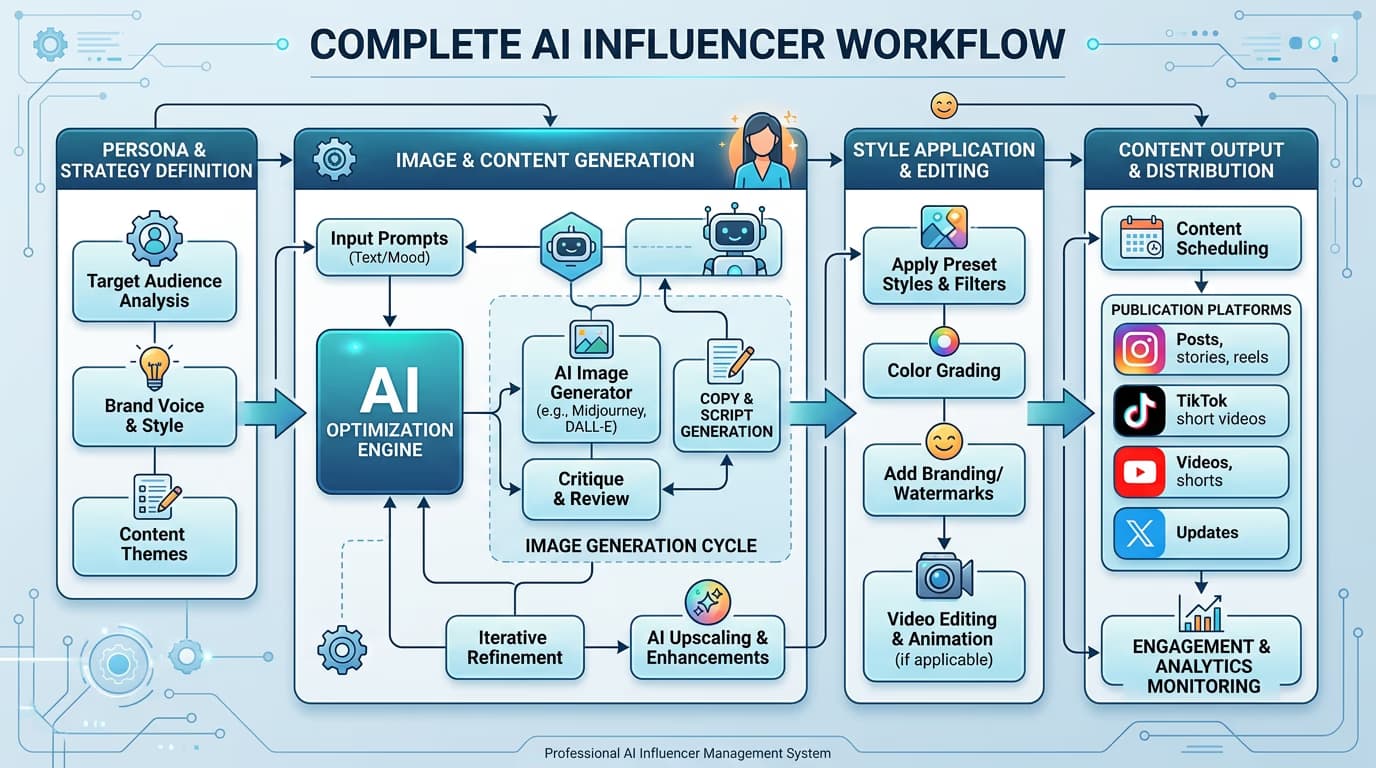
STEP 3: Design your workflow
Drag and connect nodes to create your content pipeline. Start with a prompt input, add your chosen AI model, then connect style and refinement nodes. The workflow saves automatically as you build, letting you generate unlimited variations by changing just the input prompt.
STEP 4: Test and save your template
Check that your workflow produces consistent results: Not satisfied? Adjust individual nodes, swap AI models, or modify prompt structure until you get the look you want.
- Run the workflow with 3-5 different prompts to verify character consistency
- Check that facial features, body type, and style remain recognizable across outputs
- Save as a template for quick reuse with new content ideas
Tips for best results
💡 Lock down character details early
Create a detailed character description (age, ethnicity, hair, clothing style) and save it as a reusable prompt variable. This keeps your AI influencer looking consistent across all generated content.
💡 Start with templates
Browse Flow's template library for pre-built influencer workflows. You can modify existing templates much faster than building from scratch, especially when learning which nodes work best together.
💡 Test with batch generation
Run your workflow 5-10 times with slight prompt variations before committing to a character. AI models have natural variation, so testing helps you understand what stays consistent and what changes.
💡 Build modular workflows
Create separate workflows for different content types (portraits, full-body shots, action scenes) rather than one complex workflow. This makes it easier to troubleshoot and adjust individual content categories.
Frequently asked questions

Ready to create your AI influencer?
Build automated content workflows and generate consistent character visuals with Picsart Flow's no-code AI tools.
Start building workflows