1. Home
  2. Text Editor
  3. Curve Text

Curve Text With Picsart's Text Bend Tool

The Curve Text tool might be the special sauce your content’s been craving. Now you can transform any message from simple to stylish in seconds. Try now!


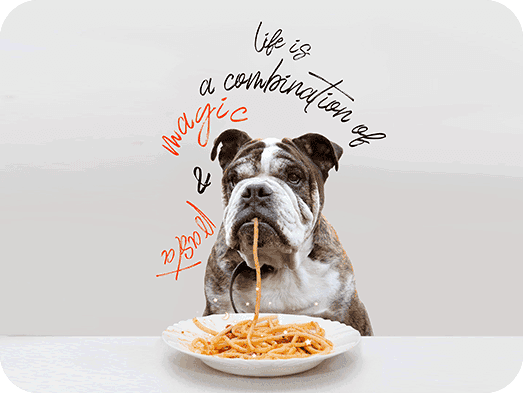
Dog eating spaghetti meme

The Picsart Curve Text tool may well be the final editing touch you didn’t realize your photos were missing. With the Curved Text Generator, you can make any message go from basic to beautiful in a matter of seconds. Simply pick your favorite font, type out your copy, and then use the Curve Text tool to twist your words in whatever way you wish. Bend them up, or bend them down, to lend a stylish, arced look that will add a dash of flair to any image. Whether you’re creating a promotional post or something more personal, the Picsart Text Bend tool will help make your copy pop, without any wasted time or effort.

Typography that pops.
Edit textRemove photo objectsErase photo objectsCreate AI text fontGenerate ad copyMake text-to-videoTry video textGenerate AI meme-textsChange photosTransform photos with AI

Use Picsart anywhere

Install the app, or bring Picsart into the AI workspaces your team already uses.

Use Picsart with

  • ChatGPT / Codex
  • Claude
  • Terminal
  • Cursor
  • OpenClaw
  • Hermes

Download the app

Download on the App StoreGET IT ON Google PlayGet it from Microsoft

Follow Picsart

Pinterest
AICPA SOC

Create

  • AI Image Generator
  • AI Video Generator
  • AI Playground
  • Flow
  • AI Photo Editor
  • AI Video Editor
  • AI Agents
  • Content Library
  • AI Models

Creators

  • Earn with Picsart
  • Earn campaigns
  • Clipping
  • For Brands
  • Video Studio
  • Tutorials
  • Challenges

Connect

  • ChatGPT / Codex
  • MCP setup
  • Command line
  • Developers
  • Google Drive

Business

  • Pricing
  • Enterprise
  • Industries
  • Quicktools

Company

  • Support
  • Careers
  • About us
  • Blog
  • Press Center
Terms of UsePrivacy PolicyInternet-Based AdvertisingCommunity GuidelinesDMCASecurity PolicyAccessibility
© 2026 PicsArt, Inc.
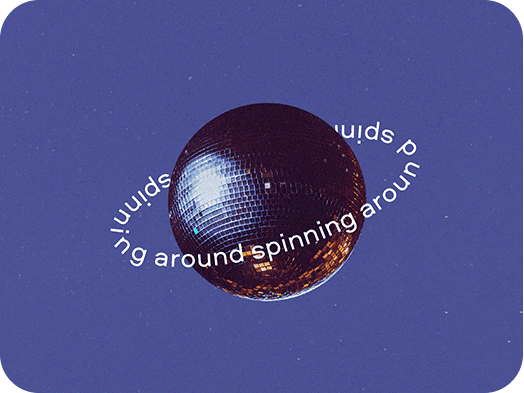
Disco ball with a curved text around it

Add a Touch of Class With The Curved Text Generator

If you’re looking for a quick and easy way to take your content to the next level, the Picsart Curve Text tool is here to help. Whether it’s for social media, personal messages, or promotional purposes, it can transform your text from simple to standout in seconds. Just pick the font that speaks to your style, write your desired message out via the Text tool, then twist it around however you see fit. Arc it up, arc it down – see what works best. And if you find you don’t like what you’ve created, no problem. Just keep curving until you find the aesthetic you like. Used wisely, the Curved Text Generator can bring more attention and eyeballs to your brand or personal message. So go get ‘em.

Curve Text
Aesthetic photo of a woman with sunglasses for sale

The Curve Text Tool Is Perfect for Any Type Of Content

Whether you’re creating content for your personal social media channels or for business, the Picsart Text Bend tool is the perfect (and super easy) way to make your words stand out from the crowd. From social media to websites, to blogs, digital flyers, and invitations, the Curve Text tool will make your posts rise above the norm. Attention spans are short online. You need every advantage you can get to lock eyes on the message you’re communicating. With the Curved Text Generator, you can steal a march on your competition. It might just be the edge you need.

Curve Text
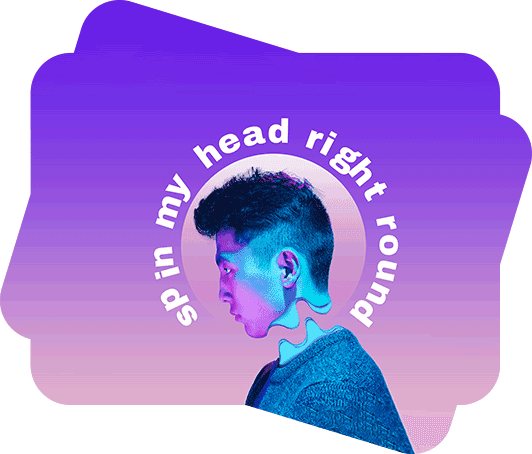
Curved text black and white image of a young female posing

The Picsart Curve Text Tool Is Made for Many Design Aesthetics

Whether your content requires a professional, personal or an artistic touch, the Curve Text tool is fully flexible to suit your goals. For a business-appropriate style, you can give your copy a more traditional look with a simple arc finish. For a brand with a playful aesthetic, you can take more liberties with the Text Bend tool to create a circular, spiral, or fun, wavy text design. Choose the best font for your project, then play around with the Curve Text tool to find a finish that will match your needs.

Curve Text
Arching text on a photo of a man

Customize Your Text Using Curve Text and Other Easy Tools

The Picsart photo editing tools are all fully customizable and user-friendly, which make them indispensable for any type of designer – beginner, intermediate, or experienced. The Curved Text Generator is no exception. You can arc text up or down, turn it on its side or upside-down – whatever looks and feels best. The key is helping your text stand out, and Picsart makes that as easy as possible. Plus, it requires minimal effort or skill to master. For added impact, combine the Text Bend tool alongside other handy editing helpers like Effects, Stickers, Background Remover, Templates, and many more.

Curve Text

Top Ways To Use the Curve Text Tool

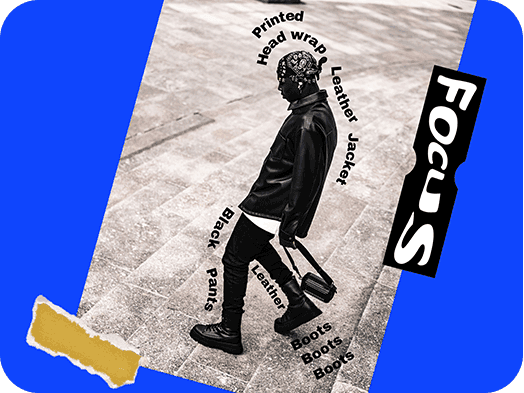
Curved text on a picture of a young man with a black and white outfit

Social Media

Whether you’re creating for personal purposes, social media channels, or for your business needs, the Picsart Text Bend tool is an easy way to make your words look smart and stylish. Start by picking the font that works best with your aesthetic, then use the Curve Text tool to bend, twist, and manipulate your words, and make them jump off the screen. There are no hard and fast rules about what you can do with it. Especially when it comes to creating fun social posts and stories. So feel free to get as creative as you want to.

Aesthetic nail beauty template with a text

Logos

Is your brand logo in need of a little TLC? With the Picsart Curve Text tool, you can fine-tune any brand or business logo within minutes. Instead of a simple, straightforward-looking logo, you can use this Text Bend tool to create wavy letter shapes or a spiral design, ensuring you’ll capture the attention of your audience.

Music fest invitation template with a curved text on it

Graphic Designs

When it comes to marketing materials such as digital flyers, brochures, event invitations, online presentations, and menus, the Picsart Curve Text tool can help your messaging make its mark in minutes. Within a few clicks, your text will be transformed from standard to stunning.

Arty presentation template with an arching text

Graphs

Have a presentation coming up? Give your charts and graphs a little more oomph with the Curve Text tool. In swathes of straight-laced lettering, arching your text is sure to help important points stand out and be noticed. You can use the Text tool to select from hundreds of stylish fonts that will work with your project.

How To Curve Text

  • 1
    Open the Text tool on web
  • 2
    Pick a font and type your message
  • 3
    Select Font tool in the settings bar
  • 4
    Slide the bend bar from left to right to adjust
  • 5
    Download your post and share it

Picsart Featured In

  • Mashable
  • Esquire
  • People
  • Forbes
  • TechCrunch
  • BuzzFeed
PricingSave big

Design text that makes content stand out

Pro

Most popular

AI tools for everyday creative work.

$15 $10.5/mo
Billed yearly
You save $54 with yearly
  • Access to all photo & video editing features
  • Advanced background & object removal
  • Parallel video generations with the world's most powerful AI video models
  • Unlimited image generations with Flex.2 Klein
  • 1-tap image enhancer
  • Millions of stock photos & Getty video clips
  • Selection of trendy fonts, text styles & stickers
  • Thousands of premium templates
  • Support for 3+ brand kits
  • Bulk edit up to 50 images at once
  • 100 GB of cloud storage
New features:
  • Auto-generate content from your terminal or agent with the Picsart CLI
  • Use Picsart inside Claude Code, Cursor, and ChatGPT via MCP — coming soon
  • AI agents for multi-step workflows and batch generation — coming soon

Ultra

Most powerful

Heavy AI usage for creators & teams.

$45 $24.5/mo
Billed yearly, per seat
You save $246 with yearly
  • Everything in Pro
  • Early access to advanced AI features
  • Leading AI models to design & automate workflows (Nano Banana, Veo 3, Seedance 2.0 & more)
  • Parallel video generations with the world's most powerful AI video models
  • Unlimited image generations with Flex.2 Klein
  • Support for 10+ brand kits
  • Add team seats
  • Create ad variations and localize
  • Track ads performance
  • 2000 credits for API services
  • Bulk edit up to 100 images at once
  • 300 GB of cloud storage per seat
New features:
  • Auto-generate content from your terminal or agent with the Picsart CLI
  • Use Picsart inside Claude Code, Cursor, and ChatGPT via MCP — coming soon
  • AI agents for multi-step workflows and batch generation — coming soon

Enterprise

Custom AI solutions for large organizations.

Custom credit volume
  • Volume discounts on credit rate
  • On-demand top-ups
Custom
Contact for pricing
  • Access to photo & video editor SDKs
  • Mobile web SDK support
  • Prepaid or pay-as-you-go creative APIs
  • Embed professional-grade editing into your product or workflow
  • Fully configurable editing experience
  • White-label to match your brand
  • Support for built-in marketing, e-commerce & printing use cases
  • Bring your own assets: images, templates & fonts
  • Enterprise-grade security, SLAs & support
  • Dedicated account manager