How to create professional headshots from a selfie with AI
What you'll learn
What is the headshot studio skill?
Common use cases
Create your headshots step by step
STEP 1: Download the skill
- On web: Go to picsart.com/cli/#skills-prosumer-headshot-studio → Click "Download"
- On mobile: Not available—use desktop terminal or AI agent (Claude Code, Cursor, Windsurf)
STEP 2: Choose your styles
Select which headshot types you need:
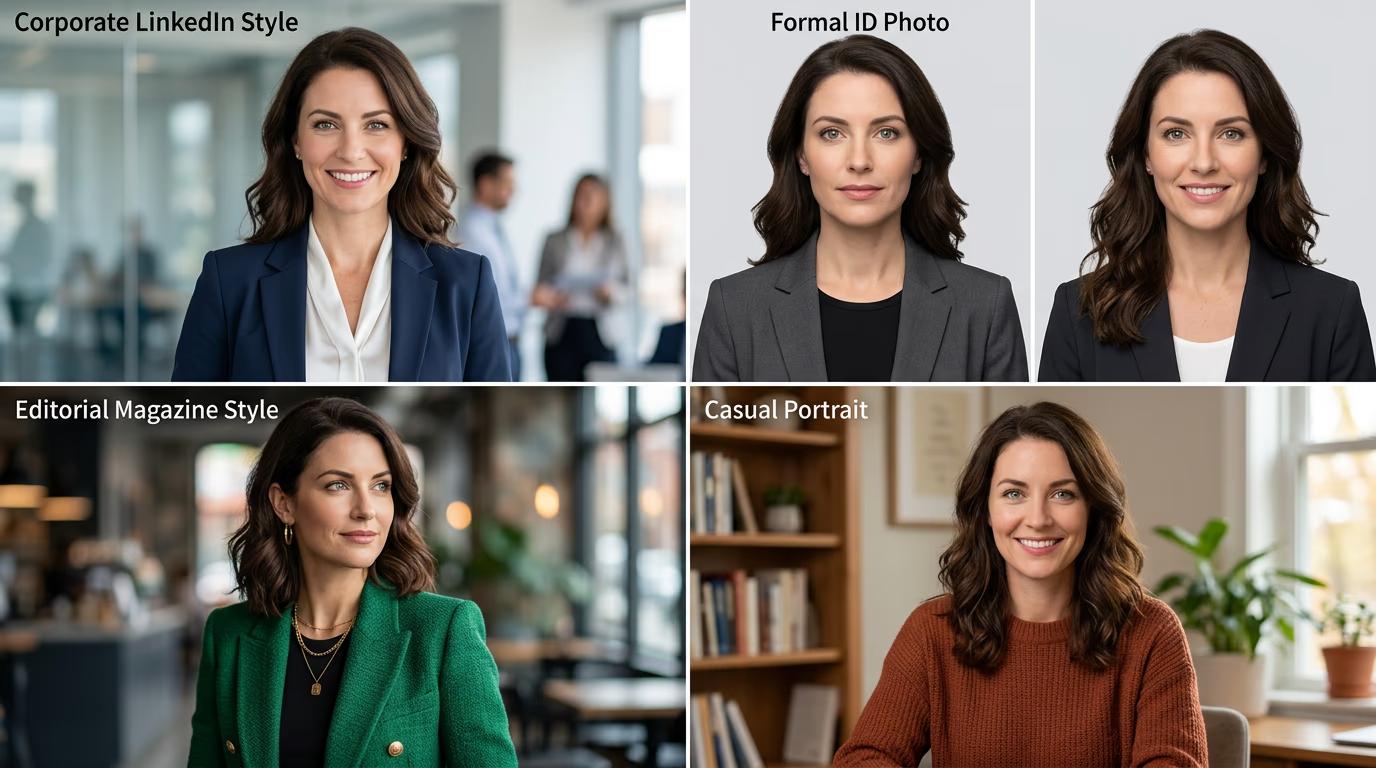
- LinkedIn: Corporate style with neutral background, professional attire, soft studio lighting
- ID photo: Formal passport-style shot with plain background, front-facing, even lighting
- Editorial: Magazine-quality portrait with artistic lighting, interesting background, creative composition
- Casual: Relaxed portrait with natural lighting, softer expression, approachable vibe
STEP 3: Upload your selfie
Point the skill to your photo. It works best with clear, well-lit selfies where your face is visible and not obscured by sunglasses or hats. The AI analyzes your features, then generates four professional versions with different lighting, backgrounds, and styling. Generation takes 30-60 seconds.
STEP 4: Review and export
Check that all four headshots look like you and fit their intended use: Not perfect? Upload a different source photo with better lighting or a more neutral expression, then regenerate.
- Verify your face looks consistent across all four styles
- Check that clothing and backgrounds match the professional context
- Confirm resolution is high enough for printing or large profile photos
Tips for best results
💡 Use a well-lit source photo
Take your selfie in natural light facing a window, or in a room with bright overhead lighting. Avoid harsh shadows across your face or backlighting that makes you a silhouette. Better input lighting means more realistic headshots.
💡 Face the camera directly
Keep your head straight and look at the lens. Angled selfies or side profiles make it harder for the AI to generate consistent front-facing headshots. If you want a three-quarter view, specify that in the skill settings.
💡 Skip filters and heavy makeup edits
Upload your actual face, not a filtered version. The skill adds professional lighting and retouching automatically. Starting with a filtered selfie can create uncanny results or lose facial details.
💡 Wear neutral clothing in your source photo
Solid colors work best. Busy patterns or logos can look strange when the AI adjusts your outfit for different headshot styles. Neutral shirts give the skill more flexibility to match professional contexts.
Frequently asked questions

Need professional headshots?
Turn selfies into studio-quality portraits without booking a photographer.
Create headshots