Picsart for Codex: One install, 140+ models, straight in your code.


Make sharper videos with AI video models

Use video models to transform clips, footage, and prompts into sharper videos for social, ads, and creative workflows.

Seedance 2.0New
Next-gen cinematic video with optional audio and reference image. Up to 1080p.Reference inputAudio1080pCinematicSee model
Seedance 2.0 FastNew
Fast cinematic video with audio, reference images, and start/end frame control.Reference inputAudioFast generationCinematicSee model
Seedance 2.0 Video EditNew
Edit video — replace subjects, add or remove objects, restyle scenes with reference images.Video editingReference inputVideo generationSee model
Seedance 2.0 Fast Video EditNew
Fast video edit — modify scenes with reference images.Video editingReference inputFast generationSee model
Sora 2 Pro
Up to 1080p with strong physical realism and optional reference image.Reference input1080pPro qualityCinematicSee model
Sora 2
Naturalistic 720p video with lifelike motion and character detail.CinematicVideo generationSee model
Wan 2.7
Wan 2.7 T2V — up to 15s at 1080p with audio input and prompt enhancement.Text to videoAudio1080pCinematicSee model
Kling V3
Long-form video up to 15s with native audio and start/end frame control.AudioCinematicVideo generationSee model
Kling V2.6
Mature pipeline with audio, adjustable cfg, and standard/pro rendering.AudioPro qualityCinematicSee model
Kling V3 Omni
Flexible generation across creative styles using V3 Omni architecture, with optional 4K output.4KCinematicVideo generationSee model
Kling V3 Turbo
Faster V3 variant — long-form video up to 15s with native audio, start/end frame control, and 720p/1080p output.Audio1080pFast generationCinematicSee model
Kling Video O1
O1-architecture video generation with 5 or 10 second output.CinematicVideo generationSee model


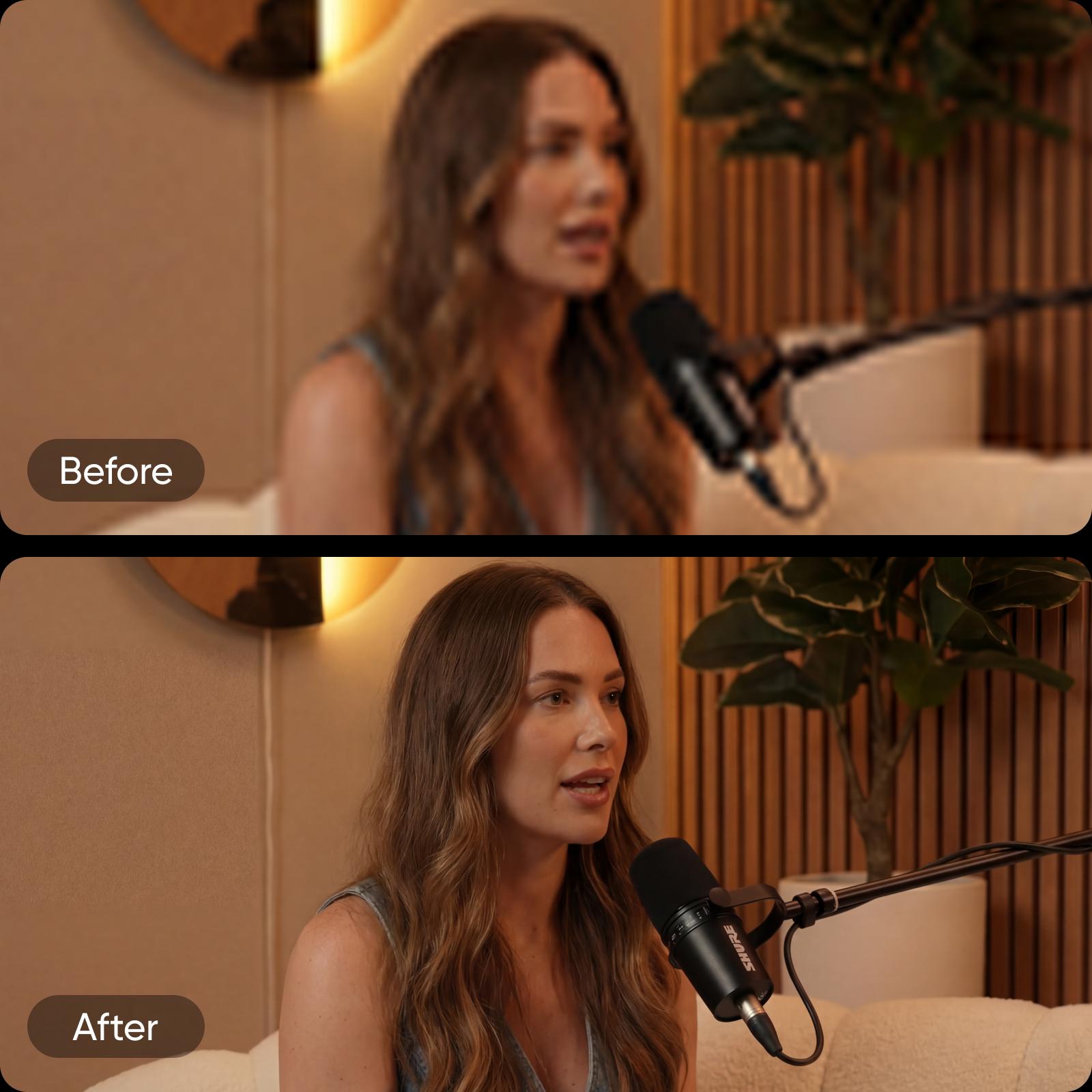
How to enhance video quality with AI?

1

Upload your video

Upload your video using Browse files to select a file from your device and start the enhancement process.

2

Apply AI enhancement

3

Preview the result

4

Edit or download your video


47%

higher productivity with AI-powered video tools

14 hrs

saved per video project

35%

more video output without extra resources

58%

lower costs with AI video workflows


Better video quality for every type of content

Social media videos

Prepare social clips that look sharp, clear, and ready to post, even when shot quickly or in low light.


Build cleaner and higher-quality video

Everything you need to enhance video quality quickly and consistently, powered by AI and built into a seamless creative workflow.

Video Enhancer FAQ

How can I improve video quality?

How does AI enhance video quality?

AI enhances video quality by reviewing each video frame and applying automatic adjustments such as noise reduction, sharper details, balanced colors, and video upscaling. This process ensures consistent results across the entire clip, even when working with low-quality footage.

Can I enhance low-resolution videos?

Yes. A video resolution enhancer is designed to work with low-resolution videos by improving clarity and visual balance. While it can't recreate missing details, it helps make footage cleaner, sharper, and more watchable across modern screens and platforms.

Is Picsart's AI Video Enhancer free to use?

Picsart's AI Video Enhancer is free to start, allowing you to enhance video quality online without an upfront cost. You can test how the tool works on your footage before deciding whether to continue with additional creative or editing features.

What types of videos can I enhance?

You can enhance video content for social media clips, video ads, product demos, marketing videos, presentations, and longer-form projects. The tool works for both short and long videos, making it suitable for creators, marketers, and teams.

How is video enhancement different from video editing?

Video enhancement focuses on automatically improving visual quality, such as clarity and resolution. Video editing involves manual changes like trimming clips, adding text, or applying effects. Enhancement often comes first, followed by editing to finalize the video.

How to enhance video quality online?

To enhance video quality online, upload your file to an AI Video Enhancer, apply automatic enhancement, and export the improved video. This process removes the need for downloads or advanced software while delivering fast, consistent results.


Enhance videos for sharper creator content

MOST POPULAR

Pro

AI tools for everyday creative work.

012345678901234567890123456789credits/month
~ 100Nano Banana Pro generations
~ 55Kling 3.0 videos
Fixed credits/mo
$15$10.5/mo
Billed yearly
You save $54 with yearly
  • Access to all photo & video editing features
  • Advanced background & object removal
  • Parallel video generations with the world's most powerful AI video models
  • Unlimited image generations with Flex.2 Klein
  • 1-tap image enhancer
  • Millions of stock photos & Getty video clips
  • Selection of trendy fonts, text styles & stickers
  • Thousands of premium templates
  • Support for 3+ brand kits
  • Bulk edit up to 50 images at once
  • 100 GB of cloud storage
New features:
  • 15+ creative AI agents that plan, execute, and deliver — across video, brand, localization, and more
  • Auto-generate content from your terminal or agent with the Picsart CLI
  • Use Picsart inside Claude Code, Cursor, and ChatGPT via MCP
MOST POWERFUL

Ultra

Heavy AI usage for creators & teams.

0123456789,012345678901234567890123456789credits/month
~ 500Nano Banana Pro generations
~ 277Kling 3.0 videos
$75$60/mo
Billed yearly, per seat
You save $180 with yearly
5x more usage than Pro
  • 140+ leading AI video, image, and audio models (Kling 3.0, Nano Banana, Veo 3, Seedance 2.0 & more)
  • Parallel video generations with the world's most powerful AI video models
  • Early access to advanced AI features
  • Unlimited image generations with Flex.2 Klein
  • Bulk edit up to 100 images at once
  • Support for 10+ brand kits
  • Create ad variations & localize
  • Track ads performance
  • Add team seats
  • 300 GB of cloud storage per seat
New features:
  • 15+ creative AI agents that plan, execute, and deliver — across video, brand, localization, and more
  • Auto-generate content from your terminal or agent with the Picsart CLI
  • Use Picsart inside Claude Code, Cursor, and ChatGPT via MCP