עורך צבע HSL להתאמת גוון, רוויה ובהירות

כוונו את הצבעים שכבר מופיעים בתמונה שלכם. התאימו גוון, רוויה ובהירות באמצעות פקדי HSL, והשוו בין התוצאות תוך כדי עריכה.
נסו עריכת HSL עם תמונת דוגמה

פתחו תמונת דוגמה ב-Adjust, ואז הרחיבו את HSL כדי להתנסות בצבעים שלה.

מה זה HSL בעריכת תמונות?

HSL הם ראשי תיבות של גוון, רוויה ובהירות. הגוון משנה את הצבע, הרוויה משנה את העוצמה שלו, והבהירות הופכת אותו לבהיר או לכהה יותר. ב-Picsart, פקדי HSL מאפשרים לכם להתאים טווח צבעים בתמונה, כך שתוכלו לחדד גוונים ירוקים בנוף או גוונים אדומים בבגד, בלי להחיל את אותו שינוי על כל הצבעים.

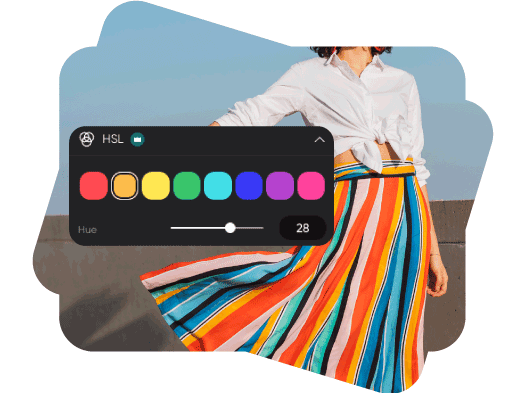
שנו את הגוון של טווח צבעים

בחרו צבע שמופיע בתמונה, ואז הזיזו את מחוון הגוון כדי לגלות גוונים סמוכים. חדדו עלווה ירוקה, שמיים כחולים או צבע הדגשה, ובדקו כיצד הטווח שנבחר משתנה לאורך התמונה.

תנו לתמונות שלכם גוון חדש

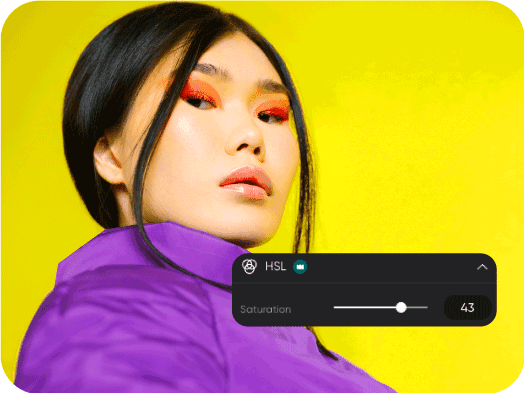
שליטה בעוצמת הצבע באמצעות רוויה

הגדילו את הרוויה לקבלת צבע עז יותר, או הפחיתו אותה למראה רך יותר. עבדו על טווח הצבעים שנבחר והשוו בין שינויים קטנים לפני המעבר לצבע אחר בתמונה.
צרו אווירה באמצעות הרוויה

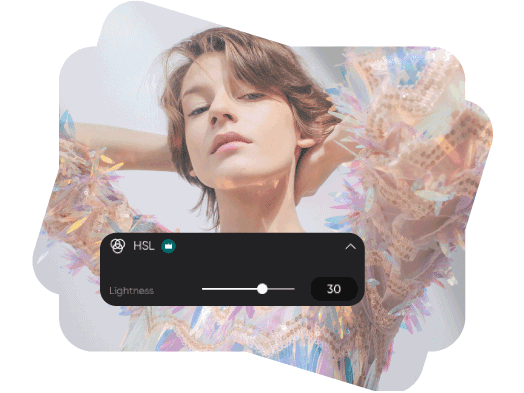
חדדו את הבהירות בלי להבהיר את כל הצבעים

הבהירו או הכהו טווח צבעים נבחר באמצעות מחוון הבהירות. השתמשו בו כדי לחדד צבע של בגד, פרט ברקע או צבע הדגשה של מוצר, ואז אזנו את התוצאה בעזרת התאמות הגוון והרוויה.

שחקו עם הבהירות בעריכת התמונות שלכם

איך להתאים צבעי HSL אונליין

התחילו עם תמונה בעורך. כלי העריכה הנוכחיים מסמנים את HSL בתור Pro.

How to

העלאת תמונה

השתמשו באפשרות העלאת תמונה שלמעלה, או פתחו את העורך והוסיפו את התמונה שלכם.

צבע HSL של Picsart

שאלות על עריכת צבעי HSL

  • גוון מתאר את הצבע, רוויה מתארת את עוצמתו, ובהירות מתארת עד כמה הוא בהיר או כהה. שינוי של פקד אחד מאפשר לחדד את המאפיין הזה בלי לשנות את שלושתם.

Picsart הופיעה ב

MashableEsquirePeopleForbesTechCrunchBuzzFeed

כוונו צבעים ליצירת עיצובים מלוטשים ונראות מותגית

Pro

Most popular

AI tools for everyday creative work.

$15 $10.5/mo
Billed yearly
You save $54 with yearly
  • Access to all photo & video editing features
  • Advanced background & object removal
  • Parallel video generations with the world's most powerful AI video models
  • Unlimited image generations with Flex.2 Klein
  • 1-tap image enhancer
  • Millions of stock photos & Getty video clips
  • Selection of trendy fonts, text styles & stickers
  • Thousands of premium templates
  • Support for 3+ brand kits
  • Bulk edit up to 50 images at once
  • 100 GB of cloud storage
New features:
  • Auto-generate content from your terminal or agent with the Picsart CLI
  • Use Picsart inside Claude Code, Cursor, and ChatGPT via MCP — coming soon
  • AI agents for multi-step workflows and batch generation — coming soon

Ultra

Most powerful

Heavy AI usage for creators & teams.

$45 $24.5/mo
Billed yearly, per seat
You save $246 with yearly
  • Everything in Pro
  • Early access to advanced AI features
  • Leading AI models to design & automate workflows (Nano Banana, Veo 3, Seedance 2.0 & more)
  • Parallel video generations with the world's most powerful AI video models
  • Unlimited image generations with Flex.2 Klein
  • Support for 10+ brand kits
  • Add team seats
  • Create ad variations and localize
  • Track ads performance
  • 2000 credits for API services
  • Bulk edit up to 100 images at once
  • 300 GB of cloud storage per seat
New features:
  • Auto-generate content from your terminal or agent with the Picsart CLI
  • Use Picsart inside Claude Code, Cursor, and ChatGPT via MCP — coming soon
  • AI agents for multi-step workflows and batch generation — coming soon

Enterprise

Custom AI solutions for large organizations.

Custom credit volume
  • Volume discounts on credit rate
  • On-demand top-ups
Custom
Contact for pricing
  • Access to photo & video editor SDKs
  • Mobile web SDK support
  • Prepaid or pay-as-you-go creative APIs
  • Embed professional-grade editing into your product or workflow
  • Fully configurable editing experience
  • White-label to match your brand
  • Support for built-in marketing, e-commerce & printing use cases
  • Bring your own assets: images, templates & fonts
  • Enterprise-grade security, SLAs & support
  • Dedicated account manager