שפרו את איכות הווידאו באמצעות משפר וידאו מבוסס AI
שפרו את הרזולוציה, הפחיתו רעשים וחַדדו פרטים באופן אוטומטי בעזרת משפר וידאו מבוסס AI שמנקה כל פריים. העלו את הסרטון, לחצו פעם אחת וקבלו תוצאה ברורה ומלוטשת יותר תוך שניות.




צרו סרטונים חדים יותר באמצעות מודלים ליצירת וידאו
השתמשו במודלים ליצירת וידאו כדי להפוך קליפים, צילומים והנחיות לסרטונים חדים יותר לרשתות החברתיות, למודעות ולתהליכי יצירה.
איך משפרים את איכות הווידאו בעזרת AI?
How to
העלו את הסרטון
העלו את הסרטון באמצעות האפשרות לעיון בקבצים, בחרו קובץ מהמכשיר והתחילו בתהליך השיפור.
- 47%פרודוקטיביות גבוהה יותר עם כלי וידאו מבוססי AI
- 14 שעותנחסכות בכל פרויקט וידאו
- 35%יותר סרטונים בלי משאבים נוספים
- 58%עלויות נמוכות יותר עם תהליכי עבודה בווידאו מבוססי AI
מהו משפר וידאו מבוסס AI?
משפר הווידאו מבוסס ה-AI של Picsart משתמש בבינה מלאכותית כדי לנתח פריימים בסרטון ולשפר את איכותו באופן אוטומטי. הכלי משפר את הבהירות, החדות, איזון הצבעים והרזולוציה של הווידאו באמצעות זיהוי טשטוש, רעשים ופרטים באיכות נמוכה, ומאפשר לכם לשפר סרטונים במהירות ובעקביות.
למה לשפר את איכות הווידאו בעזרת AI?
למה סרטון שנראה טוב בטלפון מתחיל להיראות מטושטש או רועש על מסך גדול יותר? לרוב הסיבה היא דחיסה, רזולוציה נמוכה, תאורה חלשה או פגמים שנוצרו על ידי AI. כאן נכנס לתמונה משפר הווידאו מבוסס ה-AI של Picsart: הוא מחזיר את החדות, מפחית רעשים ומשיב פרטים ברורים וטבעיים בכמה לחיצות בלבד.
תהליך עבודה מלא לווידאו בתוך Picsart
משפר הווידאו של Picsart משתלב בתהליך יצירה מלא וגמיש. אחרי שיפור איכות הווידאו, תוכלו להמשיך ללטש את התוכן שלכם בעורך הווידאו מבוסס ה-AI. צריכים לבצע התאמות מהירות? חתכו קליפים כדי למקד את הסיפור שלכם. הוסיפו טקסט לסרטון כדי לספק הקשר או להעביר מסר, ואז השלימו את המראה בעזרת מסנני וידאו מבוססי AI. סביבת העבודה הכוללת הזו מאפשרת לכם להכין את התוצרים מהר יותר, בלי לעבור בין כלים.
איכות וידאו טובה יותר לכל סוג תוכן
סרטונים לרשתות החברתיות
הכינו סרטונים קצרים לרשתות החברתיות שנראים חדים וברורים ומוכנים לפרסום, גם אם צולמו בחופזה או בתאורה חלשה.
מקליפים מהירים ועד סיפורים באורך מלא
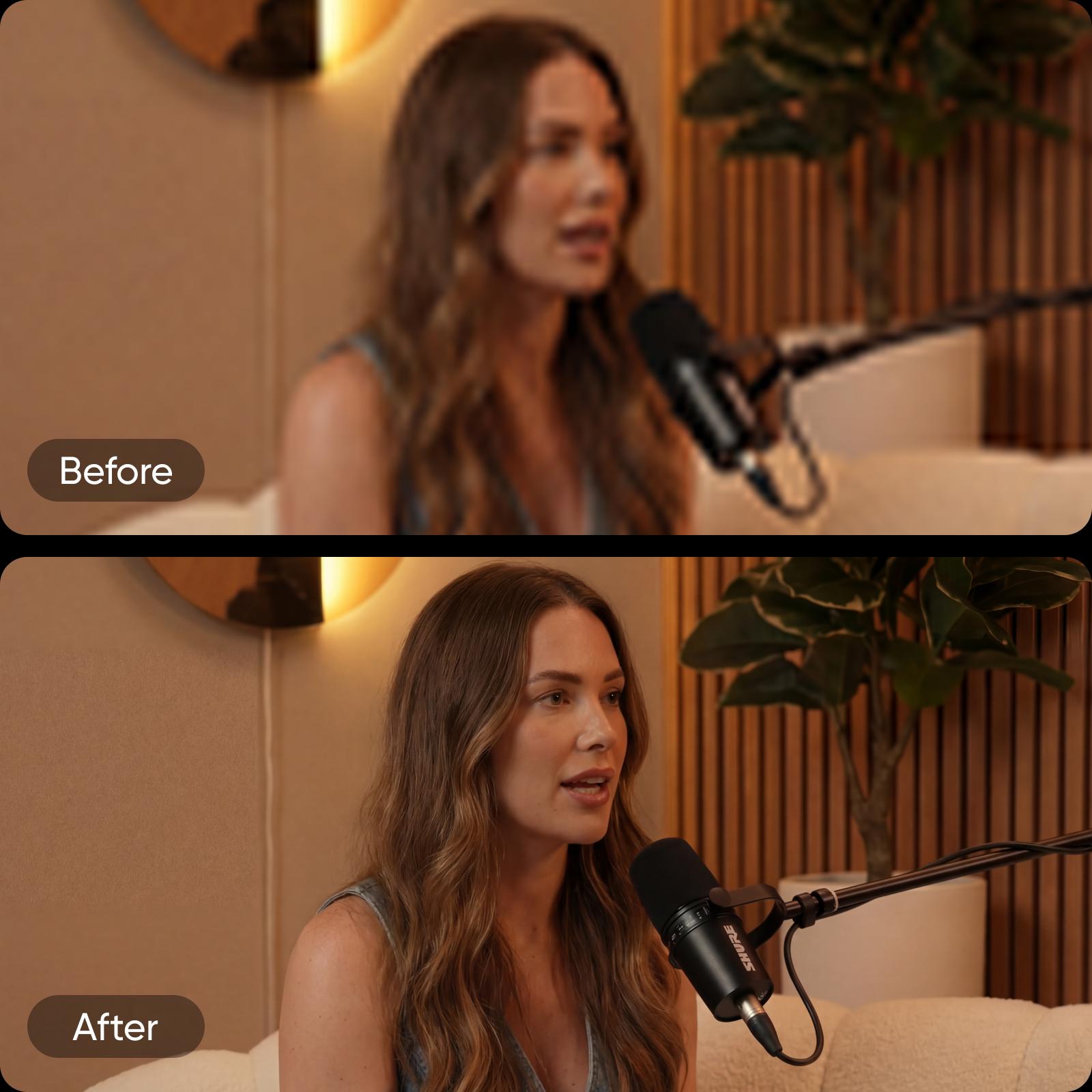
משפר הווידאו מבוסס ה-AI של Picsart מאפשר לשפר את איכות הווידאו גם בקליפים קצרים וגם בפרויקטים ארוכים. הוא פועל כמשפר רזולוציית וידאו חכם ושומר על מראה אחיד בכל אורך סרטון. אחרי שיפור התוכן, תוכלו לשלב כלים כמו מחולל אודיו מבוסס AI כדי להשלים את הסרטונים עם צליל שמתאים למראה המלוטש.
צרו סרטונים נקיים ואיכותיים יותר
כל מה שצריך כדי לשפר את איכות הווידאו במהירות ובעקביות, בעזרת AI ובתהליך יצירה חלק ומשולב.
שאלות נפוצות על משפר וידאו
אפשר לשפר את איכות הווידאו בעזרת משפר וידאו מבוסס AI, שמנתח את הצילומים שלכם באופן אוטומטי ומתקן בעיות נפוצות כמו טשטוש, רעשים ורזולוציה נמוכה. כך תוכלו לשפר את איכות הווידאו בלי עריכה ידנית, צירי זמן או מיומנויות טכניות.
שפרו סרטונים וצרו תוכן חד יותר ליוצרים
Pro
Most popularAI tools for everyday creative work.
Ultra
Most powerfulHeavy AI usage for creators & teams.
Enterprise
Custom AI solutions for large organizations.
- Volume discounts on credit rate
- On-demand top-ups


