Editor warna HSL untuk hue, saturasi, dan kecerahan

Sempurnakan warna yang sudah ada di foto Anda. Sesuaikan hue, saturasi, dan kecerahan dengan kontrol HSL, lalu bandingkan hasilnya sambil mengedit.

Coba pengeditan HSL dengan foto contoh

Buka foto contoh di Adjust, lalu buka HSL untuk bereksperimen dengan warnanya.

Apa itu HSL dalam pengeditan foto?

HSL adalah singkatan dari hue, saturasi, dan kecerahan. Hue mengubah warna, saturasi mengubah intensitasnya, dan kecerahan membuatnya lebih terang atau gelap. Di Picsart, kontrol HSL memungkinkan Anda menyesuaikan rentang warna pada foto, sehingga Anda dapat menyempurnakan warna hijau pada lanskap atau warna merah pada pakaian tanpa menerapkan perubahan yang sama ke semua warna.

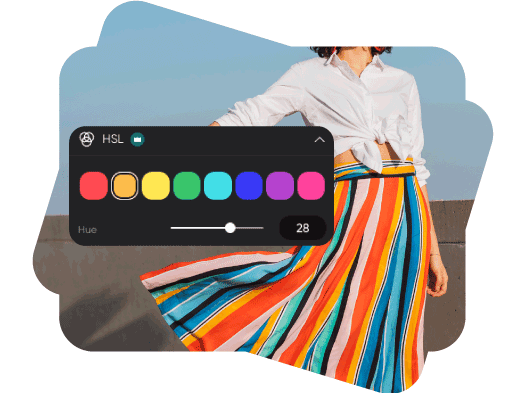
Ubah hue pada rentang warna

Pilih warna yang ada di foto, lalu geser penggeser hue untuk menjelajahi nuansa warna di sekitarnya. Sempurnakan dedaunan hijau, langit biru, atau warna aksen sambil melihat perubahan rentang yang dipilih di seluruh gambar.

Beri foto Anda hue baru

Atur intensitas warna dengan saturasi

Tingkatkan saturasi agar warna lebih kuat atau kurangi untuk tampilan yang lebih lembut. Sesuaikan rentang warna yang dipilih dan bandingkan perubahan kecil sebelum beralih ke warna lain di foto Anda.
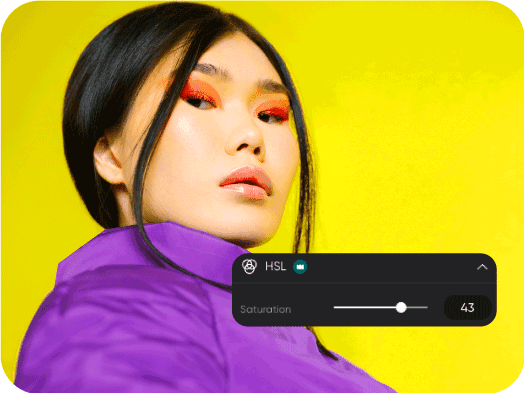
Ciptakan suasana dengan saturasi

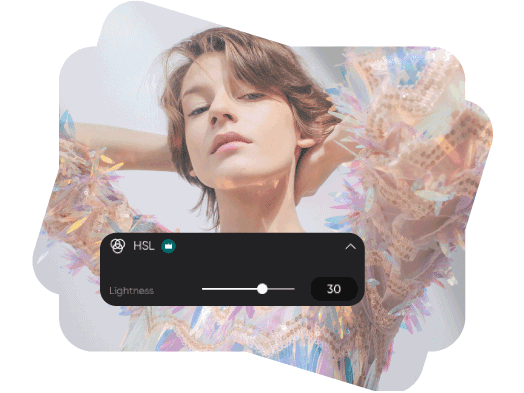
Sempurnakan kecerahan tanpa menerangkan semua warna

Terangkan atau gelapkan rentang warna yang dipilih dengan penggeser kecerahan. Gunakan untuk menyempurnakan warna pakaian, detail latar belakang, atau aksen produk, lalu seimbangkan hasilnya dengan penyesuaian hue dan saturasi.

Atur kecerahan untuk mengedit foto

Cara menyesuaikan warna HSL secara online

Mulai dengan membuka foto di editor. HSL ditandai sebagai Pro di alat pengeditan saat ini.

How to

Unggah foto

Gunakan Unggah gambar di atas, atau buka editor dan tambahkan foto Anda.

Warna HSL Picsart

Pertanyaan tentang pengeditan warna HSL

  • Hue menjelaskan jenis warna, saturasi menunjukkan intensitasnya, dan kecerahan menunjukkan seberapa terang atau gelap warnanya. Mengubah satu kontrol memungkinkan Anda menyempurnakan aspek tersebut tanpa harus mengubah ketiganya.

Picsart Ditampilkan Di

MashableEsquirePeopleForbesTechCrunchBuzzFeed

Sempurnakan warna untuk desain yang memukau dan visual merek

Pro

Most popular

AI tools for everyday creative work.

$15 $10.5/mo
Billed yearly
You save $54 with yearly
  • Access to all photo & video editing features
  • Advanced background & object removal
  • Parallel video generations with the world's most powerful AI video models
  • Unlimited image generations with Flex.2 Klein
  • 1-tap image enhancer
  • Millions of stock photos & Getty video clips
  • Selection of trendy fonts, text styles & stickers
  • Thousands of premium templates
  • Support for 3+ brand kits
  • Bulk edit up to 50 images at once
  • 100 GB of cloud storage
New features:
  • Auto-generate content from your terminal or agent with the Picsart CLI
  • Use Picsart inside Claude Code, Cursor, and ChatGPT via MCP — coming soon
  • AI agents for multi-step workflows and batch generation — coming soon

Ultra

Most powerful

Heavy AI usage for creators & teams.

$45 $24.5/mo
Billed yearly, per seat
You save $246 with yearly
  • Everything in Pro
  • Early access to advanced AI features
  • Leading AI models to design & automate workflows (Nano Banana, Veo 3, Seedance 2.0 & more)
  • Parallel video generations with the world's most powerful AI video models
  • Unlimited image generations with Flex.2 Klein
  • Support for 10+ brand kits
  • Add team seats
  • Create ad variations and localize
  • Track ads performance
  • 2000 credits for API services
  • Bulk edit up to 100 images at once
  • 300 GB of cloud storage per seat
New features:
  • Auto-generate content from your terminal or agent with the Picsart CLI
  • Use Picsart inside Claude Code, Cursor, and ChatGPT via MCP — coming soon
  • AI agents for multi-step workflows and batch generation — coming soon

Enterprise

Custom AI solutions for large organizations.

Custom credit volume
  • Volume discounts on credit rate
  • On-demand top-ups
Custom
Contact for pricing
  • Access to photo & video editor SDKs
  • Mobile web SDK support
  • Prepaid or pay-as-you-go creative APIs
  • Embed professional-grade editing into your product or workflow
  • Fully configurable editing experience
  • White-label to match your brand
  • Support for built-in marketing, e-commerce & printing use cases
  • Bring your own assets: images, templates & fonts
  • Enterprise-grade security, SLAs & support
  • Dedicated account manager