เครื่องมือแก้ไขสี HSL สำหรับปรับเฉดสี ความอิ่มตัว และความสว่าง

ปรับแต่งสีที่มีอยู่ในรูปภาพของคุณอย่างละเอียด ปรับเฉดสี ความอิ่มตัว และความสว่างด้วยการควบคุม HSL แล้วเปรียบเทียบผลลัพธ์ระหว่างแก้ไข

ลองแก้ไข HSL ด้วยรูปตัวอย่าง

เปิดรูปตัวอย่างใน Adjust แล้วขยาย HSL เพื่อทดลองปรับสี

HSL ในการแต่งภาพคืออะไร

HSL ย่อมาจาก hue (เฉดสี), saturation (ความอิ่มตัว) และ lightness (ความสว่าง) เฉดสีใช้เปลี่ยนสี ความอิ่มตัวใช้ปรับความเข้มของสี ส่วนความสว่างใช้ทำให้สีสว่างขึ้นหรือเข้มลง ใน Picsart คุณสามารถใช้การควบคุม HSL เพื่อปรับช่วงสีในรูปภาพได้ เช่น ปรับแต่งสีเขียวในภาพทิวทัศน์หรือสีแดงบนเสื้อผ้า โดยไม่ต้องใช้การปรับแบบเดียวกันกับทุกสี

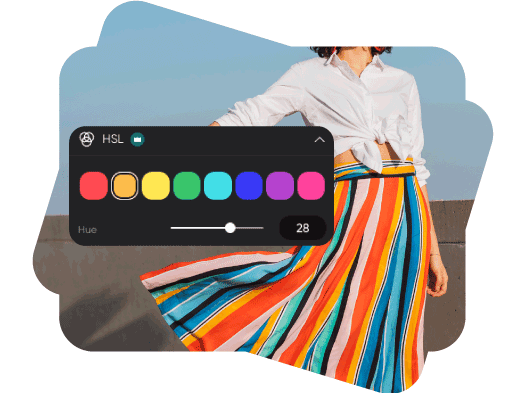
เปลี่ยนเฉดสีของช่วงสีที่ต้องการ

เลือกสีที่ปรากฏในรูปภาพ แล้วเลื่อนแถบเฉดสีเพื่อทดลองใช้โทนสีใกล้เคียง ปรับแต่งใบไม้สีเขียว ท้องฟ้าสีฟ้า หรือสีที่ใช้เน้นจุดต่าง ๆ พร้อมดูการเปลี่ยนแปลงของช่วงสีที่เลือกทั่วทั้งภาพ

เปลี่ยนเฉดสีให้รูปภาพของคุณ

ควบคุมความเข้มของสีด้วยความอิ่มตัว

เพิ่มความอิ่มตัวเพื่อให้สีเข้มขึ้น หรือลดความอิ่มตัวเพื่อให้ภาพดูนุ่มนวล ปรับช่วงสีที่เลือก แล้วเปรียบเทียบการเปลี่ยนแปลงเล็กน้อยก่อนเลือกปรับสีอื่นในรูปภาพ
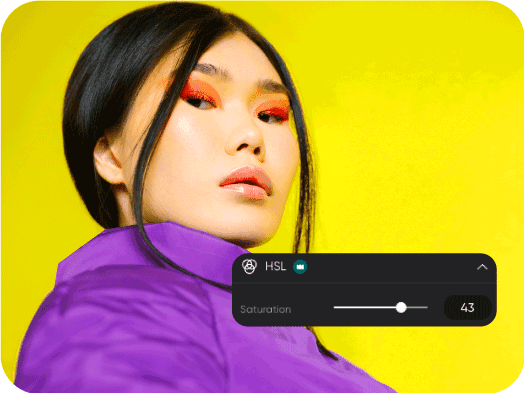
สร้างอารมณ์ให้ภาพด้วยความอิ่มตัวของสี

ปรับความสว่างโดยไม่ทำให้ทุกสีสว่างขึ้น

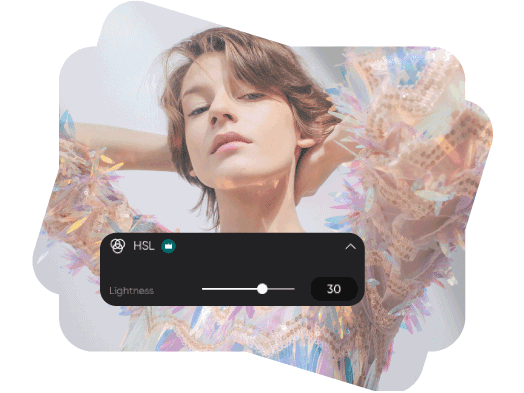
ใช้แถบความสว่างเพื่อปรับช่วงสีที่เลือกให้สว่างขึ้นหรือเข้มลง ใช้ปรับแต่งสีเสื้อผ้า รายละเอียดพื้นหลัง หรือสีที่ใช้เน้นบนสินค้า แล้วปรับสมดุลผลลัพธ์ด้วยการปรับเฉดสีและความอิ่มตัว

ทดลองปรับความสว่างในการแต่งภาพ

วิธีปรับสี HSL ออนไลน์

เริ่มต้นด้วยการเปิดรูปภาพในเครื่องมือแก้ไข HSL จะแสดงป้าย Pro ในเครื่องมือแก้ไขปัจจุบัน

How to

อัปโหลดรูปภาพ

กดอัปโหลดรูปภาพด้านบน หรือเปิดเครื่องมือแก้ไขแล้วเพิ่มรูปภาพของคุณ

สี HSL ใน Picsart

คำถามเกี่ยวกับการแก้ไขสี HSL

  • เฉดสีบอกว่าสีนั้นคือสีอะไร ความอิ่มตัวบอกความเข้มของสี และความสว่างบอกว่าสีสว่างหรือเข้มเพียงใด การปรับค่าใดค่าหนึ่งช่วยให้คุณปรับคุณสมบัตินั้นได้โดยไม่ต้องเปลี่ยนทั้งสามค่า

Picsart ปรากฏในสื่อชั้นนำ

MashableEsquirePeopleForbesTechCrunchBuzzFeed

ปรับแต่งสีให้ดีไซน์และภาพลักษณ์แบรนด์ดูโดดเด่น

Pro

Most popular

AI tools for everyday creative work.

$15 $10.5/mo
Billed yearly
You save $54 with yearly
  • Access to all photo & video editing features
  • Advanced background & object removal
  • Parallel video generations with the world's most powerful AI video models
  • Unlimited image generations with Flex.2 Klein
  • 1-tap image enhancer
  • Millions of stock photos & Getty video clips
  • Selection of trendy fonts, text styles & stickers
  • Thousands of premium templates
  • Support for 3+ brand kits
  • Bulk edit up to 50 images at once
  • 100 GB of cloud storage
New features:
  • Auto-generate content from your terminal or agent with the Picsart CLI
  • Use Picsart inside Claude Code, Cursor, and ChatGPT via MCP — coming soon
  • AI agents for multi-step workflows and batch generation — coming soon

Ultra

Most powerful

Heavy AI usage for creators & teams.

$45 $24.5/mo
Billed yearly, per seat
You save $246 with yearly
  • Everything in Pro
  • Early access to advanced AI features
  • Leading AI models to design & automate workflows (Nano Banana, Veo 3, Seedance 2.0 & more)
  • Parallel video generations with the world's most powerful AI video models
  • Unlimited image generations with Flex.2 Klein
  • Support for 10+ brand kits
  • Add team seats
  • Create ad variations and localize
  • Track ads performance
  • 2000 credits for API services
  • Bulk edit up to 100 images at once
  • 300 GB of cloud storage per seat
New features:
  • Auto-generate content from your terminal or agent with the Picsart CLI
  • Use Picsart inside Claude Code, Cursor, and ChatGPT via MCP — coming soon
  • AI agents for multi-step workflows and batch generation — coming soon

Enterprise

Custom AI solutions for large organizations.

Custom credit volume
  • Volume discounts on credit rate
  • On-demand top-ups
Custom
Contact for pricing
  • Access to photo & video editor SDKs
  • Mobile web SDK support
  • Prepaid or pay-as-you-go creative APIs
  • Embed professional-grade editing into your product or workflow
  • Fully configurable editing experience
  • White-label to match your brand
  • Support for built-in marketing, e-commerce & printing use cases
  • Bring your own assets: images, templates & fonts
  • Enterprise-grade security, SLAs & support
  • Dedicated account manager