Αφαίρεση Θορύβου από Εικόνες: Αφαιρέστε τους κόκκους από τις φωτογραφίες με ΤΝ
Παράγετε καθαρές, ευκρινείς εικόνες χωρίς κόκκους με το πρόγραμμα αποθορυβοποίησης ΤΝ του Picsart. Εφαρμόστε το εργαλείο μείωσης θορύβου φωτογραφίας για να αφαιρέσετε κόκκους και αποχρωματισμούς και να αποκαταστήσετε άμεσα τις εικόνες στην υψηλότερη ποιότητά τους.


Γιατί να χρησιμοποιήσετε την αποθορυβοποίηση εικόνας;
Πώς να αφαιρέσετε τον θόρυβο από τις φωτογραφίες
How to
Μεταφόρτωση εικόνας
Χρησιμοποιήστε το κουμπί Περιήγηση αρχείων παραπάνω για να επιλέξετε μια εικόνα.
Αφαιρέστε αυτόματα τον κόκκο με το πρόγραμμα αποθορυβοποίησης εικόνας ΤΝ
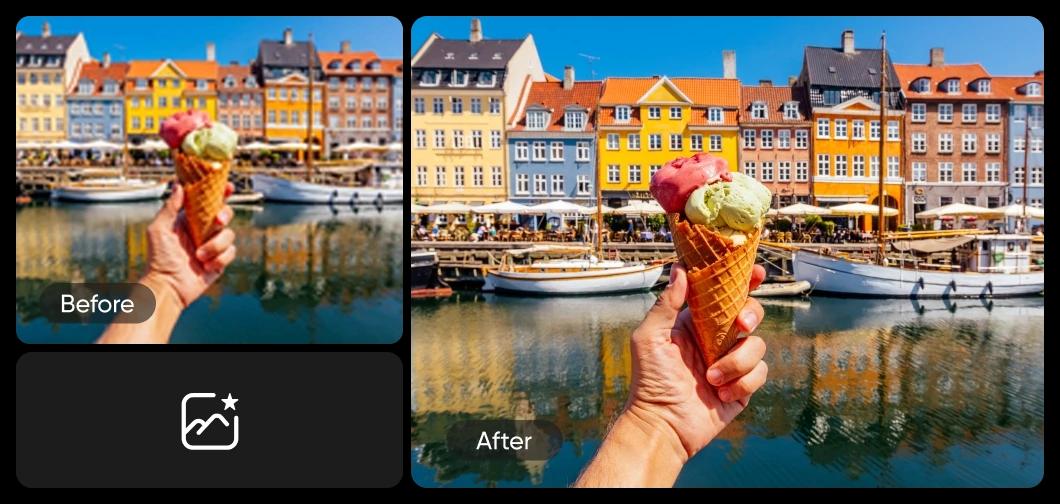
Δώστε στις κοκκώδεις, θολές φωτογραφίες μια νέα εμφάνιση χρησιμοποιώντας το πρόγραμμα αποθορυβοποίησης εικόνας ΤΝ του Picsart. Το επαναστατικό χαρακτηριστικό αποθορυβοποίησης ΤΝ του εργαλείου αφαιρεί εύκολα την κοκκώδη παραμόρφωση από τις εικόνες άμεσα. Απλό και αποτελεσματικό, το βελτιωτής εικόνας του Picsart αυτόματα αναλύει και επισκευάζει τις ατέλειες στις φωτογραφίες σας, δίνοντας στους χρήστες όλων των επιπέδων δεξιοτήτων τη δύναμη να αφαιρούν τον θόρυβο από εικόνες σε δευτερόλεπτα και να πετυχαίνουν επαγγελματικά αποτελέσματα.
- Μείωσε τους περισπασμούς από κόκκο εικόνας


Αποκτήστε τη φωτογραφία που επιθυμείτε με τη μείωση θορύβου ΤΝ
Ποτέ μην αφήνετε μικρές ατέλειες να χαλάσουν μια υπέροχη φωτογραφία. Είτε χρειάζεστε να διορθώσετε θολές φωτογραφίες, να αφαιρέσετε κόκκους από τις φωτογραφίες, ή να ακρίσετε εικόνες, το πρόγραμμα αποθορυβοποίησης εικόνας ΤΝ του Picsart κάνει εύκολη την μείωση των επιπτώσεων του θορύβου υποβάθρου. Η αυτοματοποιημένη τεχνολογία βελτίωσης μετατρέπει τις όχι και τόσο τέλειες λήψεις σας σε φωτογραφίες έτοιμες για ιστοσελίδες και portfolios, καθιστώντας το ένα απαραίτητο εργαλείο για φωτογράφους που χρειάζονται καθαρές, υψηλής ποιότητας εικόνες.


Αφαιρέστε τον κόκκο από τις φωτογραφίες για να δημιουργήσετε καλοδουλεμένα οπτικά έργα
Δουλεύετε σε μια επαγγελματική παρουσίαση, αναρτήσεις κοινωνικών μέσων, ή προσωπικές φωτογραφίες; Ανεξάρτητα από το έργο, το εργαλείο αποθορυβοποίησης ΤΝ αναδεικνύει τις καλύτερες λεπτομέρειες στις φωτογραφίες σας. Χρησιμοποιήστε τα χαρακτηριστικά μείωσης θορύβου ΤΝ για να αποεικονοστοιχειοποιήσετε εικόνες, με αποτέλεσμα πιο καθαρές λεπτομέρειες, πιο ζωντανά χρώματα, και πιο ομαλές υφές για μια οπτικά ελκυστική ολοκλήρωση.
- Προετοίμασε καθαρότερη εικόνα για το σχέδιό σου

Εξοικονομήστε χρόνο αφαιρώντας τον θόρυβο από φωτογραφίες μαζικά
Έχετε μεγάλο αριθμό φωτογραφιών για επεξεργασία; Εξοικονομήστε χρόνο και απλοποιήστε τη ροή εργασίας σας εφαρμόζοντας τη μείωση θορύβου φωτογραφίας σε πολλές εικόνες ταυτόχρονα. Όταν οι συνθήκες φωτισμού ή οι ρυθμίσεις της κάμερας οδηγήσουν σε αρκετές υποεκτεθειμένες εικόνες, χρησιμοποιήστε το ομαδικό πρόγραμμα αποθορυβοποίησης ΤΝ για να διασώσετε τις αγαπημένες σας φωτογραφίες και να μειώσετε τους μεγάλους χρόνους επεξεργασίας.
Αναβαθμίστε τα οπτικά στοιχεία της μάρκας με το πρόγραμμα αποθορυβοποίησης εικόνας ΤΝ
Σε έναν οπτικά καθοδού κόσμο, οι πρώτες εντυπώσεις είναι τα πάντα. Είτε ο τομέας είναι η φωτογραφία, ο γραφικός σχεδιασμός, το μάρκετινγκ, είτε η επιρροή στα μέσα κοινωνικής δικτύωσης, καθαρές και ζωντανές εικόνες αφηγούνται μια αξέχαστη ιστορία για την επιχείρησή σας. Κάντε το πρόγραμμα αποθορυβοποίησης ΤΝ μέρος της ροής εργασίας επεξεργασίας εικόνων σας, για να αφαιρέσετε τον θόρυβο από τις φωτογραφίες μαζικά, να διατηρήσετε επαγγελματικά πρότυπα και να τραβήξετε την προσοχή για τους σωστούς λόγους.

Αφαιρέστε τον θόρυβο από τις εικόνες με ένα εργαλείο μείωσης θορύβου φωτογραφίας που μπορεί να κάνει τα πάντα
Αποκτήστε περισσότερα με λιγότερη προσπάθεια. Χρησιμοποιήστε την αποθορυβοποίηση ΤΝ για να βελτιώσετε τις εικόνες σε υψηλότερη ποιότητα και να εφαρμόσετε μια ποικιλία χαρακτηριστικών βελτίωσης ταυτόχρονα. Η σουίτα εργαλείων σχεδίασης ΤΝ του Picsart προσφέρει έναν απλουστευμένο τρόπο για να αφαιρέσετε τον θόρυβο από συλλογές φωτογραφιών όλων των μεγεθών, μειώνοντας τους κόκκους, τη θολότητα και άλλα.
- Συνέχισε τη βελτίωση μετά την αφαίρεση θορύβου
Συχνές ερωτήσεις για την αποθορυβοποίηση ΤΝ
Ο ακούσιος θόρυβος μπορεί να μειώσει την ποιότητα μιας εικόνας, προκαλώντας κοκκώδεις κηλίδες, αποχρωματισμούς και συνολική απώλεια λεπτομέρειας. Ανάλογα με το πώς και πού χρησιμοποιείτε την εικόνα, η ποιότητα μπορεί να επιδεινωθεί και να γίνει πιο θολή όσο περισσότερο επεξεργάζεται. Ένα πρόγραμμα αποθορυβοποίησης εικόνας αποκαθιστά τη φωτογραφία σε μια ομαλότερη, καθαρότερη εμφάνιση με πιο έντονες λεπτομέρειες και καλύτερη αντίθεση χρωμάτων, διευκολύνοντας τη χρήση της για ποικίλες εφαρμογές.
Βελτιώστε την ποιότητα εικόνας για καλογυαλισμένο περιεχόμενο δημιουργών
Pro
Most popularAI tools for everyday creative work.
Ultra
Most powerfulHeavy AI usage for creators & teams.
Enterprise
Custom AI solutions for large organizations.
- Volume discounts on credit rate
- On-demand top-ups
Περισσότερα εργαλεία για να αγαπήσετε από το Picsart


