با سبکهای متن هوش مصنوعی، کلماتتان را برجسته کنید
با متنی که از پیتزا یا سوشی ساخته شده، توجه مخاطبانتان را جلب کنید. نیازی به مهارت آشپزی نیست! فقط از سبکهای متن هوش مصنوعی استفاده کنید تا در چند ثانیه با افکتهای فونت واقعاً منحصربهفرد، جلوهای بصری به متنهایتان بدهید. کافی است متن را بنویسید، سبکی را انتخاب کنید و فونتی واقعاً منحصربهفرد و سفارشی داشته باشید.
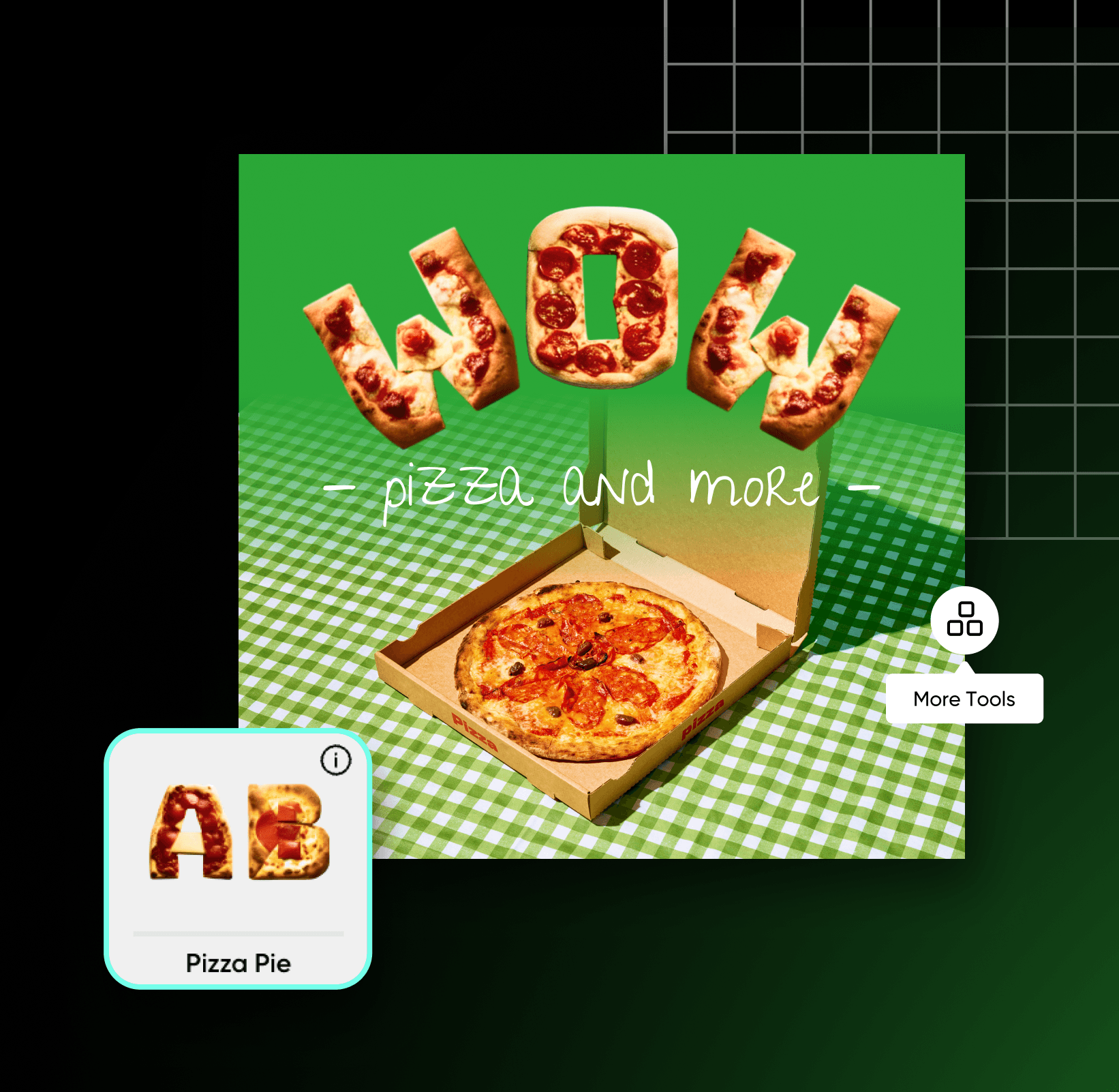
نحوه اعمال سبکهای فونت هوش مصنوعی
با سبکهای متن هوش مصنوعی، پیام خود را به چشم بیاورید
از جدیدترین فناوری هوش مصنوعی استفاده کنید و بهراحتی برای متنتان فونتهای سهبعدی بسازید. نیازی به کار پیچیدهای نیست! کافی است متن را وارد و سبک را انتخاب کنید. سپس هوش مصنوعی در چند ثانیه افکتی سفارشی به کلماتتان اضافه میکند.

بهراحتی سبکهای فونت سهبعدی چشمنواز اضافه کنید
با مجموعهای از سبکهای فونت متناسب با حالوهواها و مناسبتهای مختلف، ظاهر پیام خود را کامل کنید. برای ظاهری شاد و خودمانی، سراغ سبکهای متن الهامگرفته از خوراکیها بروید یا برای جلوهای لطیف و درخشان، سبکهای ملایمتری مثل Balloon Dreams و Fairy Floss را انتخاب کنید.

با فونتهای سهبعدی، جلوه بصری برندتان را ارتقا دهید
در میان فیدهای شلوغ اینترنت گم نشوید. با سبکهای فونت هوش مصنوعی، محتوای تبلیغاتیتان را بیشتر به چشم بیاورید. برای برندتان پستهای شبکههای اجتماعی که مخاطب را از پیمایش بازمیدارند، تبلیغات و محصولات چاپی چشمنواز بسازید.

به محتوای شبکههای اجتماعیتان جلوهای تازه بدهید
بهراحتی به نوشتههایتان در شبکههای اجتماعی جذابیت بدهید. با افکتهای متنی منحصربهفرد برای پستها و استوریهایتان متمایز شوید. امکانهای خلاقانه بیپایاناند. میتوانید پیام خود را به گوش همه برسانید یا از آن فقط بهعنوان عنصری تزئینی در طرحهایتان استفاده کنید. میخواهید حالوهوای هنری را ادامه دهید؟ از مولد هنر هوش مصنوعی استفاده کنید تا اثری هماهنگ با پیامتان بسازید.

با هوش مصنوعی، ویرایش عکسهایتان را تقویت کنید
با ویرایشگر عکس مجهز به هوش مصنوعی، بهراحتی جزئیات نهایی را به طرحهایتان اضافه کنید. تغییرات پیچیده را ساده انجام دهید؛ مثلاً با حذف اشیا از عکسها عناصر مزاحم را از بین ببرید یا با پاک کردن پسزمینه، انعطاف بیشتری به تصاویرتان بدهید. از مولد هوش مصنوعی تبدیل متن به تصویر استفاده کنید تا در چند ثانیه از ابتدا تصاویر تازه بسازید. یا با بهبود هوش مصنوعی کیفیت عکستان را بالا ببرید. همه اینها و موارد دیگر، در یک رابط کاربری ساده و یکپارچه در دسترس شماست.

با مدلهای تصویر هوش مصنوعی، سبک فونت متن هوش مصنوعی بسازید
از مدلهای تصویر استفاده کنید تا سبک فونت متن هوش مصنوعی را به جلوههای بصری صیقلی، ایدههای طراحی و فایلهای آماده ویرایش تبدیل کنید.
پرسشهای متداول درباره سبک متن هوش مصنوعی
سبکهای متن هوش مصنوعی، فونتهایی هستند که با کمک فناوری تبدیل متن به تصویر تولید میشوند.
اعمال سبکهای متن
برای پروژههای آماده تولیدکنندگان محتوا، ویرایش عکس بسازید
Pro
Most popularAI tools for everyday creative work.
Ultra
Most powerfulHeavy AI usage for creators & teams.
مسیر خلاقانهتان را با Picsart ادامه دهید
به مجموعه کاملی از ابزارهای ویرایش عکس و طراحی دسترسی داشته باشید که همگی در یک رابط کاربری ساده و کاربردی گردآوری شدهاند.


