Creatify Boreal: Generate 720p AI Video With Sound
Creatify Boreal generates 720p video with its own audio from either a prompt or a still image, in the time heavier models take to queue. Built by Creatify Labs for short scenes and fast turnarounds, it runs clips up to 10 seconds so you can generate several versions and keep the one that lands. Available now in Picsart's AI Playground.
Meet Creatify Boreal, the AI video model built for speed
Creatify Boreal is the speed tier of the Creatify Labs video family, tuned to return a finished clip while other models are still rendering. Describe a scene or upload a still and it generates 720p video of up to 10 seconds, with the soundtrack produced in the same pass. The trade is deliberate: short, straightforward shots rather than long cinematic sequences, which is exactly what ad tests, social cuts and concept work need.
What can you create with Creatify Boreal
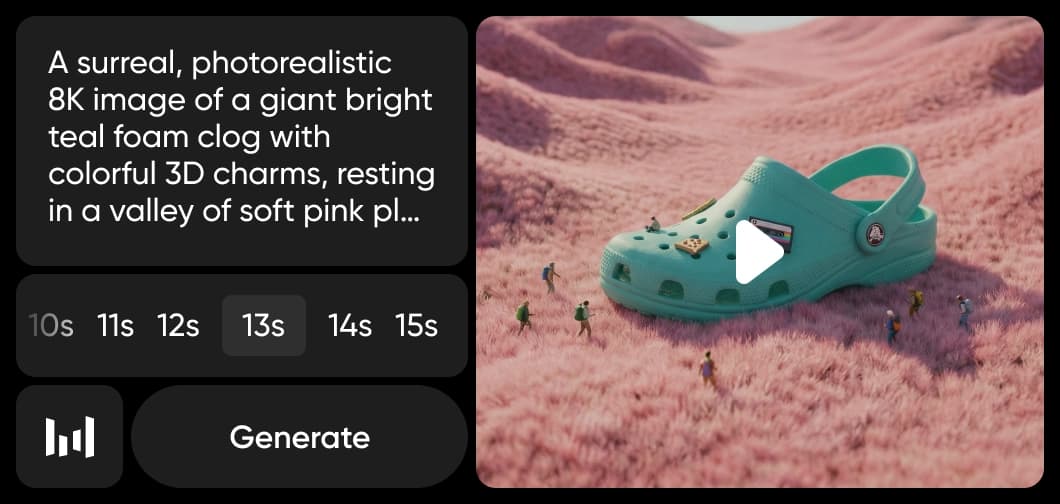
Short vertical cuts for feeds, generated with sound already attached.
720P · 10 SECONDS · AUDIO
Generate 720p AI video with audio, up to 10 seconds
Every clip returns at 720p with sound attached, running as long as 10 seconds, and both input routes produce the same output. Because a generation comes back in seconds rather than minutes, run the same prompt five or ten times, line the results up, and keep the one that lands - the cost of trying another angle is close to nothing. That changes how you work: pick from a set instead of accepting the first result.
SOUND IN THE SAME PASS
AI video with sound, straight out of the model
Generate the picture and the audio together instead of scoring a silent clip afterwards. Most video models hand back mute footage that needs a soundtrack found, licensed and synced; Boreal produces sound tied to the scene it belongs to, in the same pass. For social cuts and ad variations that removes a whole step between generating and posting, and it means a rough clip is watchable the moment it lands.
IMAGE IN OR PROMPT IN
Turn an image into video, or write it from scratch
Upload a still and Boreal animates from that frame, holding the product shot, character or layout you have already approved. Write a prompt instead and it builds the scene from nothing. Both routes generate the same 720p clip with audio, so the only question is what you are starting from - an asset that exists, or an idea that does not yet.
NO KEYS, NO SETUP
Run Creatify Boreal alongside 150+ AI models
Reach for Boreal when speed decides the work - ad variations, short social video, product motion from a single frame, or concept tests you need to see before anyone books a shoot. No Creatify account, no API key and no separate billing: pick the model, generate, and take the clip into the editor. Inside Picsart AI Playground it sits alongside 150+ models, so you can generate fast here and switch models when the next shot needs more length or resolution.
Explore more models like Creatify Boreal
Compare Creatify Boreal with other video models for motion, ads, and social clips.
Creatify Boreal AI model FAQ
Boreal is a video generation model from Creatify Labs, built for speed. It produces 720p clips of up to 10 seconds from either a text prompt or an image, with audio generated alongside the video.
720p, up to 10 seconds per clip. It performs best on short, simple scenes rather than long or heavily detailed sequences.
Yes. Boreal supports both text-to-video and image-to-video, so you can either describe a scene or upload a still and animate from that frame.
Yes. Audio is generated jointly with the video rather than added afterwards, so clips come back with sound already matched to the scene.
Boreal favours turnaround over length and maximum resolution. For longer shots or higher-resolution output, other models in the Playground are a better fit, and you can switch between them without leaving the page.
More AI models to use
Explore more AI-powered tools and models available on Picsart.
Faster V3 variant — long-form video up to 15s with native audio, start/end frame control, and 720p/1080p output.Audio1080pFast generationCinematicSee model
Fast cinematic video with audio, reference images, and start/end frame control.Reference inputAudioFast generationCinematicSee model
Edit video — replace subjects, add or remove objects, restyle scenes with reference images.Video editingReference inputVideo generationSee model
Fast video edit — modify scenes with reference images.Video editingReference inputFast generationSee model
Wan 2.7 T2V — up to 15s at 1080p with audio input and prompt enhancement.Text to videoAudio1080pCinematicSee model
Long-form video up to 15s with native audio and start/end frame control.AudioCinematicVideo generationSee model
Faster V3 variant — long-form video up to 15s with native audio, start/end frame control, and 720p/1080p output.Audio1080pFast generationCinematicSee model
Mature pipeline with audio and pro-tier rendering.
Map body movement from a video clip onto a portrait photo — V3 quality.CinematicPhotorealVideo generationSee model
Transfer body movement from a reference video onto a portrait photo.Reference inputCinematicPhotorealSee model
Fast cinematic video with audio, reference images, and start/end frame control.Reference inputAudioFast generationCinematicSee model
Edit video — replace subjects, add or remove objects, restyle scenes with reference images.Video editingReference inputVideo generationSee model
Fast video edit — modify scenes with reference images.Video editingReference inputFast generationSee model
Wan 2.7 T2V — up to 15s at 1080p with audio input and prompt enhancement.Text to videoAudio1080pCinematicSee model
Long-form video up to 15s with native audio and start/end frame control.AudioCinematicVideo generationSee model
Faster V3 variant — long-form video up to 15s with native audio, start/end frame control, and 720p/1080p output.Audio1080pFast generationCinematicSee model
Mature pipeline with audio and pro-tier rendering.
Map body movement from a video clip onto a portrait photo — V3 quality.CinematicPhotorealVideo generationSee model
Transfer body movement from a reference video onto a portrait photo.Reference inputCinematicPhotorealSee model
Fast cinematic video with audio, reference images, and start/end frame control.Reference inputAudioFast generationCinematicSee model
Edit video — replace subjects, add or remove objects, restyle scenes with reference images.Video editingReference inputVideo generationSee model
Fast video edit — modify scenes with reference images.Video editingReference inputFast generationSee model
Wan 2.7 T2V — up to 15s at 1080p with audio input and prompt enhancement.Text to videoAudio1080pCinematicSee model
Long-form video up to 15s with native audio and start/end frame control.AudioCinematicVideo generationSee model
Faster V3 variant — long-form video up to 15s with native audio, start/end frame control, and 720p/1080p output.Audio1080pFast generationCinematicSee model
Mature pipeline with audio and pro-tier rendering.
Map body movement from a video clip onto a portrait photo — V3 quality.CinematicPhotorealVideo generationSee model
Transfer body movement from a reference video onto a portrait photo.Reference inputCinematicPhotorealSee model
Fast cinematic video with audio, reference images, and start/end frame control.Reference inputAudioFast generationCinematicSee model
Edit video — replace subjects, add or remove objects, restyle scenes with reference images.Video editingReference inputVideo generationSee model
Fast video edit — modify scenes with reference images.Video editingReference inputFast generationSee model
Wan 2.7 T2V — up to 15s at 1080p with audio input and prompt enhancement.Text to videoAudio1080pCinematicSee model
Long-form video up to 15s with native audio and start/end frame control.AudioCinematicVideo generationSee model
Faster V3 variant — long-form video up to 15s with native audio, start/end frame control, and 720p/1080p output.Audio1080pFast generationCinematicSee model
Mature pipeline with audio and pro-tier rendering.
Map body movement from a video clip onto a portrait photo — V3 quality.CinematicPhotorealVideo generationSee model
Transfer body movement from a reference video onto a portrait photo.Reference inputCinematicPhotorealSee model
Fast cinematic video with audio, reference images, and start/end frame control.Reference inputAudioFast generationCinematicSee model
Edit video — replace subjects, add or remove objects, restyle scenes with reference images.Video editingReference inputVideo generationSee model
Fast video edit — modify scenes with reference images.Video editingReference inputFast generationSee model
Wan 2.7 T2V — up to 15s at 1080p with audio input and prompt enhancement.Text to videoAudio1080pCinematicSee model
Long-form video up to 15s with native audio and start/end frame control.AudioCinematicVideo generationSee model
Faster V3 variant — long-form video up to 15s with native audio, start/end frame control, and 720p/1080p output.Audio1080pFast generationCinematicSee model
Mature pipeline with audio and pro-tier rendering.


