1. Home
  2. แก้ไขข้อความในรูปภาพ

แก้ไขข้อความในรูปภาพ: ลบข้อความจากภาพถ่ายและเขียนใหม่ของคุณเอง

แก้ไข แทนที่ หรือเพิ่มคำในรูปภาพโดยใช้ Photo Text Editor ซึ่งออกแบบมาเพื่อการเปลี่ยนแปลงที่รวดเร็วและมีคุณภาพสูง

แก้ไขข้อความในรูปภาพ
พัฒนารูปภาพของคุณให้ดียิ่งขึ้น
ลบวัตถุที่ไม่ต้องการลบข้อความจากภาพถ่ายทำความสะอาดรูปภาพเพิ่มข้อความลงในภาพถ่ายลองสไตล์ข้อความ AIสำรวจตัวเลือกฟอนต์สร้างข้อความโค้งแก้ไขภาพออนไลน์ลบคนออกจากภาพถ่ายสร้างเนื้อหา AIลองแก้ไขภาพถ่าย AI

Use Picsart anywhere

Install the app, or bring Picsart into the AI workspaces your team already uses.

Use Picsart with

  • ChatGPT / Codex
  • Claude
  • Terminal
  • Cursor
  • OpenClaw
  • Hermes

Download the app

Download on the App StoreGET IT ON Google PlayGet it from Microsoft

Follow Picsart

Pinterest
AICPA SOC

Create

  • AI Image Generator
  • AI Video Generator
  • AI Playground
  • Flow
  • AI Photo Editor
  • AI Video Editor
  • AI Agents
  • Content Library
  • AI Models

Creators

  • Earn with Picsart
  • Earn campaigns
  • Clipping
  • For Brands
  • Video Studio
  • Tutorials
  • Challenges

Connect

  • ChatGPT / Codex
  • MCP setup
  • Command line
  • Developers
  • Google Drive

Business

  • Pricing
  • Enterprise
  • Industries
  • Quicktools

Company

  • Support
  • Careers
  • About us
  • Blog
  • Press Center
Terms of UsePrivacy PolicyInternet-Based AdvertisingCommunity GuidelinesDMCASecurity PolicyAccessibility
© 2026 PicsArt, Inc.
แก้ไขข้อความในรูปภาพ
4.9/5
(1,379 reviews)
ExcellentTrustpilot
แอปแอปเปิ้ลที่ดีที่สุดลบพื้นหลังมากกว่า 10 ล้านภาพแอปแอนดรอยด์ที่ดีที่สุด
ไอคอนสำหรับการแก้ไขรูปภาพ

การแก้ไขข้อความในภาพอย่างรวดเร็ว

แก้ไข แทนที่ ลบ และเพิ่มข้อความใหม่ในรูปภาพได้อย่างรวดเร็ว

ไอคอนสำหรับสไตล์ฟอนต์

หลากหลายสไตล์ฟอนต์

แก้ไขภาพด้วยข้อความออนไลน์โดยใช้สไตล์ฟอนต์ สี และขนาดที่คุณเลือก

ไอคอนสำหรับภาพความละเอียดสูง

ผลลัพธ์ที่มีความละเอียดสูง

 แก้ไขคำในรูปภาพของคุณอย่างสะดวกและได้ภาพที่คมชัด—ไม่มีการสูญเสียคุณภาพ


วิธีแก้ไขข้อความในรูปภาพ

1

อัปโหลดรูปภาพของคุณ

อัปโหลดภาพหรือภาพหน้าจอเพื่อเริ่มต้น เครื่องมือแก้ไขจะเปิดทันทีและสแกนภาพของคุณเพื่อเตรียมข้อความสำหรับการแก้ไข – โดยไม่ต้องตั้งค่าหรือเตรียมการด้วยตนเอง

2

เลือกข้อความที่จะแก้ไข

3

ลบหรือแทนที่ข้อความ

4

ใช้การเปลี่ยนแปลงและส่งออก


แก้ไขข้อความในรูปภาพออนไลน์และเพิ่มคำที่กำหนดเองด้วยความง่ายดาย

เครื่องมือลบวัตถุของ Picsart เสนอวิธีการลบองค์ประกอบที่ไม่ต้องการและแทรกข้อความใหม่ได้อย่างรวดเร็วและง่ายดาย ลบข้อความเพื่อสร้างภาพที่ชัดเจนไม่มีคำ หรือแทนที่ข้อความเพื่อใช้งานใหม่สำหรับโปรเจกต์ต่างๆ เครื่องมือลบข้อความออนไลน์นี้ใช้ได้ฟรีและใช้งานง่าย ทำให้ผู้คนทุกระดับทักษะสามารถอัปโหลดภาพและทำเครื่องหมายข้อความที่ไม่ต้องการและ แก้ไขคำในรูปภาพโดยไม่ต้องมีทักษะทางเทคนิคหรือการออกแบบ

แก้ไขข้อความในผลิตภัณฑ์ออนไลน์

แก้ไขภาพที่มีข้อความอย่างชำนาญในขณะที่รักษาความคมชัดไว้

รักษาคุณภาพและความถูกต้องของภาพเดิมหรือภาพหน้าจอ เมื่อคุณ แก้ไขข้อความในรูปภาพ ตัวลบวัตถุจะจับคู่พื้นผิวและสีของพื้นหลังไว้อย่างแม่นยำเพื่อให้ภาพที่แก้ไขคมชัดและสดใส สำรวจคลังฟอนต์ขนาดใหญ่ของ Picsart เพื่อเลือกสไตล์ฟอนต์ สี และขนาดใหม่ หรือตรงกับฟอนต์ที่มีอยู่เพื่อให้ได้ลุคที่สมบูรณ์แบบในภาพที่แก้ไขของคุณ
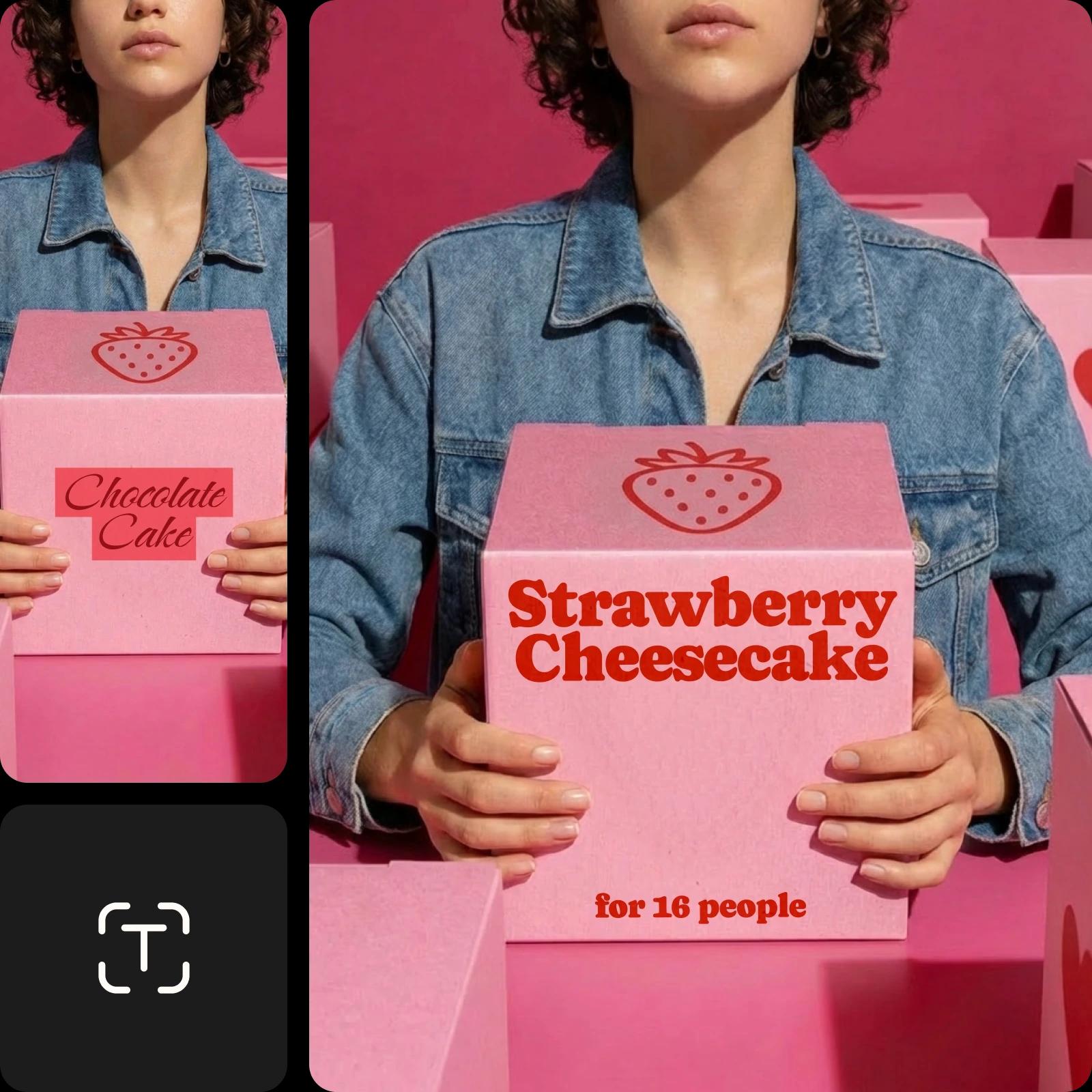
แก้ไขข้อความผลิตภัณฑ์ในรูปภาพออนไลน์

สร้างภาพด้วยข้อความที่กำหนดเองสำหรับวัสดุทางการตลาด

เปลี่ยนข้อความในภาพสำหรับธุรกิจและการตลาดเพื่อประหยัดเวลาและความพยายาม จากโบรชัวร์ไปจนถึงแผ่นราคาไปจนถึงมีม ธุรกิจที่ทันสมัยต้องการภาพที่น่าสนใจหลากหลายเพื่อโดดเด่น

ลบและข้อความที่กำหนดเองในภาพออนไลน์

แก้ไขข้อความหน้าจอออนไลน์เพื่อแก้ไขข้อผิดพลาด

อย่าทิ้งภาพที่ดีเนื่องจากข้อผิดพลาดเล็กๆ เครื่องมือแก้ไขข้อความในภาพช่วยคุณกู้ภาพ โปสเตอร์ สื่อสังคม ฯลฯ หากพบข้อผิดพลาด เพียงอัปโหลดภาพและระบุข้อความที่ต้องแก้ไข กำจัดการสะกดผิด คำที่เบลอ แล้วดาวน์โหลดเวอร์ชันอัปเดตได้โดยไม่ต้องออกแบบภาพใหม่ทั้งหมด

แก้ไขข้อความหน้าจออย่างรวดเร็ว

สร้างวัสดุแบรนด์ที่กำหนดเองด้วย Photo Text Editor

ออกแบบภาพที่แสดงข้อความแบรนด์ของคุณหรือสร้างสรรค์แบบส่วนตัวในขณะที่ตัดทอนสิ่งที่ไม่ต้องการ เพิ่มข้อมูลแบรนด์หรือคำอธิบายภาพลงในรูปภาพด้วย Photo Text Editorของ Picsart เพื่อสร้างเนื้อหาอันเอกลักษณ์ เช่น การ์ดอวยพร บัตรเชิญ และใบปลิว

"}
สร้างการ์ดอวยพรที่กำหนดเองด้วยตัวแก้ไขข้อความภาพ

แก้ไขข้อความในรูปภาพด้วย AI

แก้ไขข้อความในภาพด้วย AI โดยบรรยายสิ่งที่คุณต้องการเปลี่ยน เขียน prompt เพื่อลบคำที่มีอยู่และแทนที่ด้วยข้อความใหม่ที่ตรงกับฟอนต์ ขนาด และสไตล์ที่คุณต้องการ AI จะจัดการเรื่องการเลือก การทำความสะอาด และการแทนที่ให้ การแก้ไขเสร็จในไม่กี่วินาที


คำถามที่พบบ่อยเกี่ยวกับ Photo Text Editor

อัปโหลดภาพของคุณใน Photo Text Editor แล้วปล่อยให้เครื่องมือค้นหาข้อความโดยอัตโนมัติ เลือกข้อความด้วยการตรวจจับอัตโนมัติ แปรง หรือเครื่องมือคลิกเพื่อเลือก แล้วลบหรือแทนที่ ปรับแต่งข้อความใหม่หรือใช้ AI เพื่ออธิบายการเปลี่ยนแปลง ใช้การแก้ไขและดาวน์โหลดภาพที่อัปเดตของคุณ

โปรแกรมแก้ไขข้อความภาพของ Picsart จะไม่ลดคุณภาพของภาพ อย่างไรก็ตาม การใช้ AI enhance tool เพื่อเพิ่มคุณภาพของภาพก่อนเริ่มแก้ไขอาจเป็นประโยชน์

คลังฟอนต์ขนาดใหญ่ของ Picsart ทำให้การหาฟอนต์ยอดนิยมและจับคู่ข้อความใหม่กับข้อความที่มีอยู่ในภาพของคุณเป็นเรื่องง่าย นอกจากนี้ คุณยังสามารถอัปโหลดฟอนต์ที่คุณออกแบบเองด้วยการเป็นสมาชิก Pro ของ Picsart

เครื่องมือแก้ไขข้อความของ Picsart สามารถลบข้อความจากภาพได้ในไม่กี่วินาที อย่างไรก็ตาม ระยะเวลาที่ใช้ขึ้นอยู่กับความเร็วของการเชื่อมต่อเครือข่าย เครื่องมือแก้ไขทั้งหมดทำงานอย่างรวดเร็วเพื่อผลลัพธ์ที่เกือบทันที ดังนั้นคุณจะใช้เวลาได้ตามที่ต้องการเพื่อทำการปรับปรุงเพิ่มเติม

การแก้ไขข้อความไม่ใช่ฟีเจอร์ที่ฟรี 100% Picsart มีเครื่องมือฟรีมากมายในการเพิ่มประสิทธิภาพภาพถ่าย รวมถึงการเพิ่มข้อความในภาพ อย่างไรก็ตาม การเปลี่ยนข้อความที่มีอยู่ในภาพต้องใช้เครื่องมือลบวัตถุ ซึ่งเป็นฟีเจอร์ที่ต้องชำระเงิน


เครื่องมือเพิ่มเติมที่คุณจะหลงรักจาก Picsart

ผู้หญิงผมดำยืนอยู่บนทรายขาวพร้อมผ้าชิ้นยาวสีน้ำเงิน

เครื่องมือลบวัตถุ

ลบวัตถุที่ไม่ต้องการ เช่น ข้อความและพื้นหลังจากภาพของคุณ

ลบข้อความจากภาพ

ลบข้อความจากภาพ

ลบข้อความและโฆษณาที่ไม่ต้องการออกจากภาพใดๆ ด้วย AI

ลบคนออกจากภาพออนไลน์

เครื่องมือลบคน

เรียกคืนการควบคุมเหนือภาพถ่ายของคุณและลบคนออกจากพื้นหลังด้วย Picsart

ทำความสะอาดรูปภาพ

ทำความสะอาดรูปภาพ

ลบวัตถุและคนที่ไม่ต้องการออกจากภาพถ่ายของคุณด้วยความช่วยเหลือของ AI

เพิ่มข้อความลงในภาพถ่ายด้วย Picsart

เครื่องมือแก้ไขข้อความ

เสริมภาพถ่ายของคุณด้วยคลังฟอนต์ฟรีมากมาย

AI ขยายภาพ

AI ขยายภาพ

จับภาพสิ่งที่เล็ดลอดจากเลนส์ด้วย AI ที่สร้างสรรค์

ทำรูปภาพให้คมชัดขึ้นออนไลน์

ภาพแบบไม่พิกเซล

ทำให้ภาพคมชัดขึ้นโดยใช้โปรแกรมปรับปรุงภาพที่มีพลัง AI ของ Picsart

เพิ่มความคมชัดในภาพด้วย Picsart

เพิ่มความคมชัดในภาพ

เพิ่มคุณภาพของภาพในไม่กี่วินาทีด้วยความช่วยเหลือของ AI

เครื่องมือกำจัดสีพื้นหลังของภาพ

เครื่องมือกำจัดสีพื้นหลัง

กำจัดสีพื้นหลังที่ไม่ต้องการในภาพได้ทันที

PricingSave big

สร้างข้อความที่แก้ไขแล้วในรูปภาพด้วยโมเดลภาพ AI

ใช้โมเดลภาพเพื่อแปลงข้อความแก้ไขในรูปภาพเป็นภาพที่เสร็จสมบูรณ์ ไอเดียในการออกแบบ และทรัพย์สินที่พร้อมให้แก้ไข

GPT Image 2NewImage
Next-gen GPT image model with arbitrary output dimensions and multi-image input.Reference inputImage generationSee model
SESeedance 2.0NewVideo
SESeedance 2.0 FastNewVideo
SESeedance 2.0 Video EditNewVideo
SESeedance 2.0 Fast Video EditNewVideo
WAWan 2.7Video
Nano Banana 2Image
Nano Banana ProImage
FLFlux 2 FlexImage
SESeedream 5.0 LiteImage
KLKling V3Video
KLKling V3 TurboNewVideo
GPT Image 2NewImage
GPT Image 2NewImage
GPT Image 2NewImage
GPT Image 2NewImage
GPT Image 2NewImage
Next-gen cinematic video with optional audio and reference image. Up to 4K.Reference inputAudio4KCinematicSee model
Fast cinematic video with audio, reference images, and start/end frame control.Reference inputAudioFast generationCinematicSee model
Edit video — replace subjects, add or remove objects, restyle scenes with reference images.Video editingReference inputVideo generationSee model
Fast video edit — modify scenes with reference images.Video editingReference inputFast generationSee model
Wan 2.7 T2V — up to 15s at 1080p with audio input and prompt enhancement.Text to videoAudio1080pCinematicSee model
Fast 4K generation with accurate text and search-grounded accuracy.4KFast generationImage generationSee model
Top-tier 4K images with precise multilingual text rendering.4KPro qualityImage generationSee model
Adaptable generation across varied visual styles up to 4K.4KImage generationSee model
Speedy 3K output with negative prompt and dual-image input support.Reference inputFast generationImage generationSee model
Long-form video up to 15s with native audio and start/end frame control.AudioCinematicVideo generationSee model
Faster V3 variant — long-form video up to 15s with native audio, start/end frame control, and 720p/1080p output.Audio1080pFast generationCinematicSee model
Next-gen GPT image model with arbitrary output dimensions and multi-image input.Reference inputImage generationSee model
SESeedance 2.0NewVideo
Next-gen cinematic video with optional audio and reference image. Up to 4K.Reference inputAudio4KCinematicSee model
SESeedance 2.0 FastNewVideo
Fast cinematic video with audio, reference images, and start/end frame control.Reference inputAudioFast generationCinematicSee model
SESeedance 2.0 Video EditNewVideo
Edit video — replace subjects, add or remove objects, restyle scenes with reference images.Video editingReference inputVideo generationSee model
SESeedance 2.0 Fast Video EditNewVideo
Fast video edit — modify scenes with reference images.Video editingReference inputFast generationSee model
WAWan 2.7Video
Wan 2.7 T2V — up to 15s at 1080p with audio input and prompt enhancement.Text to videoAudio1080pCinematicSee model
Nano Banana 2Image
Fast 4K generation with accurate text and search-grounded accuracy.4KFast generationImage generationSee model
Nano Banana ProImage
Top-tier 4K images with precise multilingual text rendering.4KPro qualityImage generationSee model
FLFlux 2 FlexImage
Adaptable generation across varied visual styles up to 4K.4KImage generationSee model
SESeedream 5.0 LiteImage
Speedy 3K output with negative prompt and dual-image input support.Reference inputFast generationImage generationSee model
KLKling V3Video
Long-form video up to 15s with native audio and start/end frame control.AudioCinematicVideo generationSee model
KLKling V3 TurboNewVideo
Faster V3 variant — long-form video up to 15s with native audio, start/end frame control, and 720p/1080p output.Audio1080pFast generationCinematicSee model
Next-gen GPT image model with arbitrary output dimensions and multi-image input.Reference inputImage generationSee model
SESeedance 2.0NewVideo
Next-gen cinematic video with optional audio and reference image. Up to 4K.Reference inputAudio4KCinematicSee model
SESeedance 2.0 FastNewVideo
Fast cinematic video with audio, reference images, and start/end frame control.Reference inputAudioFast generationCinematicSee model
SESeedance 2.0 Video EditNewVideo
Edit video — replace subjects, add or remove objects, restyle scenes with reference images.Video editingReference inputVideo generationSee model
SESeedance 2.0 Fast Video EditNewVideo
Fast video edit — modify scenes with reference images.Video editingReference inputFast generationSee model
WAWan 2.7Video
Wan 2.7 T2V — up to 15s at 1080p with audio input and prompt enhancement.Text to videoAudio1080pCinematicSee model
Nano Banana 2Image
Fast 4K generation with accurate text and search-grounded accuracy.4KFast generationImage generationSee model
Nano Banana ProImage
Top-tier 4K images with precise multilingual text rendering.4KPro qualityImage generationSee model
FLFlux 2 FlexImage
Adaptable generation across varied visual styles up to 4K.4KImage generationSee model
SESeedream 5.0 LiteImage
Speedy 3K output with negative prompt and dual-image input support.Reference inputFast generationImage generationSee model
KLKling V3Video
Long-form video up to 15s with native audio and start/end frame control.AudioCinematicVideo generationSee model
KLKling V3 TurboNewVideo
Faster V3 variant — long-form video up to 15s with native audio, start/end frame control, and 720p/1080p output.Audio1080pFast generationCinematicSee model
Next-gen GPT image model with arbitrary output dimensions and multi-image input.Reference inputImage generationSee model
SESeedance 2.0NewVideo
Next-gen cinematic video with optional audio and reference image. Up to 4K.Reference inputAudio4KCinematicSee model
SESeedance 2.0 FastNewVideo
Fast cinematic video with audio, reference images, and start/end frame control.Reference inputAudioFast generationCinematicSee model
SESeedance 2.0 Video EditNewVideo
Edit video — replace subjects, add or remove objects, restyle scenes with reference images.Video editingReference inputVideo generationSee model
SESeedance 2.0 Fast Video EditNewVideo
Fast video edit — modify scenes with reference images.Video editingReference inputFast generationSee model
WAWan 2.7Video
Wan 2.7 T2V — up to 15s at 1080p with audio input and prompt enhancement.Text to videoAudio1080pCinematicSee model
Nano Banana 2Image
Fast 4K generation with accurate text and search-grounded accuracy.4KFast generationImage generationSee model
Nano Banana ProImage
Top-tier 4K images with precise multilingual text rendering.4KPro qualityImage generationSee model
FLFlux 2 FlexImage
Adaptable generation across varied visual styles up to 4K.4KImage generationSee model
SESeedream 5.0 LiteImage
Speedy 3K output with negative prompt and dual-image input support.Reference inputFast generationImage generationSee model
KLKling V3Video
Long-form video up to 15s with native audio and start/end frame control.AudioCinematicVideo generationSee model
KLKling V3 TurboNewVideo
Faster V3 variant — long-form video up to 15s with native audio, start/end frame control, and 720p/1080p output.Audio1080pFast generationCinematicSee model
Next-gen GPT image model with arbitrary output dimensions and multi-image input.Reference inputImage generationSee model
SESeedance 2.0NewVideo
Next-gen cinematic video with optional audio and reference image. Up to 4K.Reference inputAudio4KCinematicSee model
SESeedance 2.0 FastNewVideo
Fast cinematic video with audio, reference images, and start/end frame control.Reference inputAudioFast generationCinematicSee model
SESeedance 2.0 Video EditNewVideo
Edit video — replace subjects, add or remove objects, restyle scenes with reference images.Video editingReference inputVideo generationSee model
SESeedance 2.0 Fast Video EditNewVideo
Fast video edit — modify scenes with reference images.Video editingReference inputFast generationSee model
WAWan 2.7Video
Wan 2.7 T2V — up to 15s at 1080p with audio input and prompt enhancement.Text to videoAudio1080pCinematicSee model
Nano Banana 2Image
Fast 4K generation with accurate text and search-grounded accuracy.4KFast generationImage generationSee model
Nano Banana ProImage
Top-tier 4K images with precise multilingual text rendering.4KPro qualityImage generationSee model
FLFlux 2 FlexImage
Adaptable generation across varied visual styles up to 4K.4KImage generationSee model
SESeedream 5.0 LiteImage
Speedy 3K output with negative prompt and dual-image input support.Reference inputFast generationImage generationSee model
KLKling V3Video
Long-form video up to 15s with native audio and start/end frame control.AudioCinematicVideo generationSee model
KLKling V3 TurboNewVideo
Faster V3 variant — long-form video up to 15s with native audio, start/end frame control, and 720p/1080p output.Audio1080pFast generationCinematicSee model
Next-gen GPT image model with arbitrary output dimensions and multi-image input.Reference inputImage generationSee model
SESeedance 2.0NewVideo
Next-gen cinematic video with optional audio and reference image. Up to 4K.Reference inputAudio4KCinematicSee model
SESeedance 2.0 FastNewVideo
Fast cinematic video with audio, reference images, and start/end frame control.Reference inputAudioFast generationCinematicSee model
SESeedance 2.0 Video EditNewVideo
Edit video — replace subjects, add or remove objects, restyle scenes with reference images.Video editingReference inputVideo generationSee model
SESeedance 2.0 Fast Video EditNewVideo
Fast video edit — modify scenes with reference images.Video editingReference inputFast generationSee model
WAWan 2.7Video
Wan 2.7 T2V — up to 15s at 1080p with audio input and prompt enhancement.Text to videoAudio1080pCinematicSee model
Nano Banana 2Image
Fast 4K generation with accurate text and search-grounded accuracy.4KFast generationImage generationSee model
Nano Banana ProImage
Top-tier 4K images with precise multilingual text rendering.4KPro qualityImage generationSee model
FLFlux 2 FlexImage
Adaptable generation across varied visual styles up to 4K.4KImage generationSee model
SESeedream 5.0 LiteImage
Speedy 3K output with negative prompt and dual-image input support.Reference inputFast generationImage generationSee model
KLKling V3Video
Long-form video up to 15s with native audio and start/end frame control.AudioCinematicVideo generationSee model
KLKling V3 TurboNewVideo
Faster V3 variant — long-form video up to 15s with native audio, start/end frame control, and 720p/1080p output.Audio1080pFast generationCinematicSee model

ทำความสะอาดภาพเพื่อเนื้อหาผู้สร้างที่ดูเรียบร้อย

Free

Starter tools for casual exploration.

$0/mo
  • Standard photo & video editing tools
  • Selection of free images, videos & customizable templates
  • Limited AI access
  • 100 MB of cloud storage