
என் சிறு வணிகத்திற்கு இது பெரிய மாற்றத்தை ஏற்படுத்தியது. எனது அனைத்து தயாரிப்பு புகைப்படங்களையும் தயாரிக்க சுத்தப்படுத்தும் கருவியைப் பயன்படுத்துகிறேன். இது பின்னணி சீர்குலைவுகளை சில நொடிகளில் அகற்றி, நிபுணரை வேலைக்கு அமர்த்தாமல் எல்லாவற்றையும் ஸ்டுடியோ தரத்தில் தோன்றச் செய்கிறது.
Lina, business ownerAI மூலம் படங்களைச் சுத்தப்படுத்துங்கள்
AI-ஐப் பயன்படுத்தி இலவசமாக சில நொடிகளில் படங்களைச் சுத்தப்படுத்துங்கள். Picsart ஆன்லைன் புகைப்பட சுத்தப்படுத்தியைக் கொண்டு படங்களிலிருந்து தேவையற்ற பொருட்கள், நபர்கள் அல்லது உரையை எளிதாக அகற்றுங்கள்.
புகைப்பட சுத்தப்படுத்தலை ஏன் பயன்படுத்த வேண்டும்?
ஒரு படத்தை எப்படி சுத்தப்படுத்துவது
How to
உங்கள் படத்தைத் தேர்ந்தெடுக்கவும்
பொருள் அகற்றும் கருவியைத் திறந்து, நீங்கள் சுத்தப்படுத்த விரும்பும் படத்தைத் தேர்ந்தெடுக்கவும்.
தனிப்பட்ட மற்றும் வணிகத் தேவைகளுக்காக படங்களைச் சுத்தப்படுத்துங்கள்
Picsart-ன் Cleanup Picture கருவி வணிக மற்றும் அன்றாட புகைப்படத் திருத்தங்கள் இரண்டிற்கும் உருவாக்கப்பட்டுள்ளது. விற்பனையாளர்கள் மற்றும் மார்க்கெட்டர்களுக்கு, பின்னணி குழப்பத்தை அகற்ற, தயாரிப்பு படங்களைச் சுத்தப்படுத்த அல்லது புகைப்படங்களை கூர்மையாகவும் தொழில்முறையாகவும் தோன்றும் வகையில் மீட்டெடுக்க இது சிறந்தது. தனிப்பட்ட பயன்பாட்டிற்கு, நீங்கள் உருவப்படங்களைச் சுத்தப்படுத்தலாம், பயணப் படங்களில் இருந்து தேவையற்ற நபர்களை அழிக்கலாம் அல்லது பழைய குடும்பப் புகைப்படங்களைச் சரிசெய்யலாம் - மேம்பட்ட திருத்தம் தேவையில்லை.
- முக்கிய உருவத்தின் மீது கவனம் வைத்திருங்கள்
AI மூலம் படங்களை எளிதாகச் சுத்தப்படுத்துங்கள்
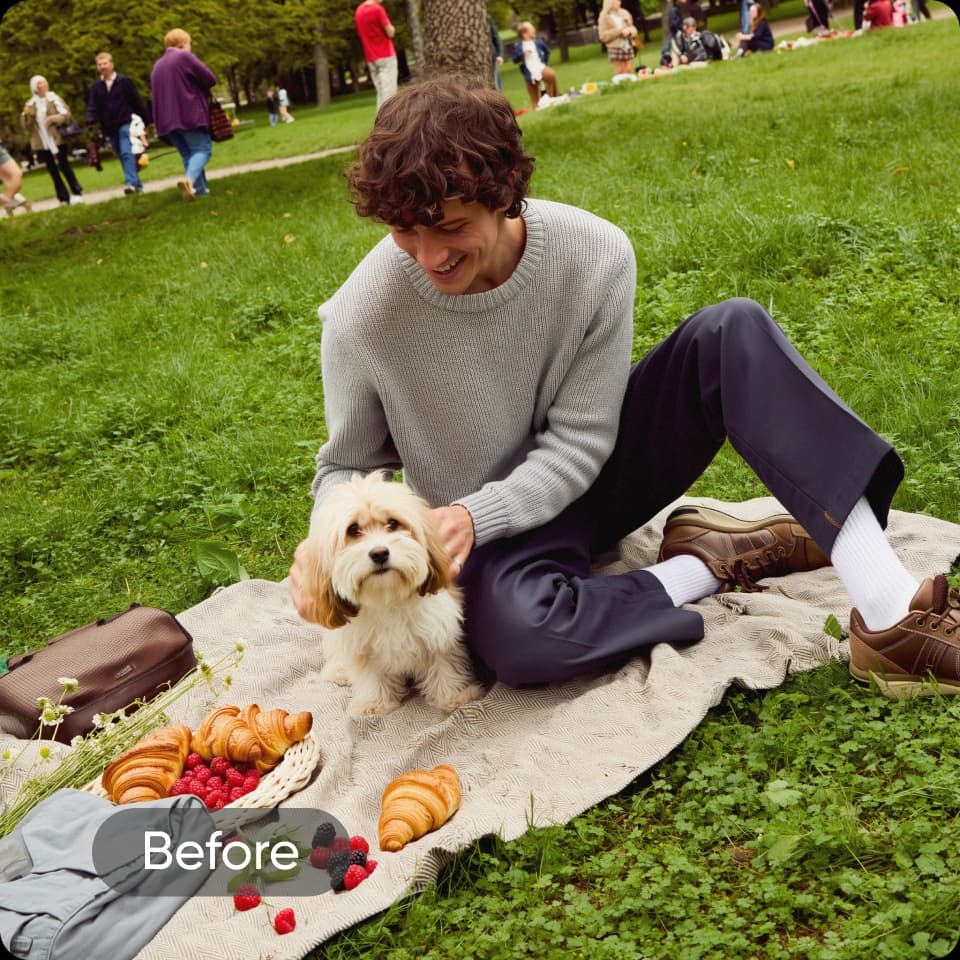
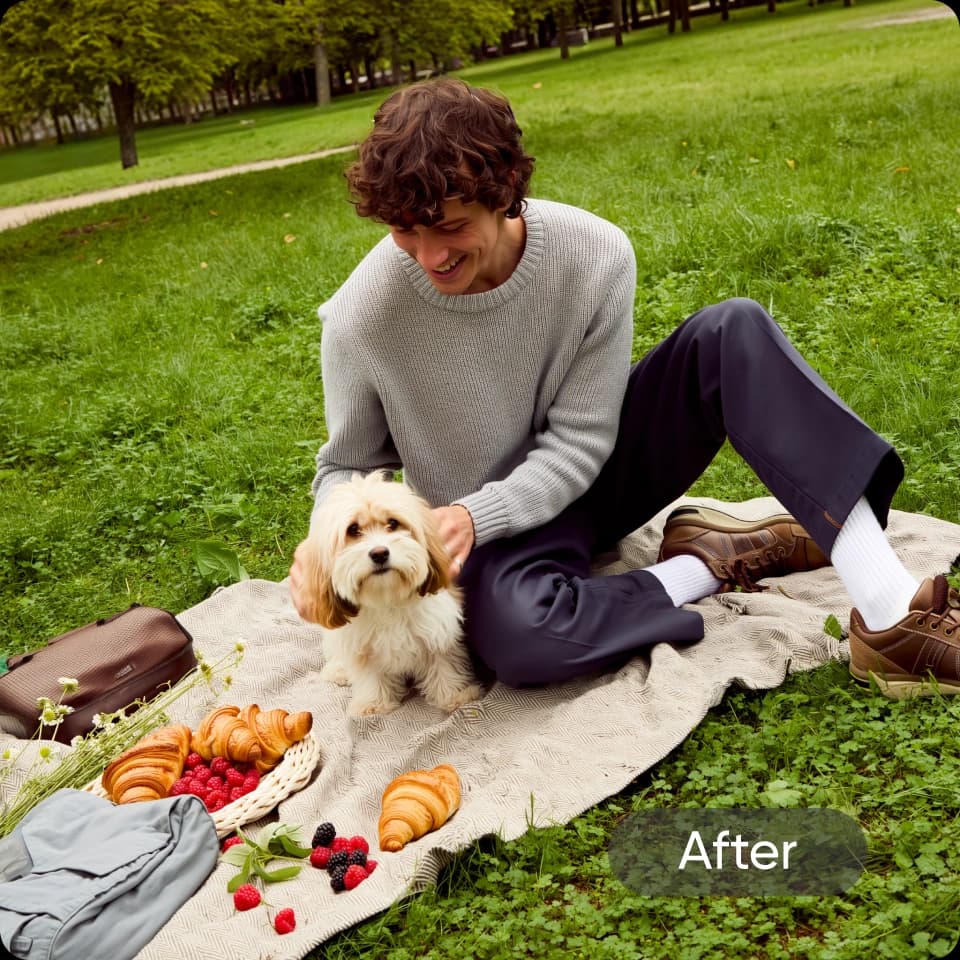
தேவையற்ற இடையூறுகள், குறைகள் மற்றும் விவரங்களுக்கு விடை கொடுக்க வேண்டிய நேரம் இது. Picsart-ன் ஆன்லைன் புகைப்பட சுத்தப்படுத்தியைக் கொண்டு, எந்தப் படத்தின் காட்சித் தோற்றத்தையும் சில நொடிகளில் மேம்படுத்தலாம். நீங்கள் சுத்தப்படுத்த விரும்பும் பகுதிகளின் மேல் தூரிகையால் குறியிடுங்கள், மீதியை AI கவனிக்கட்டும். நீங்கள் நபர்கள், பின்னணி இடையூறுகள் அல்லது கவனச்சிதறல் ஏற்படுத்தும் உரையை அகற்ற விரும்பினாலும், Picsart மூலம் படங்களைச் சுத்தப்படுத்துவது தொந்தரவில்லாதது — உங்களிடம் எந்தத் திருத்தும் திறன்களும் இல்லாவிட்டாலும்.
படம் கச்சிதமான திருத்தங்களுக்கான AI சுத்தப்படுத்தும் கருவி
புகைப்பட சுத்தப்படுத்தல், முக்கியமான படப் பகுதிக்கான கவனத்தைத் தக்கவைத்தபடி கவனச்சிதறல் ஏற்படுத்தும் விவரங்களை எவ்வாறு அகற்ற முடியும் என்பதைப் பாருங்கள்.
பின்னணியிலிருந்து கவனச்சிதறல்களை அகற்றுங்கள்
ஒரே தட்டலில் சீரற்ற நபர்களை அகற்றி உங்கள் படங்களைச் சுத்தப்படுத்துங்கள். AI பின்னணியை தடையின்றியும் விரைவாகவும் நிரப்பட்டும்.
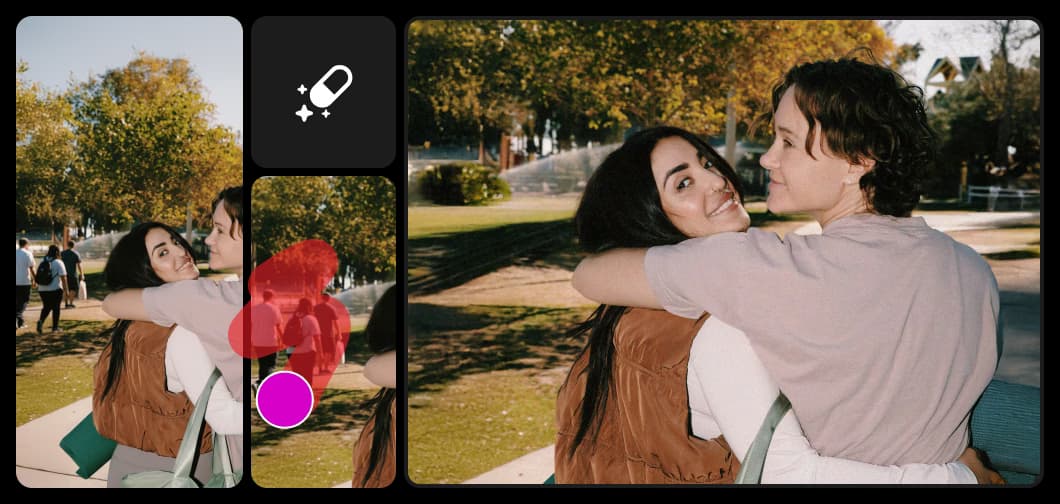
AI மூலம் எந்தப் படத்தையும் சுத்தப்படுத்துங்கள் அல்லது மாற்றுங்கள்
உங்கள் புகைப்படத்தைச் சுத்தப்படுத்துவதிலிருந்து தொடங்குங்கள் - தேவையற்ற பொருட்கள், கவனச்சிதறல்கள் அல்லது பொருந்தாத எதையும் அகற்றுங்கள். இன்னும் மேம்படுத்த வேண்டுமா? அகற்றப்பட்ட பொருட்களைப் புதிய ஒன்றால் மாற்ற AI Replace கருவியைப் பயன்படுத்துங்கள். விரைவான சுத்தப்படுத்தல்களுக்கு, Object Remover புத்திசாலியான, தடையற்ற AI மூலம் பின்னணி திருத்தங்களை எளிதாக்குகிறது.
உங்கள் புகைப்படங்களை முழுமையாகச் செம்மைப்படுத்துங்கள்
Picsart இன் புகைப்பட சுத்தப்படுத்தி மூலம் பொருட்களை அகற்றிவிட்ட பிறகு, Picsart இன் விரிவான AI திருத்தக் கருவிகள் தொகுப்புடன் இறுதி மெருகூட்டல்களைச் சேர்க்க வேண்டிய நேரம் இது. மேலும் மெருகூட்டப்பட்ட தோற்றத்திற்காகப் படங்களிலிருந்து உரையை எளிதாக அகற்றுங்கள், உங்கள் காட்சி மனநிலைக்குப் பொருந்தும் எழுத்துருவுடன் உங்கள் பார்வையாளர்களுக்கு சரியான செய்தியை அனுப்ப புகைப்படங்களில் உரையைச் சேர்க்கவும், அல்லது AI பட மேம்படுத்தி மூலம் படத் தெளிவை மேம்படுத்தவும். படைப்பாற்றல் மிக்க சிறப்பு தோற்றத்திற்கு, கூட்டத்தில் இருந்து தனித்து நிற்க சிறப்பு விளைவுகள் மூலம் பரிசோதித்து பாருங்கள்.
- பகிர்வதற்கு முன் காட்சியமைப்பைச் சரிபாருங்கள்
எந்தப் புகைப்படத்தையும் சுத்தப்படுத்த உங்களுக்குத் தேவையான அனைத்தும்
புத்திசாலியான AI திருத்தங்களிலிருந்து ஏற்றுமதிக்குத் தயாரான முடிவுகள் வரை, இந்தக் கருவிகள் உங்கள் புகைப்படங்களைச் சுத்தப்படுத்த, ரீடச் செய்ய மற்றும் புதுப்பிக்க எளிதாக்குகின்றன - மேம்பட்ட திருத்தத் திறன்கள் தேவையில்லை.
பயணப் புகைப்படங்களுக்கு சரியானது. என் விடுமுறைப் படங்களில் இருந்த கூட்டங்களையும் சீரற்ற நபர்களையும் சுத்தப்படுத்தினேன், முடிவுகள் மிகவும் இயல்பாகத் தோன்றின. Photoshop இருப்பது போல, ஆனால் மிக எளிது.
Daniel, travel bloggerசமூக உள்ளடக்கத்திற்கான விரைவான திருத்தங்கள். என் படங்களிலிருந்து லோகோக்கள் அல்லது உரையை எவ்வளவு வேகமாக அகற்ற முடிகிறது என்பதைக் நான் விரும்புகிறேன். என் பிராண்ட் கூட்டாண்மைகளுக்கான உள்ளடக்கத்தைத் தயாரிக்கும்போது இது எனக்கு மிக அதிக நேரத்தைச் சேமிக்கிறது.
Maya, content creatorAI பட மாதிரிகளுடன் சுத்தமான படங்களை உருவாக்குங்கள்
சுத்தமான படங்களை மெருகூட்டப்பட்ட காட்சிகள், வடிவமைப்பு யோசனைகள் மற்றும் திருத்தத் தயாரான சொத்துகளாக மாற்ற பட மாதிரிகளைப் பயன்படுத்துங்கள்.
புகைப்பட சுத்தப்படுத்தி அடிக்கடி கேட்கப்படும் கேள்விகள்
Picsart இன் புகைப்பட சுத்தப்படுத்தி என்பது பயன்படுத்த எளிதான AI திருத்தக் கருவி; இது செயற்கை நுண்ணறிவைப் பயன்படுத்தி புகைப்படங்களிலிருந்து தேவையற்ற பொருட்களை கண்டறிந்து அகற்றுகிறது.
ஒவ்வொரு படைப்பாளர் திட்டத்திற்கும் புகைப்படங்களைச் சுத்தப்படுத்துங்கள்
Pro
Most popularAI tools for everyday creative work.
Billed yearly
Ultra
Most powerfulHeavy AI usage for creators & teams.
Billed yearly, per seat
Enterprise
Custom AI solutions for large organizations.
Custom credit volume
- Volume discounts on credit rate
- On-demand top-ups
Custom
Contact for pricing
தொடர்புடைய எடிட்டிங் கருவிகளை ஆராயுங்கள்

AI கலை உருவாக்கிAI மூலம் பல்வேறு பாணிகள் மற்றும் இயக்கங்களில் கவனத்தை ஈர்க்கும் கலைப்படைப்பை நொடிகளில் உருவாக்குங்கள்.

AI பட உருவாக்கிஉங்கள் கற்பனையைத் தட்டச்சு செய்யுங்கள்; AI உங்கள் சொற்களை வசீகரிக்கும் காட்சிகளாக மாற்றட்டும்.

AI புகைப்பட மேம்படுத்திAI மூலம் ஒரே முறையில் பல படங்களின் தெளிவுத்திறனை உயர்த்துங்கள்.

AI GIF உருவாக்கிதனிப்பயன் GIF காட்சிகளை புதிதாக எளிதாக உருவாக்குங்கள்.

AI அவதார்AI மூலம் பல்வேறு பாணிகளில் உருவப்படங்களை உருவாக்குங்கள்.

AI பின்புலம்ஒரு குறிப்பு மட்டும் கொண்டு புதிதாக தனித்துவமான பின்புலங்களை உருவாக்குங்கள்.

AI மாற்றுஉங்கள் படத்தின் எந்தப் பகுதியையும் AI உருவாக்கிய பொருளால் மாற்ற AI ஐப் பயன்படுத்துங்கள்.

AI எழுத்தாளர்உங்கள் காட்சிகளுக்கான படைப்பாற்றலான தலைப்புகள் மற்றும் உரையை AI உருவாக்கட்டும்.

AI புகைப்பட எடிட்டர்AI ஆற்றல்மிக்க புகைப்பட எடிட்டர் மூலம் உங்கள் எடிட்டிங் செயல்முறையை வேகப்படுத்துங்கள்.