نموذج Seedance 2.0 الذكي – توليد الفيديو والصور المتعدد الأوضاع
نموذج Seedance 2.0 الذكي لإنشاء المحتوى البصري
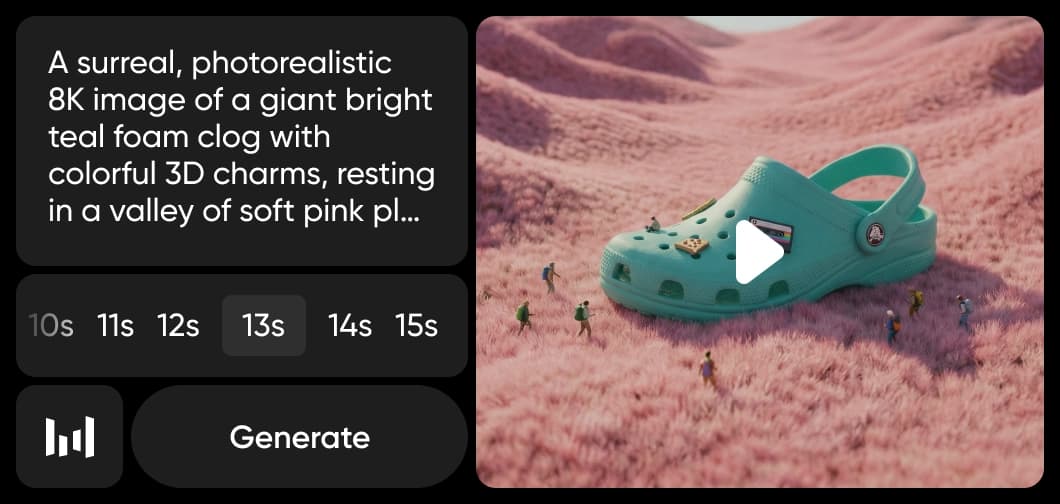
تم دمج Seedance 2.0 في مولد الفيديو الذكي وAI Playground من Picsart، مما يوفر نموذج الفيديو متعدد الأنماط الأكثر تقدماً من ByteDance مباشرة في سير عملك الإبداعي. أنشئ فيديوهات ذكية سينمائية بحد أقصى 12 مرجع إدخال — بجمع النصوص والصور والفيديو والصوت — مع مزامنة شفاه طبيعية واتساق الشخصيات وسرد قصص متعدد المشاهد. استخدم Seedance 2.0 لإنشاء محتوى فيديو احترافي من موجه واحد.
نموذج Seedance 2.0 الذكي هو نظام ذكاء اصطناعي توليدي مصمم لتمكين إنشاء محتوى الصور والفيديو من خلال الأتمتة الذكية والفهم البصري. يدعم مهام إبداعية متعددة الأنماط، بدمج نموذج إنشاء الصور الذكي ونموذج إنشاء الفيديو الذكي في سير عمل متكامل. مصمم لإنشاء بصري قابل للتوسع، يركز Seedance 2.0 على الأتمتة بدلاً من التعقيد اليدوي ويعمل بسلاسة داخل بيئات البرامج الإبداعية.
ماذا يمكنك أن تنشئ مع Seedance 2.0
أنشئ مقاطع فيديو كجزء من سير عمل أوسع يعتمد على الذكاء الاصطناعي يربط الإنشاء والتحرير والتحسين في عملية إبداعية واحدة مركزة. يدعم Seedance 2.0 قدرات نموذج إنشاء الفيديو الذكي المصممة لإنتاج محتوى بصري فعال وقابل للتوسع.
كيف يعمل Seedance 2.0 داخل أدوات Picsart
تدمج Picsart نموذج Seedance 2.0 في مولد الفيديو الذكي وAI Playground، مما يسمح للمستخدمين بإنشاء وتحويل محتوى الفيديو دون التفاعل مع النموذج نفسه. اختر Seedance 2.0 من منتقي النموذج وأنشئ فيديو من نص أو صور مع صوت أصلي. في Picsart Flow، اربط Seedance 2.0 مع نماذج أخرى لبناء خطوط إنتاج فيديو متعددة الخطوات آلية.
لماذا يهم Seedance 2.0 للمبدعين والفرق
يدعم Seedance 2.0 تكرار إبداعي أسرع ويقلل خطوات التحرير اليدوية ويمكّن إنتاج محتوى قابل للتوسع للأفراد والفرق. بتقوية سير عمل الفيديو المدعوم بالذكاء الاصطناعي وأنظمة الإنشاء البصري، فإنه يؤتمت العمليات المتكررة مع الحفاظ على الجودة المتسقة عبر المخرجات.
هذا يؤدي إلى مزايا واضحة وعملية للمبدعين المعاصرين:
Seedance 2.0 وسير العمل الذكي متعدد الأنماط
يساهم Seedance 2.0 في سير عمل ذكي متعدد الأنماط حيث يتقاطع إنشاء الفيديو مع عمليات التحرير والتحسين الآلية. بحد أقصى 12 مرجع إدخال يجمع بين النصوص والصور والفيديو والصوت، يدعم بيئات إنتاج إبداعية موحدة. داخل مولد الفيديو الذكي و AI Playground من Picsart، يمكّن Seedance 2.0 إنشاء محتوى بصري يتكيف مع التنسيقات الرقمية الحديثة واحتياجات الإنتاج التعاوني.
Seedance ضمن منصة Picsart
Seedance هو أحد عدة نماذج ذكاء اصطناعي مستخدمة عبر منصة Picsart الإبداعية. يعمل جنباً إلى جنب مع نماذج مثل Kling 3.0 و Runway Gen 4 و Veo 3.1 و WAN 2.7 لتشغيل مولد الفيديو الذكي و AI Playground. معاً، تدعم هذه النماذج إنشاء الفيديو وإنشاء الصور وسير العمل الآلي — مما يمنح المبدعين الوصول إلى أفضل نموذج لكل مشروع دون تبديل المنصات.
استكشف نماذج أخرى مثل Seedance 2.0
قارن Seedance 2.0 مع نماذج فيديو أخرى للحركة والإعلانات والمقاطع الاجتماعية.
الأسئلة الشائعة عن نموذج Seedance 2.0 الذكي
نموذج Seedance 2.0 الذكي هو نموذج ذكاء اصطناعي توليدي متعدد الأنماط مصمم لإنشاء محتوى الصور والفيديو. يدعم إنشاء بصري آلي وتحسين وسير عمل إنتاج قابل للتوسع.
تدمج Picsart نموذج Seedance مباشرة في أدواتها الإبداعية. Seedance Pro و Seedance Fast متاحان بالفعل، وسيقوم Seedance 2.0 قريباً بتشغيل مولد الفيديو الذكي و AI Playground بإنشاء فيديو متعدد الأنماط متقدم وصوت أصلي والتحكم بمراجع متعددة.
لا. يعمل Seedance خلف الكواليس داخل أدوات Picsart، مما يجعل الإنشاء البصري المتقدم المدعوم بالذكاء الاصطناعي متاحاً بدون خبرة تقنية.
يعتمد الوصول على الأداة المحددة وخطة الاشتراك. Seedance هو جزء من نماذج الذكاء الاصطناعي المستخدمة عبر منصة Picsart، مع توفر يختلف حسب الميزة.
يشغل Seedance إنشاء الفيديو ضمن مولد الفيديو الذكي من Picsart وهو متاح للمقارنة في AI Playground. بدلاً من كشف النماذج مباشرة، تدمج Picsart الذكاء الاصطناعي على مستوى الأداة — مما يمكّن إنشاء الفيديو السينمائي وسير عمل التحرير بسلاسة.
نماذج ذكاء اصطناعي أخرى للاستخدام
استكشف المزيد من الأدوات والنماذج المدعومة بالذكاء الاصطناعي المتاحة على Picsart.
Faster V3 variant — long-form video up to 15s with native audio, start/end frame control, and 720p/1080p output.Audio1080pFast generationCinematicSee model
Fast cinematic video with audio, reference images, and start/end frame control.Reference inputAudioFast generationCinematicSee model
Edit video — replace subjects, add or remove objects, restyle scenes with reference images.Video editingReference inputVideo generationSee model
Fast video edit — modify scenes with reference images.Video editingReference inputFast generationSee model
Wan 2.7 T2V — up to 15s at 1080p with audio input and prompt enhancement.Text to videoAudio1080pCinematicSee model
Long-form video up to 15s with native audio and start/end frame control.AudioCinematicVideo generationSee model
Faster V3 variant — long-form video up to 15s with native audio, start/end frame control, and 720p/1080p output.Audio1080pFast generationCinematicSee model
Mature pipeline with audio and pro-tier rendering.
Map body movement from a video clip onto a portrait photo — V3 quality.CinematicPhotorealVideo generationSee model
Transfer body movement from a reference video onto a portrait photo.Reference inputCinematicPhotorealSee model
Fast cinematic video with audio, reference images, and start/end frame control.Reference inputAudioFast generationCinematicSee model
Edit video — replace subjects, add or remove objects, restyle scenes with reference images.Video editingReference inputVideo generationSee model
Fast video edit — modify scenes with reference images.Video editingReference inputFast generationSee model
Wan 2.7 T2V — up to 15s at 1080p with audio input and prompt enhancement.Text to videoAudio1080pCinematicSee model
Long-form video up to 15s with native audio and start/end frame control.AudioCinematicVideo generationSee model
Faster V3 variant — long-form video up to 15s with native audio, start/end frame control, and 720p/1080p output.Audio1080pFast generationCinematicSee model
Mature pipeline with audio and pro-tier rendering.
Map body movement from a video clip onto a portrait photo — V3 quality.CinematicPhotorealVideo generationSee model
Transfer body movement from a reference video onto a portrait photo.Reference inputCinematicPhotorealSee model
Fast cinematic video with audio, reference images, and start/end frame control.Reference inputAudioFast generationCinematicSee model
Edit video — replace subjects, add or remove objects, restyle scenes with reference images.Video editingReference inputVideo generationSee model
Fast video edit — modify scenes with reference images.Video editingReference inputFast generationSee model
Wan 2.7 T2V — up to 15s at 1080p with audio input and prompt enhancement.Text to videoAudio1080pCinematicSee model
Long-form video up to 15s with native audio and start/end frame control.AudioCinematicVideo generationSee model
Faster V3 variant — long-form video up to 15s with native audio, start/end frame control, and 720p/1080p output.Audio1080pFast generationCinematicSee model
Mature pipeline with audio and pro-tier rendering.
Map body movement from a video clip onto a portrait photo — V3 quality.CinematicPhotorealVideo generationSee model
Transfer body movement from a reference video onto a portrait photo.Reference inputCinematicPhotorealSee model
Fast cinematic video with audio, reference images, and start/end frame control.Reference inputAudioFast generationCinematicSee model
Edit video — replace subjects, add or remove objects, restyle scenes with reference images.Video editingReference inputVideo generationSee model
Fast video edit — modify scenes with reference images.Video editingReference inputFast generationSee model
Wan 2.7 T2V — up to 15s at 1080p with audio input and prompt enhancement.Text to videoAudio1080pCinematicSee model
Long-form video up to 15s with native audio and start/end frame control.AudioCinematicVideo generationSee model
Faster V3 variant — long-form video up to 15s with native audio, start/end frame control, and 720p/1080p output.Audio1080pFast generationCinematicSee model
Mature pipeline with audio and pro-tier rendering.
Map body movement from a video clip onto a portrait photo — V3 quality.CinematicPhotorealVideo generationSee model
Transfer body movement from a reference video onto a portrait photo.Reference inputCinematicPhotorealSee model
Fast cinematic video with audio, reference images, and start/end frame control.Reference inputAudioFast generationCinematicSee model
Edit video — replace subjects, add or remove objects, restyle scenes with reference images.Video editingReference inputVideo generationSee model
Fast video edit — modify scenes with reference images.Video editingReference inputFast generationSee model
Wan 2.7 T2V — up to 15s at 1080p with audio input and prompt enhancement.Text to videoAudio1080pCinematicSee model
Long-form video up to 15s with native audio and start/end frame control.AudioCinematicVideo generationSee model
Faster V3 variant — long-form video up to 15s with native audio, start/end frame control, and 720p/1080p output.Audio1080pFast generationCinematicSee model
Mature pipeline with audio and pro-tier rendering.